Inventory Summary Report
Shows the value or quantity sold per month of inventory items in a table form.
Inventory module> Reports> Reports List
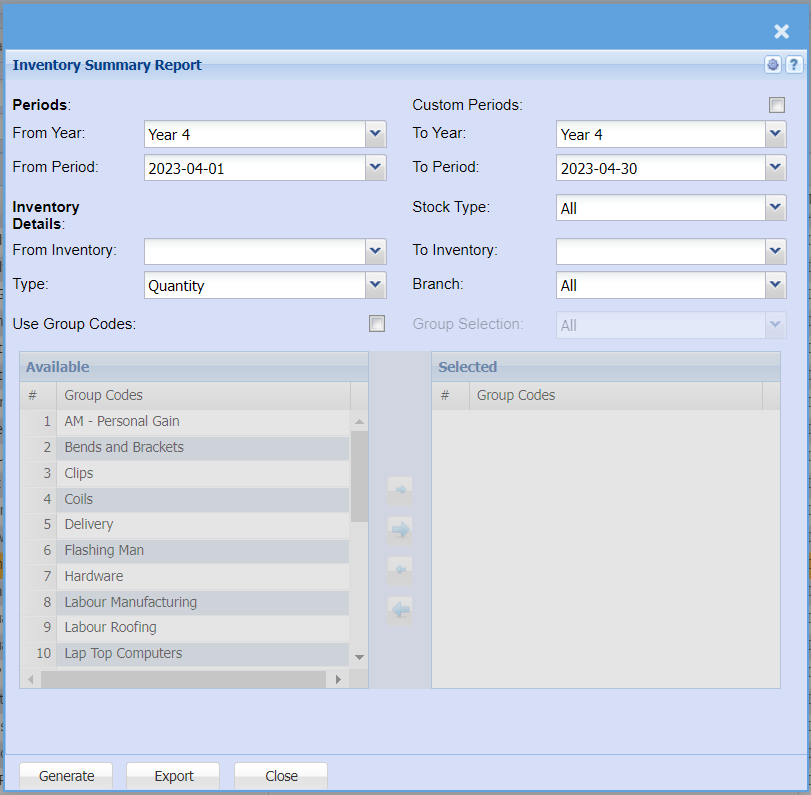
| Year From / To |
Select the year From and year to from the drop-down menus |
| Period From / To |
Select the period From and the Period To from the drop-down menus |
| Inventory From / To |
FromIf Inventoryyou and To Inventory allowsleave the userstock toitem selectfields blank, all stock fromitems wherewill be displayed on the report. If you choose specific stock items, the report will startsort information by stock item code from and to the endselected stockcodes item.rather than description. |
| Use Group Codes |
IfDouble thisclick optionon isthe selected,code afrom the list to move the group codes screenyou appearswish andto allowsfilter your report by to the userselected to select them by using the arrowswindow.
|
| Group Selection |
SelectDouble aclick on the code from the list to move the group selectioncodes fromyou awish drop-downto menufilter your report by to the selected window. |
| Type |
SelectType aallows stockyou typeto fromrefine theyour drop-downreport selectionto only show Item Quantity of sales, Sales Value, Cost of Sales or Quantity and Sales together. |
| Stock Type |
Select stockfrom typeAll, Stock, Service or Custom from the drop-down selectionmenu if you want to refine your Inventory report. |
| Branch |
AllowsWhen working with multiple branches this drop-down allows the user to select thea specific branch to pull a report for. |
| Generate Button |
Click the "Generate" button to open the report
You will have options to copy, email, or print the report
To view the report in an Excel document, copy the report and paste it into an Excel file
|
| Export |
This allows you to export theyour report to Excelan excel spreadsheet |