
Inventory Summary Report
Shows the value or quantity sold per month of inventory items in a table form.
Inventory module> Reports> Reports List
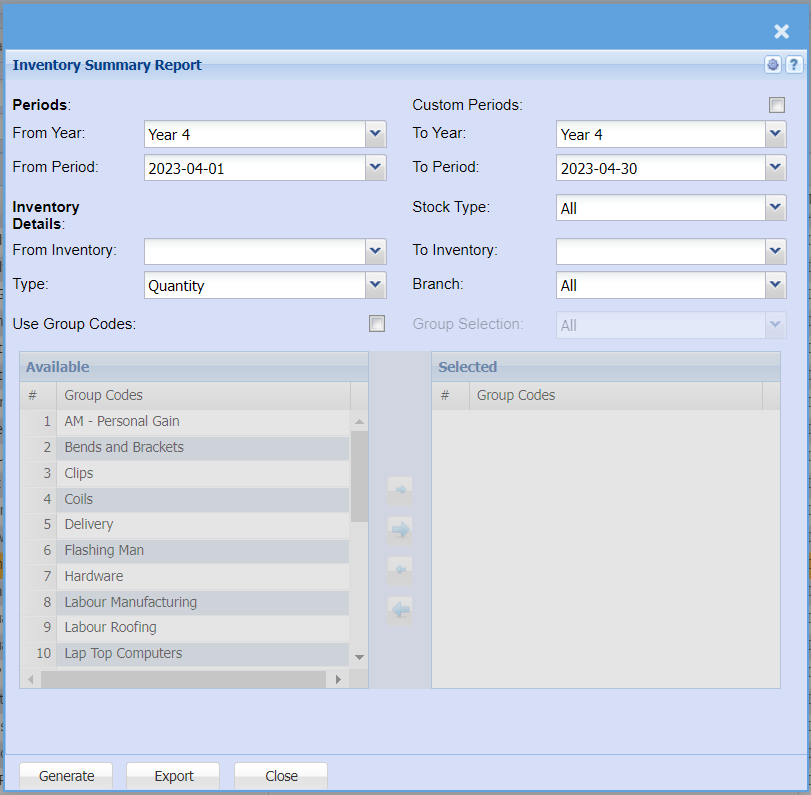
| From Year | Select the From financial year |
| From Period | Select the start period for your report |
| From Inventory | From Inventory and to Inventory allows the user to select stock from where the report will start and the end stock item. |
| Use Group Codes | If this option is selected, a group codes screen appears and allows the user to select them by using the arrows |
| Group Selection | Select a group selection from a drop down menu |
| Type | Select a stock type from the drop down selection |
| To Year | Select to financial year for your report |
| To Period | Select the end period for your report |
| Stock Type | Select stock type from the drop down selection |
| To Inventory | From Inventory and to Inventory allows the user to select stock from where the report will start and the end stock item. |
| Branch | Allows the user to select the branch |
| Generate Button |
Click the "Generate" button to open the report You will have options to copy, email, or print the report To view the report in an Excel document, copy the report and paste it into an Excel file |
| Export | This allows you to export the report to Exel |