
Inventory Slow Movers
Allows a check on inventory items sold below a certain value indicated by the user.
Inventory module> Reports> Reports List
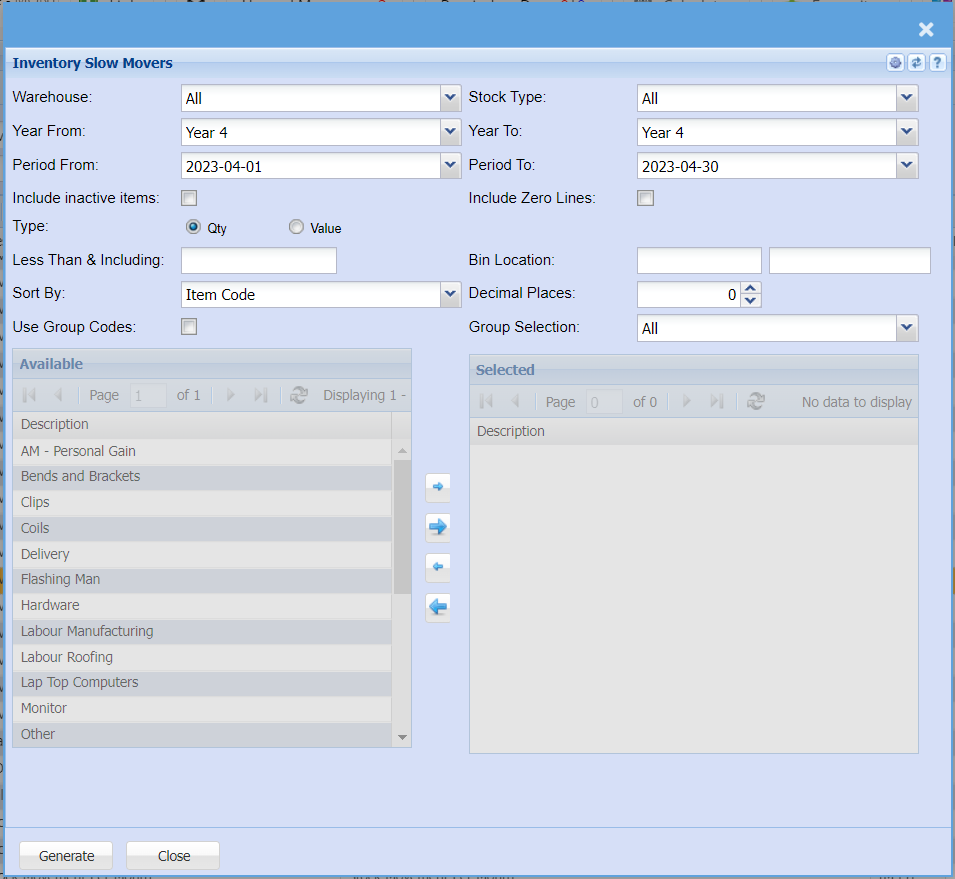
Allows a check on inventory items sold below a certain value indicated by the user
| Warehouse |
If you select all warehouses the report will fetch data from all warehouse If you want to search by a specific report, select the report on the warehouse selection |
| Year From | This allows you to filter a report by financial year |
| Period From | Select the Year From and the Year To, then the period From and the period to from the drop down arrows |
| Include inactive items | This option will include inactive items in the report if selected |
| Type | Select either Quantity or value option for a report |
| Less Than & Including | Enter the number less than and including the entered number |
| Sort By | Sort the report by select one option form the drop down arrow |
| Use Group Codes | Select this option to be able to manipulate or select the group codes by using arrows |
| Stock Type | To select type of stock or leave it to “All” for the report |
| Year To | This allows you to filter a report by financial year |
| Period To | Select the Year From and the Year To, then the period From and the period to from the drop down arrows |
| Include Zero Lines | The option will include zero lines on the report as well if selected for the report |
| Bin Location | |
| Decimal Places |
It is advisable to set decimals to two places You can view the report with any number of decimal places. |
| Group Selection | Select a group selection on the drop down menu |
| Generate Button |
Click the "Generate" button to open the report You will have options to copy, email, or print the report To view the report in an Excel document, click copy on the report and past it into an Excel file |