
Inventory Slow Movers
Inventory module> Reports> Reports List
Allows a check on inventory items sold below a certain value indicated by the user.
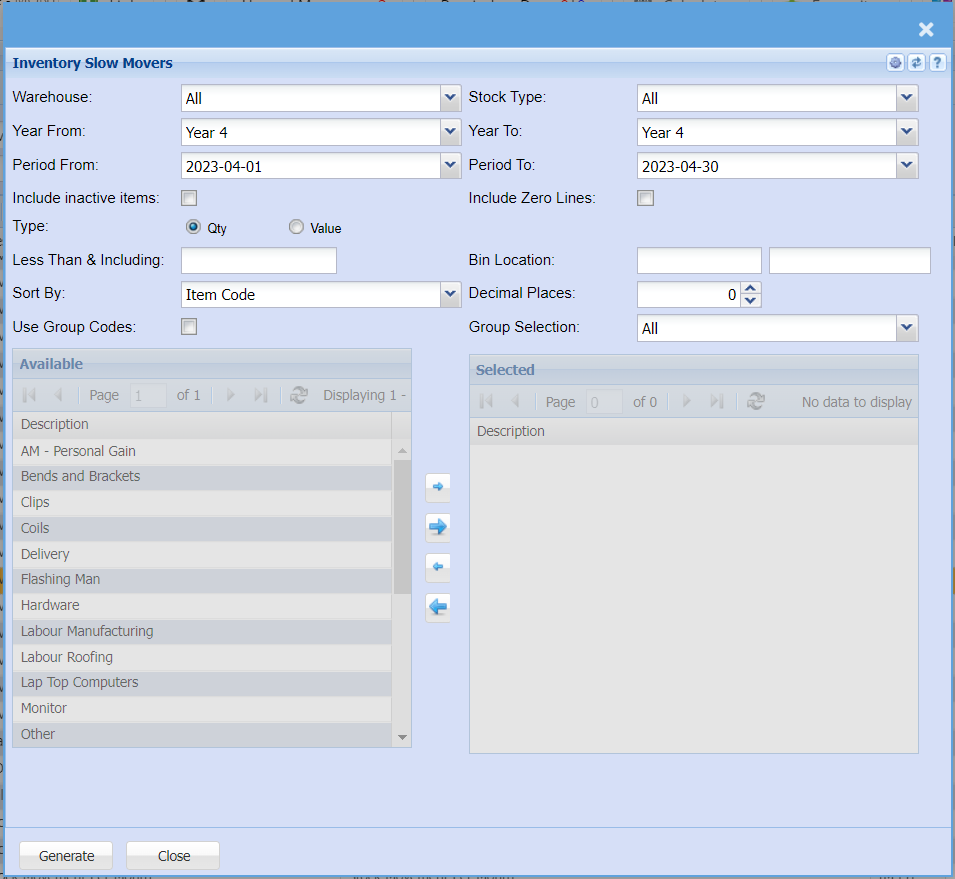
Allows a check on inventory items sold below a certain value indicated by the user
| Warehouse | to select the stock item from the drop down arrow |
| Year From | |
| Period |
select the Year From and the Year To, then the period From and the period to from the drop down arrows |
| Include inactive items | this option will include inactive items in the report if selected |
| Type | Select either Quantity or value option for a report |
| Less |
enter the number less than and including the entered number |
| Sort By | sort the report by select one option form the drop down arrow |
| Use Group Codes | select this option to be able to manipulate or select the group codes by using arrows |
| Stock Type | to select type of stock or leave it to “All” for the report |
| Year To | |
| Period To | select the Year From and the Year To, then the period From and the period to from the drop down arrows |
| Include Zero |
the option will include zero lines on the report as well if selected for the report |
| Bin Location | |
| Decimal |
|
| Group |
Generate button – to run the report Close button – to close the form