
Inventory Listing Report
Inventory module> Reports> Reports List
Reports on all inventory items which have being added to the inventory Setup. Custom Fields can also be used to sort inventory items for this report.
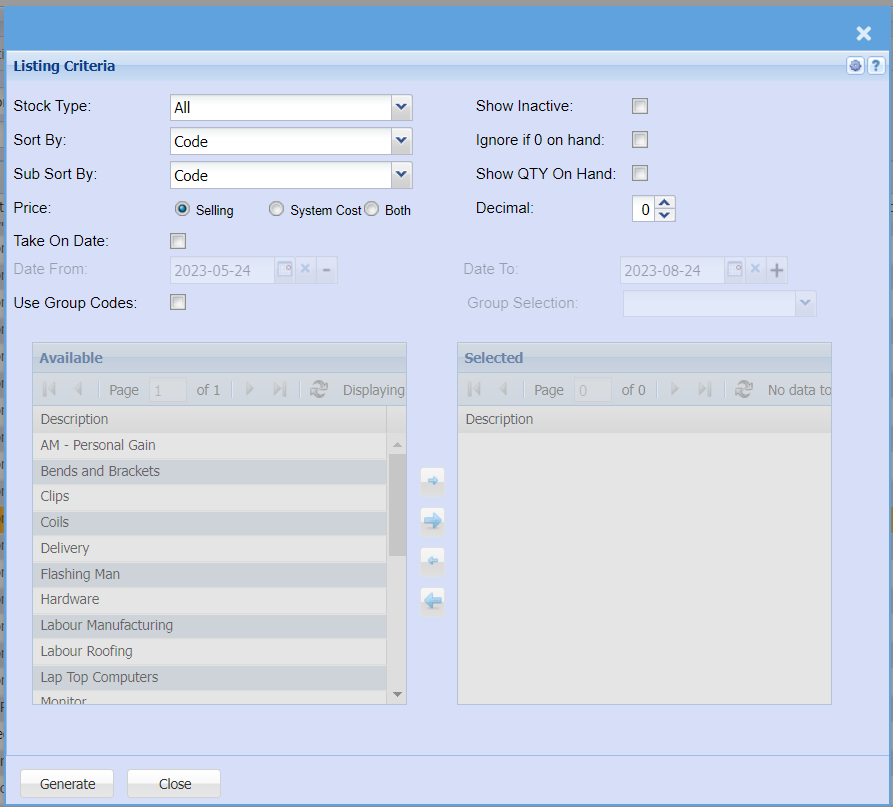
| Stock Type | |
| Sort By | sorting the report by selecting one option from the drop down arrow |
| Sub Sort By | select one option from the drop down arrow |
| Price | select either selling or system option for this report |
| Take On Date | |
| Date From | |
| Use Group Codes | |
| Show Inactive | the report will include inactive items when this option is selected |
| Ignore if 0 on hand | the report will ignore zero quantities when selected |
| Show QTY On Hand | the report will show quantity on hand if this option is selected |
| Decimal | |
| Date To | |
| Group Selection |