
Inventory Forecast Report
Select inventory on the category drop down
Search for Inventory Forecast Report on the list the double click on it to be able to edit it
The report is extensive and checks all sales by item and a forecast is made of the stock required based on the past period specified
Inventory Module> Reports> Reports List
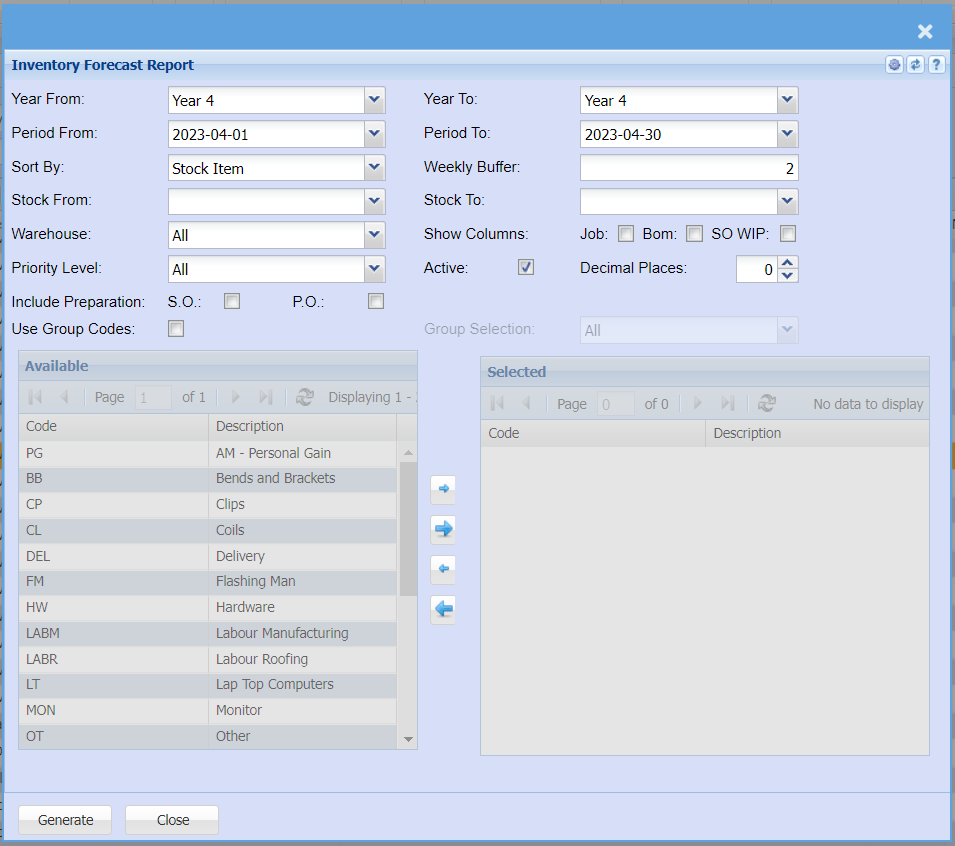
Select from the following fields to run the report:
| Year From / To | Select the year From and year to from the |
| Period From / To | Select the period From and the period to from the |
| Sort By | Sort the report by selecting one an option from the drop |
| Weekly Buffer | |
| Stock From / To |
Select a stock item you wish to search from. If you leave the stock item fields blank, all stock items will be displayed on the report. If you choose specific stock items, the report will sort information by stock item code rather than description. Select the |
| Warehouse | If you want to search by a |
| Show Columns | Tick which columns you would like to show on the report Job / Bom / SO WIP |
| Priority Level | Click |
| Active Tick | Allows the user to run either active or inactive inventory forecast |
| Decimal Places | You can View the report with any number of decimal |
| Include Preparation | Tick S.O or P.O |
| Use Group Codes | Tick the group codes option to allow the visible selection of the group codes |