
Inventory Forecast Report
Inventory module> Reports> Reports List
The report is extensive and checks all sales by item and a forecast is made of the stock required based on the past period specified.
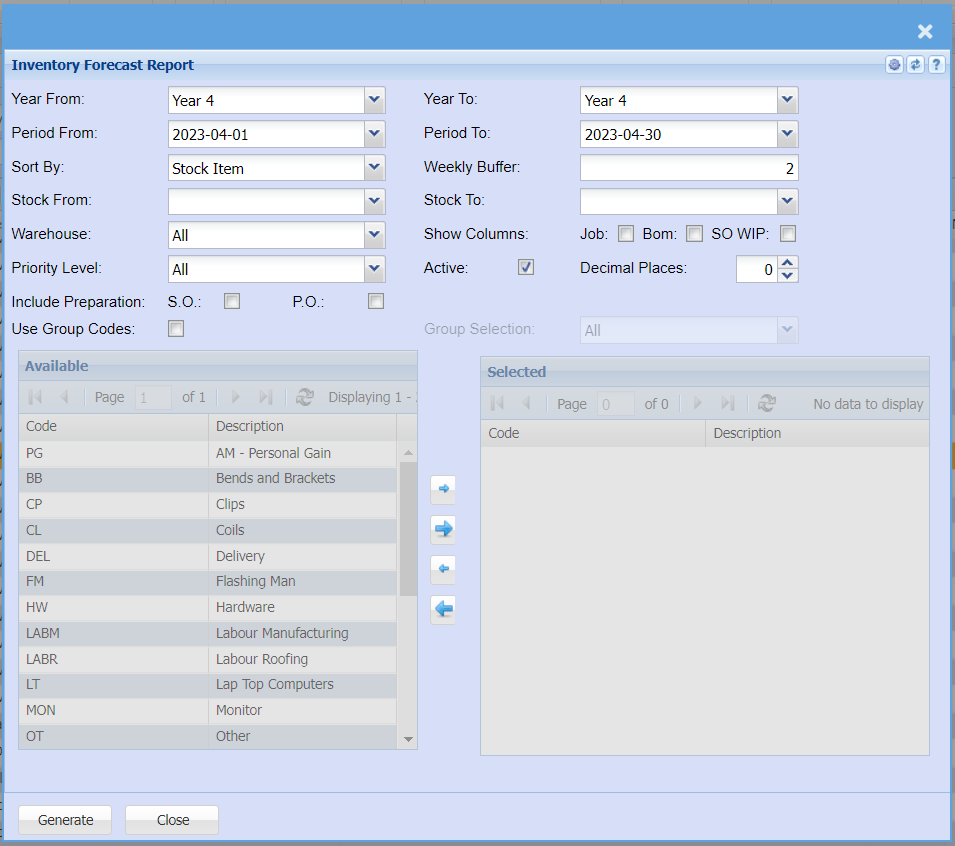
The report is extensive and checks all sales by item and a forecast is made of the stock required based on the past
period specified.
Select from the following fields to run the report:
| Year From / To | select the year From and year to from the drop down arrow |
| Period From / To | select the period From and the period to from the drop down arrow |
| Sort By | sort the report by selecting one an option from the drop down arrow |
| Weekly Buffer | |
| Stock From / To | select the stock, warehouse and priority from the drop down arrows |
| Warehouse | |
| Show Columns | Tick which columns you would like to show on the report Job / Bom / SO WIP |
| Priority Level | |
| Active Tick | allows the user to run either active or inactive inventory forecast |
| Decimal Places | |
| Include Preparation | Tick S.O or P.O |
| Use Group Codes | tick the group codes option to allow the visible selection of the group codes |