
Inventory Analysis of Movement
Inventory Analysis of movement per financial period grouped by Inventory Items or by Debtor or Creditor
Inventory module> Reports> Reports List
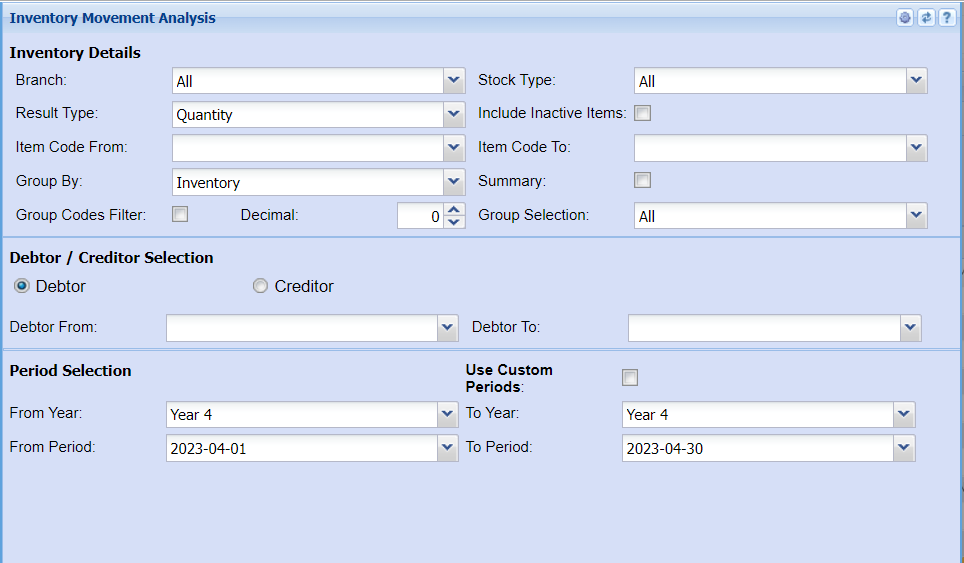
Inventory Details
| Branch |
Select the branch you wish to run the report by from the If you wish to run a report on all branches leave it on all |
| Result Type | Select a result type on the |
| Item Code From / To |
Select a stock item you wish to search from. If you leave the If you choose specific stock items, the report will sort information by stock item code rather than description. Select the start |
| Group By | The report can be grouped by selecting one option from the group by drop down arrow |
| Group Codes Filter | Put a tick on if you wish to filter the report by group codes |
| Decimal |
It is advisable to set decimals to two places You can view the report with any number of decimal places. |
| Stock Type | Select a stock type from the |
| Include Inactive Items | Put a tick on if you wish to display inactive items on your report |
| Summary |
If you put the tick on the report will only pull limited information |
| Group Selection | Select a group on the |
Debtor / Creditor Selection
| Debtor | You need to select debtor if you wish to run the report by debtor/customer |
| Creditor | You need to select a creditor if you wish to run the report by creditor/supplier |
| Debtor From | |
|
Select a Customer/Debtor you wish to view the report from. Select the Customer/Debtor you wish to see up to in the report. |
Period Selection
| Use Custom Periods | Put a tick on to use custom fields |
| From Year / To Year |
Select the financial year you wish to pull your report from and a financial year you wish to stop at |
| From Period / To Period | Select |