
Inventory Analysis of Movement
Inventory Analysis of movement per financial period grouped by Inventory Items or by Debtor or Creditor
Inventory module> Reports> Reports List
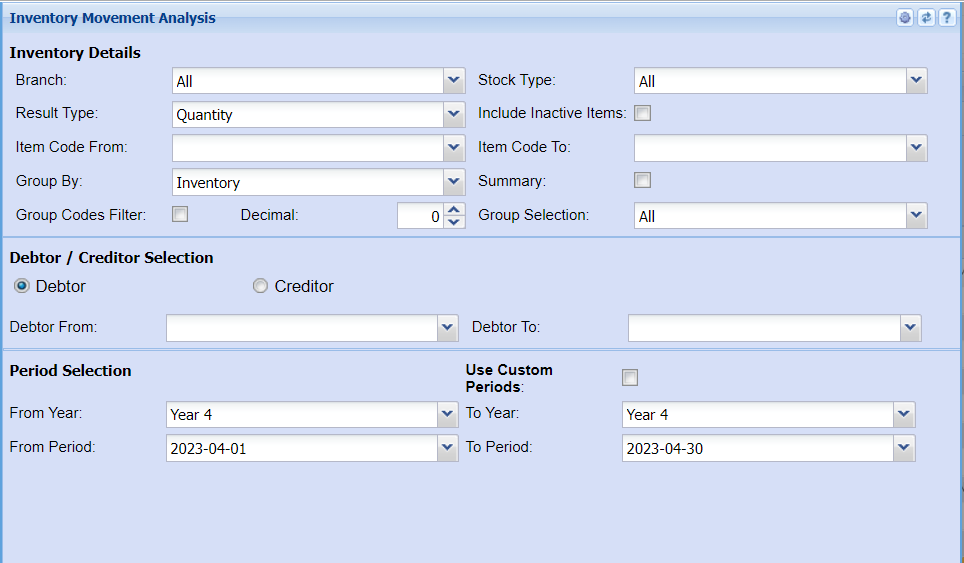
Inventory Details
| Branch |
Select the branch you wish to run the report by from the drop down arrow If you wish to run a report on all branches leave it on all |
| Result Type | Select a result type on the drop down menu selection |
| Item Code From | Select the inventory where the report will start from |
| Group By | The report can be grouped by selecting one option from the group by drop down arrow |
| Group Codes Filter | Put a tick on if you wish to filter the report by group codes |
| Decimal | It is advisable to set decimals to two places You can view the report with any number of decimal places. |
| Stock Type | Select a stock type from the drop down selection |
| Include Inactive Items | Put a tick on if you wish to display inactive items on your report |
| Item Code To | Select a customer you wish to view the report from the customer you wish to see the report to |
| Summary | If you put the tick on the report will only pull limited information |
| Group Selection | Select a group on the drop down menu |
Debtor / Creditor Selection
| Debtor | You need to select debtor if you wish to run the report by debtor/customer |
| Creditor | You need to select a creditor if you wish to run the report by creditor/supplier |
| Debtor From | Select a from customer/ debtor on the drop down menu |
| Debtor To | Select |
Period Selection
| Use Custom Periods | Put a tick on to use custom fields |
| From Year / To Year | Select the financial year you wish to pull your report from and a financial year you wish to stop at |
| From Period / To Period | Select a start and end period for the report |