
Inventory Age Analysis
Inventory module> Reports> Reports List
Gives movement - In and Out - of Inventory Items based on the Audit date and Time
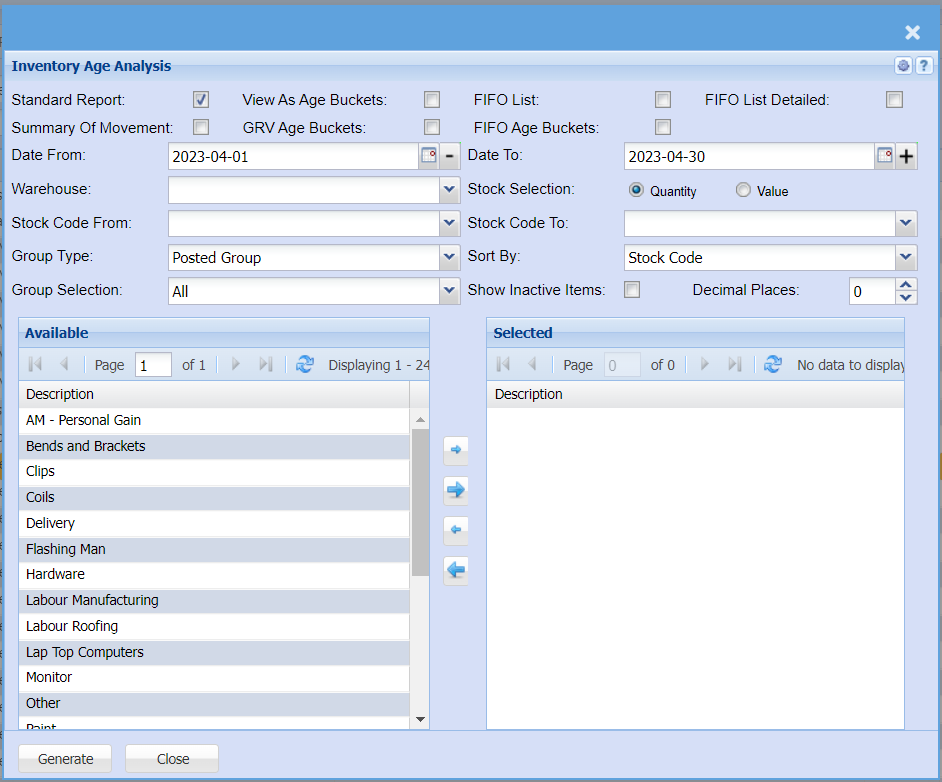
It shows how many times the average inventory quantity is used in a given period
| Standard Report Tick | |
| Summary Of Movement Tick | |
| View As Age Buckets Tick | when selecting this option, the group code option will only filter the group code and not group by them |
| GRV Age Buckets Tick | |
| FIFO List Tick | |
| FIFO Age Buckets Tick | |
| FIFO List Detailed Tick | |
| Date From / Date To | |
| Warehouse | to select the master warehouse from the drop down arrow |
| Stock Selection | to selection either quantity or value option for inventory age analysis |
| Stock Code From / To | to select the stock code from which the inventory analysis will run from, select stock code to in order to limit the inventory age analysis report |
| Group Type | to select the group type from the drop down arrow |
| Sort By | to sort the report either by stock code or stock description by selecting one from the drop down arrow |
| Group Selection | |
| Show Inactive Items | this option will show inactive inventory age analysis when selected |
| Decimal Places |