
Debtor Warehouse Report
Report on Stock Item as per debtor from the debtor warehouse.
Inventory module> Reports> Reports List
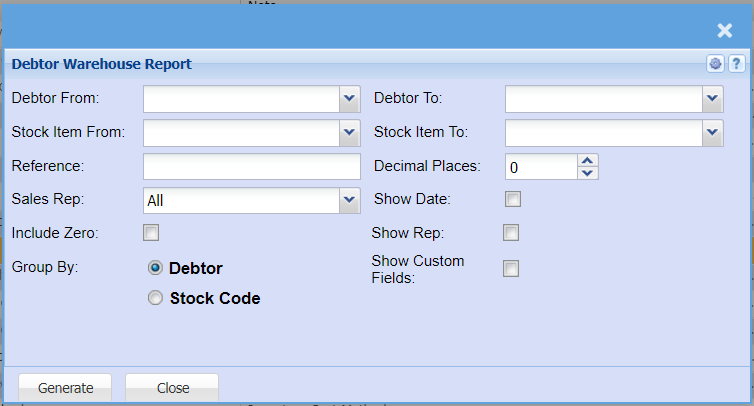
| Debtor From / To |
Select a Customer/Debtor you wish to view the report Select the Customer/Debtor you wish to see up to in the |
| Stock Item From / To |
Select a stock item you wish to search from. If you leave the stock item fields blank, all stock items will be displayed on the report. If you choose specific stock items, the report will sort information by stock item code rather than description. Select |
| Reference | Add a reference to search a report by |
| Sales Rep |
Select a sales rep on the drop-down menu If you wish to run a report on all sales reps, let it on All |
| Include Zero | Put a tick on to include items that have zero quantity |
| Group By | select either Debtor or Stock Code |
| Decimal Places |
It is advisable to set decimals to two places You can view the report with any number of decimal places. |
| Show Date | Put a tick on to show date |
| Show Rep | Put a tick on to show a sales rep |
| Show Custom Fields | Put a tick on to show custom fields |