
Sales Overview Report
Debtors>Reports>Report List >Sales Overview
An Analysis of various interactions with customer from Support Logs through to Invoices and Credit Notes.
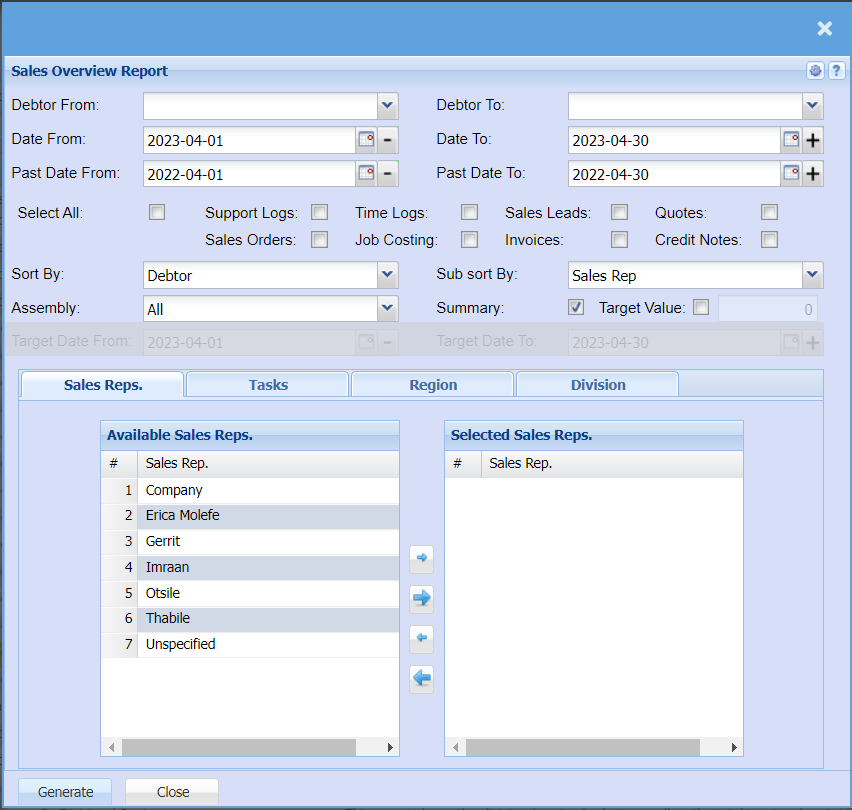
Debtor from and Debtor To -> helps you select a range of debtors
Date from and Date to -> helps you select a range of dates linking to your debtors
Past Date from And Past Date to -> select a range of past date
NOTES
New Debtor: It looks at the captured date on the Debtor, then it checks if this date is within the date range for the report, if it is then it looks if there is an invoice against the debtor. Only then is it flagged as a new debtor. This was the requirement to classify a new debtor flag.
Division / Region: This looks at the invoice and not the debtors setup.
Invoices Value Current: No longer displays cancelled invoices.
Check lists:
Select all generates a report of everything within the checklist options
Support logs generates a log report of all support logs limited to what you have clicked
Sales leads generates a sales report limited to what you have selected
Quotes generates a quote report which includes totals, amounts, approved not approved etc.
Sort by within the sort by dropdown they are options in which you can select to make report more readable
Sales reps contains all the reps, Task contains all the tasks, region contains all regions and division contains all division