
POS Cash up Report
Debtors >Reports >Report list
Shows the cash and Sales received by the till for point of sale.
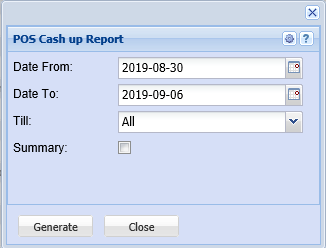
Report on cash and sales received from the till point of sale
Date From – to select the date from which the report will be running from
Date To – to select the date at which the report will stop running
Till – to select the till from the drop down arrow
Summary – Tick if you require a summary sum total of the respective payment methods by till
Generate button – to run the report
Close button – to close the form