
Group Code YTD Turnover Report
Debtors >Reports >Report list
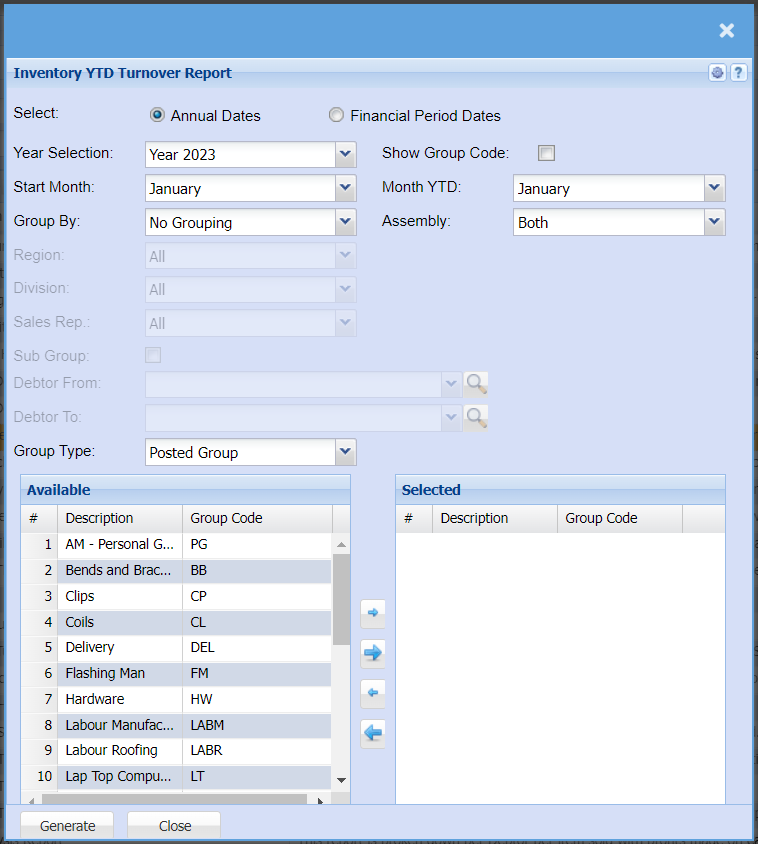
| Select | Select if you want to pull your YTD Turnover Report using Annual dates or Financial Period Dates |
| Year Selection | Select the financial year you are pulling the report for |
| Start Month | Select the month you are pulling this report for |
| Group By | Select from the drop-down menu if you want to pull your report by a specific group, you can choose from No Grouping, Region, Division or Sales Rep. |
| Region | You can pull the report for all your debtors, or you can select a specific Region from the drop-down menu if you have set up Regions for your debtors. |
| Division | If you have set up divisions for your debtors, you can pull the report for all your debtors or you can select a specific Division from the drop-down menu. |
| Sales Rep | If you want to run a report by a specific sales rep, then you will need to select the sales rep on the drop-down menu. If you leave the sales rep on all the report will run by all sales rep. |
| Sub Group | When ticking Sub Group you will be able to select your range of debtors you want to pull a report for. |
| Debtor From | |
| Debtor To | Select a Customer/Debtor you wish to view the report from. Select the Customer/Debtor you wish to see up to in the report. |
| Group Type | You can select from Current Group or Posted Group types |
| Show Group Code | If you tick this box a column will be added that shows the group code |
| Month YTD | Select the month you want to pull the report up to. It cannot be older than the Start month. |
| Assembly |