Debtors Statements
The Debtors/ Customer statements allow the company to send out statements to customers via print out, emails or sms.
This is found in Debtors Module > Reports > Statements
.png)
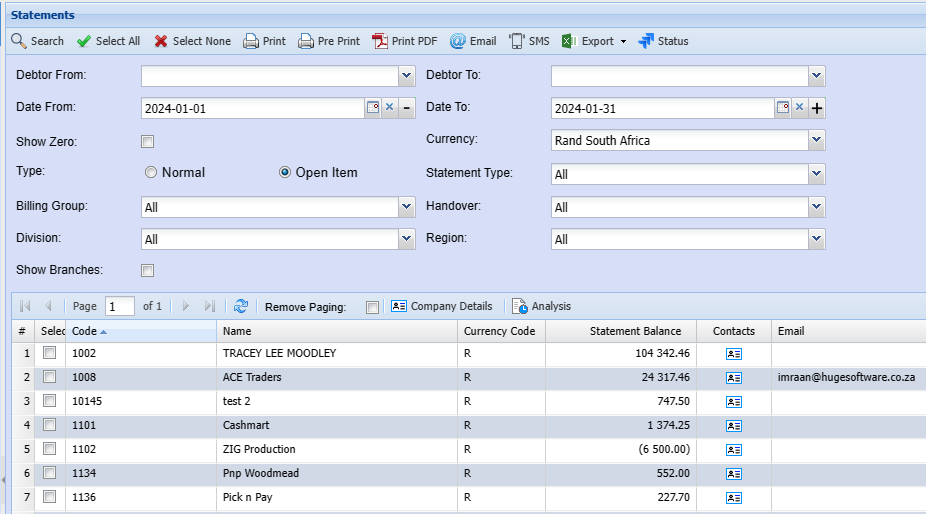
Debtor From and Debtor To enter a specific debtor to run the statement or alternatively leave blank to see all debtors
| Select all | select all flags all debtors in the list |
| Select None | Select none removes the selected list |
| Prints to screen the statement details | |
| Pre-Print | send the statement to your email address |
| Print Pdf | send the statement to your email address |
| this will email the statement to the person selected to receive statement shown on the email column | |
| SMS | this will sms the statement to the person selected to receive sms statement (cell number provided) |
| Export | XML or CSV - export the statement in either a CSV or XML format |
| Status | opens up the printing status window so you can see the whether the statement was sent successfully. |
| Show Zero | tick this if you want to see statement with zero balance in the grid |
| Normal | Shows all transactions between date range |
| Open statement | Shows outstanding un allocated transactions with opening balance |
| Billing Group | Filter statements by Billing Group |
Email statements with attachments
When sending out debtors / customer statements, one can attach invoices to the emailed statements.
The Send Invoices options allow for the following:
.png)
| None | Does not attach any invoices to the statements emailed out. |
| Last 5 | Takes the last five invoices of the customer irrelevant of the date of invoice and attaches these to the statement. |
| Open Item | Takes the invoices that are unpaid or fully allocated and attaches these to the email statement. |
| Current Month |
The Current invoices when sending out statements work off of SCM->Reference Values. It can either be set to 7 Days or 30 Days. It also depends on if the Debtor / Customer is set to Date of Statement or Date of Invoice. |
| Last 10 | Takes the last ten invoices of the customer irrelevant of the date of invoice and attaches these to the statement. |
.png)
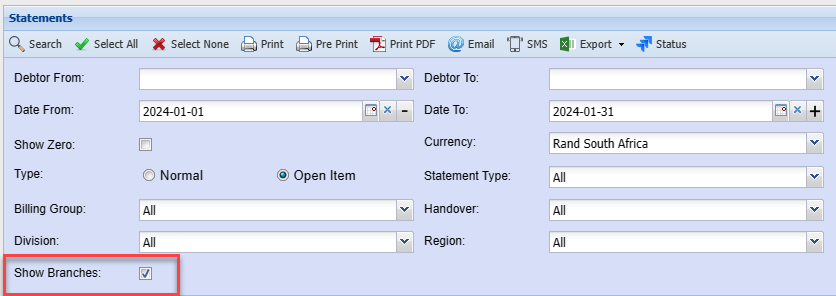
Consolidated statements or branch statements
Video training manual 2016 - Click Here
Consolidated statements are where you link up head office and branches together.
You will print one statement and within the statement you will show multiple branch sub statements.