
Transactions Report
Creditors >Reports > Report List
Full transactional history of all postings done within Creditors. With the opening and closing balance per creditor and movement between dates specified.
The "Print Creditors" tick is a filter to include creditors that have a closing balance but do not have any transactions within the selected date range that the report is generated for.
Removing this tick will return only creditors that have transactions within the report date range.
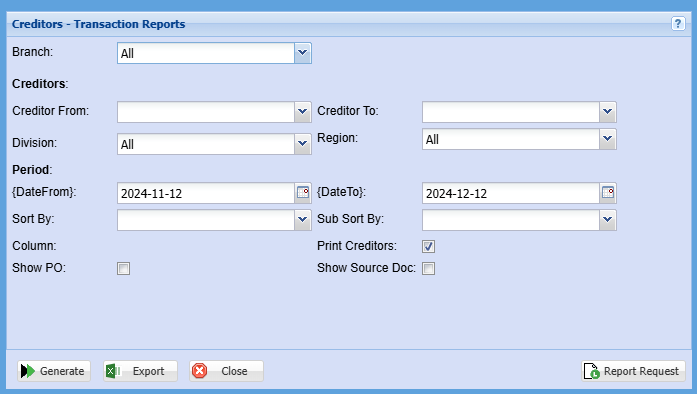
| Branch | When working with multiple branches this drop-down allows the user to select a specific branch to pull a report for. |
| Creditor From | |
| Creditor To | Select a Suppliers/Creditors you wish to view the report from. Select the Suppliers/Creditors you wish to see up to in the report. |
| Division | If you have set up divisions for your debtors, you can pull the report for all your debtors or you can select a specific Division from the drop-down menu. |
| Region | You can pull the report for all your debtors, or you can select a specific Region from the drop-down menu if you have set up Regions for your debtors. |
| Date From |
|
a date range of when you want to see up to on the report. |
|
| Sort By | Sub Sort the report by selecting one option from the drop-down menu allows the user to pull a report with a secondary criteria that will be sorted by either, Date, Reference, Description, Debit or Credit. |
| Sub Sort By | Sub Sort the report by selecting one option from the drop-down menu allows the user to pull a report with a secondary criteria that will be sorted by either, Date, Reference, Description, Debit or Credit. |
| Show PO Tick | By ticking this box there will be a column added to this report for Purchase Order Numbers |
| Print Creditors Tick | |
| Show Source Doc Tick |