
Sales Rep Commission
System Configuration>General>Sales Rep Commission
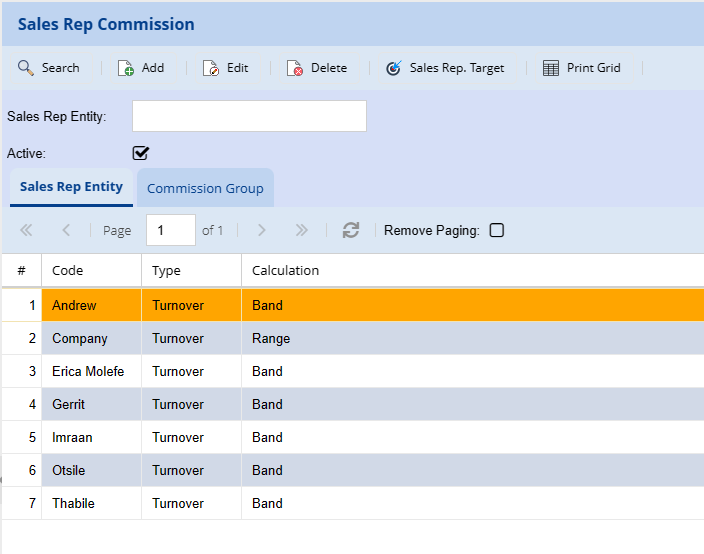
Commission structures can be setup on a one-to-one basis or one to many. This means two or more reps can share commission on one invoice.
Search Tab allows the user to search the sales commission by entering sales rep or searching all the not specifying anything.
Sales Rep Entity – shows the rep entities
Commission Group – shows commission groups
Help Tab – show how the sales rep is created
Sales Rep. Entity Tab
Each Sales Rep. employed by the Company or any entity that could earn commission as a result of sales must be created on this tab. Click on Insert to create a Sales Rep. Entity
Description: The sales rep’s name or the entity that would be executing the sales, e.g. James, Philip.
Entity Type: Will the entity receive commission on Turnover or Profit, e.g. Turnover / Profit
Entity Calculation: Will the entity receive commission on a Sales Range or Sales Band, e.g. Range / Band
Active: When the tick box has been ticked; the Sales Rep Code will appear on all Sales Rep drop down selections. If not ticked the Sale Rep Code will not be displayed
Once this has been setup click on Save, the Insert button becomes available. Click on Insert to create the actual sales value ranges or bands; e.g. Range
| Percentage | From Amount | To Amount |
| 5 | 0.00 | 25,000.00 |
| 10 | 25,000.01 | 50,000.00 |
| 12 | 50,000.01 | 75,000.00 |
| 15 | 75,000.01 | 100,000.00 |
Or simply
| Percentage | From Amount | To Amount |
| 3 | 0.00 | 2,000,000.00 |
Commission Group Tab
The Commission Group set consists of setting up either a Sales Rep as a Group or creating a Group that will receive commission for sales. Click on Insert to create a Sales Group.
Code ; The code can be either a sales rep name or a name, code or word to identify a group that will be receiving commission
Description : Description of the name, code or word used in the Code.
Once this has been entered click on Save, the Insert button becomes available. Click on the Insert button to create the Commission Group Entities.
Select the Sales Rep. Entity from the dropdown options. The Sales Rep. Type and Calculation are available in the dropdown from the previous setup under Sales Rep. Entity.
e.g. James (Commission Group)
Percentage Code Type Calculation
100 James Turnover Range
Or
e.g. James and Philip (Commission Group)
50 James Turnover Range
50 Philip Turnover Range
Scenarios based on the above setups;8
Turnover and Range
First Calculation: (Sales Rep entity)
Sales Rep, “James”, Sales Turnover R80,000.00 at 15% result Total Commission R12,000.00.
Second Calculation (Commission Group)
“James” receives 100% of the commission calculated in First Calculation, based on the “James” Commission Group result R12,000.00
“James” receives 50% of commission calculated in First Calculation, based on “James and Philip” Commission Group result R6,000.00
Turnover and Bands
First Calculation: (Sales Rep entity)
Sales Rep, “James”, Sales Turnover R80,000.00.
e.g. Bands
5% up to R25,000.00 = R 1,250.00
10% up to R50,000.00 = R 5,000.00
15% up to R75,000.00 = R 9,000.00
15% up to R80,000.00 = R 750.00
Total Commission R16,000.00
Second Calculation (Commission Group)
“James” receives 100% of the commission calculated in First Calculation, based on the “James” Commission Group result R16,000.00
“James” receives 50% of commission calculated in First Calculation, based on “James and Philip” Commission Group result R8,000.00
Profit and Range
This calculation is based on deducting Cost of Sales from the Turnover (Total Invoiced amount) e.g.
Sales Rep, “James”, Sales Turnover R80,000.00.
Turnover : R80,000.00
Cost of Sales : R65,000.00
Profit : R15,000.00
First Calculation: (Sales Rep entity)
Sales Rep, “James”, Sales Turnover R15,000.00 at 15% result R2,250.00.
Second Calculation (Commission Group)
“James” receives 100% of the commission calculated in First Calculation., based on the “James” Commission Group result R2,250.00
“James” receives 50% of commission calculated in First Calculation. Based on “James and Philip” Commission Group result R1,125.00
Profit and Bands
Sales Rep, “James”, Sales Turnover R80,000.00.
Turnover : R80,000.00
Cost of Sales : R65,000.00
Profit : R15,000.00
5% up to R15,000.00 = R 750.00
Total Commission R 750.00
Second Calculation (Commission Group)
“James” receives 100% of the commission calculated in First Calculation., based on the “James” Commission Group result R750.00
“James” receives 50% of commission calculated in First Calculation. Based on “James and Philip” Commission Group result R375.00