
Manage Job Statuses
Job Statuses
Jobs come in variousJob statuses indicate the current stage of a job, helping users track progress, manage workflows, and ensure accurate reporting.
| Status | Details |
| NotStarted | The job has been created but not yet begun. It is unmanaged and
|
| Started | The job is in progress. This typically means managed lines have been added or work has
|
| Completed |
The job has been finished and
closed.
|
| Closed |
|
| Cancelled |
|
| JobBOM |
The job is being used to produce a Bill of
In
|
| InProcessing |
An error has occurred while completing the
|
When running reportsreports, oneyou can look at Started and completedfilter jobs forbased reporting.on their status, such as Started or Completed.
This allows for accurate tracking of work in progress versus completed work. If a This ensures the job reflects the correct stage for accurate tracking and reporting. This status occurs when This ensures the job is properly finalised for accurate reporting and Job Costing > Activity > Manage Job Due date colours is based on Completion date to current date Job Costing > Activity > Manage Job Due date colours visual indicators help quickly identify whether a job is on track, approaching its deadline, or overdue. Icon Details Past 30 days from Due date based on current date Before 30 days from due date based on current date Past 7 days from the Due date based on current date Due date is on today’s date Future 7 days from current date to due date Anything after 7 days up to 30 days in the future After 30 days in the future Job Costing > Activity > Manage Job Line statuses provide a clear visual way to track progress by comparing planned (budgeted) quantities against actual usage, while also indicating whether a line has been completed. These colour-coded indicators make it easy to quickly see if a line is on track, completed, or exceeding plan. Icon Details Not Started No In Progress Qty Reached Qty Reached (Blue with Tick) Qty Exceeded The line Is Complete
that are currently in progress
jobsJobs – These are active jobs.png)
_______________________________________________________________________________________________________Correcting an Incorrect Job Status
wrongjob statushas after closing
Toggle betweenbeen closed or completedmarked with the wrong status, it can be corrected by updating the job status.Go
.png)
Change
In Processing Status
changeinvoicingan andissue arises during invoicing, preventing the Jobjob wasfrom not able to bebeing completed.Failed inTypically, the final stage of invoice (Invoice most likelyhas processed correctly, but the job nothas completed.failed to update to a completed status.CorrectTo bycorrect Closingthis:
marking it as completed.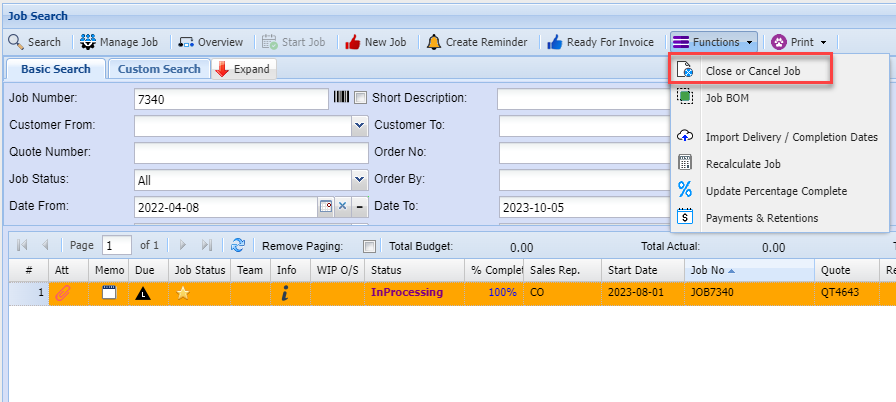
Job Manage status search
.png)
Job Status Line Due Date
isare based on the Completion dateDate -compared to the current date
These
.png)
.png)
.png)
.png)
.png)
.png)
.png)
.png)
Job Status Lines Indicators
.png)
linesactivity has been recorded on the line.
noprocessedmarkedcompletestill required
.png)
LineIn managedProgress -(Green)
Work Budgethas begun and the line is greateractively thanbeing managed.
.png)
The lineplanned work has been completed exactly as expected.
balanceequals the budgeted quantityreachedbeen themetbudgetversus actual and is equal
.png)
quantity has exceededgone beyond the Budgetoriginal versusplan.actual
.png)
MarkedThe withline tickhas boxbeen completedmanually marked as finished.
Status of line, colours
Not Started – No lines allocated or no marked is complete – RED
In Progress – Line managed – GREEN
Qty Reached – Means the line quantity balance has reached the budget versus actual – Blue with a tick
Qty Exceed – Means that the line quantity has exceeded the Budget versus actual - BLACK
Completed – Marked with tick box completed – Black tick
Manage Line Status Indicators
Job Line Status Word
Job Costing > Activity > Manage Job
Line status comes in three types
Line Status Types
-
The=lineRedhas not yet been actioned. No work or quantities have been recorded. -
Started (Green)
The=lineGreenis actively in progress. Work has begun and is being managed. -
Completed (Blue)
The=lineBluehas been finished. All required work has been completed and marked accordingly.
.png)