
Create Reminder

The “Create Reminder” button (highlighted with the bell icon in the top toolbar) is used to set up reminders for a job.
When you click this button, it allows you to:
- Schedule a follow-up action
- Set a date and time for the reminder
- Add notes about what needs to be done
- Ensure important tasks or jobs are not missed
This is especially useful for:
- Following up with customers
- Checking on job progress
- Reminding yourself to complete outstanding tasks
This screen is where you set up and manage a reminder for a job.
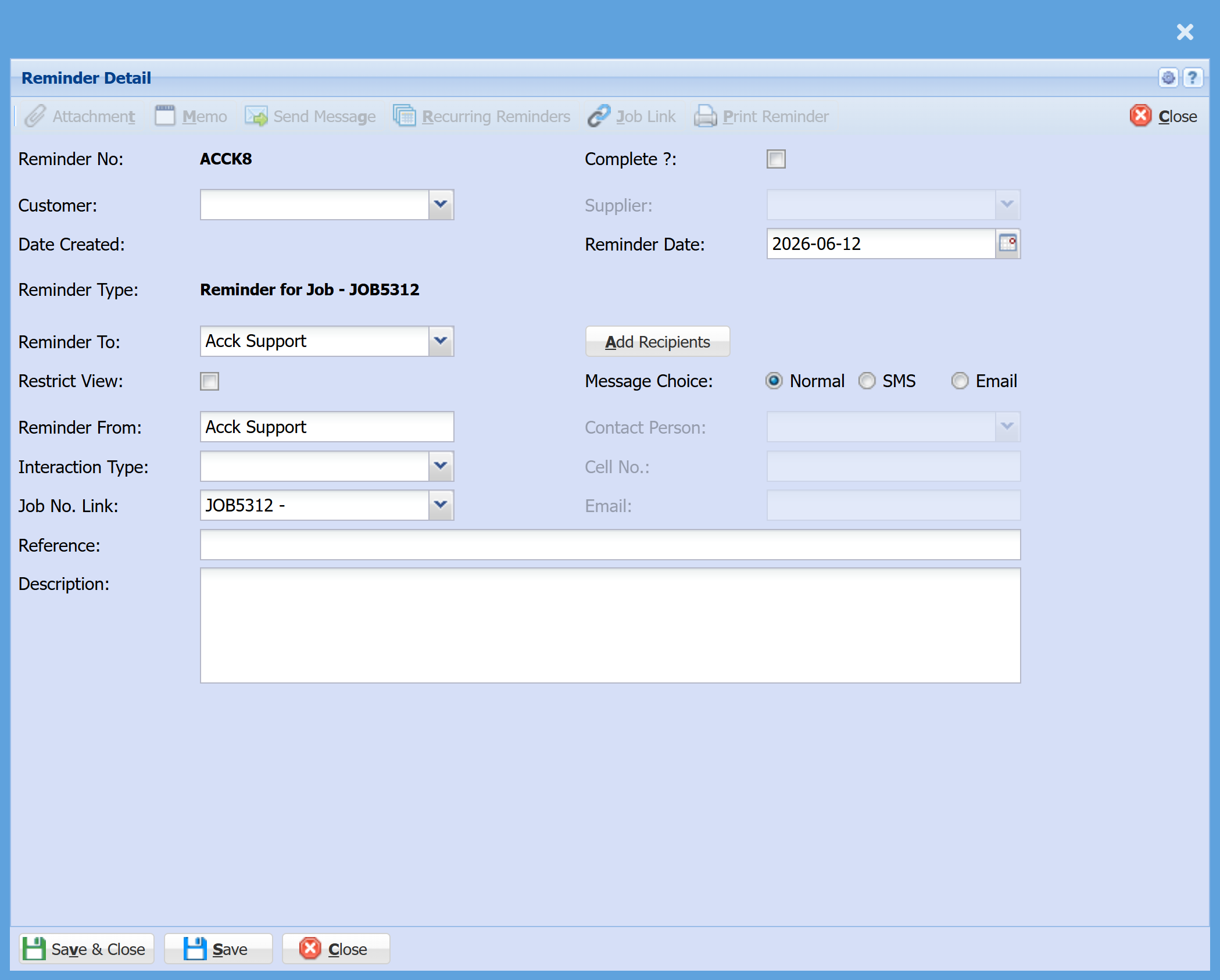
| Reminder Date | Select the date you would like the reminder to trigger. |
| Reminder To | Choose who the reminder will be assigned to (e.g. a user, team, or department). |
| Add Recipients | Optional – add additional people who should also receive the reminder. |
| Message Choice |
|
| Job No. Link | This automatically links the reminder to the job you created it from. |
| Reference | Enter a short title or subject for the reminder. |
| Description | Add detailed notes about what needs to be done or followed up. |