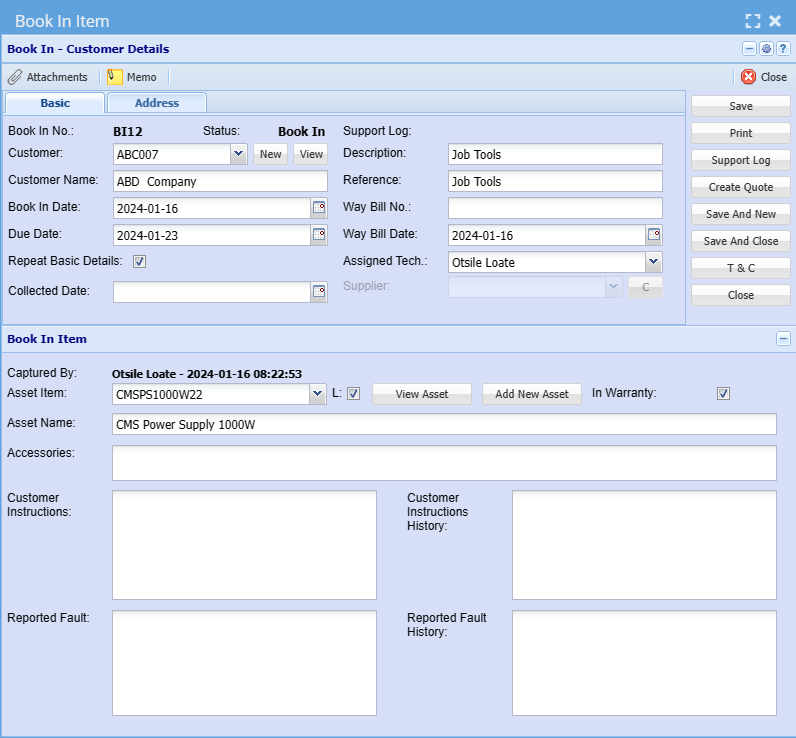
BookIn integration with Asset Tracker
SoThis whatenhancement we'veallows doneyou nowto isseamlessly we'vebook integratedassets within the booking module.
So oh sorry, the booking is mainly done in job costing wherefeature. Whether you're bookingreserving anequipment asset,or soscheduling youresources, canthis bookingfeature anstreamlines assetthe process for you.
SoJob whenCosting youmodule pick> thisActivity up> andBookin
- Open the Job Costing module to find the integrated booking
anfeature. - Within
essentiallyJobthisCosting,asset tracking is if you didn't know asset tracker has a whole lot of actions that that happen inlocate thesystem.So if you come over here there's so when you start you can see that these things are, so you've gotoption to book assets. - Choose the specific asset you want to book. Ensure accuracy in
andassetbookidentification. - Depending on your activity (entry or exit), select the appropriate action:
- Book In: Use this when bringing an asset into the system.
- Book Out: Choose this when removing an asset from the system.