
Quotation Search
Video training manual 2016 - Click Here
Debtors Module> Activity> Quotation
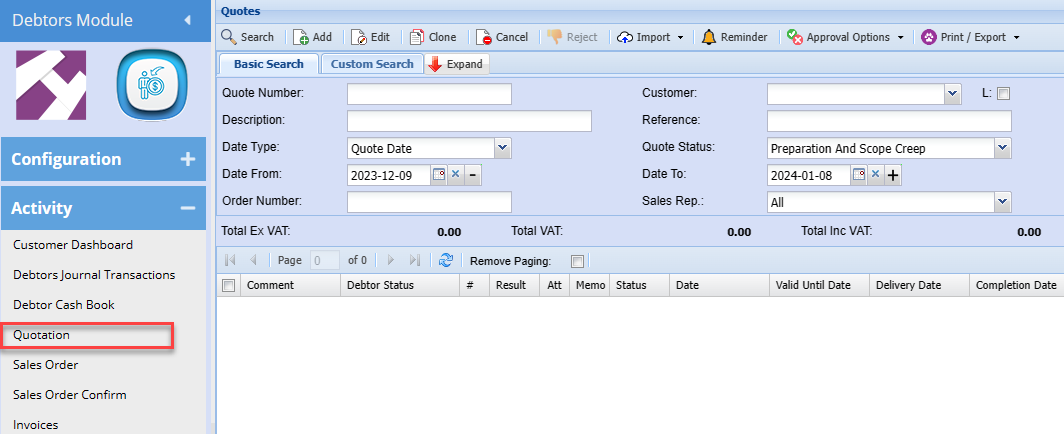
On the Basic Search Tab, the user can search the quotes by entering information on the following fields
| Quote Name | search be entering the quote number |
| Customer | search by selecting the customer |
Search by selecting the status from the drop down arrow
| Date | search by selecting the date from and the date to |
| Short Description | search by entering the description of the quote |
| Customer Account | search by entering the customer’s account |
| Sales Rep | search the quotes by selecting the sales rep from the drop down arrow |
Custom Search Tab allows the user to search by selecting from the category
Standard Tab has the following buttons
| Insert button | Insert a new Quote Item. |
| Amend button | View or edit an already added Quote Item. |
| Cancel button | to cancel the quote |
Approve Tab has the following buttons
| Internal Approval button | For the Employer/Employees to approve the quote |
| Customer Approval | This is what a customer will use to approve a quote. |
| Approve To Job button | Approves the currently selected Quote item to be used in various other forms. |
Print Tab has the following buttons
| Print button | Prints the currently selected Quote Item. |
| Print Job Card button | Prints the job card for the currently selected Quote Item. |