
Part /Proforma Invoice
The proforma invoice is used when you want to generate an invoice without affecting stock
Debtors > Invoice> Add/Edit Invoice > Action Tab
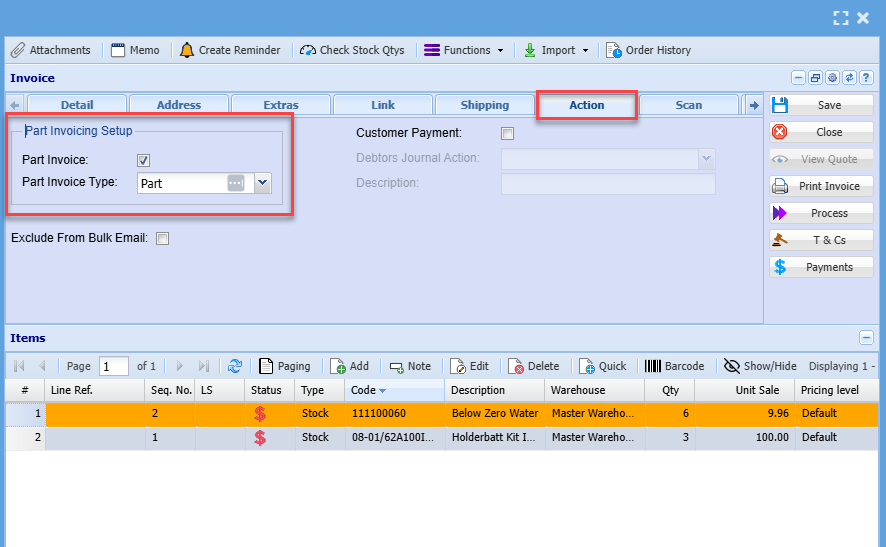
When creating a partAdd invoice inas theper systemnormal. -See how to capture the details as previously shown on thean invoice manual and add the invoice items.here
SelectAfterthecapturingextrasyourtabinvoice click on Action Tab- Add a tick where it says part invoice
- Save and close
This option will only process the sales leg of the transaction ie debtors control, Sales account, and VAT entries. It will not process the cost of sales leg, since no stock is allocated and moved with this option.
This option processes no GL entries. All postings only occur when you finalize the proforma invoice. However, when you click proforma invoice process after capturing, the system will allocate an invoice number to the document.
When you later process and finalize the Proforma invoice, all the postings will occur on that date. The stock movement will also take place on the finalized date.
When you search the invoice on the grid, you will notice the status is preparation but it will indicate this is Proforma in red
The usual process button will be greyed out and the Proforma invoice process button will be active
Select the proforma invoice
- the Proforma Invoice Process is made active
- process the Proforma invoice
.png)
Once the Proforma invoice has been processed it will remain under Activity> Invoice status > Part Invoice.
It will remain here until all stock is in, process the proforma invoice again to complete all stock movements and finalise proforma invoice.
.png)
You can run a stock verification report to check if you have enough stock to complete the proforma
.png)
Once the stock is available you can then process the rest of the proforma
Cancel a Proforma Invoice
Proforma invoices are official invoices.
They cannot be cancelled but have to be fully completed by clicking on Proforma Invoice Process.
If you cannot complete the proforma invoice process, it is because you don’t have enough stock on hand.
You will have to put stock into the system by doing a stock level adjustment, then process the proforma invoice which will take out the stock.
Then you will be able to do a credit note, then take stock out of the system by stock level adjustment again.
.png)