
Part /Proforma Invoice
The proforma invoice is used when you want to generate an invoice without affecting stock
Debtors > Invoice> Add/Edit Invoice > ExtrasAction Tab
.png)
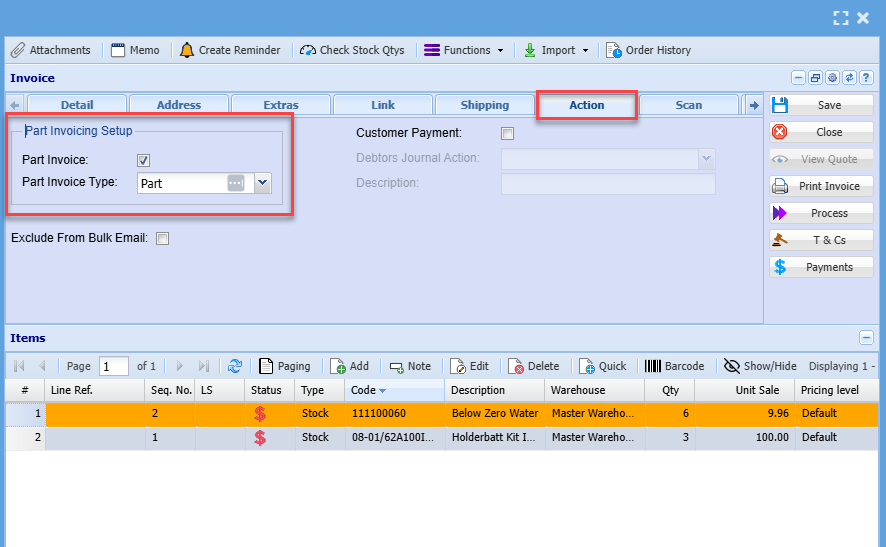
When creating a part invoice in the system - capture the details as previously shown on the invoice manual and add the invoice items.
- Select the extras tab
- Add a tick where it says part invoice
- Save and close
Select the proforma invoice
- the Proforma Invoice Process is made active
- process the Proforma invoice
.png)
Once the Proforma invoice has been processed it will remain under Activity> Invoice status > Part Invoice.
It will remain here until all stock is in, process the proforma invoice again to complete all stock movements and finalise proforma invoice.
.png)
You can run a stock verification report to check if you have enough stock to complete the proforma
.png)
Once the stock is available you can then process the rest of the proforma
Cancel a Proforma Invoice
Proforma invoices are official invoices.
They cannot be cancelled but have to be fully completed by clicking on Proforma Invoice Process.
If you cannot complete the proforma invoice process, it is because you don’t have enough stock on hand.
You will have to put stock into the system by doing a stock level adjustment, then process the proforma invoice which will take out the stock.
Then you will be able to do a credit note, then take stock out of the system by stock level adjustment again.
.png)