
Debtor Cash Book Search
Video training manual 2016 - Click Here
This allows a user to prepare debtor’s financial records.
Debtor/Customer Module> Activity> Cashbook
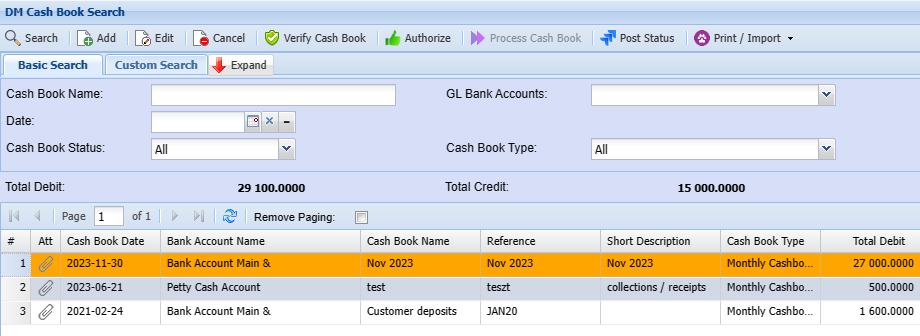
Debtor/Customer Cash Book Basic Search
You can search by the following:
- Cash Book Name
- Cash book Date
- GL Bank Accounts
- Cash Bool Status
- Cash Book Type
Debtors Cashbook is where we capture Debtors'/ Customer's payment entries
Debtors Module> Activity> Debtors Cash Book
| Search | Search for an already created cashbook |
| Add | Add a new cashbook |
| Edit | Edit existing Lines function |
| Cancel | cancel a cashbook |
| Verify Cashbook | Verify the cashbook lines before posting |
| Authorize | Authorize the cashbook before processing this activates the process button |
| Process Cashbook | Post to the ledger account |
| Post Status | Check the posted status |
| Print/Import | Print the cashbook grid or import data from Excel |
Click Add to create a cashbook new cashbook
.png)
Post Status Button
Debtors Cashbook> Activity> Debtors Cashbook New
.png)
Allows a user to check if the cashbook has been posted or not
| Search | search for posted cashbook |
| Reset Item | reset the item |
| Reset All Qued | reset all qued items at once |
| Remove Item | remove item from the list |
| Remove completed item | remove the completed items from the list |
| View | view the transaction |
| View button | allows a user to view the cashbook |
| Print button | allows a user to print the cashbook |
Print / Import Button
Debtors Cashbook> Activity> Debtors Cashbook New
.png)
Print cashbook
.png)
Order: allows you to order it by date, account, account date, description, and reference
Upload Cashbook
.png)
Import Cashbook
Once the cashbook has been uploaded it will be found under the import list
.png)
Select cashbook
Verify the cashbook for any errors
click on import
(refer to the import menu for the cashbook import format file)