
Customer Dashboard
Debtors Module> Activity> Customer Dashboard
Customer dashboard is like your personal control center for all things related to your customers. It's a webpage or screen that brings together important info and key stats about your interactions with customers.
Customer dashboards give you an overview of a clients activities and transactions
You can only select one client at a time time
If you do not select a debtor/ customer you will receive an error
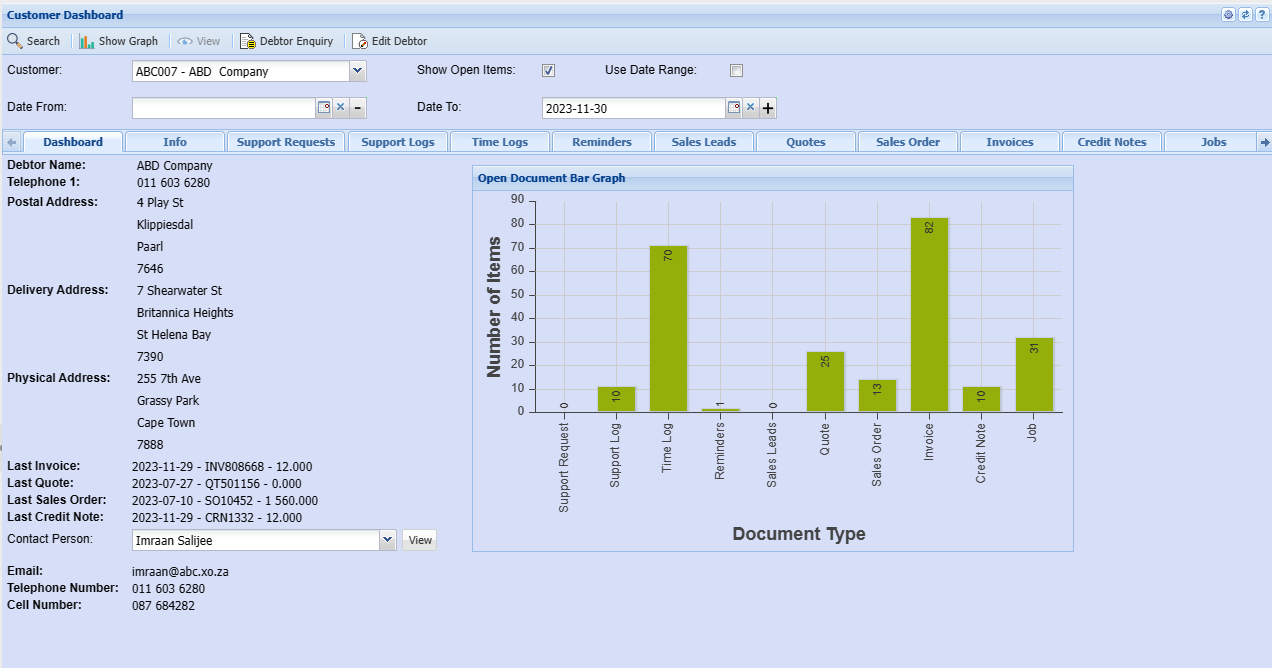
| Show Graph | Shows a graph with a summary of clients activities |
| Debtor/ Customer Enquiry |
The customer inquiry window allows you to view the customer at a quick glance Information on invoices in payments. Debtor enquiry allows you to view all transactions against the client |
| Edit Debtor/ Customer |
This button will take you back to customer setup screen to edit debtor/customer details For a detailed manual on how to edit debtor/ customer |
| Customer | Select a debtor/ customer you want to view the dashboard for |
| Show Open |
Include items that are not yet completed to the dashboard |
| Use Date Range | You can also view by date range |
| Date From | Select a start date |
| Date To | Select end date |