
Support Log Ticket Search
The Support Log Ticket is essential and serves as a centralised repository for all relevant support log queries
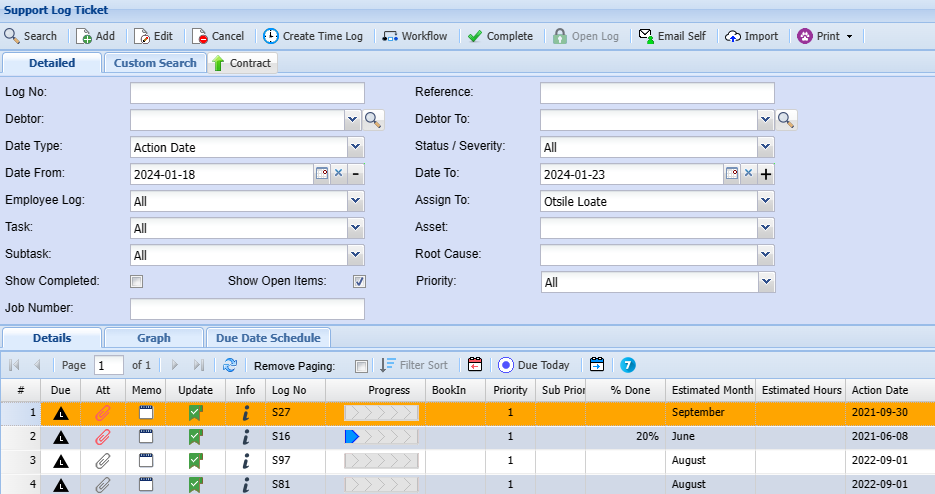
In the Debtor setup search, you will see two search tabs
| Basic Search tab | If you know the log number or part of the support log number you can search here |
| Custom Search tab | If you have setup custom fields in support log tickets, you can search for the items in this area. |
If you leave the basic search blank it will bring up all support log ticket codes
CRM Module> Activity> Support Log
|
Log No |
|
| Debtor | |
| Date Type | |
| Date From | |
| Employee Log | |
| Task | |
| Subtask | |
| Show Complete | |
| Show Open Items | |
| Job Number | |
| Reference | |
| Debtor To | |
| Status/ Severity | |
| Date To | |
| Asset | |
|
Root Cause |
|
|
Priority |
System Buttons
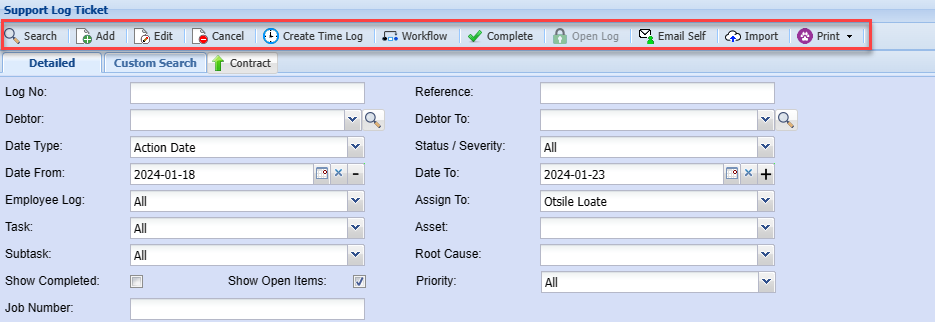
| Search | The search function will return support log ticket records based on the search criteria entered. |
| Add | Allows you to create a new support log ticket |
| Edit | Allows you to make changes to an existing support log ticket |
| Cancel | Allows you to cancel support log ticket |
| Create Time Log | Duplicate an existing debtor or customer |
| Workflow | Allows you to load a workflow and move support logs around |
| Complete | Allows you to highlight a support log and complete it |
| Email Self | Allows you to email support logs to yourself |
| Import | Allows you to import support logs |
| Print Dropdown | Allows you to print your Support log ticket in PDF or download an Excel sheet of your support log tickets |