
Sales Leads Search
Basic Search
Video training manual 2016 - Click Here
Sales Lead Search is where you search for existing sales leads or create new sales leads
Webatar > Activity> Sales Leads
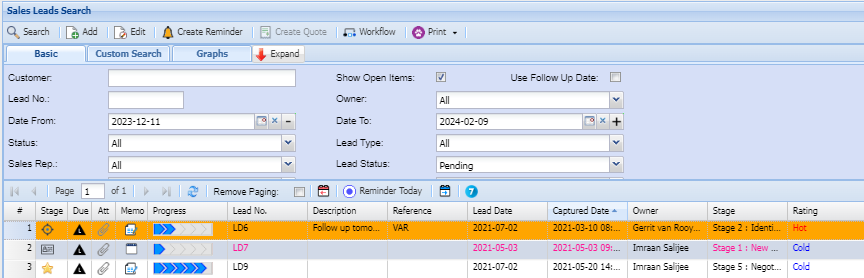
If no filter options are selected all Sales Lead records are displayed on the gird.
At the top of the screen on the navigation ribbon, there are 5 buttons and one drop down list
Print Export Drop Down allows one to select from the following options:
Export: export Sales Leads to Excel file
Print Grid: print all the Sales Leads display on the gird
Print Lead Details: prints a lead form of the Sales Lead selected
Print Lead Form: prints a lead form template as per example below
Custom Search
If the lead number in the Basic search Tab or any other search filter fields are left blank, the search will display all the leads listed in the system sorted by lead number. The search criteria can be narrowed by inputting information in any of the following filter fields.
Graph tab
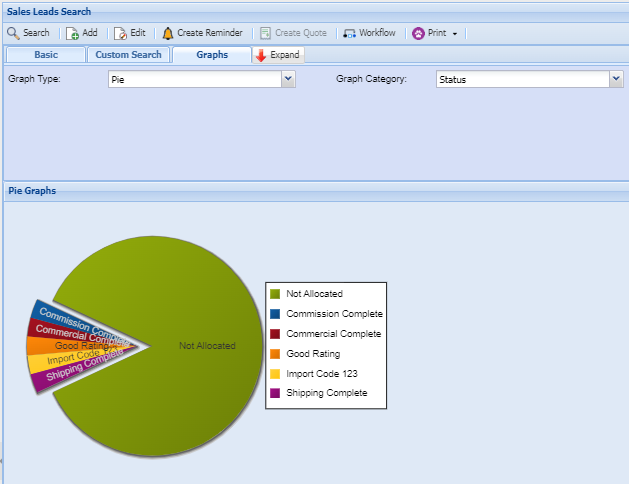
Graph Type: Select graph type from drop down options
Graph Category: Select the graph Category from the drop down options
Date From: the start period for the selection
Date To: the end period for the selection