
Pre-Inspection Checksheet
Webatar > Activity>Pre-Inspection checksheet
.png)
Allows the user to search, add, edit and delete pre-inspection checksheets
CRM Module> Activity> Pre Inspection Check List
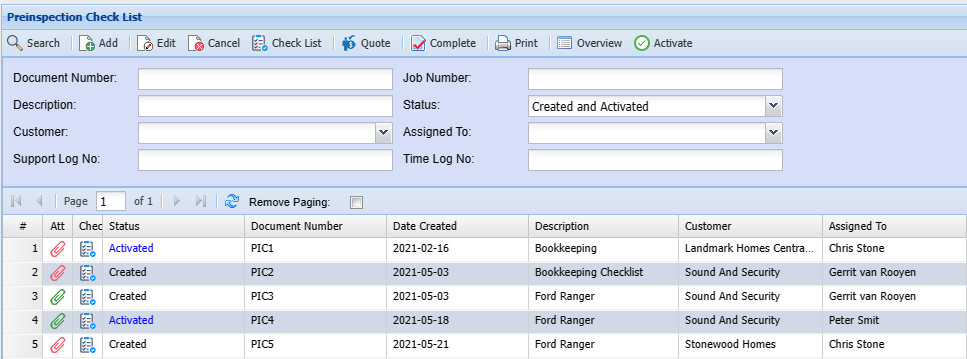
| Document |
Enter a document number you wish to search |
| Description | |
| Customer | |
| Support Loh No | |
| Job Number | |
| Status | Search by status |
| Assigned |
If you know who the checksheet was assigned to. Enter it to narrow down search |
| Time Log No |
Status: Search by status.
Add PreInspection Checksheet
.png)
Template: Select the template from the drop down
description: Description will be populated according to the setup in the template
TrackiT: you can link a track it item to this checksheet
Customer:Select a client to the check sheet
Assign to: Assign the technician or user
Pre-Inspection check sheet Edit
.png)
This help document describes how to create and maintain a Pre Inspection Checksheet.
The Pre Inspection Checksheet is created from the Check Sheet Template
Standard tab: this tab allows you to link actions to the Pre Inspection Checksheet
Questions tab: this tab allows you to link questions to the Pre Inspection Checksheet
Notes tab: this tab allows you to link notes to the Pre Inspection Checksheet
Custom Fields tab: this tab allows you to assign custom fields to the Pre Inspection Checksheet