
Creditors Allocations
.png)
Allocating a receipt to a specific invoice
General Tab
| Creditor Code | to select a creditor |
| Currency | currency used by the creditor comes up when the creditor is selected |
| Date From and Date To | select the date from and the date to which the invoices will be running from |
| Status | select the allocation status from the drop down arrow |
| Grid View | select the grid view from the drop down arrow |
| Credit Lines Tab | shows the payments lines according to the selection made on General tab |
| Associated Debit Lines Tab | shows the invoice associated with the payment |
| Debit Lines Tab | shows the invoice lines according to the selection made on General tab |
| Associated Credit Lines Tab | the payment associated with the invoice |
| Notes Tab | allows a user to make notes on allocations |
| Contact | Select the contact from the drop down arrow |
| Date from | enter the date from which the allocation will run from |
| Sort By | select from the drop down arrow |
| Show Complete | select from the drop down arrow |
| Date To | enter the date to |
| Insert button | to insert a reminder |
| Amend | to make changes on the reminder |
| Delete button | delete the reminder |
| View button | view the reminder |
| Send button | send the reminder to a selected contact person |
Allocations
Allocations is where you tie up the payment to an invoice.
Go to debtors/Creditors> Activity> Allocations
Select the debtor or Creditor to allocate and then click on Search
The data goes back 6 Months , Should you want to go further back change your date from.
The Status settings is set to partial and Un-Allocated, This Means the allocations screen will only show transactions which have not been allocated or are partially allocated
If the transaction is fully allocated it will not show on this setting.
.png)
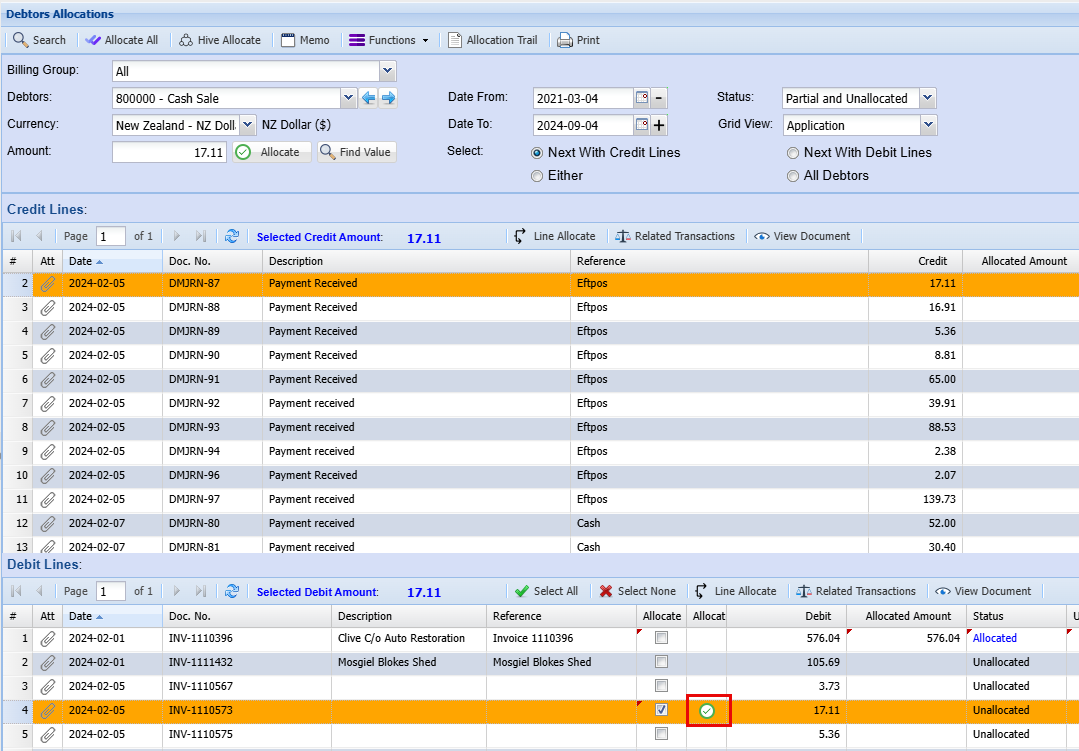
Select the debit line (1) to allocate to the credit line (2)
And click on Allocatethe (3)small green tick to the right of the allocated tick to offset the two amounts.
.png)
In the case where a transaction was wrongly allocated
Change the status to Allocated and search
.png)
Select the transaction and click (just above the line) a button called Line Allocate
A window will open, and you will be able to tick on the tick box to select the transaction you wish to un – allocate
.png)
.png)