C61 Keyboard Emulator
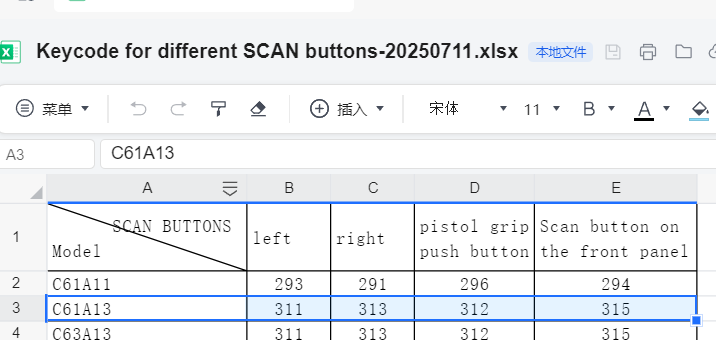
See table below for C61 Android11&13.
Each number represent a key; Left-scan, right-scan, center-scan and trigger-scan.
It shows the definition of the key value of C61 A13 device.
And please kindly find my reply of your four points below:
1. Whether the handle is assembled or disassembled, the key values used are the same. You can open the Keyboard Emulator app and click on the input box, then tap the scan button on your device, the key value will automatically display in the input box
2. All the scan button can be used for scanning, if your device have UHF function, then it can also be set to use read the UHF tags.
3. Yes, as below picture shows, the key values of the scan buttons are different between A11 and A13 version.