
Item Cost Price Editing
Service and Custom Items
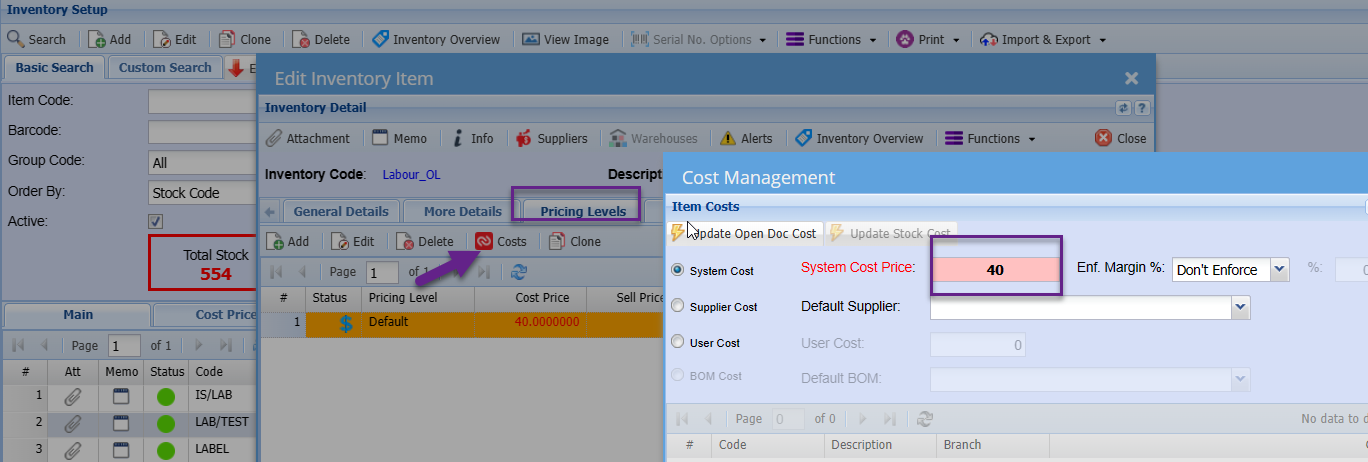
Service and Custome item cost prices can be edited on the Item setup.
To add or edit the unit cost price of service and Custom items go to:
Inventory Module> Configuration> Inventory Setup
Search the required service or custom item.
Click edit
Click the Pricing Level Tab
Click the Cost Button
Enter the cost price.
Save and Close
Edit Cost price of a Stock
Item:
There are only 2 ways to update the cost price of a stock item:
- Processing a Goods Received Voucher (GRV)
- Process a Stock Value Adjustment
This is because stock is an asset, and any adjustments to the cost price will affect the stock (asset) Valuation. As such an actual entry needs to be processed so the control account balances or is affected accordingly.