
Debtors Setup Import
To import multiple new debtors accounts into the database, follow the below procedure:
Go to Debtors Module> Configuration> Debtor Setup
Click the Import/ Export Drop down
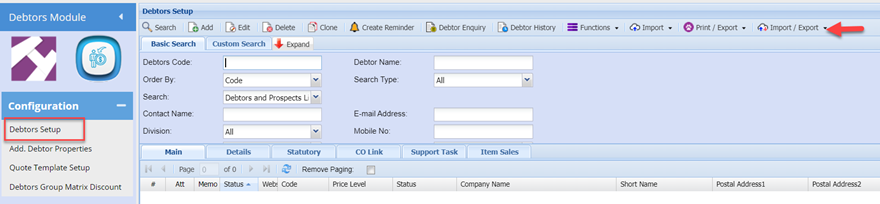
Select: Debtors Import / Export

You can click the Export button which will return the existing debtors listing into the required template for import
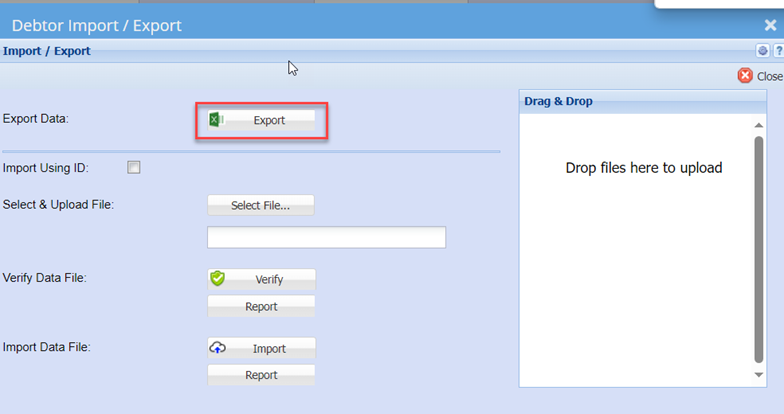
You can then delete the existing debtors and use the template to populate the information of the New debtors you wish to add into the system
Once you have the worksheet populated with the respective new debtors’ details, save the file as a normal Excel file.
Then go back to the Debtors Import/ export function (Above Screen shot)
Click the Select File Button to open your file explorer: search and select the import file you saved in the above step.
You should get a successful result returned. If not, correct the file, resave the file and retry the verify
Once Verify is successful, click the Import Button
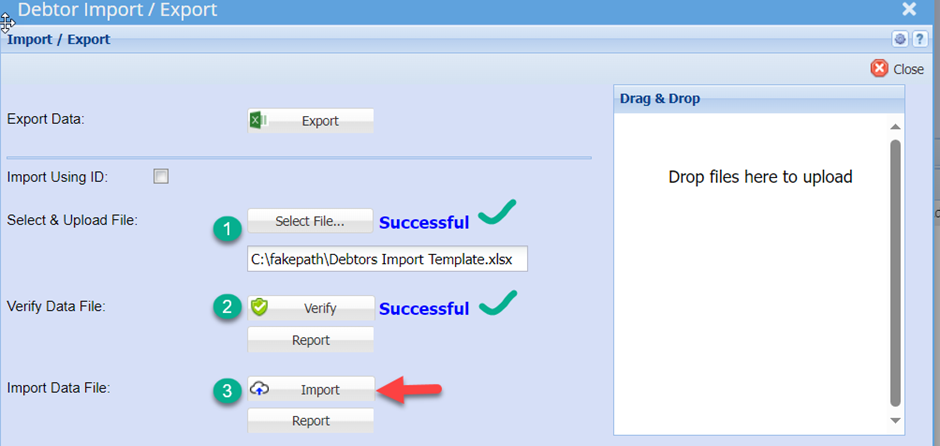
This should also return a successful result
Close the window
Your New debtors have now been uploaded into the system and you can search for them in the normal manner.