
Automatic Discount
Automatic Discount works differently in Webatar than in the main system.
Setup automatic discount on customer setup
Debtors Module> Configuration> Debtor Setup> Account Details Tab
The tick indicates that this discount needs to be applied. If a tick is off, a discount is not applied to documents or line items
There are three types of Discounts namely:
- Line Discount
- Discount Matrix
- Document Discount
Line Discount
This allows a user to put a discount on a line item in case the user does not want to discount the whole document due to some line items that are permanently not discounted.
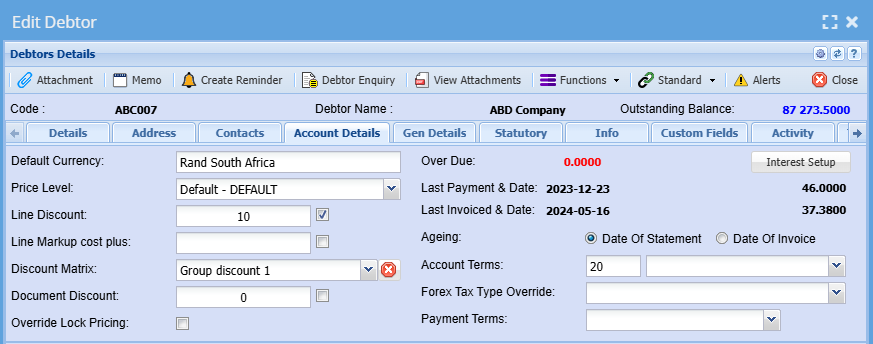
Line Discount
Line discount allows a user to put a discount on all items that have been marked to allow line discount.
If an item is not marked to allow line discount it will not add the discount to the line.
To add allow line discounts on items you need to go here
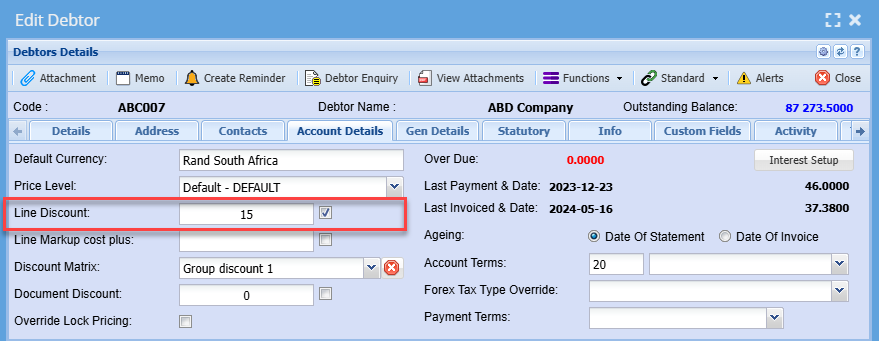
Webatar quote puts the automatic discount per line
When Webatar syncs the quote document to main system, the discount is on the line
.png)
NOTE:
That when adding new items to the document in Webaccounting after a sync from Webatar.
There will be no discount applied to the new lines added.
This is because when you first open up the document in Webaccounting, discount is applied to the whole document.
.png)