
Contract Maintenance Setup
Video Training Manual 2016 - Click Here
The ATime service-levellogging agreement (SLA)setup is adone under the contract betweenmaintenance amenu
There serviceare provider3 andsetups arequired:
- The
thatcontract - The
SLAtasks - Service
specifyitems - Billing
includeRates
Once ofthese thehave timebeen servicessetup, you will beneed availableto link these to one another
CRM Module> Configuration> Contract Maintenance
Contract Task setup
Click the Contract Tab
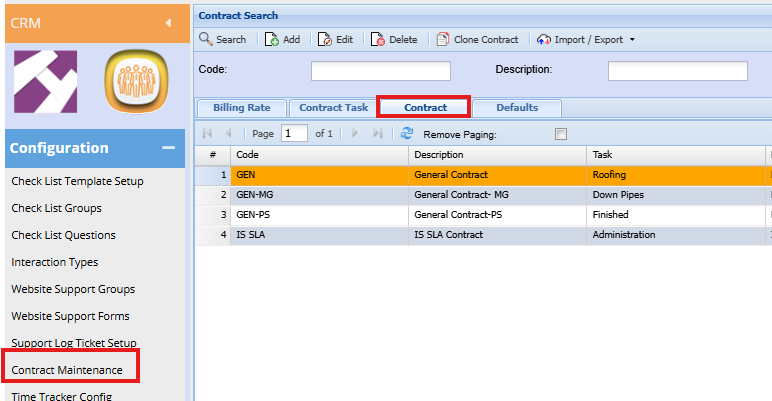
| Add | To create a new Contract |
| Edit | To edit existing contracts |
| Code | Enter a code for the Contract |
| Description | Enter a description for contract |
| Archived | This is used to flag obsolete contracts that are no longer in use. we do not allow them to be deleted due to audit trails and historic time logs that may have the contract linked |
Billing Rate Tab
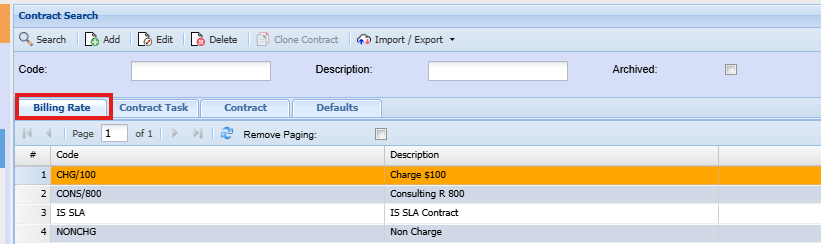
| Add | To add a new billing rate |
| Edit | To edit an existing rate |
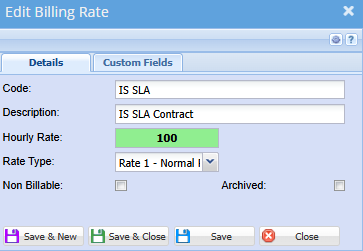
| Code | Enter SLA or billing rate code |
| Description | Enter brief description of SLA or billing rate |
| Hourly Rate | Enter the amount billed per hour |
| Rate Type | Select the billing rate tye on the drop down |
| Non Billable | Put a tick of an SLA is non billable |
| Archived | If the archived box is ticked, the billing rate will be achieved |
Contract Task Tab
Video training Manual 2016 - Click Here
Click the Contract Task Tab
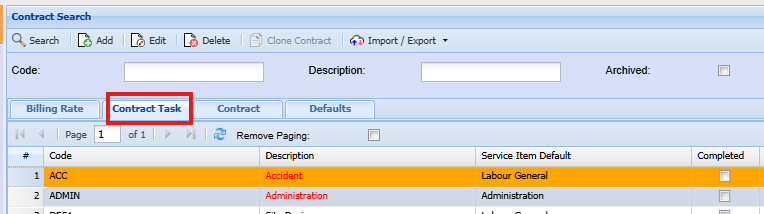
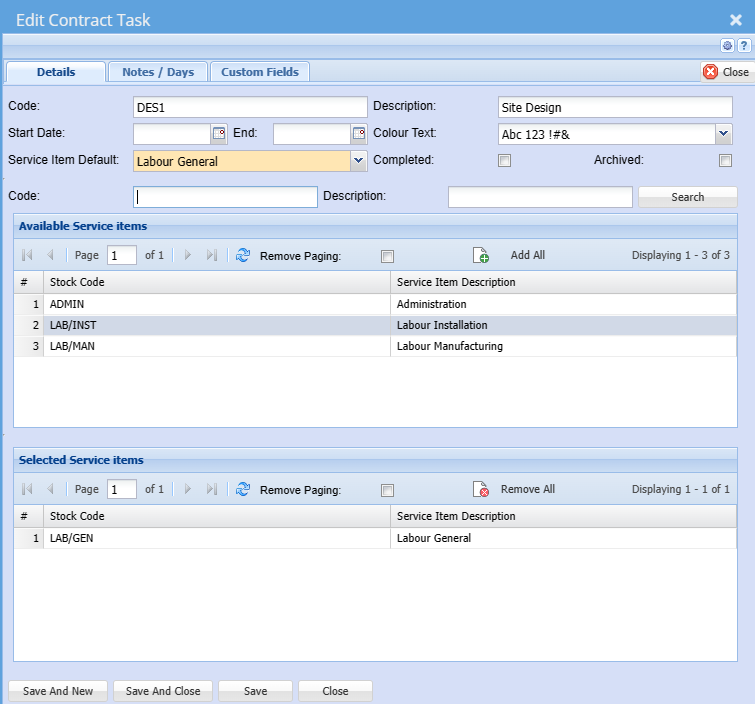
| Add | To add a new task |
| Edit | To edit an existing task |
| Code | Enter an code for the |
| Description | Enter |
| Start Date | The date could be set to a year if the tasks are to be reviewed yearly - Not mandatory |
| End | The date could be set to a year if the tasks are to be reviewed yearly - Not Mandatory |
| Colour Text | you can enter colour codes to differentiate the different tasks |
| Service Item Default | This field allows the default service to be chosen from the selected list |
| Completed | |
| Archived | If the archived box is ticked, the billing rate will be achieved |
| Code | This field allows the user to search for an existing service item code |
| Description | This field allows the user to search for an existing service using the description |
| Available Service Items Grid | These will be the available service items that can be selected to be used in the service item for billing purposes |
| Selected Service Items Grid | These are the service items selected from the above list that will be available for use |
The date could be set to a year if the tasks are to be reviewed yearly
| Search | Search button to populate the available service item list |
| Add All | Allows the user to add existing items |
| Remove All | Allows the user to remove all selected items |
Note/Days
These fields define the working day hours
these details are not mandatory to complete. they are typically used for scheduling
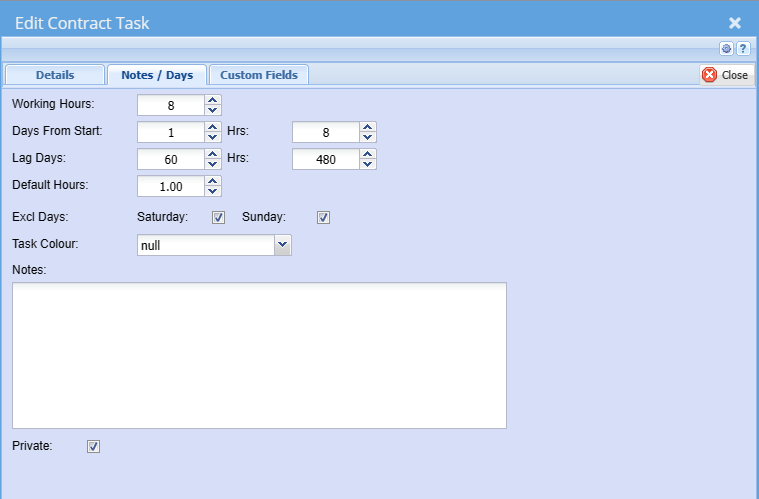
| Working Hours | |
| Days From Start | |
| Hrs | |
| Lag Days | |
| Hrs | |
| Default Hours | |
| Excl Days | |
| Text Colour | |
| Notes | Users can add notes for internal use |
| Private |
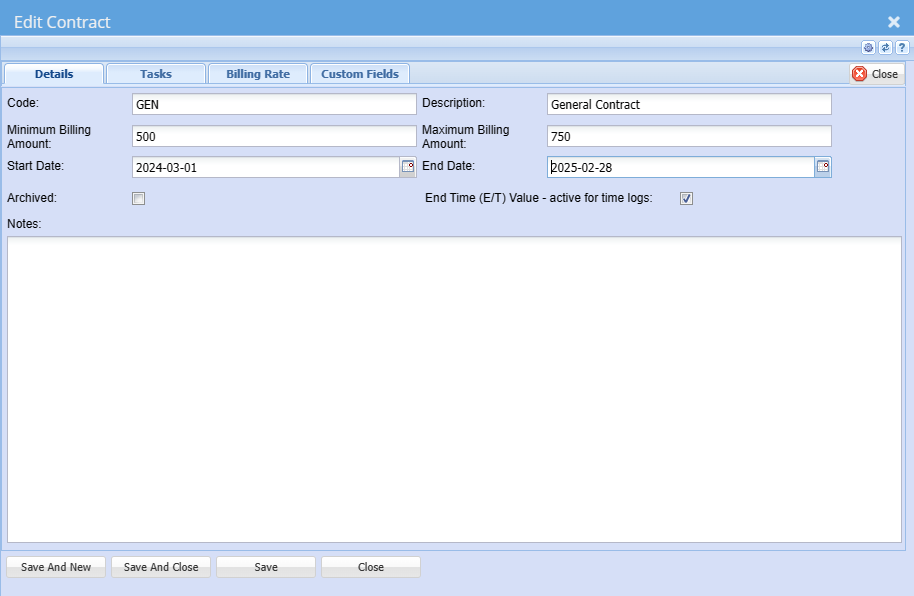
Link Contract to Tasks & billing rates
Click the Contract tab
Click
Contractedit Tab
to edit the contract
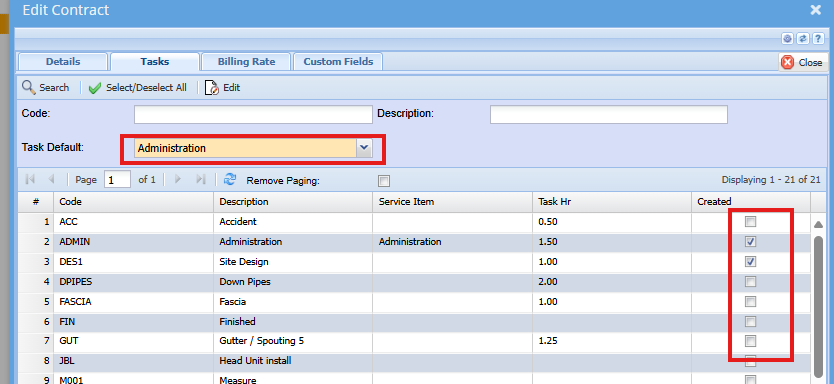
Click the task tab
Activate the relevant task for the specific contract
Select the default task
Save and close
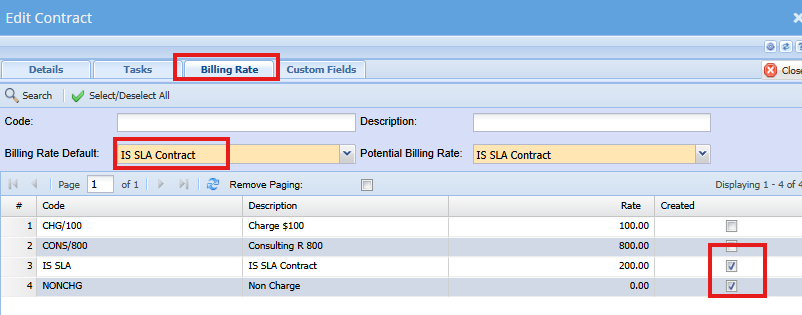
Click the Billing Rate tab
Activate the relevant rates for the task and select the default rate
Save and Close
| |
Defaults Tab
This tab allows one to set certain defaults, so the user does not have to complete all these fields when capturing the time logs.
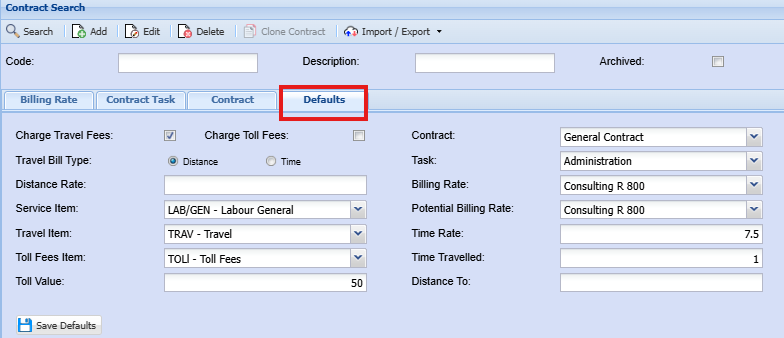
| Charge Travel Fees | This will set the default to always charge travel. Tick off will set default to off, indicating no travel charges. user can manually tick the box on time log capture if applicable. |
| Charge Toll Fees | This will set the default to always charge toll fees. Tick off will set default to off, indicating no toll fees charges. user can manually tick the box on time log capture if applicable. |
| Travel Bill Type | Sets the default to charge travel based on distance or time travelled |
| Distance Rate | Rate per kilometer |
| Service Item | this is the default service item related to the task selected for the contract |
| Travel Item | Service item for travel |
| Toll Fees item | Service item for toll fees |
| Toll Value | default Toll price |
| Contract | Default contract. this can be set per user on the user profile setup as well |
| Task | Default task related to the contract |
| Billing Rate | Default billing rate to pull through |
| Potential Billing Task | Default potential billing rate |
| Time Rate | Travel time default rate |
| Time Travelled | Travel time default, eg. 1 = 1 hour |
| Distance To |