
Add Support Log Task
Edit /Add supportSub Task
To Thisedit Functionor isadd undera new support log task follow this path
CRMWebatar Module >Configuration >Support log Setup
.png)
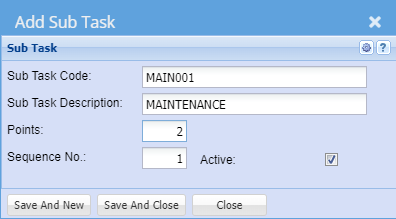
Enter
| Sub Task Code | Enter a Sub Task |
| Sub Task Description | Enter a Sub Task |
| Points | |
| Sequence No | |
| Active |
.png)
Click Save And Close to save this Sub Task.Status
Click Save And New to save this Sub Task and clear the text boxes to allow for another Sub Task to be entered.
Click Close to close the window.
Please Note : Sub Task codes cannot be duplicated
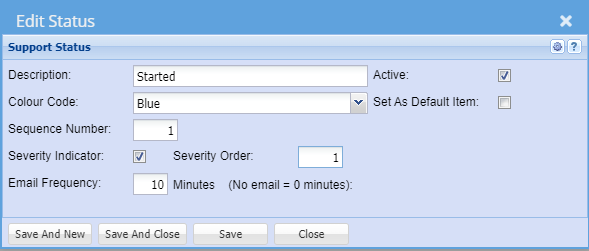
| Description | |
| Colour Code | |
| Sequence Number | |
| Severity Indicator | |
| Email Frequency | |
| Severity Order | |
| Active | |
| Set As Default Item |
Root Cause
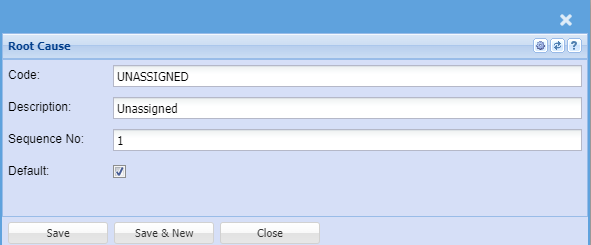
| Code | |
| Description | |
| Sequence No | |
| Default |
Defaults
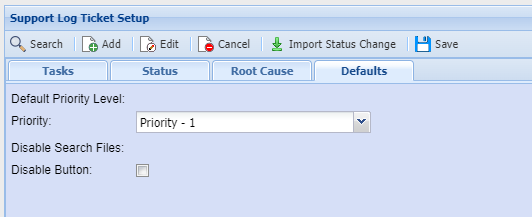
| Priority | |
| Disable Button |