Warning
The utility will do the following 1. Make a PDF invoice and store in folder 2. Un allocate the invoice 3. Delete General Ledger transactions 4. Delete VAT / GST tables 5. Delete mirror table 6. Delete allocations table 7. Delete stock movement 8. Recalculate each stock item 9. Make a user log entry This utility is specific to Debtors invoices only, no job invoices and no other documents.Recommended to do the following after invoice re opened.
This can be done at the end of the dayReports maybe out of sync if the following utilities are not run before running reports
1. Recalculate Account Balances 2. Recalculate summary income 3. Recalculate Balance Sheet 4. Recalculate Debtor Balance Access the system via the System Utilities (System Recalculations) [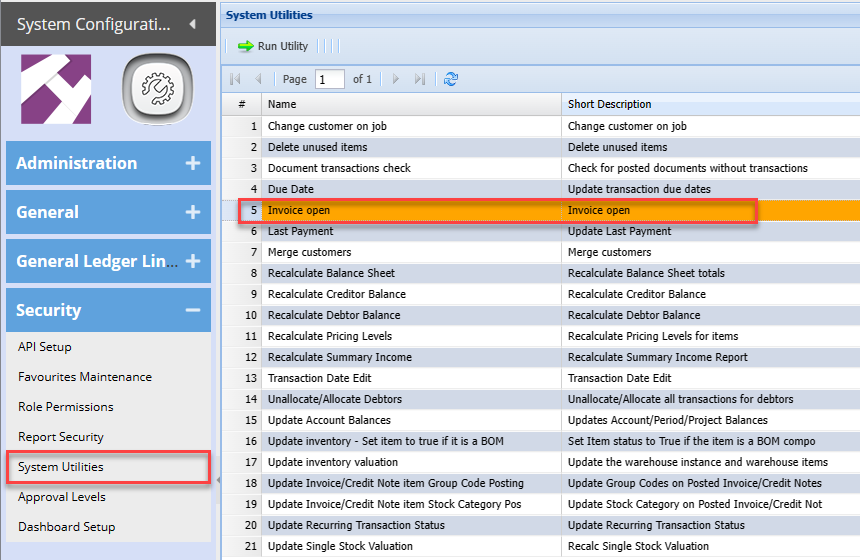](https://hugeerp10.co.za/hsofmanual/uploads/images/gallery/2024-03/VTHimage.png) Enter your invoice number in full Click on Search Click on Continue to complete [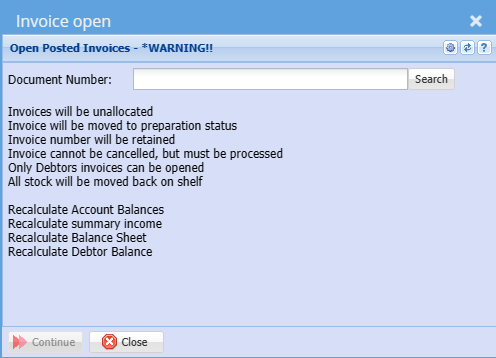](https://hugeerp10.co.za/hsofmanual/uploads/images/gallery/2024-03/Tj7image.png) After the invoice has been re opened, find it in the Debtors Module > Activity > Invoice This will be displayed as a preparation invoice, which can be edited and reprocessed.The Invoice cannot be cancelled as it has reserved the invoice number. it must be processed
A copy of the invoice is kept in the back ground folders for audit purposes. A user log is created to log who re opened an invoice and which invoice was re opened. New transactions and stock movements will take place when processing the invoice.