Report Security
Report Security
Video training manual 2016 - Click Here
System Configuration> Security> Report Security
This is where the permissions for reports are set
| On the permissions button | You will allow or restrict certain user roles to access certain reports. |
Click on Permissions button.
.png)
| Search | To search by selected criteria: User Role, Category and Report Description. |
| User Role | The security role of the user where the administrator will select which reports the user has access to. |
| Select All | Selects all reports |
| Unselect All | Unselects all reports |
| Add Security Role | Allows the administrator to create a new security permissions role for a particular user/ group of users. |
| Allows the administrator to print the role list |
The Administrator will have an option to print All reports, print only the selected reports or to group the reports by selected on top
Reports
The system has many reports broken down into categories.
The main categories are as follows:
| Auditors Reports | |
| Creditors | |
| CRM | |
| Debtors | |
|
Financial Reports |
|
| Favourites | |
| General Ledger | |
| General | |
| Inventory | |
| Job Costing | |
| Lab | |
| Serial Numbers | |
| Assets | |
| VAT / GST |
User Reports Maintenance
Maintaining and adding new reports.
This can only be done by Huge Software developers
It is a function to add in new reports and define what the report is all about
.png)
Add report
This form is used to insert or maintain existing reports.
| Category | enter the category that the report falls under |
| Description | enter the description of the report |
| File Name | enter the file name, the height and the Width. |
| Note | a note could describe what the report is about the save the changes made to the report. |
Edit report
This form is used to insert or maintain existing reports.
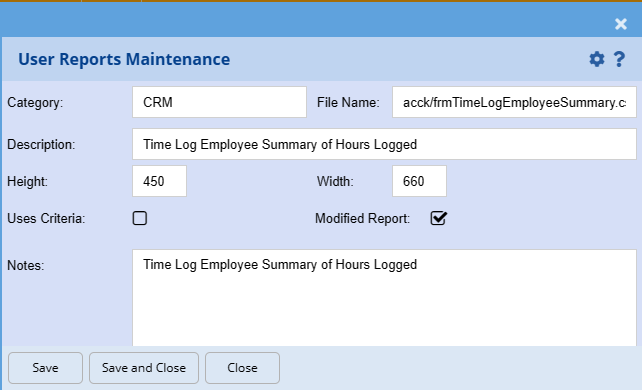
| Category | enter the category that the report falls under |
| Description | enter the description of the report |
| File Name | enter the file name, the height and the Width. |
| Note | a note could describe what the report is about the save the changes made to the report. |
Delete Report
.png)