# Report Favorites

# Favorites

Video training manual 2019 - Click Here

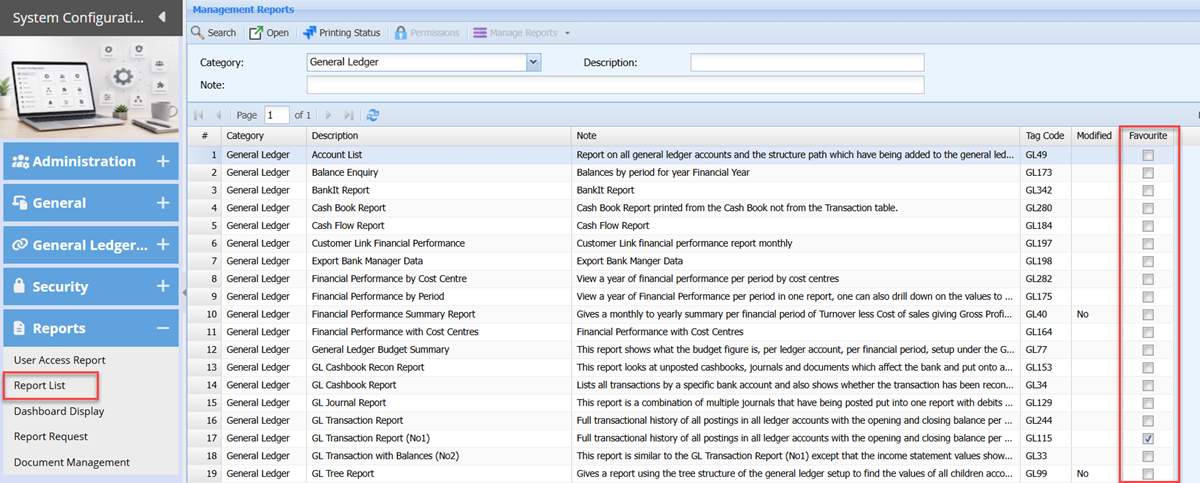
Check on the column with the tick box with the report that you'd like to add to your favourites list.

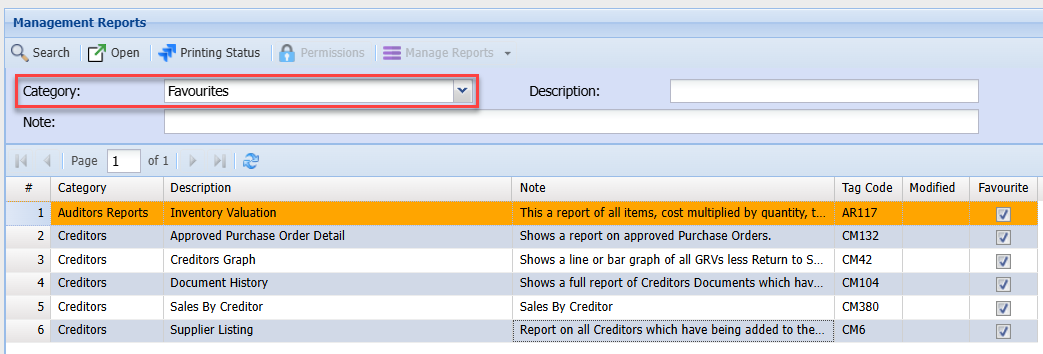
Go to the category and select favourites to view and filter all the selected reports that you have chosen.

[![image.png](https://hugeerp10.co.za/hsofmanual/uploads/images/gallery/2026-07/scaled-1680-/28wimage.png)](https://hugeerp10.co.za/hsofmanual/uploads/images/gallery/2026-07/28wimage.png)
<table border="1" id="bkmrk-search-open-printing" style="border-collapse: collapse; width: 100%; height: 238.375px;"><colgroup><col style="width: 27.4113%;"></col><col style="width: 72.5887%;"></col></colgroup><tbody><tr style="height: 29.7969px;"><td style="height: 29.7969px;">**Search**

</td><td style="height: 29.7969px;">  
</td></tr><tr style="height: 29.7969px;"><td style="height: 29.7969px;">**Open**

</td><td style="height: 29.7969px;">  
</td></tr><tr style="height: 29.7969px;"><td style="height: 29.7969px;">**Printing Status**

</td><td style="height: 29.7969px;">  
</td></tr><tr style="height: 29.7969px;"><td style="height: 29.7969px;">**Permissions**

</td><td style="height: 29.7969px;">  
</td></tr><tr style="height: 29.7969px;"><td style="height: 29.7969px;">**Manage Reports (Drop-down)**

</td><td style="height: 29.7969px;">  
</td></tr><tr style="height: 29.7969px;"><td style="height: 29.7969px;">**Category**

</td><td style="height: 29.7969px;">  
</td></tr><tr style="height: 29.7969px;"><td style="height: 29.7969px;">**Description**

</td><td style="height: 29.7969px;">  
</td></tr><tr style="height: 29.7969px;"><td style="height: 29.7969px;">**Note**

</td><td style="height: 29.7969px;">  
</td></tr></tbody></table>

# Setting User Report Favourite

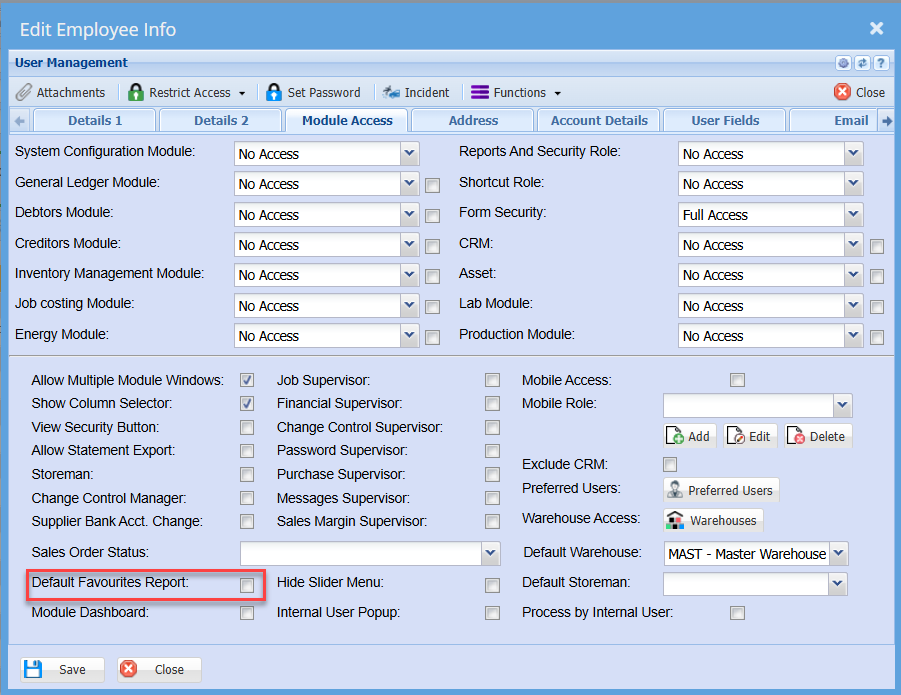
Once you have checked on the column with the tick box with the report that you'd like to add to your favourites list.  
One can set the favourite report category to open up automatically.

<span style="color: rgb(45, 194, 107);">**System Configuration &gt; General &gt; User Setup**</span>

[![image.png](https://hugeerp10.co.za/hsofmanual/uploads/images/gallery/2026-04/scaled-1680-/ULEimage.png)](https://hugeerp10.co.za/hsofmanual/uploads/images/gallery/2026-04/ULEimage.png)

When accessing your report list, this will default to the Favourites category

[![image.png](https://hugeerp10.co.za/hsofmanual/uploads/images/gallery/2026-04/scaled-1680-/wj9image.png)](https://hugeerp10.co.za/hsofmanual/uploads/images/gallery/2026-04/wj9image.png)