Q&A
- Questions and Answers
- Discontinued
- Time Tracker Exports
- Point of Sales (POS) Invoice
- Point of Sale (POS) Credit Note
- Point of Sales (POS) Setup
- Purchase Questions
- Stock Questions
- Accounting Glossary
- Average Costing when returning stock RTS
Questions and Answers
Average Costing Method for Stock
Huge ERP Accounting System makes use of two types of costing methods namely:
1.Average Costing
2.Latest Costing
Average Costing
Average costing is worked out by the number of stock items coming into the system with a value. This value is posted to the general ledger books to your stock ledger account and Creditors control account. When the next Goods Received Note with stock comes in, the value of the incoming stock and quantity is worked out. The existing stock quantity and value is multiplied to give you a value and the new value from the Goods Received Note is added together and then divided to give you the new average cost of the item.
Looking at the table below the average cost of the item is worked out each time stock comes in based on quantity and value. If the user does not back date any GRV or revalue the stock, one can work out the average cost of the item in excel and in history.
|
Date |
Doc No |
Item |
QTY IN |
QTY OUT |
Unit Value |
Total Line Value |
|
Total Value |
Total QTY |
Ave cost |
|
Mon |
GRV10 |
Pen |
5 |
0 |
10 |
50 |
|
50 |
5 |
10 |
|
Tues |
GRV11 |
Pen |
5 |
0 |
15 |
75 |
|
125 |
10 |
12.5 |
|
Wed |
GRV12 |
Pen |
5 |
0 |
20 |
100 |
|
225 |
15 |
15 |
|
Thurs |
INV5 |
Pen |
0 |
-3 |
15 |
-45 |
|
180 |
12 |
15 |
|
Fri |
GRV13 |
Pen |
4 |
0 |
12 |
48 |
|
228 |
16 |
14.25 |
Total Line Value = QTY x Unit Value
Total Value = Previous Total Value + New Total Line Value
Total QTY = Previous Total QTY + New Line QTY
Ave Cost = Total Value / Total QTY
When a user back dates a GRV or revalues the stock the history of the item of the average cost cannot be determined.
The vat amount on my invoice does not match the calculation and my customer does not want to pay because the Vat is out by 1c?
This is a decimal place problem, in Huge ERP we hold 9 decimal places by default in the system. So what is happening on your invoice is that the rounding is causing a problem. Go to System Configuration Module > Administration > Company Profiles. Amend your company and go to the tab which says decimal places. Change the decimal place from 2 to 3 or 4 and save your changes. Remember to log out of the system and log back in for the changes to take effect.
What does Function and Department do in the system under System Configuration?
This is specific to the Job Costing Module which allows you to print job cards by Department, Employee or Function.
Department example: Paint, Mechanical, Finance or Admin Department
Function example: Painter, Cleaner, Debtors Clerk or Manager.
An employee can belong to many departments and have many functions.
How does the system work out the average cost price?
See Excel sheet for example
Average Unit Cost work Excel Sheet
Remote Access Setup by IT
I have installed a web based accounting system at the client, it uses IIS web services on the server and internet explorer.
From local machines the access is as follows:
http://server/csp/demo/wab/index.csp
http://server = location of server – this can be the dyndns address
/csp/demo/wab/index.csp = package address
Startup.csp = takes the user directly to the log in page and does not allow him to see the index of companies.
Index.csp = gives the list of companies on the system.
IF you have a firewall so companies use a port access eg
http://company.dyndns.info:5080/csp/demo/wab/index.csp
:5080 = port access from outside world = internal port is pointer to port 80 to the web server.
How to delete a namespace which is a problem
The first thing to do is to Shut down the Cache database. Go to the small blue cube and right click on the mouse. Go to Stop Cache and then select the shut down section.
Open up Cache Configuration Manager
Click on the tab called Namespaces, then Highlight the namespace you want to delete and click on the Remove Button. After you have clicked Remove the namespace will disappear from the list.
WARNING
Make sure you are deleting the correct namespace!!! Once you have deleted all traces of the database one cannot retrieve anything back.
Click on the Databases Tab
Find your namespace to Remove, highlight it and click on Remove button.
It will ask you whether you want to delete this, click on Yes.
Click on the CSP tab and highlight the namespace you want to Remove. Click on the Remove button and the namespace will disappear off the list.
Now we are going to delete the data off the harddrive.
Go to the C:\cachesys\csp and find the folder namespace to delete. Highlight the file to delete and click on delete.
Yes we are sure.
Now deleting folder.
Last step to do to complete this
Go to the folder where the databases are kept, usually in the c:\cachesys\mgr or you could have put it in a different drive.
The file contains a Cache.dat and cache.lck files in it, this tells you that this folder is a data base folder. Go back to the folder and highlight and click on Delete.
Click on Yes to delete the folder
You have now deleted all traces of the database
Right click on the Cache cube and Start up Cache
Creditors and Stock Questions
What is the difference between stock and custom type items in Huge ERP Systems?
Stock – Physical items such as a ruler. Stock items work with costing methods a. Latest cost or b. Average Cost. (this is setup under the System Configuration Module- Administration – Reference Values). Stock Type items updates the stock ledger account.
Custom – Works the same as Service type. You can put sub contractors work under this. This will appear in Goods Received Vouchers. Custom type items replaces the stock ledger account and updates a Cost of Sales account or expense account.
Stock and Custom type items appear in the creditors module where as the service type item does not appear in the Creditors Module.
Give 2 examples of when you would use Delivery Note processing in the system?
a.Update stock immediately on receipt of stock
b.Update the stock, Cost of Sales or Expense immediately on receipt of Delivery note.
c.When one receives a delivery note without an supplier invoice
d.Keeping track of Delivery notes that have not got a corresponding creditor invoice.
e.Checking that the supplier invoices the correct amount based on the purchase order.
f.Checking if the supplier has changed the unit price of the item from purchase order to supplier invoice
Can Delivery Notes be partially received?
Yes, Delivery notes can be partially received.
Example the basic process flow of the Purchase Order to Delivery Note Processing?
a.Create Purchase Order
b.Authorise PO
c.Place Order for PO
d.Receive Stock
e.Process Receive Stock
f.Check Delivery Note
g.Complete Delivery Note Process
At what stage of the above steps does the stock and accounting entries get updated in the system?
When you click on complete button on the receive stock section and selecting the Delivery Note section, entering the Delivery note number and clicking on complete. At this stage the accounting entries are updated and stock is updated.
What happens if the delivery note sent by the supplier which was captured into the system via the delivery note and then the supplier invoice arrives and it does not match. Answer the following processes
a.If the value is different to the Purchase Order?
If the value on the Delivery note process is different from the supplier invoice it means a few things:
The buyer entered the incorrect value on the purchase order, OR the purchase order had the correct value and the supplier entered the incorrect amount on his invoice, OR discount was not added from both the buyer or supplier, OR finger trouble from both buyer or supplier.
One should always change the Delivery note value to match the supplier invoice as long as the quantities are correct. The system will automatically correct the value difference and post an entry to Price Variance Ledger account.
Next step would be to check why the difference occurred, should this be a mistake of the supplier, an email and phone call should be made to let the supplier correct this via a credit note from his side.
You will capture this credit note as a creditors journal and select the Price variance ledger account to contra the value posted differences.
Remember also to revalue the stock that had a price variance difference using a stock level adjustment.
a.If the quantity is different to the Purchase Order?
If the quantity on the Delivery note process is different from the supplier invoice it means a few things:
The buyer entered the incorrect quantity on the receive stock confirmation, OR the purchase order had the correct quantity and the supplier entered the incorrect quantity on his invoice, OR finger trouble from both buyer or supplier.
In this case because the stock was updated from the received stock process section and ledger accounts were updated you will have to complete the delivery note based on the incorrect quantity received but ensure that the value of each unit matches the supplier invoice.
Next step is to go and reverse the incorrect processed confirmed delivery note via a stock returned Note. Make sure the Stock Return matches both quantities and values. This will reverse the entry and return the stock. Remember to allocate the stock return note to the processed delivery note in the creditor.
Then go to Goods received Notes and recapture the supplier invoice correctly and process.
Next step would be to check why the difference occurred, should this be a mistake of the supplier, an email and phone call should be made to let the supplier correct this via a credit note from his side.
a.If the supplier only delivered part of the goods and then invoices for the full stock on the invoice?
If the quantity on the Delivery note process is different from the supplier invoice it means a few things:
The buyer entered the incorrect quantity on the receive stock confirmation, OR the purchase order had the correct quantity and the supplier entered the incorrect quantity on his invoice, OR finger trouble from both buyer or supplier.
Remember that you should only receive what stock was physically received and not what is on the invoice from the supplier.
Also note that you should not force balance the value to match the invoice as you are going to under or over value the stock. You are also going to mismatch the value due to the invoice when the second part of the stock arrives.
There are two ways one can handle this:
First Way
In this case because the stock was updated from the received stock process section and ledger accounts were updated you will have to complete the delivery note based on the actual quantities received.
Keep a note and reminder that the invoice is only partly invoiced. Note that the supplier will only be paid part of his invoice and his full invoice will not be in the system. Only when you receive the rest of the stock you will complete the second part of the stock and invoice.
Second Way
Phone the supplier immediately and ask him to credit the whole invoice and then re-invoice only the stock that was delivered.
When you receive the new invoice with the corrected amount, complete the delivery note process to the books.
Next step would be to check why the difference occurred, should this be a mistake of the supplier, an email and phone call should be made to let the supplier correct this via a credit note from his side.
a.If the stock item on the Delivery Note is totally different to the supplier invoice supplied?
One should always check why there is a difference and establish what the best process is to do from the above points.
One should complete the delivery note process and reverse the incorrect processed confirmed delivery note via a stock returned Note. Make sure the Stock Return matches both quantities and values. This will reverse the entry and return the stock. Remember to allocate the stock return note to the processed delivery note in the creditor.
Then go to Goods received Notes and recapture the supplier invoice correctly and process.
What happens when you run the Purchase Order flow to the Goods Received Notes and the supplier invoice is different from the Purchase Order. Answer the following processes
a.If the value is different to the Purchase Order?
If the value on the Goods Received Note is different from the supplier invoice it means a few things:
The buyer entered the incorrect value on the purchase order, OR the purchase order had the correct value and the supplier entered the incorrect amount on his invoice, OR discount was not added from both the buyer or supplier, OR finger trouble from both buyer or supplier.
One should always change the Goods Received Note value to match the supplier. This means that the stock values, stock quantities and supplier invoice processed will be correct.
Next step would be to check why the difference occurred, should this be a mistake of the supplier, an email and phone call should be made to let the supplier correct this via a credit note from his side.
You will capture this credit note as a creditors journal and select the Price variance ledger account to contra the value posted differences.
Remember that this is the easy part of correcting the supplier invoice and has minimal audit trail capabilities, it relays on the operator to do following ups. Easy to hide mistakes.
a.If the quantity is different to the Purchase Order?
If the quantity on the Goods Received Note is different from the supplier invoice it means a few things:
The buyer entered the incorrect quantity on the receive stock confirmation, OR the purchase order had the correct quantity and the supplier entered the incorrect quantity on his invoice, OR finger trouble from both buyer or supplier.
One should always change the Goods Received Note value to match the supplier. This means that the stock values, stock quantities and supplier invoice processed will be correct.
Next step would be to check why the difference occurred, should this be a mistake of the supplier, an email and phone call should be made to let the supplier correct this via a credit note from his side.
You will capture this credit note as a creditors journal and select the Price variance ledger account to contra the value posted differences.
Remember that this is the easy part of correcting the supplier invoice and has minimal audit trail capabilities, it relays on the operator to do following ups. Easy to hide mistakes.
a.If the supplier only delivered part of the goods and then invoices for the full stock on the invoice?
If the quantity on the Goods Received Note is different from the supplier invoice it means a few things:
The buyer entered the incorrect quantity on the receive stock confirmation, OR the purchase order had the correct quantity and the supplier entered the incorrect quantity on his invoice, OR finger trouble from both buyer or supplier.
Remember that you should only receive what stock was physically received and not what is on the invoice from the supplier.
Also note that you should not force balance the value to match the invoice as you are going to under or over value the stock. You are also going to mismatch the value due to the invoice when the second part of the stock arrives.
There are two ways one can handle this:
First Way
In this case because the stock was updated from the received stock process section and ledger accounts were updated you will have to complete the delivery note based on the actual quantities received.
Keep a note and reminder that the invoice is only partly invoiced. Note that the supplier will only be paid part of his invoice and his full invoice will not be in the system. Only when you receive the rest of the stock you will complete the second part of the stock and invoice.
Second Way
Phone the supplier immediately and ask him to credit the whole invoice and then re-invoice only the stock that was delivered.
When you receive the new invoice with the corrected amount, complete the delivery note process to the books.
Next step would be to check why the difference occurred, should this be a mistake of the supplier, an email and phone call should be made to let the supplier correct this via a credit note from his side.
a.If the stock item on the Delivery Note is totally different to the supplier invoice supplied?
One should always check why there is a difference and establish what the best process is to do from the above points.
Because the Purchase Order goes to the Goods Received Voucher one can change the quantity on the GRV to match the supplier invoice.
You have to ensure that the physical stock received on the delivery note equals the stock on the supplier invoice other wise you have to only receive the stock on the GRV that was actually received.
Get a credit note from the supplier or only GRV the stock that actually arrived. Do not receive the GRV if you are missing actual stock which the supplier still has to delivery.
When will you use Creditors Journals for supplier invoices?
You can use Creditors Journals for supplier invoices when receiving Stationery, fixed assets and expense type suppliers like telephone account, Lights and Water etc.
When would you use a Stock Return Note?
A stock Return Note is used to return stock back to the supplier which can be for various reasons. Stock is damaged, Wrong stock supplied, Correction of GRV and many more.
1.Is it advisable to back date Goods received Notes and explain your reason for this?
It is not advisable to back date Goods Received Notes because stock is always posted current and values are then put in the specific period. VAT is also an issue if back dating and if management reports have being completed you will be changing figures.
1.Is it possible to back date a Goods received Note and explain your reason for this?
Yes it is possible to back date a Goods received Note as long as it is still in the same period.
1.If a Purchase Order is partially received and you are waiting for stock. The supplier takes too long to delivery the goods, what steps would you take to complete the stock order and how would you complete the matching steps in the accounting system?
I would first call the supplier to try and get the stock delivered. If the supplier cannot delivery the goods, I would close the remaining open receive stock. Then call a different supplier to order the goods. When in the system go to Purchase Order Section and create a new Purchase Order for the stock, refer to the other Purchase Order and order the stock.
What is the difference between supplier cost and landed cost?
Supplier Cost is the cost of the goods that you purchase directly from the supplier without delivery and shipping costs.
Landed Cost is where the supplier has to ship the goods to you and when it arrives at your office the supplier cost may have cost you R100-00 but it cost an additional cost of R30-00 to delivery it to you. So the Landed cost is the supplier cost plus additional costs of shipping etc equals the landed cost of R130-00. The real cost is R130-00 and not R100-00.
How do you work out average costing for an item purchase? Please give formula and example.
Average costing is worked by multiplying the actual cost on the supplier invoice with the quantity, taking that value and adding it to the total value that is on hand currently and then dividing up by the total stock on hand and new stock to get your new average cost price.
Example
GRV1 1 Qty R10-00
|
Document |
QTY |
VALUE |
TOTAL |
AVE Cost |
Formula |
|
GRV1 |
1 |
10 |
10 |
10 |
1 x 10 = 10 0 on hand therefore average is 10 |
|
GRV2 |
1 |
20 |
20 |
15 |
1 x 20 = 20 New GRV 1 x 10 = 10 Current on hand Total value = R30 divided by 2 on hand = R15 average |
|
GRV3 |
1 |
30 |
30 |
20 |
1 x 30 = 30 New GRV 2 x 15 = 30 Current on hand Total value = R60 divided by 3 on hand = R20 average |
What is the difference between open item and balance brought forward?
The difference between open item and balance brought forward is that open item allows the invoice for example to stay open until a payment has being allocated to it. This means that the item will continue to age and be outstanding. You can also pin point which transaction has not being allocated.
Balance brought forward is where you continue to allocate payments to a balance brought forward figure. Allocations are not specific but grouped for the brought forward balance.
What is the better method Open item or balance brought forward and explain your answer?
Open Item is the better method because you can track specific transactions that have not being allocated or might have a query against them.
Why do we do allocations in the system?
We do allocations in the system to ensure that all transactions are accounted for. It ensures that if a transactions is aging that it needs some attention. It might indicate that a supplier invoice is a problem and we are not paying for it, it will show up as outstanding.
If you don’t do allocations your age analysis will start to be fill of figures and you won’t have a correct age analysis to work off.
Purchase Orders done for overseas suppliers, which method is better to do, delivery note processing or straight Goods received Note processing, explain your answer?
When doing a Purchase Order for an overseas supplier it is better take the Purchase Order to a Goods Received Note as the Delivery Note method does not take into account importation splits (additional costs into account). A Goods Received Note takes into account the additional costs on an item and updates the correct landed costs.
Where in the system is the best place to find transaction information on the supplier?
The best place in the system to find all your information on a supplier is the Creditor’s Analysis screen. This is found under Creditors Module> Analysis> Creditors Analysis
Why does the age analysis report for a creditor show a figure in brackets, what does this mean and how would you fix it?
When your Creditors Age analysis shows negative figures on the aging it means that allocations have not being done.
To fix this go to Creditors Module> Activity> Allocations and search for the creditor and allocate all credits with the debits under there is no more transactions to allocate.
Can you change a purchase order after it has being authorised and explain what happens in the system?
Yes you can change a purchase order after it has being authorised. However the purchase order’s status will go back to created and has to be re-authorised.
What is the difference between Creditors journal payments and Cashbook payments?
The difference between Creditors journal payments and cashbook payments is that Creditors Journal payments are done for a single creditor at a time where as the Creditors Cashbook allows one to capture multiple payments within one Cashbook batch.
In Creditors journal what does the following functions do?
a.Show all Decimals tick
This allows the journal to process more than the 2 decimal place example if you want to correct a fraction of cents – 0,0000567. This tick allows you to process up to 9 decimal places.
a.Auto Allocate
Auto Allocate tick allows the payment journal to auto allocate oldest to newest to unallocated transactions.
a.Check Zero
When you tick Check Zero and Auto Allocate together the journal will try to auto allocate only if after the payment is processed the creditor amount equals zero then auto allocate. If it does not equal zero do not allocate the journal.
a.Import Tax
This is only in the creditors journal section and allows one to add importation tax to a creditor. This is where the VAT amount is not equal to normal VAT calculation. It will put the entry on the VAT amount and inclusive amount.
When you try and process a supplier invoice and the system says that the supplier invoice already exists, what steps would you take when getting this message?
The system will always check to see if there are duplicate supplier invoices in the system. It checks against previously entered supplier invoice numbers. So if you are trying to process a supplier invoice and the system says it already exists, you need to check the entered supplier invoice to ensure you are not entering the same supplier invoice. If you are not then you can enter the supplier invoice number and add an A at the end of the supplier invoice number. This indicates that you have captured 2 supplier invoices with the same invoice number.
When processing a creditors journal and one has to select a ledger account and one is unsure, what steps should you take before processing?
It is always advisable where one is unsure of something to ask someone. Can be your senior, bookkeeper or Accountant. Or one can call support to assist.
Why is it important to update all information on a creditors account in the system?
It is important to update all information on creditors accounts for the following reasons:
a.It makes doing your job easier
b.When emailing a Purchase Order you have all the information
c.When you are not at the office the supplier information is all there and the other user can pick up all the information.
d.When sending out information on your company to suppliers you know who they are.
Where would you check in the system for stock movements?
You can go into the inventory analysis screen which is found under Inventory Module>Analysis>Inventory Analysis
Do you force a change to the unit price on the delivery note to match the overall total of the supplier invoice supplied in this example. You have received and processed 3 stock items into a delivery note. But the supplier gives you an invoice for 5 items. Give answer and explain your answer.
No you do not force a unit price change on the Delivery Note.
Remember that you should only receive what stock was physically received and not what is on the invoice from the supplier.
Also note that you should not force balance the value to match the invoice as you are going to under or over value the stock. You are also going to mismatch the value due to the invoice when the second part of the stock arrives.
There are two ways one can handle this:
First Way
In this case because the stock was updated from the received stock process section and ledger accounts were updated you will have to complete the delivery note based on the actual quantities received.
Keep a note and reminder that the invoice is only partly invoiced. Note that the supplier will only be paid part of his invoice and his full invoice will not be in the system. Only when you receive the rest of the stock you will complete the second part of the stock and invoice.
Second Way
Phone the supplier immediately and ask him to credit the whole invoice and then re-invoice only the stock that was delivered.
When you receive the new invoice with the corrected amount, complete the delivery note process to the books.
Next step would be to check why the difference occurred, should this be a mistake of the supplier, an email and phone call should be made to let the supplier correct this via a credit note from his side.
What is the general ledger accounts that are updated when doing a Goods received note for stock type items?
Creditors Control Account
Stock Control Account
VAT Control Account
Give the debit and credit sides of the accounts that are updated in question 1.
Creditors Control Account = Credit
Stock Control Account = Debit
VAT Control Account = Debit
What is the general ledger accounts that are updated when doing a Goods received note for Custom type items?
The stock Control Account is always replaced with the ledger account which was setup at the inventory item. It is normally a Cost of Sales account or Expense account.
When doing a creditors journal, explain when it is OK to use the suspense account?
It is OK to use the suspense account if you are moving a payment from one supplier to another. Because it takes it out of the one creditor and updates the suspense account. Then when you do the other entry to put the payment onto another creditor account it balances out the suspense account. This is an in and out entry.
Job Costing and Inventory Questions
What is the definition of Stock?
Stock is defined as actual stock which can be physically held. This is defined as bringing stock into the system and selling.
What is the difference between Service type items and Custom Type items?
Service Type Items can be defined as items which the company sells but are not stock items, examples of these are Labour and consulting. Service type items cannot be GRVed in the Creditors Module only sold.
Custom Type Items can be defined as items which are outsourced by company. These items can be found under Creditors Module.
What is the purpose of setting up group codes against stock items?
The purpose of setting up group codes against stock items are for the following reasons:
Group items together for reports
Group items together for stock takes
Allow groups to be posted to a sales or cost of sales account
Why is it important to keep your inventory list up to date?
It is important to keep your inventory up to date for the following reasons:
Have all stock information on hand
Have information on product in one central place
Name some examples of why putting a supplier name, supplier code and unit price against a stock item?
This helps when ordering stock on a Purchase Order, when selecting the supplier on the PO and selecting the line, it will also show the supplier’s item code as well. Makes ordering stock easier and ensures that the correct stock is delivered to the company.
1.When setting up Bill of Material items define the following:
a.Does cost prices of BOM items get updated when GRVs get processed?
Yes the cost prices of BOMS get updated when GRVs get processed so that the BOM cost price is always correct and up to date.
a.Can you input labour costs into a BOM item.
Yes you can input labour costs in BOM items.
Explain what a stock value adjustment does?
Stock Value Adjustments adjust the system cost price of an item. This creates a journal in the books.
Explain what a stock level adjustment does?
Stock Level Adjustments adjust the quantity of an item. Items are reduced or increased by the quantity imputed into the stock level adjustment. This creates a journal in the books.
Explain what a stock take does?
A stock take changes the quantity of an item. Items are changed by the quantity imputed into the stock take. This creates a journal in the books.
Where in the system can you find information and history of a stock item.
Inventory Analysis Screen
Does Custom type items track quantities in the system?
No Custom type items do not track quantities in the system
What are the 3 steps in Quotation process before managing a job.
a.Create a quote
b.Internal authorisation of quote
c.Customer approval of a quote
Do you require an order number when activating the quote to job?
Yes you do require an order number when activating the quote to job
a.What if you don’t have one?
You have to put in some form of order number, you can enter something and add it later
a.Can you add the order number later?
Yes you can change or add the order number later on in managing the job
What are the 4 main parts to job costing?
a.Quotations
b.Manage Job
c.Delivery Notes
d.Invoicing
At what part of the job costing does stock move out of the system?
Stock is moved out of the system when you Invoice.
What happens when stock is managed in job costing?
When stock is managed in job costing it moves the stock from on shelf to Work in Progress.
What is the difference between usage invoicing and percentage invoicing in job costing process.
Usage invoicing is when you select the lines of the job and invoice those lines, it is very specific.
Percentage invoicing is when you invoice any amount on a job. It does not worry about the actual lines
Explain the following in Manage Job
a.Cost to Company
Cost to Company is the companies cost and does not allow you to invoice the company but tracks the stock
a.Scope Creep
Allows you to add an item to the job and charge for it. Normally is pre-authorised where you can just add to a job and invoice for it.
a.Quote
You can create an additional quote for a client, this quote adds .1 and .2 to the end of the quote and goes through the whole authorisations process again.
What does Job Total Analysis function give you?
This function gives you an overall view of the job looking at 3 sections of a job namely Quote, Manage Job and invoice. These areas show quantities, costs and values on a job with profits.
What does Job Capture window do in the system?
Job Capture allows one to capture inventory type items like stock, service or custom items to a job and manage at the same time.
What is the difference between Job Delivery Note and Job Invoice?
Job Delivery note gives a delivery note document when stock leaves the warehouse.
Job Invoices follows from a delivery note or can run from a Job and creates an invoice for items out of the system.
What does Job Badger Import do?
Job Badger import allows one to import data from a scanner with many stock items. This can imported manually or automatically once the person has scanned in the items.
What is the purpose of doing Job Costing?
The purpose of doing job costing is to cost jobs accurately and ensure all things done on a job is recorded. One can look back at jobs completed and check if one has made profits.
Discontinued
Discontinued features or modules
This shows functions or modules discontinued in the system
Time Tracker Exports
Time Tracker Exports - Discontinued
Time Tracker exports is used with a program called Badger.
This is where you use job Badger import, which is a timekeeping system for the manufacturing floor.
Staff will Clock in on a job and Clock in on another job, this is recorded in an external program .
All the time is then imported via the Badger import, then the time tracker allows one to export all the time to job costing or to a payroll system called VIP.
.png)
Point of Sales (POS) Invoice
Till Access Help
Debtors > Activity > Point of Sale Invoice
.png)
It’s an access till with a keyboard that operates a mechanism for displaying and adding the
amounts of cash received in individual sales.
Till number – select the till number from the drop down arrow
Password – to enter the users’ password
Enter button – enter login details
Close button – to close till access screen
Point of Sale Invoice
To Create a point of sale invoice in WebAccounting
Go to Debtors Module> Activity> Point of Sale Invoice
1.Select the till you will be working on
2.Enter given Password For that Till
.png)
1. Capture Invoice Details > that will be the
short description
Reference
Order Number etc
Sales Rep
And click on save invoice
2. Enter item details
Add the list of items to be sold
Enter invoice Lines by selecting the item code
3. Click on Add line to invoice and save invoice
.png)
Line added successfully
.png)
1. Go to Payment option TAB
2. Select the payment method on the drop down
3. Add the payment amount
4. This is the total of the invoice
5. The change after the payment rendered will be shown here
.png)
The captured payment amount will appear on the grid and the change due will show in red if it was more than the invoice amount.
.png)
Once all the required information is added
The invoice can be processed.
.png)
Point of Sale (POS) Credit Note
Collections
Video training manual 2016 - Click Here
Monitor and follow up collections on money outstanding on your debtors book.
Take a snap shot of your debtors at month end and follow up on your collections done by staff.
Management can flag to put account on hold
Enter comments on each customer for quick preview on follow ups
Enter memo notes for log history on that customer
Enter amount promised with date
Tick off clients who have paid which hides them in the list.
Only show debtors that still need to pay
Sort by biggest amount outstanding to follow up
View total amount collectable
Use this for better cashflow management by ensuring your customers pay on time.
Monitor your progress on collections
.png)
Point of Sales (POS) Setup
POS Setup Help
Video training manual 2016 - Click Here
System Configuration>Administration>POS Setup
.png)
This function enables you to configure the POS till setups and Payment Methods
Search button: allows you to search for Till Setup or Payment Mehtods
Add button: to add to the POS setup
Edit button: to view or make changes on the POS setup
Delete button: the delete button allows you to remove from the POS setup
Print Grid button: to print POS setup
Point of Sales (POS) Till setup
Video training manual 2016 - Click Here
.png)
Purchase Questions
Question 1
PO19195 – we received in 1,000 kg of the coil but it should be 955 and mark the PO as complete.
PO19200 – we received in 2,000 of the SCR/045/10/WAF-PL-1 in error when the PO was delivery noted as goods received. Need to revert this line item and leave the PO as partial complete.
Answer 1
In both instances, if we assume that they both went the delivery note route.
Then accounts clerk will need to complete the delivery note to a GRV as if you received the stock (this is because the stock has already been received, accounted for and ledger accounts updated)
Then do a stock return (Purchase credit) for the difference.
If the stock touched and updated a job, then the difference needs to be taken off the job.
This can be done in two ways.
Method One
1.Remove the stock off the job by managing a negative amount (this brings the stock back on shelf and out of the job)
2.Create a stock return note (purchase credit) for the difference of the stock to take it out of the warehouse and credit the supplier
3.Create another purchase order for the difference if it was received in error and still needs to be received.
Method two
1.Create a stock request – Orange sheet – stock back to supplier and off the job
2.This step will remove the stock off the job and create a stock return note (purchase Credit)
3.Create another purchase order for the difference if it was received in error and still needs to be received.
If the stock went via a GRV first and not via the delivery note.
It means that stock is not on the job or received yet.
GRV can be adjusted to the supplier invoice and then received.
This will update the stock on the job and the supplier is correct values.
Create another purchase order for the difference if it was received in error and still needs to be received
Stock Questions
Stock / Inventory Questions
Question 1
Seach cannot find the stock item?
Answer 1
This can be that the setup of the item is set to either to Hide from Purchase or Hide from Sale
Item is not linked to that users branch
.png)
Accounting Glossary
Accounts
1.These are detailed records of all the money that a person or business receives and spends.
2.A record of money, goods or services received or given showing a balance.
3.The department of a company that handles the accounts of the business.
Account
1.An arrangement with a bank or similar organisation where a person is able to leave his or her money and take out some or all of it when needed.
2.An arrangement with a shop or business to buy goods or services on credit. (Credit is the taking receipt of goods or services before paying, on the trust that payment will be made in the future.)
Accounting
The activity of keeping detailed, systematic records of activities and events of a business or person expressed in terms of money. These activities and events specifically relate to the transfer of value and are known as “transactions”. The main purpose of accounting is to provide decision makers with accurate financial information.
Accounting Books of Entry
In bookkeeping there are several different books in which accounting information is recorded. This would apply to both manual and computerized systems. These books include: Cash Receipts Journal, Cash Payments Journal, Petty Cash, Accounts Payable, Accounts Receivable, General Ledger and Inventory Control.
The Cash Books, Accounts Payable, Accounts Receivable and Inventory Control all fall under the heading of Original Books of Entry in that the original information is first entered into these books. The General Ledger is then The Book of Final Entry in that the monthly totals recorded in the Original Books of Entry are then posted to the General Ledger.
(1).png)
In most companies, these books are closed off at the end of each month, so that financial reports can be generated and the management can be advised on profits or losses.
Cash Book
This is a book (either manual or computerized), which keeps a record of each money transaction in and out of the bank. On the payment side, details of cheques written, debit orders and so on are recorded showing: The date of the transaction, cheque number, to whom the payment was made, what the payment was for and the amount paid. On the deposit side, other details are recorded: The date, name of the person or business making the deposit, what they are paying for and the amount.
General Ledger
A manual or a computerized book in which all of a company’s financial transactions, movement of stock and any financial transaction which would affect the company’s financial position, are recorded. It is the complete set of a company’s accounts. These accounts would include things like Stationery Account, Bank Account and the Accounts Payable Account. It is into these accounts that the information from the original books of entry are posted or transferred. The information needed in order to compile a Trial Balance and Balance Sheet comes from the General Ledger. (See Balance Sheet & Trial Balance.)
Accounts Payable (Creditors)
This is the book into which all purchasing details (those things bought by the company on credit) are entered. Later this information is posted to the General Ledger. Details would include the name of the creditor, the category of items purchased, such as Stationery, (on a computerized system, this would be a code - which represents the Stationery Account or a name (Brilliant Accounting allows both name and code) and the amount spent and owing to the creditor. (See Creditor.)
Accounts Receivable (Debtors)
This book contains details of the company’s sales, including the name of the debtor, invoice number and amount of the sale owing to the company. (See Debtor.) This is a control account within Brilliant Accounting and monitors all the detailed information relevant to the customer.
Petty Cash Journal
Petty cash is the cash money made available to a company to purchase items too small to pay by cheque. (The word “petty” means: having little value, small.) These payments and receipts are recorded in the Petty Cash Journal.
Inventory Control
This book contains the records of the company’s stock movements, both in and out of the company. This control account controls stock coming into and going out of the company in one ledger account called Stock. When stock comes in via a Goods Received Voucher it increases the value and number of stock items in the stock account and when you sell items via an Invoice it reduces the value and number of stock items in the stock account. This will then give you a balance of stock items and the value.
Assets
Items of value owned by a person or business. In a company this would include items such as furniture and equipment (e.g. computers, machinery, stock).
Fixed Assets: These are assets purchased with the intention of using them to provide a service that will generate income for the business. Buildings, land, motor vehicles and equipment are examples of fixed assets.
Current Assets: Cash or items that can be easily converted into cash within a short space of time (such as, stock) are known as current assets.
Age Analysis
Age is the length of time that a person or thing has existed. Age analysis is an explanation or description of something that has been carefully examined and broken down into its parts; in accounting, it refers to an accounting schedule, which shows month-by-month what amounts are owed by or owed to the company.
A company has an age analysis for both Accounts Payable and Accounts Receivable and, in each case, one would be able to see how much money is owed by/owed to the company for the current month, outstanding for 30 days, 60 days, 90 days, etc. This will be listed by the creditor’s or debtor’s name. This schedule will also show totals for Current, 30 days, 60 days, 90 days, and so on. In this way, the totals outstanding for these periods can be clearly noted.
Example of an Age Analysis:
|
NAME |
60 DAYS |
30 DAYS |
CURRENT |
TOTAL |
|
|
|
|
|
|
|
ATLAS CO. |
500.00 |
|
200.00 |
700.00 |
|
NOKIA |
|
100.00 |
100.00 |
200.00 |
|
SAIAGE |
600.00 |
400.00 |
100.00 |
1100.00 |
|
METRO |
|
|
200.00 |
200.00 |
|
Total |
1100.00 |
500.00 |
600.00 |
2200.00 |
Balance Sheet
This is a written statement of assets, liabilities and capital of a business at a particular point in time. It details the balance of income and expenditure of the preceding period. (Capital: money provided by shareholders plus retained income – i.e., profits.)
Credit/Debit
There is no fixed definition for the words credit or debit in accounting terms with the exception of: a credit is any right-hand entry to an account; a debit is any left-hand entry to an account. (See Double Entry Bookkeeping System.) The reason is, there are different rules that apply when crediting or debiting an account. The rules are given below:
Asset accounts increase with a debit entry.
Asset accounts decrease with a credit entry.
So, a R1 000 cash purchase of stock would result in a credit of R1 000 to the Bank Account and a corresponding debit to the Stock Account.
Liability accounts increase with a credit entry.
Liability accounts decrease with a debit entry.
Example: A company buys R10 000 of furniture on credit from ABC Office Co; the Furniture Account is debited and ABC Office Co is credited.
Owner’s equity increases with a credit entry (see definition of Owner’s Equity).
Owner’s equity decreases with a debit entry.
Example: The owner contributes R50 000 to the company. The Bank Account is debited with R50 000 and the Capital Account is credited with the same amount.
Because income and expenditure affect Owner’s Equity, it follows that income accounts are credited (as it increases owner’s equity) and expense accounts are debited (it decreases owner’s equity). See Owner’s Equity.
Credit
1.The amount of money that a person has available from which to draw on from the bank or elsewhere.
2.The power to buy goods or services before payment (based on the trust that payment will be made at a later date).
3.In bookkeeping, credit is any right hand entry into an account. (See Double Entry.)
Creditor
A person or company to whom money is owed, also known as a Payable.
Credit Note
1.This is a document given to a customer when goods that were bought and paid for are returned. The credit note states that the customer has the right to take goods to the value of that credit note without paying for them (since he paid for them originally).
2.It is a written advice by a company to a customer that the customer’s account has been credited with the value on the credit note. This could be for goods returned, overcharges, gift voucher, etc.
Cheque
A cheque is a printed form on which is written an amount of money to be paid and to whom this amount is to be paid. It is an order to the recipient’s bank by the person or company who gave the cheque to pay the stated amount of money from the giver’s bank account to the specified recipient.
Debit
Any entry into the left-hand side of an account. [See: Double Entry Bookkeeping System and Credit/Debits.]
Debtor
A person or business that owes money to another. Example: When you sell goods on credit to a customer, he/she is a debtor.
Delivery Note
When goods have been ordered from a company by arrangement that company will deliver to the buyer. A document known as a Delivery Note is issued by the company to the driver of the delivery vehicle. The driver will need to have this document signed by the receiver as proof that the delivery did occur and as an acknowledgment that the condition of the goods was satisfactory. Details that are always reflected on a Delivery Note are the name of the purchasing party, items being purchased and quantities. It may or may not reflect the value of the goods.
Double Entry Bookkeeping System
A system of bookkeeping in which there are always two bookkeeping entries for each accounting transaction – one debit and one credit. In a manual set of books one can see there are two columns: the debit is always entered in the left-hand column and the credit is always entered in the right-hand column. This is not necessarily visible on computerised accounting systems.
Financial Year
This applies to the 12-month accounting period for a company. This can be any 12-month period within which the company chooses to operate. One company, for example, might decide that their financial year begins in March of each year and ends in February the following year, while another company might decide that their financial year begins in July of each year and ends in June the following year. At the end of the financial year, the books of the company are closed and analysed to establish profits/losses and what income tax will need to be paid.
Fiscal Year
The word fiscal describes something that relates to government money.
Fiscal Year simply means the government financial year. In South Africa, it begins March of one year, ending February the following year.
Income Tax
In South Africa every person who works and earns more than a stipulated amount per annum must contribute a portion of every Rand earned to state expenses by way of Income Tax. The percentage of income that must be paid to the state varies according to how much one earns. The most commonly used method by Revenue Services of collecting this money is by way of PAYE, which is a system whereby companies are responsible for deducting tax from their employees on a monthly basis and then paying this over to Revenue Services. [See: PAYE.]
Interest
Money paid for the use of money. If one pays money into a bank or some other institution, that business is in essence using that money to generate profit for themselves. In return for this and by agreement, the company pays out a percentage of the original amount – this is known as interest. Interest is applied to money both invested and borrowed.
In other words, when one invests money in a bank (specifically investment accounts) one gets back an additional amount over and above the original sum paid in. This additional amount is known as interest and is calculated on the basis of percentage of the value of the amount invested. Likewise, if a person borrows money from a bank or lending company, he or she one is charged a percentage of the value of the loan. This charge is the interest. When a debtor fails to pay a company money owed within the specified payment terms, the company can charge interest because their money is being used by the debtor.
Invoice
1.(noun) A list of goods or services delivered to a company or person, which includes the goods item by item, their prices and a total.
2.(verb) To make and/or send an invoice for goods or services delivered to a company or individual.
Journal Entry
This is a corrective entry into the Original Book of Entry, where one General Ledger account is debited and another is credited. Details of the correction or change are recorded together with the amount and later, these details are posted to the General Ledger. Journal Entries usually have their own numbering system to identify them as corrective entries.
Example: while processing the Waltons Account, R100.00 was entered erroneously into the computer so that in the General Ledger the Walton’s account had an additional debit and the Stationery account R100 credit. To correct this, a journal entry was done in Accounts Payable, crediting the Waltons account with R100.00 and debiting the Stationery account with R100.00. This information was then posted to the General Ledger.
Journal
A Book of Original Entry into which the daily business transactions of a company are first entered, noting all transaction details and which account they belong under. These transactions are later posted in the General Ledger as part of the double entry bookkeeping system.
Loss
In business, a loss is a condition where one has spent more than one has earned. [See: Profit.]
Not Negotiable
As negotiate means to transfer (a cheque, etc.) to another or to convert (a cheque, etc) into cash, so Not Negotiable means that this (cheque, for example)
is not able to be negotiated or changed into something else. Not Negotiable, when written on a cheque, means:
1.Cannot be transferred to another person or account name, but can only be deposited into the account of the person or business named on the cheque.
2.Cannot be cashed.
Owner’s Equity
The money provided by the owner to his business, called Capital Contribution, gives the owner an interest in the business. This is called owner’s equity. Income has the effect of increasing owner’s equity while expenses decrease owner’s equity.
PAYE (Pay As You Earn)
In South Africa, this is the system established by the government to collect income tax from employees. This system works on the basis that each company or employer becomes an agent for the S.A. Revenue Services and is held responsible for deducting and collecting employee’s income tax on behalf of the government, then paying these deductions over to Revenue Services.
Payment Terms
When buying on credit from a company, that company allows a period of time before the debtor must settle his account. This is known as payment terms and it can vary from customer to customer. For example, one customer may be given payment terms of 30 days while another may only get 14 days.
Payroll
The list of employees receiving pay, with the amount payable to each as well as the total sum to be paid for that period (week, month, etc).
Post-Dated Cheque
A cheque on which the date written is later than the date it was actually written. This is usually done to allow a period of time to elapse before the cheque can be cashed. For example, a cheque written on 1 January is dated 15 January, meaning the cheque can only be cashed on 15 January.
Prime
1.Best quality, quantity or value.
2.In financial circles it means the best published interest rate charged for credit. For example, if one had an overdraft with a bank, one would be charged interest for the amount of money overdrawn; if this interest was charged at the prime overdraft rate it would mean that one is paying the lowest interest rate available.
Profit
The amount by which a company’s income exceeds its expenses and costs.
Reconcile/Reconciliation
1.To cause or bring about agreement between people or things.
2.In accounting, to reconcile is to make (one account) agree with another, especially where:
a)A transaction has begun but has not yet been completed.
Example: On a bank reconciliation, to make the balances shown on the bank statement and the Cash Book agree. When reconciling this, the situation may be that cheques have been written (and recorded in the Cash Book) but have not yet been debited from the bank account. In this instance, the value of outstanding the cheques would have to be deducted from the balance on the bank statement to get a true balance, which should agree with the Cash Book balance.
a)Where there are unresolved issues, such as queries.
Example: When reconciling a creditor account, the balances shown on the creditor’s statement and that creditor’s account in Accounts Payable is made to agree (or match). To do this, any bills (creditor’s invoices) on the creditor’s statement which are under query must be deducted from the creditor’s statement. This gives the creditor’s statement a corrected balance; this balance should agree with the Accounts Payable balance.
Statement
1.A printed document showing how much money has been paid into and taken out of a bank account.
2.A document issued by a company to a debtor showing exactly how much is owed by the debtor. It summarises the current month’s transactions (invoices and payments), as well as any previous month’s amounts as yet unpaid.
State’s Revenue
A government’s annual income from which public expenses are paid.
Tax
1.(noun) An enforced contribution by individuals and companies to the State’s Revenue. (See: State’s Revenue.)
2.(verb) To impose (require to be paid) a tax on income, goods etc.
Tax Invoice
A tax invoice is an invoice where, in addition to the normal charged for sales, VAT is charged on the total value of the sales and this charge is reflected on the invoice. In South Africa, these invoices must state clearly “TAX INVOICE” and it must reflect the company’s VAT registration number. [See VAT section below.]
Companies are permitted to claim back the value of VAT they have paid to other businesses. This is done by deducting the total value of VAT received by customers less the total value of VAT paid out. In order to legally claim VAT for money paid out, the company or individual MUST have a valid Tax Invoice, otherwise the company or individual is not permitted to claim.
Transaction
A business deal, from beginning to completion. Selling something would be a transaction. Buying something would be another transaction.
Trial Balance
At the end of each month a trial balance is drawn up. It is a list of all General Ledger accounts, giving the names of the accounts and the balances shown
for each in the General Ledger. The purpose is to ensure that accounts with debit balances are equal to accounts with credit balances. If not, there is an error. This is based on the double-entry accounting system where every transaction has two entries, debit and credit, into two different accounts.
VAT (Value Added Tax)
This is a method of taxing sales used in South Africa and by some other countries in the world. The system works on the basis that every point of sale generates VAT on their invoices to their customers. For example, a stationery manufacturer charges VAT to the distributor. The distributor then charges VAT to the retail store, who in turn charges VAT to the end-user.
Not every trader will necessarily charge VAT. A person whose total value of taxable sales exceeds the limit set by the local Receiver of Revenue must register for and charge VAT. A person with taxable sales under the minimum amount set by the local Receiver of Revenue may register voluntarily but, once registered, MUST charge VAT.
The amount added as VAT on invoices does not belong to the company charging it. It belongs to and must be paid to the government via the tax-collecting agency (in South Africa known as the South African Revenue Services).
There are currently three VAT rates:
Standard rate – 14%
Zero rate – 0% On certain basic food products.
Exempt – Usually, certain import products are exempt. To find out what is exempt from VAT, acquire a local South African Revenue Services guidelines manual.
Year End
This refers to the closing of the accounting books at the end of the financial year. It includes all actions necessary to finalise all accounts in such a way that a Balance Sheet can be drawn up.
Average Costing when returning stock RTS
Question
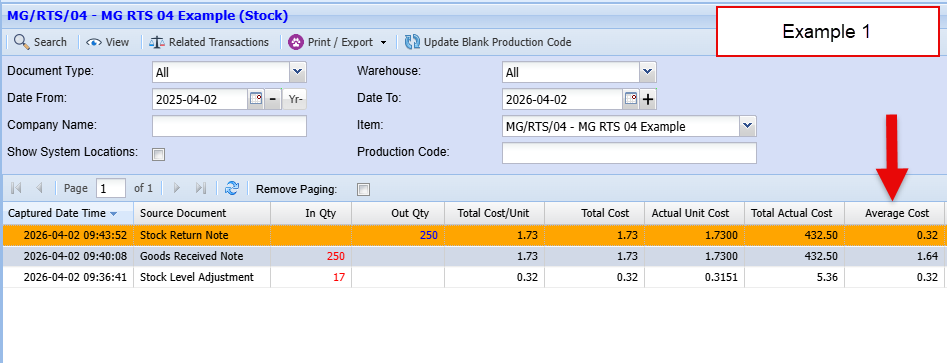
Returning stock back with same cost price
- 17 units
- Unit cost = $0.3151

- 250 units @ $1.73
-
Value =


- 250 units
- Cost per unit for the return = $1.73


- 17 units
- Average cost = $0.3151
- The 250‑unit receipt increased the average.
- The 250‑unit return reversed that exact receipt.
- Under weighted average costing, returns must undo the receipt at the original receipt cost, not the new average.
Returning stock at a different cost price
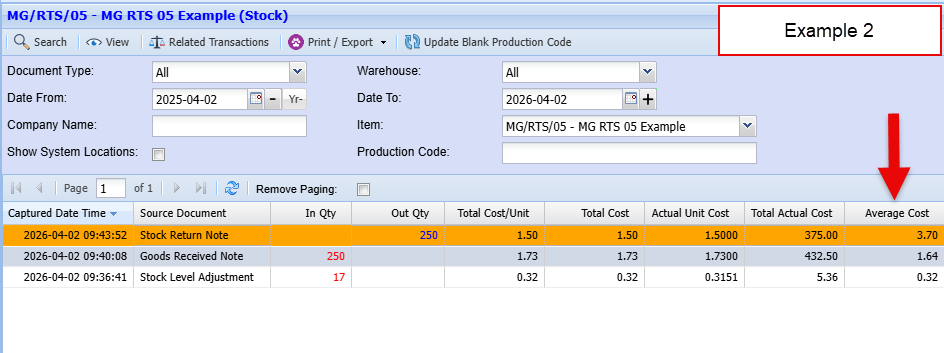
- Return at the original receipt cost (e.g., $1.73)
- Return at a user‑entered cost (your scenario: $1.50)
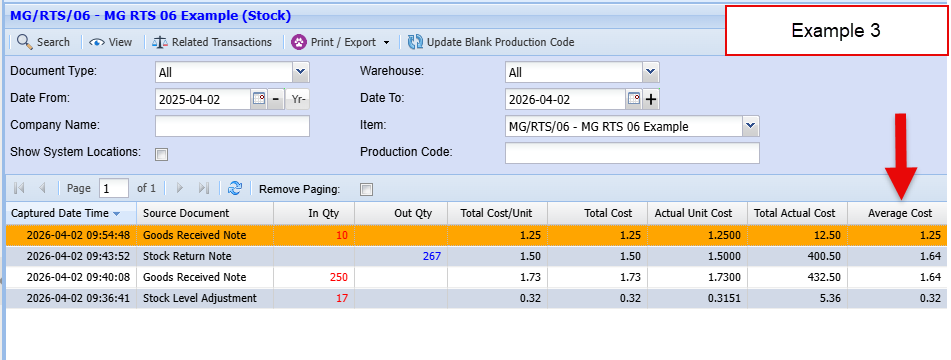
- Inventory before return:
- Units: 267
- Total value: $437.8567
- Average cost: $1.64061


- The purchase increased inventory value by $432.50.
- The return only removed $375.00.
- So inventory value increased by:

|
Event
|
Units
|
Total Value
|
Average Cost
|
|---|---|---|---|
|
Starting
|
17
|
5.3567
|
0.3151
|
|
After purchase
|
267
|
437.8567
|
1.6406
|
|
After return @ $1.50
|
17
|
62.8567
|
3.6975
|
Examples of processing stock with RTS
Example 1
GRV stock quantity and cost, then returning RTS stock quantity and cost the same
Example 2
GRV stock quantity and cost, then returning RTS stock quantity same but different cost price
Example 3
GRV stock quantity and cost, then returning RTS stock quantity (All stock on hand) and different cost price