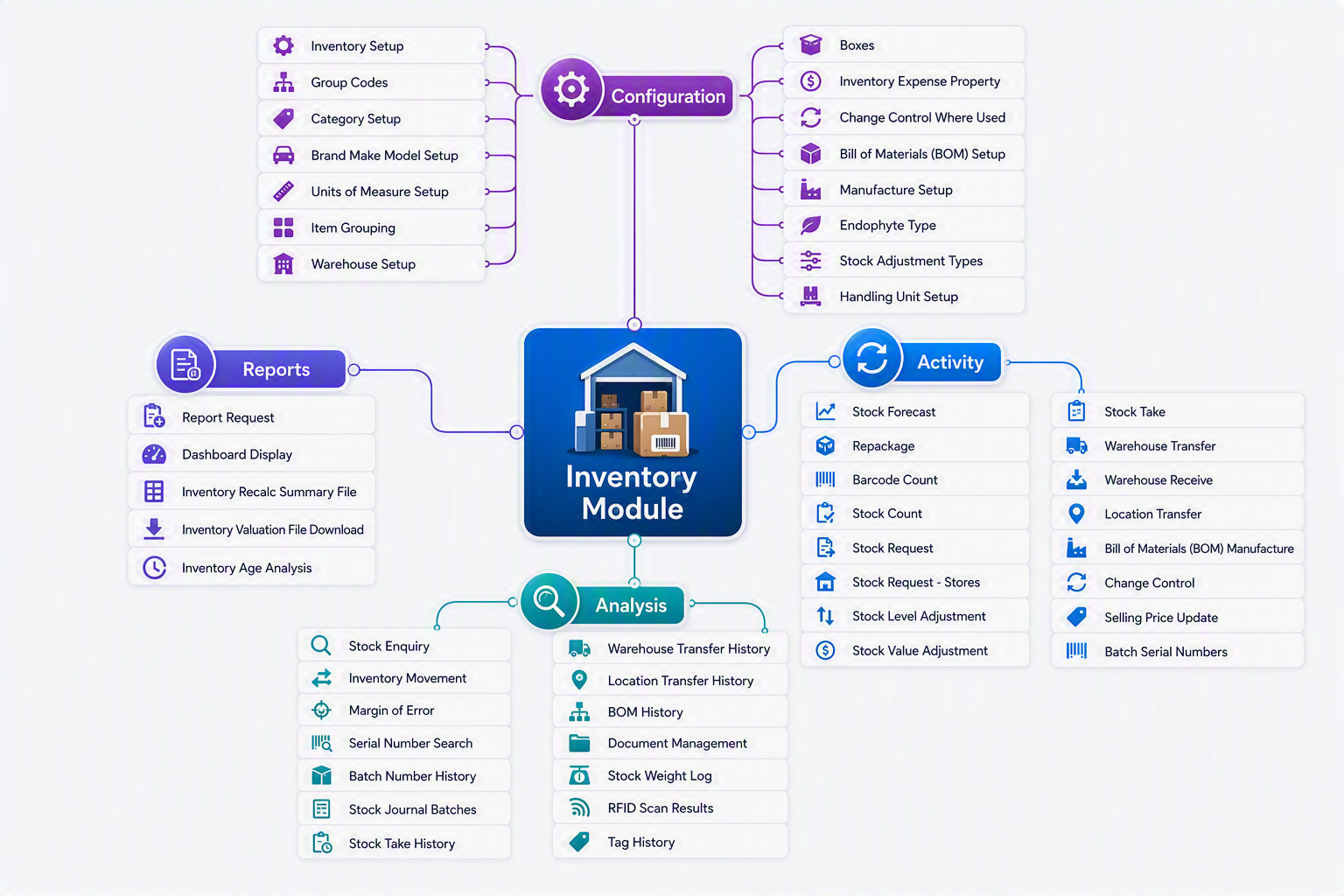
Inventory Module map

The Inventory Module is the central hub for managing stock, warehouses, inventory movements, and product control. It provides organisations with complete visibility of inventory levels across multiple locations while supporting purchasing, manufacturing, stock adjustments, transfers, barcode scanning, RFID tracking, serial number management, and batch-controlled inventory. The module is designed to help businesses maintain accurate stock records, optimise inventory holdings, improve warehouse efficiency, and ensure inventory costs are accurately reflected throughout the organisation.

The Inventory Module is divided into four key areas:

  • Configuration – Setup and maintain inventory structures, warehouses, categories, units of measure, handling units, and manufacturing settings.
  • Activity – Perform day-to-day inventory transactions such as stock receipts, transfers, stock takes, adjustments, forecasting, and manufacturing.
  • Analysis – Monitor inventory performance through enquiries, movement history, batch tracking, RFID results, and stock analysis tools.
  • Reports – Generate inventory reports, dashboards, valuation extracts, and ageing analysis to support operational and management decision-making.

Using these tools together allows businesses to maintain accurate inventory records, improve stock control, support manufacturing processes, and provide real-time visibility of inventory across the organisation.
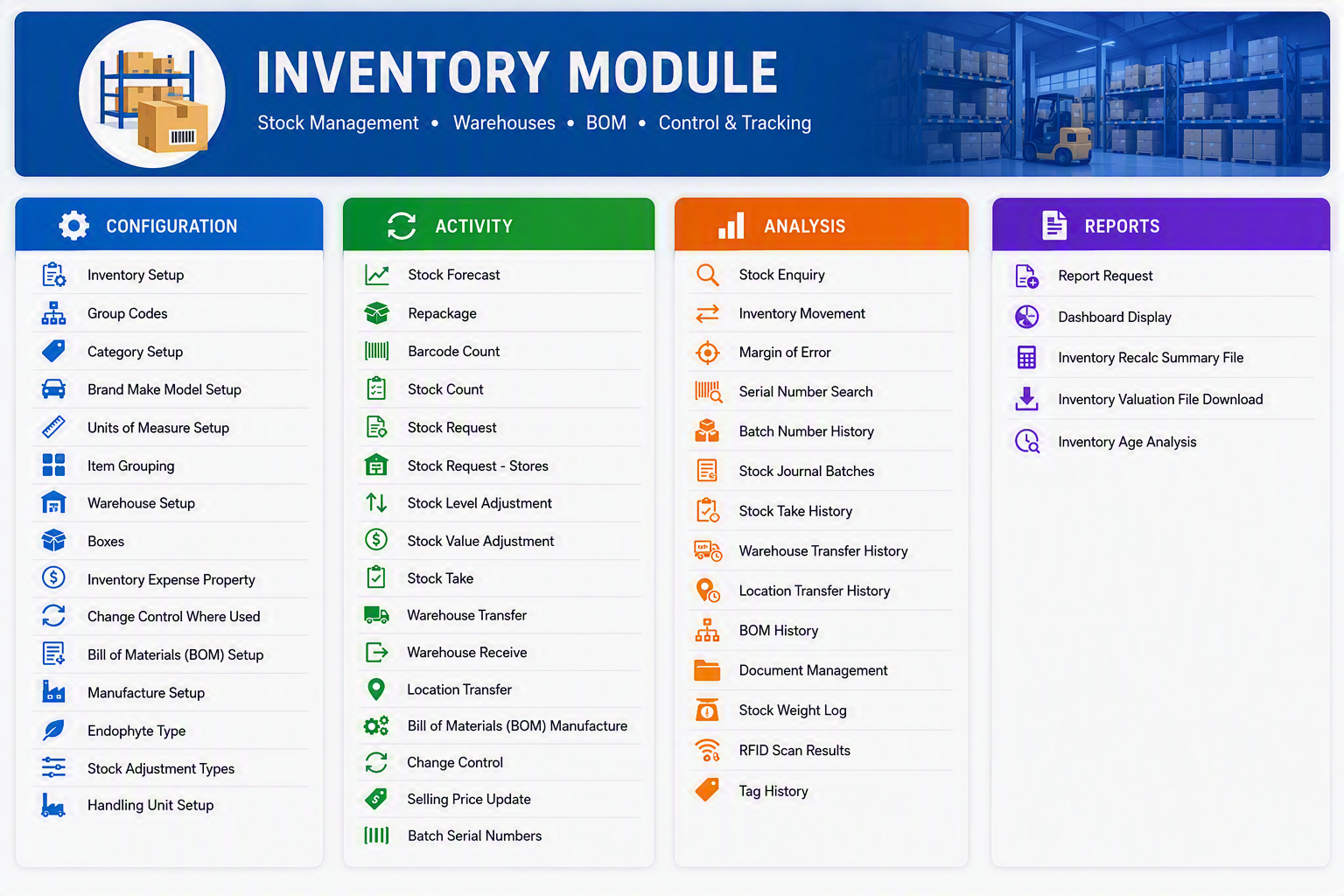
Inventory Module.png

Inventory Module

The Inventory Module manages stock items, warehouses, inventory movements, valuation, manufacturing, barcode/RFID tracking, and stock analysis. The following tables provide a high-level explanation of each menu item available within the module.


Configuration
Menu Item Description
Inventory Setup Configure global inventory settings and operational parameters.
Group Codes Create and maintain inventory grouping structures.
Category Setup Define inventory categories for classification and reporting.
Brand Make Model Setup Maintain product brands, makes, and models.
Units of Measure Setup Define units of measure used for purchasing, stocking, and selling items.
Item Grouping Create logical item groupings for reporting and analysis.
Warehouse Setup Define warehouses and storage locations.
Boxes Configure packaging units and box definitions.
Inventory Expense Property Define expense account mappings for inventory transactions.
Change Control Where Used Identify where specific inventory configurations are being used.
Bill of Materials (BOM) Setup Configure components and structures for manufactured products.
Manufacture Setup Define manufacturing settings and production parameters.
Endophyte Type Maintain endophyte classifications for applicable inventory items.
Stock Adjustment Types Define adjustment reasons and transaction types.
Handling Unit Setup Configure pallets, containers, and handling units for warehouse operations.

Activity
Menu Item Description
Stock Forecast Review expected stock requirements and future inventory demand.
Repackage Convert stock into alternative packaging or unit quantities.
Barcode Count Perform stock counts using barcode scanning devices.
Stock Count Conduct physical inventory counts.
Stock Request Create stock requests between departments or locations.
Stock Request - Stores Manage stock requisitions from stores or internal users.
Stock Level Adjustment Increase or decrease stock quantities with audit tracking.
Stock Value Adjustment Adjust inventory valuation without changing quantities.
Stock Take Execute a full stock take process and reconcile variances.
Warehouse Transfer Transfer inventory between warehouses.
Warehouse Receive Receive stock into a warehouse from transfers.
Location Transfer Move inventory between locations within a warehouse.
Bill of Materials (BOM) Manufacture Manufacture finished goods using predefined BOM structures.
Change Control Manage controlled changes affecting inventory records.
Selling Price Update Update selling prices for inventory items.
Batch Serial Numbers Maintain and process batch-controlled and serialised inventory.

Analysis
Menu Item Description
Stock Enquiry View detailed inventory balances and availability information.
Inventory Movement Analyse stock movements over a selected period.
Margin of Error Review inventory variances on supplier invoice costs.
Serial Number Search Locate inventory items using serial numbers.
Batch Number History View transaction history for batch-controlled inventory.
Stock Journal Batches Review stock journal entries and adjustment batches.
Stock Take History View historical stock take results and adjustments.
Warehouse Transfer History Review stock movements between warehouses.
Location Transfer History Monitor transfers between warehouse locations.
BOM History Review historical manufacturing and BOM transactions.
Document Management Access documents attached to inventory transactions and items.
Stock Weight Log Analyse inventory weight records and tracking information.
RFID Scan Results View results captured from RFID scanning activities.
Tag History Review the history of inventory tags and tracking records.

Reports
Menu Item Description
Report Request Generate inventory reports using predefined criteria.
Dashboard Display View inventory KPIs, alerts, and graphical summaries.
Inventory Recalc Summary File Review inventory recalculation results and processing summaries.
Inventory Valuation File Download Export inventory valuation information for analysis or audit purposes.
Inventory Age Analysis Analyse inventory age and identify slow-moving or obsolete stock.


Inventory Module Workflow

Menu Group Purpose
Configuration Setup inventory rules, warehouses, categories, units of measure, manufacturing settings, and stock structures.
Activity Perform day-to-day inventory operations including receiving, transfers, stock counts, adjustments, and manufacturing.
Analysis Monitor stock performance, movement, history, serial numbers, batches, RFID activity, and inventory trends.
Reports Produce operational and management reports, dashboards, valuation reports, and stock ageing analysis.

Inventory Module map.png


Revision #4
Created 1 August 2023 21:06:02 by Paige
Updated 8 August 2026 19:16:36 by Malcolm