CRM Module map

The CRM (Customer Relationship Management) Module provides a centralised platform for managing customer interactions, sales opportunities, support requests, communication activities, and time-based services. It enables organisations to maintain stronger customer relationships by capturing and tracking all customer-related activities in a single system.

The module includes tools for managing sales leads, customer support tickets, reminders, bookings, contracts, document storage, email and SMS communications, and time logging. Integrated checklist management and workflow tracking help ensure that customer enquiries, support issues, and sales opportunities are handled consistently and efficiently.

The CRM Module is divided into five key areas:

  • Configuration – Defines CRM settings, interaction types, support configurations, checklists, contracts, email templates, and sales lead parameters.
  • Activity – Provides day-to-day operational functions including sales lead management, support ticket processing, reminders, bookings, customer communications, and expense recording.
  • Time Logging – Records and manages time spent on customer support, service activities, and billable work, with the ability to convert approved time into invoices.
  • Analysis – Offers search and document management facilities for reviewing customer information, reminders, and historical CRM records.
  • Reports – Delivers reporting and dashboard tools that provide visibility into customer activity, support performance, sales pipeline status, and operational workload.

By combining customer relationship management, service management, communication tracking, and time recording into a single integrated solution, the CRM Module helps organisations improve customer service, increase sales effectiveness, and maintain complete visibility of all customer-related activities.
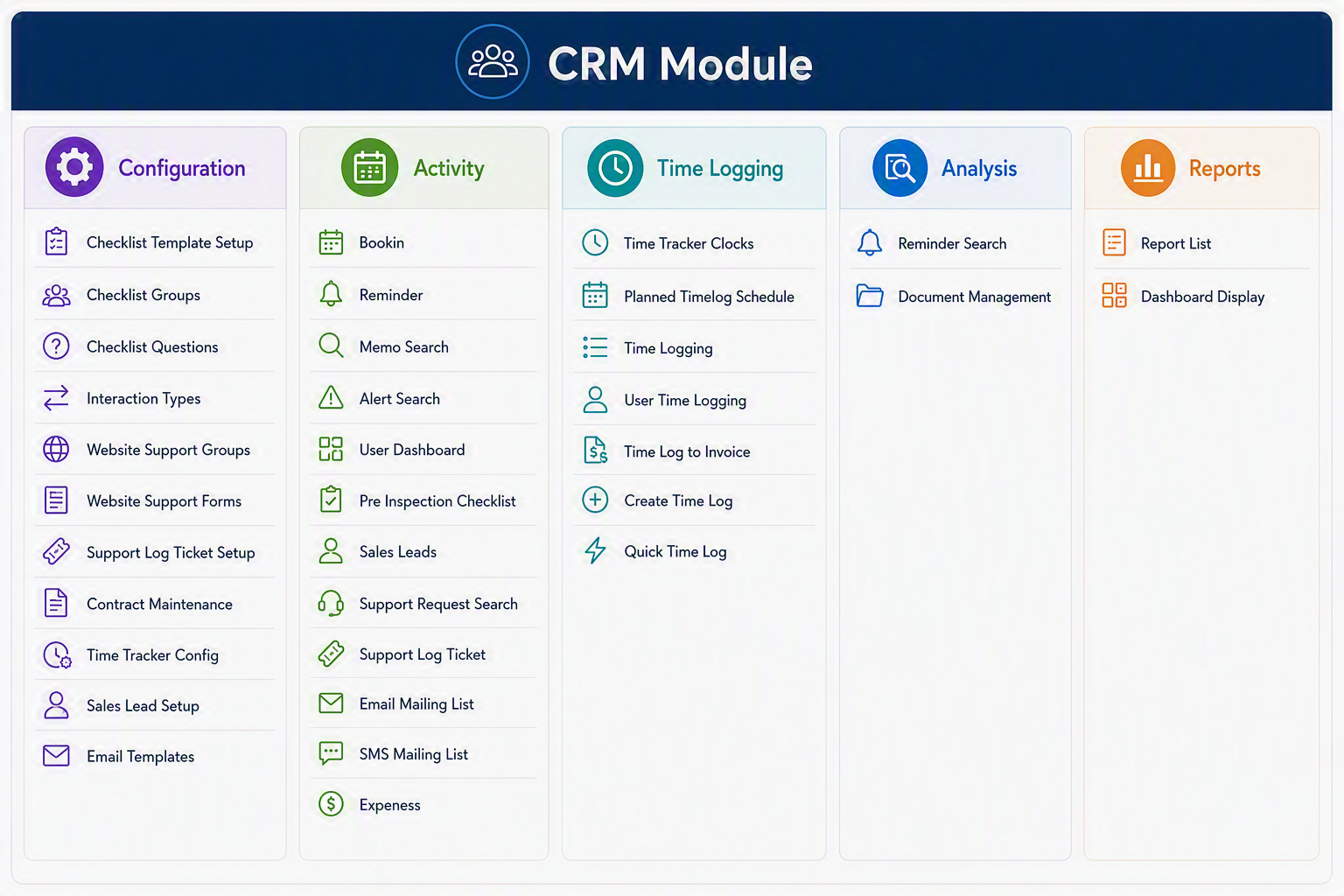
CRM Module.png


CRM Module Menu Groups and Menu Items

Configuration
Menu Item Explanation
Checklist Template Setup Used to create and maintain checklist templates that can be reused for inspections, support processes, customer follow-ups, or internal procedures.
Checklist Groups Allows checklist items to be grouped into logical sections, making checklists easier to manage and complete.
Checklist Questions Used to create and maintain the individual questions or checklist lines that appear within checklist templates.
Interaction Types Defines the different types of customer or user interactions that can be recorded, such as calls, emails, meetings, support contacts, or follow-ups.
Website Support Groups Used to configure support groups that manage or respond to support requests submitted through the website or online support forms.
Website Support Forms Allows setup and maintenance of online support forms used to capture customer support requests or enquiries.
Support Log Ticket Setup Used to configure the settings, categories, defaults, or rules required for support log tickets.
Contract Maintenance Allows customer contracts, service agreements, or support arrangements to be maintained and referenced within the CRM process.
Time Tracker Config Used to configure the time tracking settings used for recording time against customers, support tickets, jobs, or CRM activities.
Sales Lead Setup Allows setup of sales lead categories, sources, statuses, or other settings required for managing sales opportunities.
Email Templates Used to create and maintain standard email templates for reminders, support replies, customer communication, sales follow-ups, or bulk mailing.

Activity
Menu Item Explanation
Bookin Used to create or manage bookings for Asset Tracking where equipment is taken off site from a client or booked in for repair.
Reminder Allows users to create and manage reminders for follow-ups, tasks, customer actions, or important CRM activities.
Memo Search Used to search for memos, notes, or recorded comments linked to customers, users, tickets, or CRM records.
Alert Search Allows users to search for system alerts, CRM notifications, or flagged items that require attention.
User Dashboard Provides a dashboard view of user-specific CRM activities, reminders, tasks, tickets, or key items requiring action.
Pre Inspection Checklist Used to complete or review checklists before inspections, site visits, service work, or customer-related activities.
Sales Leads Allows users to capture, manage, update, and follow up on potential sales opportunities or customer enquiries.
Support Request Search Used to search for support requests raised by customers, users, or website forms.
Support Log Ticket Allows users to create, update, and manage support tickets, including issue details, status, responsibility, and resolution notes.
Email Mailing List Used to manage or select email mailing lists for customer communication, campaigns, notices, or bulk email messages.
SMS Mailing List Used to manage or select SMS mailing lists for sending customer text notifications, alerts, or marketing messages.
Expenses Allows expenses linked to CRM activities, customers, support work, or sales-related tasks to be recorded and reviewed.

Time Logging
Menu Item Explanation
Time Tracker Clocks Used to view or manage clocking records captured through the time tracker, including start and finish times.
Planned Timelog Schedule Allows users to view or maintain planned time log schedules for future work, appointments, support tasks, or customer activities.
Time Logging Used to record time spent on CRM activities, support tickets, customer work, or internal tasks.
User Time Logging Allows time logs to be reviewed or entered for a specific user, supporting tracking of individual work activity.
Time Log to Invoice Used to convert approved or billable time logs into invoice lines for customer billing.
Create Time Log Allows users to manually create a new time log entry for work completed.
Quick Time Log Provides a faster way to capture time with minimal entry, suitable for simple or repetitive time recording.

Analysis
Menu Item Explanation
Reminder Search Used to search and review reminders by customer, user, date, status, or activity type.
Document Management Allows documents linked to CRM records, customers, support tickets, leads, or contracts to be stored, viewed, and managed.

Reports
Menu Item Explanation
Report List Provides access to available CRM reports, allowing users to review CRM activity, sales leads, support requests, time logs, and related information.
Dashboard Display Displays CRM information in a dashboard format, giving users a visual overview of key activity, outstanding items, and performance indicators.

CRM Module

The CRM Module is used to manage customer relationships, support requests, sales leads, reminders, communication lists, contracts, time logging, and related CRM activities. The module is divided into five main Menu Groups: Configuration, Activity, Time Logging, Analysis, and Reports. Configuration is used to set up the CRM structure and defaults, Activity manages day-to-day customer and support tasks, Time Logging records and processes time spent on activities, Analysis provides search and document management tools, and Reports gives users access to CRM reporting and dashboard views.
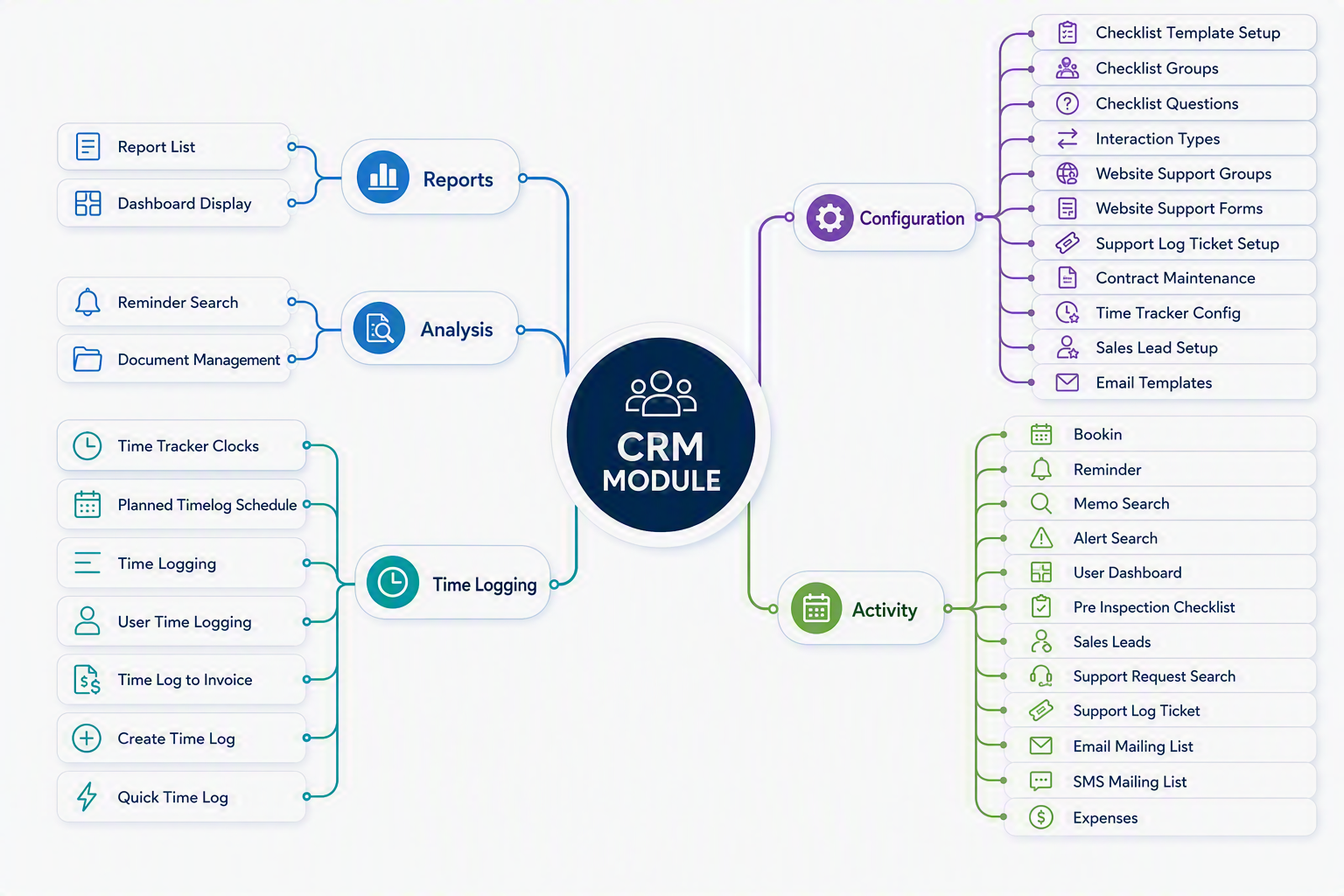
CRM map.png


Revision #2
Created 8 August 2026 01:54:32 by Malcolm
Updated 8 August 2026 18:50:12 by Malcolm