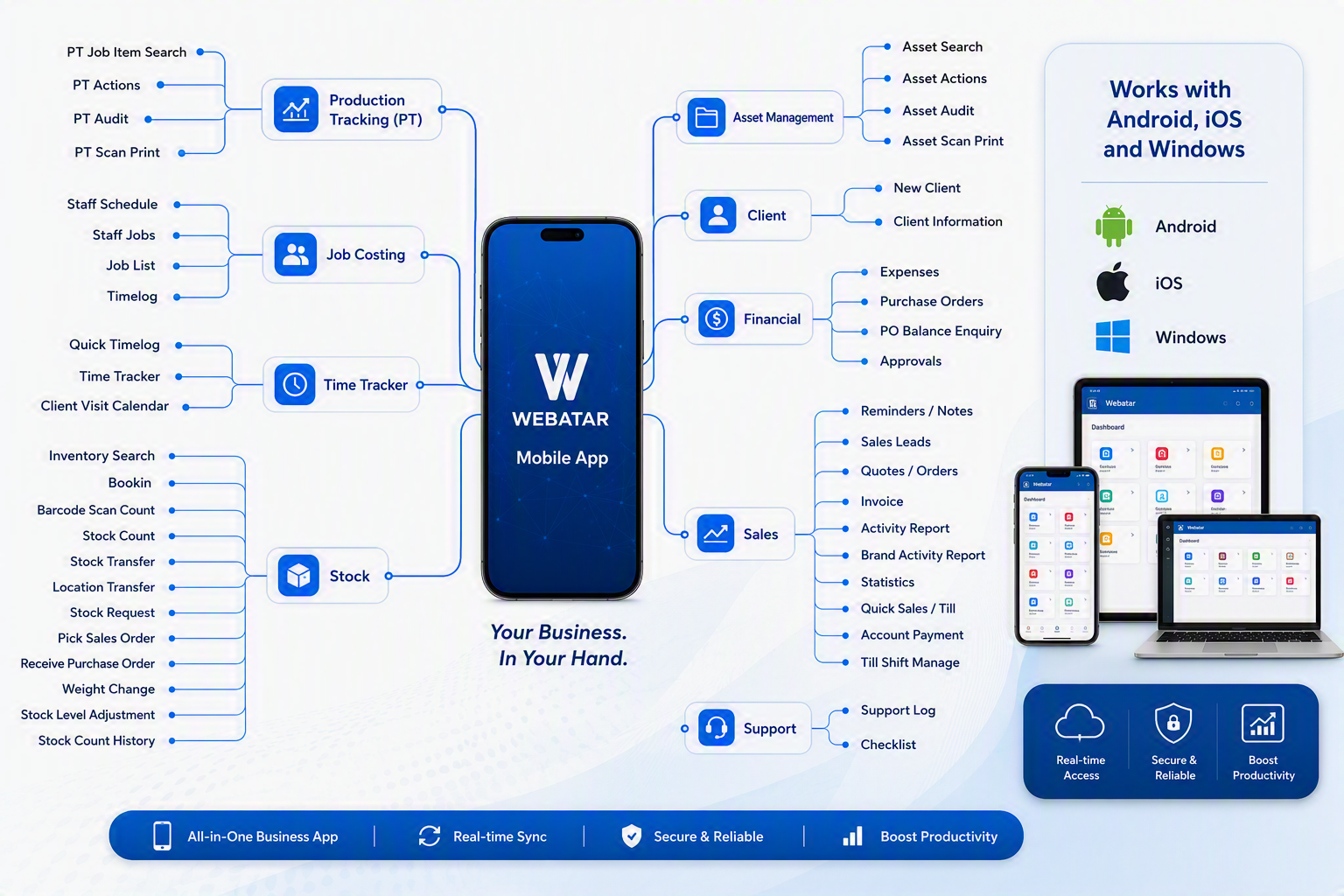
# Module Maps defined

# System Configuration map

Welcome to the **System Configuration Module**, the central administration area. This module is designed to control and maintain the core settings that drive the operation of the entire ERP system. It provides administrators and authorised users with the tools required to configure company information, maintain security settings, manage users, define financial periods, set default system behaviour, and establish critical links between operational modules and the General Ledger.

The System Configuration Module serves as the foundation of the ERP system, ensuring that all modules operate consistently and efficiently. Changes made within this module can affect system-wide functionality, making it one of the most important areas of the application. Proper setup and maintenance help ensure data accuracy, streamline business processes, improve security, and support organisational compliance requirements.

Within this module, users can manage company profiles, user accounts, security permissions, approval workflows, tax settings, pricing structures, email schedules, imports, integrations, and reporting access. The module is organised into five main menu groups:

<div id="bkmrk-administration-%E2%80%93-con">- **Administration** – Controls system-wide configuration settings and company setup.
- **General** – Maintains users, pricing, tax structures, projects, and recurring information.
- **General Ledger Links** – Defines how transactions from other modules are posted to the General Ledger.
- **Security** – Manages permissions, approvals, favourites, dashboard settings, and access controls.
- **Reports** – Provides access to configuration reports, security reports, dashboards, and document management functions.

</div>Because many settings in this module affect the entire ERP environment, it is recommended that only authorised personnel make changes. Before updating configuration settings, users should ensure they understand the impact these changes may have on business processes and other system users.

By maintaining accurate configuration settings, organisations can maximise the efficiency, security, and reliability of their ERP environment.

[![System Config Module.png](https://hugeerp10.co.za/hsofmanual/uploads/images/gallery/2026-08/scaled-1680-/system-config-module.png)](https://hugeerp10.co.za/hsofmanual/uploads/images/gallery/2026-08/system-config-module.png)
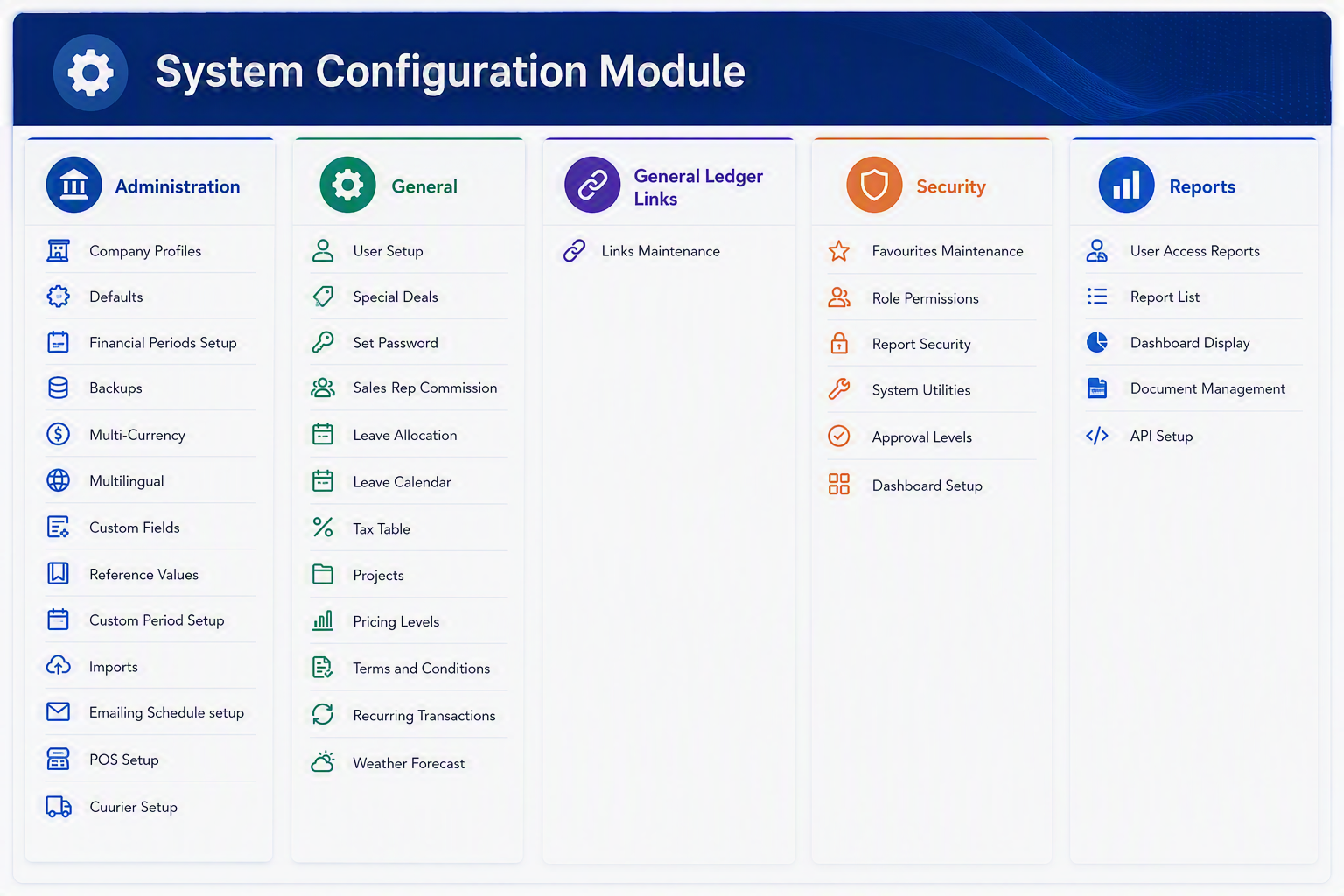
#### System Configuration Module Menu Items

##### Administration

<div id="bkmrk-menu-item-explanatio"><table style="width: 100%;"><thead><tr><th style="width: 19.069%;">Menu Item</th><th style="width: 80.931%;">Explanation</th></tr></thead><tbody><tr><td style="width: 19.069%;">**Company Profiles**</td><td style="width: 80.931%;">Used to maintain core company information such as company details, trading information, contact details, and setup values used throughout the system.</td></tr><tr><td style="width: 19.069%;">**Defaults**</td><td style="width: 80.931%;">Allows default system settings to be defined so that common values are automatically applied when transactions or records are created.</td></tr><tr><td style="width: 19.069%;">**Financial Periods Setup**</td><td style="width: 80.931%;">Used to create, manage, and control the financial periods used for accounting, reporting, and transaction processing.</td></tr><tr><td style="width: 19.069%;">**Backups**</td><td style="width: 80.931%;">Provides access to backup-related settings or processes to help protect system and company data.</td></tr><tr><td style="width: 19.069%;">**Multi-Currency**</td><td style="width: 80.931%;">Used to configure and manage currency settings where transactions may be processed in more than one currency.</td></tr><tr><td style="width: 19.069%;">**Multilingual**</td><td style="width: 80.931%;">Allows language-related settings to be maintained where the system supports users working in different languages.</td></tr><tr><td style="width: 19.069%;">**Custom Fields**</td><td style="width: 80.931%;">Used to define additional fields that can be added to records where extra company-specific information needs to be captured.</td></tr><tr><td style="width: 19.069%;">**Reference Values**</td><td style="width: 80.931%;">Allows standard lookup values and predefined lists to be maintained for consistent data entry across the system.</td></tr><tr><td style="width: 19.069%;">**Custom Period Setup**</td><td style="width: 80.931%;">Used to configure additional or specialised period structures where standard financial periods are not sufficient.</td></tr><tr><td style="width: 19.069%;">**Imports**</td><td style="width: 80.931%;">Provides access to import setup or import routines used to bring external data into the ERP system.</td></tr><tr><td style="width: 19.069%;">**Emailing Schedule Setup**</td><td style="width: 80.931%;">Used to configure scheduled email settings for system-generated email processes or recurring email activities.</td></tr><tr><td style="width: 19.069%;">**POS Setup**</td><td style="width: 80.931%;">Allows Point of Sale related settings to be configured where POS functionality is used within the system.</td></tr><tr><td style="width: 19.069%;">**Courier Setup**</td><td style="width: 80.931%;">Used to maintain courier-related settings and options for delivery or dispatch processes.</td></tr></tbody></table>

---

</div>##### General

<div id="bkmrk-menu-item-explanatio-1"><table style="width: 100%;"><thead><tr><th style="width: 20.8553%;">Menu Item</th><th style="width: 79.1447%;">Explanation</th></tr></thead><tbody><tr><td style="width: 20.8553%;">**User Setup**</td><td style="width: 79.1447%;">Used to create and maintain user accounts, including user details and general access setup.</td></tr><tr><td style="width: 20.8553%;">**Special Deals**</td><td style="width: 79.1447%;">Allows special pricing, promotions, or deal-related settings to be configured where applicable.</td></tr><tr><td style="width: 20.8553%;">**Set Password**</td><td style="width: 79.1447%;">Used to set or update user passwords, depending on the security permissions available to the user.</td></tr><tr><td style="width: 20.8553%;">**Sales Rep Commission**</td><td style="width: 79.1447%;">Allows commission rules or commission-related settings for sales representatives to be maintained.</td></tr><tr><td style="width: 20.8553%;">**Leave Allocation**</td><td style="width: 79.1447%;">Used to manage leave allocation settings where employee leave balances or allowances are maintained in the system.</td></tr><tr><td style="width: 20.8553%;">**Leave Calendar**</td><td style="width: 79.1447%;">Provides a calendar view or setup area for leave-related information and scheduling.</td></tr><tr><td style="width: 20.8553%;">**Tax Table**</td><td style="width: 79.1447%;">Used to maintain tax codes, tax rates, or tax-related setup values used when processing transactions.</td></tr><tr><td style="width: 20.8553%;">**Projects**</td><td style="width: 79.1447%;">Allows project records or project-related settings to be created and maintained for reporting or transactional use.</td></tr><tr><td style="width: 20.8553%;">**Pricing Levels**</td><td style="width: 79.1447%;">Used to configure different pricing levels that may be applied to customers, products, or sales transactions.</td></tr><tr><td style="width: 20.8553%;">**Terms and Conditions**</td><td style="width: 79.1447%;">Allows standard terms and conditions to be maintained for use on documents, transactions, or system outputs.</td></tr><tr><td style="width: 20.8553%;">**Recurring Transactions**</td><td style="width: 79.1447%;">Used to configure transactions that need to be repeated on a regular basis.</td></tr><tr><td style="width: 20.8553%;">**Weather Forecast**</td><td style="width: 79.1447%;">Provides access to weather forecast information where this is linked to operational or planning activities.</td></tr></tbody></table>

---

</div>##### General Ledger Links

<div id="bkmrk-menu-item-explanatio-2"><table style="width: 100%;"><thead><tr><th style="width: 19.0716%;">Menu Item</th><th style="width: 80.9284%;">Explanation</th></tr></thead><tbody><tr><td style="width: 19.0716%;">**Links Maintenance**</td><td style="width: 80.9284%;">Used to maintain links between system activities and the General Ledger, ensuring that transactions post to the correct ledger accounts.</td></tr></tbody></table>

---

</div>##### Security

<div id="bkmrk-menu-item-explanatio-3"><table><thead><tr><th>Menu Item</th><th>Explanation</th></tr></thead><tbody><tr><td>**Favourites Maintenance**</td><td>Allows frequently used menu items or shortcuts to be maintained for easier user access.</td></tr><tr><td>**Role Permissions**</td><td>Used to define what each user role is allowed to access or perform within the system.</td></tr><tr><td>**Report Security**</td><td>Controls access to reports, helping ensure users can only view reports they are authorised to access.</td></tr><tr><td>**System Utilities**</td><td>Provides access to utility functions used for system maintenance, support, or administrative tasks.</td></tr><tr><td>**Approval Levels**</td><td>Used to define approval limits or approval stages for workflows that require authorisation.</td></tr><tr><td>**Dashboard Setup**</td><td>Allows dashboard views, layouts, or dashboard-related settings to be configured for users or roles.</td></tr></tbody></table>

---

</div>##### Reports

<div id="bkmrk-menu-item-explanatio-4"><table><thead><tr><th>Menu Item</th><th>Explanation</th></tr></thead><tbody><tr><td>**User Access Reports**</td><td>Provides reports showing user access, permissions, or security-related information.</td></tr><tr><td>**Report List**</td><td>Displays the available reports within the system or within the selected module.</td></tr><tr><td>**Dashboard Display**</td><td>Used to view or manage dashboard-style reporting and summary information.</td></tr><tr><td>**Document Management**</td><td>Provides access to document storage, document references, or document-related reporting functions.</td></tr><tr><td>**API Setup**</td><td>Used to configure API-related settings where ERP connects to external systems or services.</td></tr></tbody></table>

</div><div id="bkmrk--1">---

</div>##### System Configuration Module

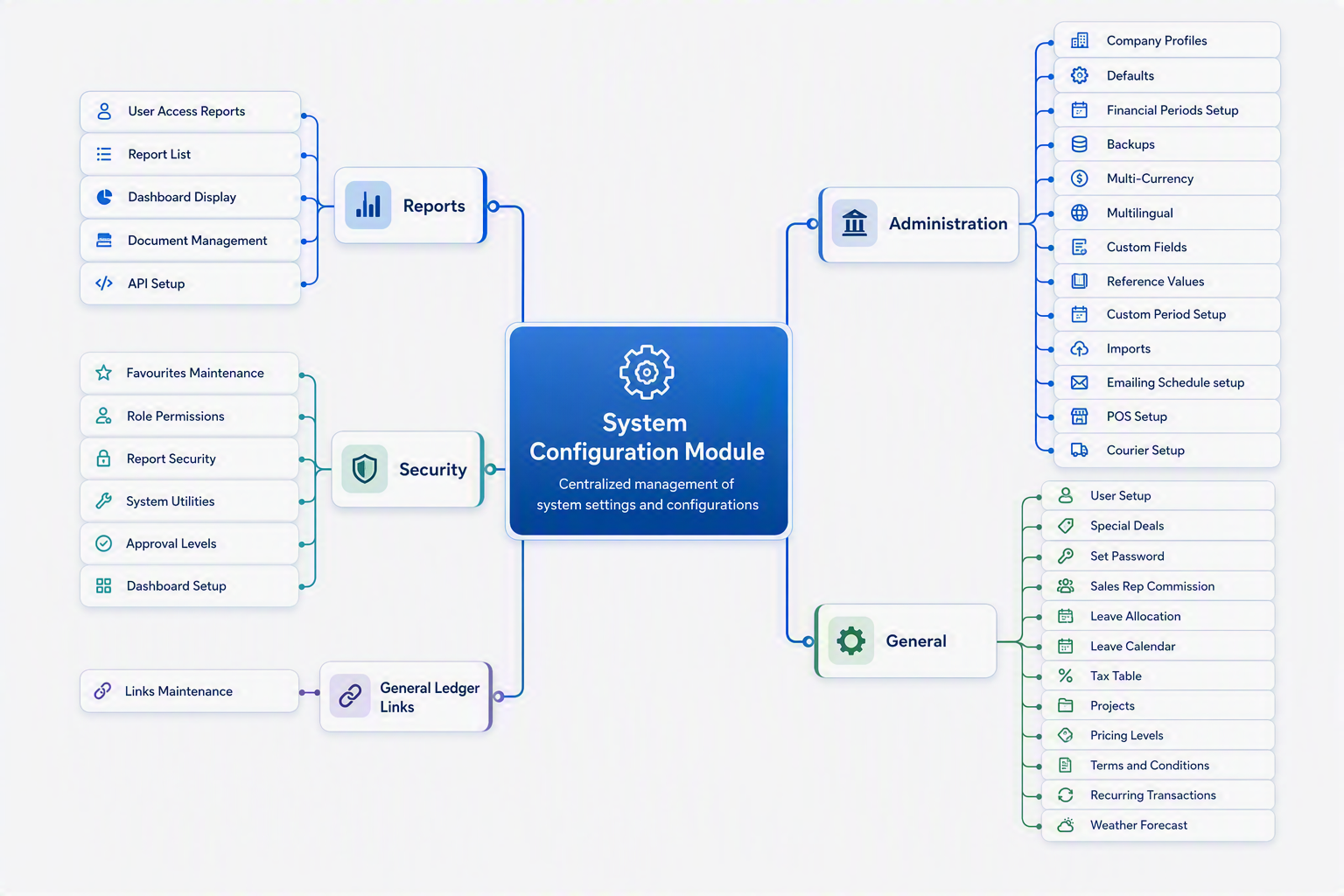
The **System Configuration Module** is used to manage the central setup areas of the ERP system. This module controls key system settings such as company profiles, user setup, security permissions, financial periods, tax tables, pricing levels, email scheduling, imports, POS setup, and reporting access. It is normally used by administrators or authorised users to configure how the system operates, control access, and maintain the core information required by other modules.

[![System Config Module map.png](https://hugeerp10.co.za/hsofmanual/uploads/images/gallery/2026-08/scaled-1680-/system-config-module-map.png)](https://hugeerp10.co.za/hsofmanual/uploads/images/gallery/2026-08/system-config-module-map.png)
# General Ledger Module map

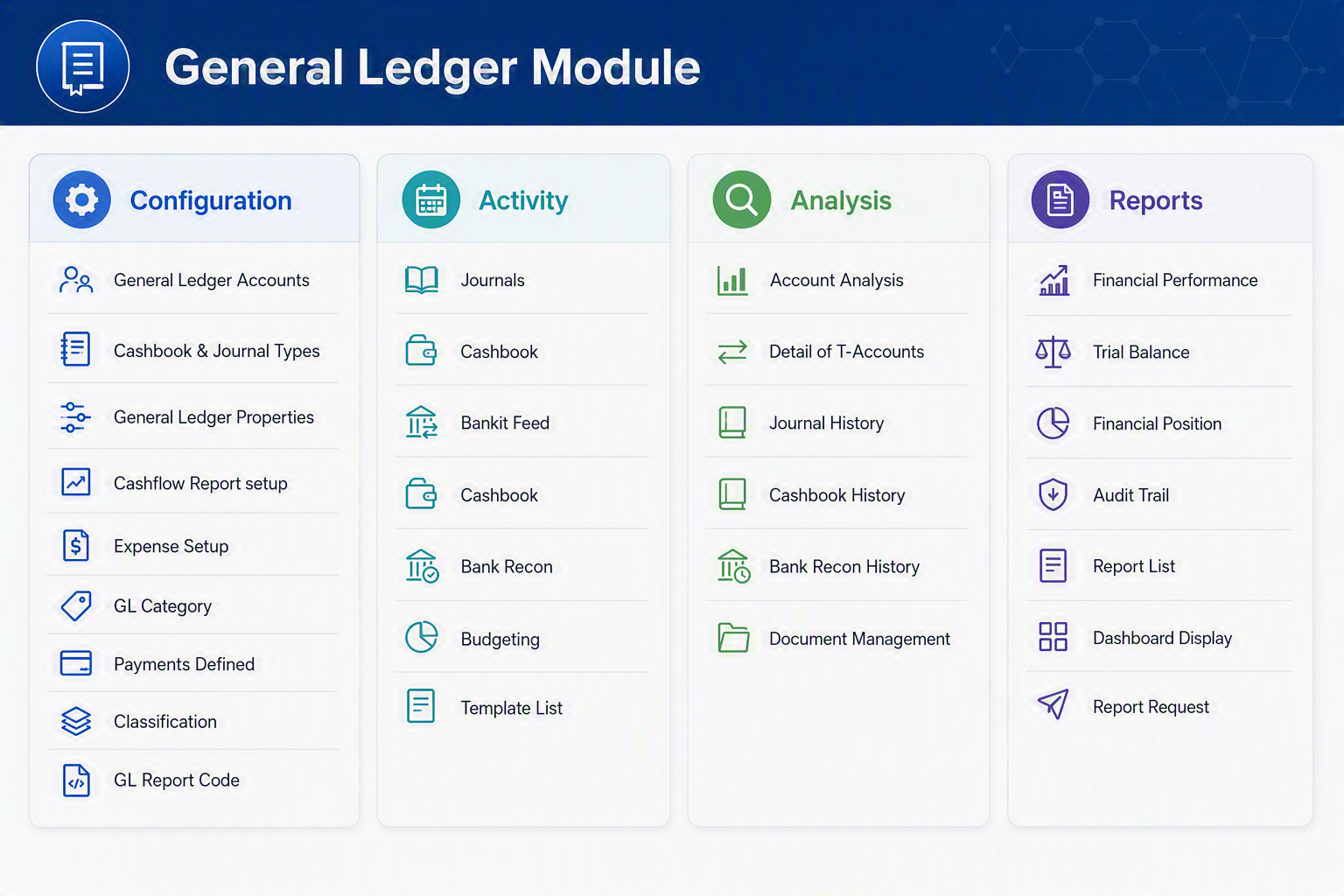
The General Ledger Module is the central financial management. It allows users to configure accounting settings, process financial transactions, analyse financial information, and produce management and statutory reports.

[![General Ledger Module.png](https://hugeerp10.co.za/hsofmanual/uploads/images/gallery/2026-08/scaled-1680-/general-ledger-module.png)](https://hugeerp10.co.za/hsofmanual/uploads/images/gallery/2026-08/general-ledger-module.png)
<div id="bkmrk--1">---

</div>#### Configuration Menu Group

<div id="bkmrk-menu-item-descriptio"><table style="width: 100%;"><thead><tr><th style="width: 24.198%;">Menu Item</th><th style="width: 75.802%;">Description</th></tr></thead><tbody><tr><td style="width: 24.198%;">**General Ledger Accounts**</td><td style="width: 75.802%;">Create and maintain the Chart of Accounts used throughout the system. Define account types, account names, and reporting structures.</td></tr><tr><td style="width: 24.198%;">**Cashbook &amp; Journal Types**</td><td style="width: 75.802%;">Configure the different cashbook and journal transaction types available for processing financial entries.</td></tr><tr><td style="width: 24.198%;">**General Ledger Properties**</td><td style="width: 75.802%;">Define system-wide General Ledger settings, financial periods, account defaults, and operational preferences.</td></tr><tr><td style="width: 24.198%;">**Cashflow Report Setup**</td><td style="width: 75.802%;">Configure categories and groupings used for cashflow reporting and forecasting.</td></tr><tr><td style="width: 24.198%;">**Expense Setup**</td><td style="width: 75.802%;">Maintain expense categories and default account mappings used throughout the ERP system.</td></tr><tr><td style="width: 24.198%;">**GL Category**</td><td style="width: 75.802%;">Create and manage General Ledger account categories to assist with reporting and financial analysis.</td></tr><tr><td style="width: 24.198%;">**Payments Defined**</td><td style="width: 75.802%;">Define payment methods, payment classifications, and related accounting treatments.</td></tr><tr><td style="width: 24.198%;">**Classification**</td><td style="width: 75.802%;">Create financial classifications used to group accounts and transactions for reporting purposes.</td></tr><tr><td style="width: 24.198%;">**GL Report Code**</td><td style="width: 75.802%;">Define report codes that determine where accounts appear within financial statements and management reports.</td></tr></tbody></table>

---

</div>#### Activity Menu Group

<div id="bkmrk-menu-item-descriptio-1"><table><thead><tr><th>Menu Item</th><th>Description</th></tr></thead><tbody><tr><td>**Journals**</td><td>Enter and process general ledger journal transactions including adjustments, accruals, and corrections.</td></tr><tr><td>**Cashbook**</td><td>Process cash receipts and payments and update bank account balances.</td></tr><tr><td>**Bank Feed**</td><td>Import and process electronic transactions received directly from banking institutions.</td></tr><tr><td>**Cashbook Allocation**</td><td>Allocate imported bank transactions to the correct General Ledger accounts and business transactions.</td></tr><tr><td>**Bank Reconciliation**</td><td>Reconcile cashbook transactions against bank statements to ensure accounting accuracy.</td></tr><tr><td>**Budgeting**</td><td>Create, maintain, and analyse budgets by period, department, or account.</td></tr><tr><td>**Template List**</td><td>Maintain recurring journal templates and commonly used transaction templates to simplify data entry.</td></tr></tbody></table>

---

</div>#### Analysis Menu Group

<div id="bkmrk-menu-item-descriptio-2"><table style="width: 100%;"><thead><tr><th style="width: 21.6967%;">Menu Item</th><th style="width: 78.3033%;">Description</th></tr></thead><tbody><tr><td style="width: 21.6967%;">**Account Analysis**</td><td style="width: 78.3033%;">Analyse account activity, balances, movements, and transaction history for selected General Ledger accounts.</td></tr><tr><td style="width: 21.6967%;">**Detail of T-Accounts**</td><td style="width: 78.3033%;">View transactions in a traditional T-Account format showing debits and credits for analysis purposes.</td></tr><tr><td style="width: 21.6967%;">**Journal History**</td><td style="width: 78.3033%;">Review previously posted journal transactions and audit financial adjustments made over time.</td></tr><tr><td style="width: 21.6967%;">**Cashbook History**</td><td style="width: 78.3033%;">Review historical cashbook transactions including receipts, payments, and adjustments.</td></tr><tr><td style="width: 21.6967%;">**Bank Reconciliation History**</td><td style="width: 78.3033%;">View completed bank reconciliations and historical reconciliation balances.</td></tr><tr><td style="width: 21.6967%;">**Document Management**</td><td style="width: 78.3033%;">Access supporting documents, attachments, and electronic records associated with General Ledger transactions.</td></tr></tbody></table>

---

</div>#### Reports Menu Group

<div id="bkmrk-menu-item-descriptio-3"><table><thead><tr><th>Menu Item</th><th>Description</th></tr></thead><tbody><tr><td>**Financial Performance**</td><td>Produces the Profit and Loss Statement showing income, expenses, and profitability for a selected period.</td></tr><tr><td>**Trial Balance**</td><td>Displays all General Ledger account balances and verifies that total debits equal total credits.</td></tr><tr><td>**Financial Position**</td><td>Produces the Balance Sheet showing assets, liabilities, and equity at a specific point in time.</td></tr><tr><td>**Audit Trail**</td><td>Provides a detailed history of transactions, postings, and system activities for auditing purposes.</td></tr><tr><td>**Report List**</td><td>Displays all available General Ledger reports available within the system.</td></tr><tr><td>**Dashboard Display**</td><td>Provides graphical dashboards and KPI summaries for financial performance monitoring.</td></tr><tr><td>**Report Request**</td><td>Allows users to schedule, generate, and distribute financial reports.</td></tr></tbody></table>

---

</div>#### General Ledger Workflow

<div id="bkmrk-step-purpose-configu"><table><thead><tr><th>Step</th><th>Purpose</th></tr></thead><tbody><tr><td>**Configuration**</td><td>Setup accounts, categories, report structures, and financial settings.</td></tr><tr><td>**Activity**</td><td>Process journals, cashbook entries, bank transactions, and budgets.</td></tr><tr><td>**Analysis**</td><td>Review financial activity and investigate balances or transactions.</td></tr><tr><td>**Reports**</td><td>Produce financial statements, management reports, and audit information.</td></tr></tbody></table>

</div>This structure follows the standard accounting process of **Configure → Process → Analyse → Report**, making the General Ledger the financial backbone of the ERP system.

[![General Ledger Module map.png](https://hugeerp10.co.za/hsofmanual/uploads/images/gallery/2026-08/scaled-1680-/general-ledger-module-map.png)](https://hugeerp10.co.za/hsofmanual/uploads/images/gallery/2026-08/general-ledger-module-map.png)

# Debtors Module map

The **Debtors Module** manages the complete customer receivables process, from quotation and sales order entry through to invoicing, payment allocation, collections, customer analysis, and financial reporting. It provides sales staff, accounts receivable teams, and management with the tools required to control customer accounts, monitor outstanding debt, and improve cash flow.

[![Debtors Module.png](https://hugeerp10.co.za/hsofmanual/uploads/images/gallery/2026-08/scaled-1680-/debtors-module.png)](https://hugeerp10.co.za/hsofmanual/uploads/images/gallery/2026-08/debtors-module.png)

#### Debtors Module - Menu Item Explanations

##### Configuration

<div id="bkmrk-menu-item-descriptio"><table style="width: 100%;"><thead><tr><th style="width: 28.3648%;">Menu Item</th><th style="width: 71.6352%;">Description</th></tr></thead><tbody><tr><td style="width: 28.3648%;">**Debtors Setup**</td><td style="width: 71.6352%;">Defines the core configuration settings for the Debtors module, including numbering sequences, default values, and operational controls.</td></tr><tr><td style="width: 28.3648%;">**Debtors Properties**</td><td style="width: 71.6352%;">Maintains company-specific debtor parameters such as Shipping defaults, regions, divisions, sales mapping, item mapping, and defaults.</td></tr><tr><td style="width: 28.3648%;">**Quote Template Setup**</td><td style="width: 71.6352%;">Creates and maintains standard quotation templates used when generating customer quotations.</td></tr><tr><td style="width: 28.3648%;">**Debtors Group Matrix Discount**</td><td style="width: 71.6352%;">Defines discount structures for customers based on debtor groups and item categories.</td></tr><tr><td style="width: 28.3648%;">**Sales Rep Item Group Template**</td><td style="width: 71.6352%;">Assigns commission structures, pricing rules, or defaults between sales representatives and product groups.</td></tr></tbody></table>

---

</div>##### Activity

<div id="bkmrk-menu-item-descriptio-1"><table style="width: 100%;"><thead><tr><th style="width: 26.5744%;">Menu Item</th><th style="width: 73.4256%;">Description</th></tr></thead><tbody><tr><td style="width: 26.5744%;">**Debtors Dashboard**</td><td style="width: 73.4256%;">Provides a real-time overview of customer balances, outstanding accounts, sales activity, and key debtor indicators.</td></tr><tr><td style="width: 26.5744%;">**Debtors Journal Transactions**</td><td style="width: 73.4256%;">Processes manual debtor journals to adjust customer balances, corrections, and transfers.</td></tr><tr><td style="width: 26.5744%;">**Debtors Cashbooks**</td><td style="width: 73.4256%;">Records cash receipts, banking transactions, and customer payments.</td></tr><tr><td style="width: 26.5744%;">**Quotation**</td><td style="width: 73.4256%;">Creates and manages customer quotations before converting them into sales orders.</td></tr><tr><td style="width: 26.5744%;">**Sales Order**</td><td style="width: 73.4256%;">Captures customer orders for goods or services.</td></tr><tr><td style="width: 26.5744%;">**Sales Order Confirm**</td><td style="width: 73.4256%;">Confirms approved sales orders and prepares them for fulfilment and invoicing.</td></tr><tr><td style="width: 26.5744%;">**Invoice**</td><td style="width: 73.4256%;">Generates customer invoices from sales orders, deliveries, or service transactions.</td></tr><tr><td style="width: 26.5744%;">**Dispatch Stock**</td><td style="width: 73.4256%;">Processes goods dispatches and updates inventory movements against customer orders.</td></tr><tr><td style="width: 26.5744%;">**Collect / Deliver**</td><td style="width: 73.4256%;">Manages collection and delivery tracking activities for customer orders.</td></tr><tr><td style="width: 26.5744%;">**Credit Notes**</td><td style="width: 73.4256%;">Creates customer credit notes for returned goods, pricing adjustments, or invoice corrections.</td></tr><tr><td style="width: 26.5744%;">**Allocations**</td><td style="width: 73.4256%;">Allocates receipts, credit notes, and journals against outstanding customer invoices.</td></tr><tr><td style="width: 26.5744%;">**Allocation Decimal Journal**</td><td style="width: 73.4256%;">Records rounding differences that can occur during allocation processes.</td></tr><tr><td style="width: 26.5744%;">**Interest Transaction**</td><td style="width: 73.4256%;">Calculates and posts interest charges on overdue customer accounts.</td></tr><tr><td style="width: 26.5744%;">**Collections**</td><td style="width: 73.4256%;">Assists with debtor collection activities and follow-up processes for overdue accounts.</td></tr><tr><td style="width: 26.5744%;">**Till Shift Manage**</td><td style="width: 73.4256%;">Opens, closes, reconciles, and manages point-of-sale till sessions and cash drawer activities.</td></tr></tbody></table>

---

</div>##### Analysis

<div id="bkmrk-menu-item-descriptio-2"><table style="width: 100%;"><thead><tr><th style="width: 25.1535%;">Menu Item</th><th style="width: 74.8465%;">Description</th></tr></thead><tbody><tr><td style="width: 25.1535%;">**Debtors Search**</td><td style="width: 74.8465%;">Searches customer transactions, balances, invoices, and account information.</td></tr><tr><td style="width: 25.1535%;">**Customer Price Enquiry**</td><td style="width: 74.8465%;">Views customer-specific pricing, discounts, and special pricing agreements.</td></tr><tr><td style="width: 25.1535%;">**Debtors Analysis**</td><td style="width: 74.8465%;">Analyses customer sales, profitability, outstanding balances, and account activity.</td></tr><tr><td style="width: 25.1535%;">**Debtors Document History**</td><td style="width: 74.8465%;">Provides access to historical debtor documents including quotes, invoices, credit notes, and sales orders.</td></tr><tr><td style="width: 25.1535%;">**Debtors Transaction History**</td><td style="width: 74.8465%;">Displays a detailed audit trail of all recorded debtor transactions.</td></tr><tr><td style="width: 25.1535%;">**Dispatch Stock History**</td><td style="width: 74.8465%;">Reviews completed dispatches and stock movements relating to customer orders via invoices.</td></tr><tr><td style="width: 25.1535%;">**Debtors Cashbook History**</td><td style="width: 74.8465%;">Displays previous customer receipts, banking records, and cashbook transactions.</td></tr><tr><td style="width: 25.1535%;">**Document Management**</td><td style="width: 74.8465%;">Stores and retrieves customer-related documents such as contracts, correspondence, and supporting files.</td></tr><tr><td style="width: 25.1535%;">**Manifest**</td><td style="width: 74.8465%;">Reviews transport manifests and shipment documentation associated with customer deliveries.</td></tr></tbody></table>

---

</div>##### Reports

<div id="bkmrk-menu-item-descriptio-3"><table><thead><tr><th>Menu Item</th><th>Description</th></tr></thead><tbody><tr><td>**Debtors Age Analysis**</td><td>Produces ageing reports showing balances outstanding by period (Current, 30, 60, 90+ days).</td></tr><tr><td>**Statements**</td><td>Generates customer account statements showing transactions and balances.</td></tr><tr><td>**Report List**</td><td>Displays all available debtor reports within the system.</td></tr><tr><td>**Dashboard Display**</td><td>Provides visual dashboards and key performance indicators related to debtor activity.</td></tr><tr><td>**Report Request**</td><td>Allows users to generate, schedule, and distribute debtor reports.</td></tr><tr><td>**Debtor Aging Letter**</td><td>Produces reminder and collection letters for customers with overdue balances.</td></tr></tbody></table>

</div><div id="bkmrk--2"></div>---

#### Debtors Workflow

<div id="bkmrk-step-purpose-configu"><table style="width: 100%;"><thead><tr><th style="width: 20.2511%;">Step</th><th style="width: 79.7489%;">Purpose</th></tr></thead><tbody><tr><td style="width: 20.2511%;">**Configuration**</td><td style="width: 79.7489%;">Configure customer account settings, quotation templates, discount structures, debtor groups, and sales-related defaults.</td></tr><tr><td style="width: 20.2511%;">**Activity**</td><td style="width: 79.7489%;">Process daily customer transactions including quotations, sales orders, invoicing, cash receipts, allocations, collections, and credit notes.</td></tr><tr><td style="width: 20.2511%;">**Analysis**</td><td style="width: 79.7489%;">Review customer activity, outstanding balances, pricing information, transaction history, document records, and stock movement information.</td></tr><tr><td style="width: 20.2511%;">**Reports**</td><td style="width: 79.7489%;">Generate debtor ageing reports, customer statements, collection letters, dashboards, and management reports to monitor receivables performance.</td></tr></tbody></table>

</div>This structure follows the standard customer receivables process of **Configure → Process → Analyse → Report**, making the **Debtors Module** the central hub for managing customer accounts, sales transactions, collections, and cash flow.

[![Debtors Module map.png](https://hugeerp10.co.za/hsofmanual/uploads/images/gallery/2026-08/scaled-1680-/debtors-module-map.png)](https://hugeerp10.co.za/hsofmanual/uploads/images/gallery/2026-08/debtors-module-map.png)

<span class="ts0"> </span>

<span class="ts0"> </span>

<span class="ts0"> </span>

<span class="ts0"></span>

# Creditors Module map

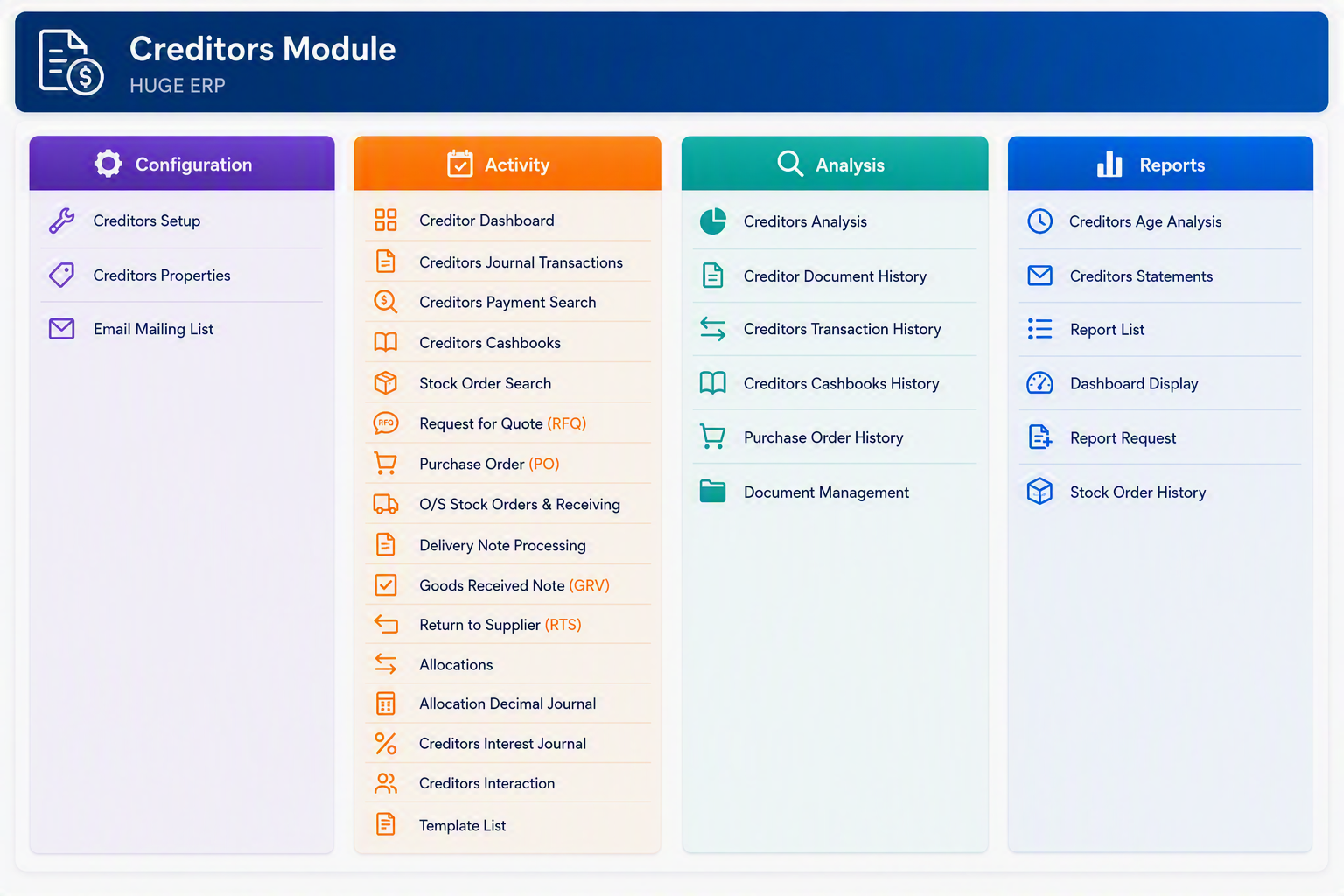
<div id="bkmrk-the-creditors-module">The **Creditors Module** is used to manage supplier accounts, purchase-related transactions, payments, allocations, document history, and creditor reporting. The module is divided into four main menu groups: **Configuration**, **Activity**, **Analysis**, and **Reports**. Configuration is used to maintain the setup and system rules for creditors. Activity is used for day-to-day processing such as purchase orders, goods received notes, supplier returns, allocations, and creditor journals. Analysis provides access to historical transactions, documents, and purchasing information. Reports provides formal creditor reporting such as age analysis, creditor statements, dashboards, and stock order history.</div><div id="bkmrk-"></div><div id="bkmrk--1"></div>[![Creditors Module.png](https://hugeerp10.co.za/hsofmanual/uploads/images/gallery/2026-08/scaled-1680-/creditors-module.png)](https://hugeerp10.co.za/hsofmanual/uploads/images/gallery/2026-08/creditors-module.png)

##### Creditors Module - Configuration

<div id="bkmrk-menu-item-descriptio"><table style="width: 100%;"><thead><tr><th style="width: 19.9012%;">Menu Item</th><th style="width: 80.0988%;">Description</th></tr></thead><tbody><tr><td style="width: 19.9012%;">**Creditors Setup**</td><td style="width: 80.0988%;">Configure the primary settings used for supplier accounts, creditor transactions, payment processing, and reporting.</td></tr><tr><td style="width: 19.9012%;">**Creditors Properties**</td><td style="width: 80.0988%;">Maintain creditor defaults, control settings, and processing rules used throughout the Creditors Module.</td></tr><tr><td style="width: 19.9012%;">**Email Mailing List**</td><td style="width: 80.0988%;">Manage supplier email addresses and mailing lists used for correspondence.</td></tr></tbody></table>

</div><div id="bkmrk--3">---

</div>##### Creditors Module - Activity

<div id="bkmrk-menu-item-descriptio-1"><table><thead><tr><th>Menu Item</th><th>Description</th></tr></thead><tbody><tr><td>**Creditor Dashboard**</td><td>View key creditor information, outstanding balances, and supplier activity in a single dashboard.</td></tr><tr><td>**Creditors Journal Transactions**</td><td>Process creditor journals, adjustments, and accounting corrections.</td></tr><tr><td>**Creditors Payment Search**</td><td>Search and review historical supplier payments and payment details.</td></tr><tr><td>**Creditors Cashbooks**</td><td>Process and review creditor-related cashbook transactions.</td></tr><tr><td>**Stock Order Search**</td><td>Search for stock orders linked to suppliers and purchasing transactions.</td></tr><tr><td>**Request for Quote (RFQ)**</td><td>Create and manage requests for quotations from suppliers before issuing purchase orders.</td></tr><tr><td>**Purchase Order (PO)**</td><td>Create, maintain, and process purchase orders issued to suppliers.</td></tr><tr><td>**O/S Stock Orders &amp; Receiving**</td><td>Review outstanding stock orders and manage the goods receiving process.</td></tr><tr><td>**Delivery Note Processing**</td><td>Process supplier delivery notes and match deliveries to purchase orders.</td></tr><tr><td>**Goods Received Note (GRV)**</td><td>Record goods received from suppliers and update inventory and creditor records.</td></tr><tr><td>**Return to Supplier (RTS)**</td><td>Process stock returns and supplier return transactions.</td></tr><tr><td>**Allocations**</td><td>Allocate invoices, payments, credit notes, and other creditor transactions.</td></tr><tr><td>**Allocation Decimal Journal**</td><td>Process rounding and decimal balancing journals resulting from allocations.</td></tr><tr><td>**Creditors Interest Journal**</td><td>Process interest charges and interest-related adjustments on creditor accounts.</td></tr><tr><td>**Creditors Interaction**</td><td>Record and review supplier communications, notes, and interactions.</td></tr><tr><td>**Template List**</td><td>Maintain document and communication templates used within the Creditors Module.</td></tr></tbody></table>

</div><div id="bkmrk--4">---

</div>##### Creditors Module - Analysis

<div id="bkmrk-menu-item-descriptio-2"><table><thead><tr><th>Menu Item</th><th>Description</th></tr></thead><tbody><tr><td>**Creditors Analysis**</td><td>Analyse supplier balances, transactions, and purchasing activity.</td></tr><tr><td>**Creditor Document History**</td><td>Review historical creditor documents, including invoices and supporting records.</td></tr><tr><td>**Creditors Transaction History**</td><td>View a complete history of supplier transactions and account movements.</td></tr><tr><td>**Creditors Cashbooks History**</td><td>Review historical creditor cashbook entries and payment activity.</td></tr><tr><td>**Purchase Order History**</td><td>Access historical purchase orders and purchasing records.</td></tr><tr><td>**Document Management**</td><td>Store, retrieve, and manage creditor-related electronic documents.</td></tr></tbody></table>

</div><div id="bkmrk--5">---

</div>##### Creditors Module - Reports

<div id="bkmrk-menu-item-descriptio-3"><table><thead><tr><th>Menu Item</th><th>Description</th></tr></thead><tbody><tr><td>**Creditors Age Analysis**</td><td>Produce aged creditor reports showing outstanding balances by ageing period.</td></tr><tr><td>**Creditors Statements**</td><td>Generate detailed supplier statements showing balances and transaction activity.</td></tr><tr><td>**Report List**</td><td>Access the available reports within the Creditors Module.</td></tr><tr><td>**Dashboard Display**</td><td>Display graphical and summary information relating to creditors and supplier activity.</td></tr><tr><td>**Report Request**</td><td>Generate, queue, print, or export creditor reports.</td></tr><tr><td>**Stock Order History**</td><td>Produce reports showing historical stock orders and supplier purchasing activity.</td></tr></tbody></table>

</div>
---

#### Creditors Module Overview

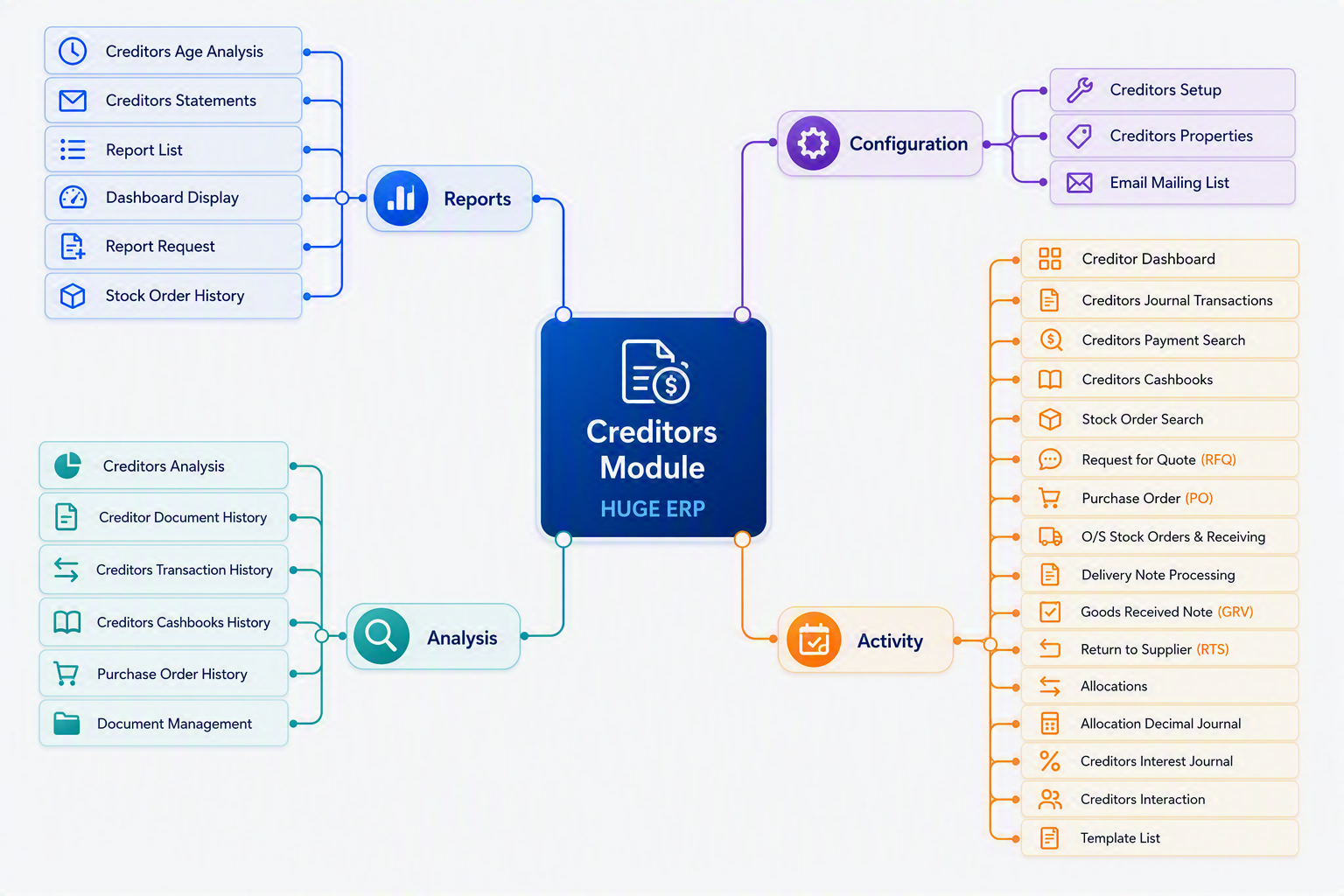
The **Creditors Module** is used to manage supplier accounts, purchasing activities, goods receiving, creditor payments, allocations, and supplier reporting. The module is divided into four menu groups:

<div id="bkmrk-menu-group-purpose-c"><table><thead><tr><th>Menu Group</th><th>Purpose</th></tr></thead><tbody><tr><td>**Configuration**</td><td>Maintain system settings and creditor master setup information.</td></tr><tr><td>**Activity**</td><td>Perform daily supplier processing, purchasing, receiving, and payment transactions.</td></tr><tr><td>**Analysis**</td><td>Review historical transactions, documents, and purchasing information.</td></tr><tr><td>**Reports**</td><td>Produce creditor reports, statements, dashboards, and analysis reports.</td></tr></tbody></table>

</div>[![Creditors Module map.png](https://hugeerp10.co.za/hsofmanual/uploads/images/gallery/2026-08/scaled-1680-/creditors-module-map.png)](https://hugeerp10.co.za/hsofmanual/uploads/images/gallery/2026-08/creditors-module-map.png)

---

#### Creditors Purchasing Flow Overview

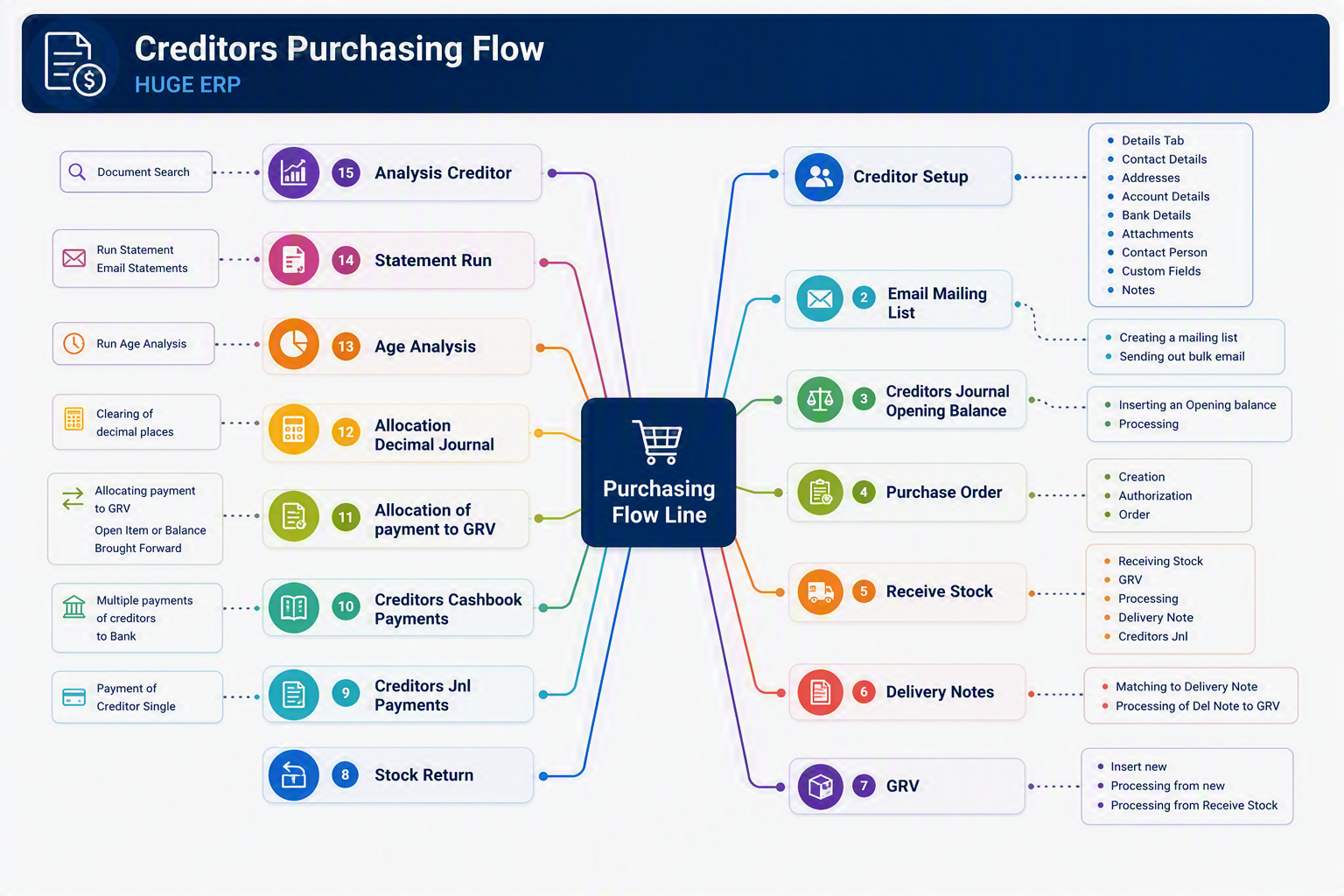
The **Creditors Purchasing Flow** illustrates the complete purchasing lifecycle within the Huge ERP Creditors Module, from supplier setup through to payment and reporting. It provides a visual guide to the key processes used when purchasing goods and services from suppliers and managing creditor accounts.

[![Creditors Purchasing Flow.png](https://hugeerp10.co.za/hsofmanual/uploads/images/gallery/2026-08/scaled-1680-/creditors-purchasing-flow.png)](https://hugeerp10.co.za/hsofmanual/uploads/images/gallery/2026-08/creditors-purchasing-flow.png)
<span class="ts0"> </span>

##### Flow Summary

<div id="bkmrk-creditor-setup-creat">1. **Creditor Setup**
    
    
    - Create and maintain supplier records.
    - Store contact details, addresses, bank details, attachments, contact persons, custom fields, and notes.
2. **Email Mailing List**
    
    
    - Maintain supplier email distribution lists.
    - Send bulk communications or supplier notices.
3. **Creditors Journal Opening Balance**
    
    
    - Enter opening balances when implementing the system.
    - Record historical creditor balances brought forward.
4. **Purchase Order (PO)**
    
    
    - Create and authorise purchase orders.
    - Generate formal orders for suppliers.
5. **Receive Stock**
    
    
    - Record the arrival of goods from suppliers.
    - Capture received quantities prior to invoice processing.
6. **Delivery Notes**
    
    
    - Process supplier delivery notes.
    - Match delivered goods against purchase orders and receipts.
7. **Goods Received Voucher (GRV)**
    
    
    - Confirm goods received into inventory.
    - Create the accounting transaction that links purchasing and creditors.
8. **Stock Return**
    
    
    - Return damaged, incorrect, or surplus stock to suppliers.
    - Adjust inventory and supplier balances accordingly.
9. **Creditors Journal Payments**
    
    
    - Process individual supplier payments via creditor journals.
10. **Creditors Cashbook Payments**
    
    
    - Generate and process multiple supplier payments.
    - Transfer payments through bank processing and cashbooks.
11. **Allocation of Payment to GRV**
    
    
    - Match supplier payments against invoices and GRVs.
    - Clear outstanding creditor balances.
12. **Allocation Decimal Journal**
    
    
    - Handle rounding differences and minor allocation variances.
13. **Age Analysis**
    
    
    - Review outstanding creditor balances by ageing period.
    - Identify suppliers requiring payment.
14. **Statement Run**
    
    
    - Produce creditor statements.
    - Email statements directly to suppliers if required.
15. **Analysis Creditor**
    
    
    - Access historical creditor transactions.
    - Review documents, balances, purchasing history, and supplier activity.

---

</div>#### Typical Purchasing Process

For most organisations the purchasing cycle follows this sequence:

**Creditor Setup → Purchase Order → Receive Stock → Delivery Note → GRV → Supplier Payment → Allocation → Age Analysis → Reporting**

This process ensures that:

<div id="bkmrk-goods-received-are-m">- Goods received are matched to purchase orders.
- Supplier invoices are correctly recorded.
- Payments are allocated accurately.
- Creditor balances remain up to date.
- Complete audit trails are maintained throughout the purchasing cycle.

</div>##### Business Benefit

The Creditors Purchasing Flow provides full control over supplier purchasing, inventory receipts, invoice matching, payment processing, and creditor analysis, ensuring accurate financial records and improved supplier management throughout the organisation.

# Inventory Module map

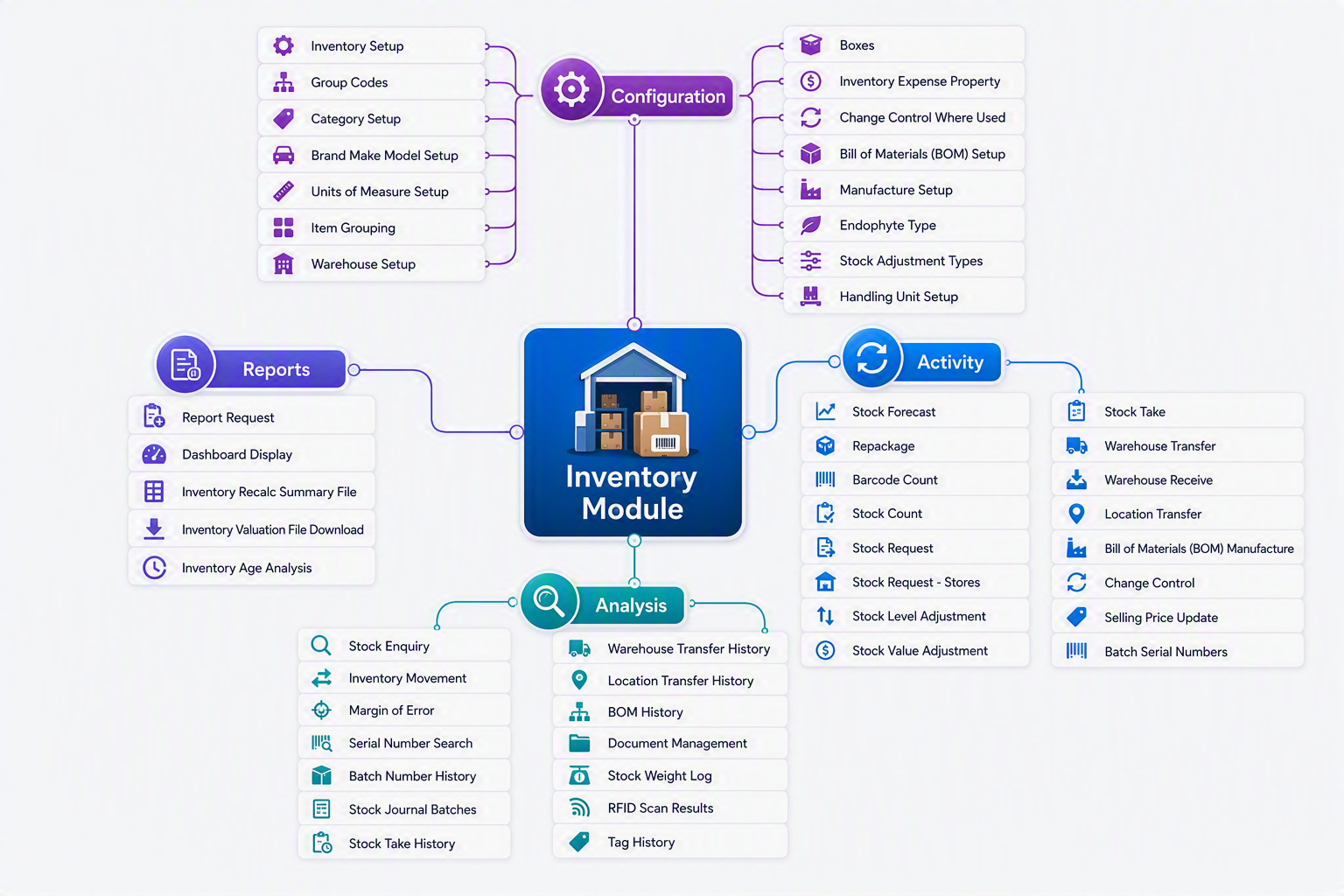
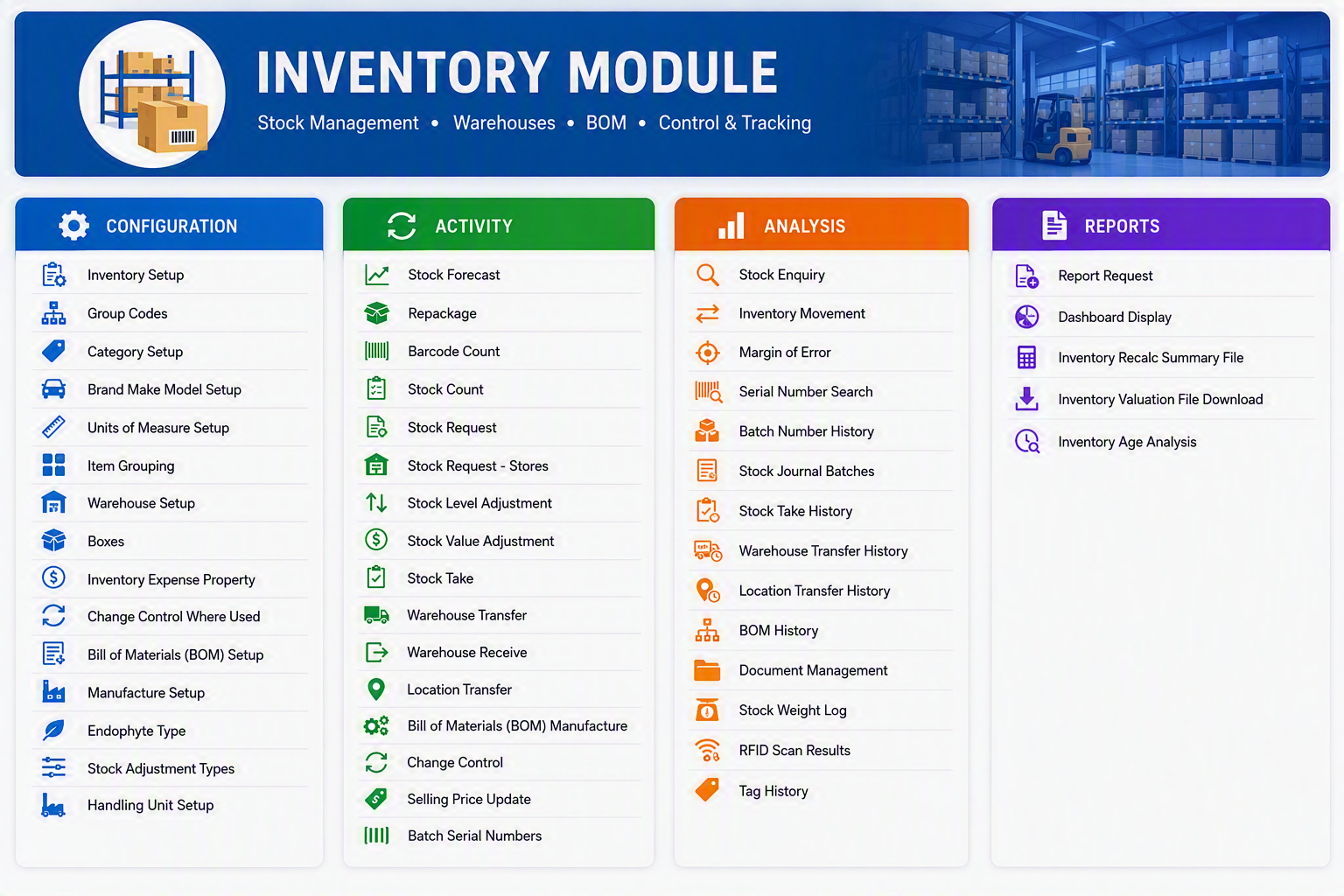
The **Inventory Module** is the central hub for managing stock, warehouses, inventory movements, and product control. It provides organisations with complete visibility of inventory levels across multiple locations while supporting purchasing, manufacturing, stock adjustments, transfers, barcode scanning, RFID tracking, serial number management, and batch-controlled inventory. The module is designed to help businesses maintain accurate stock records, optimise inventory holdings, improve warehouse efficiency, and ensure inventory costs are accurately reflected throughout the organisation.

The Inventory Module is divided into four key areas:

<div id="bkmrk-configuration-%E2%80%93-setu">- **Configuration** – Setup and maintain inventory structures, warehouses, categories, units of measure, handling units, and manufacturing settings.
- **Activity** – Perform day-to-day inventory transactions such as stock receipts, transfers, stock takes, adjustments, forecasting, and manufacturing.
- **Analysis** – Monitor inventory performance through enquiries, movement history, batch tracking, RFID results, and stock analysis tools.
- **Reports** – Generate inventory reports, dashboards, valuation extracts, and ageing analysis to support operational and management decision-making.

</div>Using these tools together allows businesses to maintain accurate inventory records, improve stock control, support manufacturing processes, and provide real-time visibility of inventory across the organisation.

[![Inventory Module.png](https://hugeerp10.co.za/hsofmanual/uploads/images/gallery/2026-08/scaled-1680-/inventory-module.png)](https://hugeerp10.co.za/hsofmanual/uploads/images/gallery/2026-08/inventory-module.png)
#### Inventory Module

The Inventory Module manages stock items, warehouses, inventory movements, valuation, manufacturing, barcode/RFID tracking, and stock analysis. The following tables provide a high-level explanation of each menu item available within the module.

<div id="bkmrk--1">---

</div>##### Configuration

<div id="bkmrk-menu-item-descriptio"><table><thead><tr><th>Menu Item</th><th>Description</th></tr></thead><tbody><tr><td>**Inventory Setup**</td><td>Configure global inventory settings and operational parameters.</td></tr><tr><td>**Group Codes**</td><td>Create and maintain inventory grouping structures.</td></tr><tr><td>**Category Setup**</td><td>Define inventory categories for classification and reporting.</td></tr><tr><td>**Brand Make Model Setup**</td><td>Maintain product brands, makes, and models.</td></tr><tr><td>**Units of Measure Setup**</td><td>Define units of measure used for purchasing, stocking, and selling items.</td></tr><tr><td>**Item Grouping**</td><td>Create logical item groupings for reporting and analysis.</td></tr><tr><td>**Warehouse Setup**</td><td>Define warehouses and storage locations.</td></tr><tr><td>**Boxes**</td><td>Configure packaging units and box definitions.</td></tr><tr><td>**Inventory Expense Property**</td><td>Define expense account mappings for inventory transactions.</td></tr><tr><td>**Change Control Where Used**</td><td>Identify where specific inventory configurations are being used.</td></tr><tr><td>**Bill of Materials (BOM) Setup**</td><td>Configure components and structures for manufactured products.</td></tr><tr><td>**Manufacture Setup**</td><td>Define manufacturing settings and production parameters.</td></tr><tr><td>**Endophyte Type**</td><td>Maintain endophyte classifications for applicable inventory items.</td></tr><tr><td>**Stock Adjustment Types**</td><td>Define adjustment reasons and transaction types.</td></tr><tr><td>**Handling Unit Setup**</td><td>Configure pallets, containers, and handling units for warehouse operations.</td></tr></tbody></table>

---

</div>##### Activity

<div id="bkmrk-menu-item-descriptio-1"><table><thead><tr><th>Menu Item</th><th>Description</th></tr></thead><tbody><tr><td>**Stock Forecast**</td><td>Review expected stock requirements and future inventory demand.</td></tr><tr><td>**Repackage**</td><td>Convert stock into alternative packaging or unit quantities.</td></tr><tr><td>**Barcode Count**</td><td>Perform stock counts using barcode scanning devices.</td></tr><tr><td>**Stock Count**</td><td>Conduct physical inventory counts.</td></tr><tr><td>**Stock Request**</td><td>Create stock requests between departments or locations.</td></tr><tr><td>**Stock Request - Stores**</td><td>Manage stock requisitions from stores or internal users.</td></tr><tr><td>**Stock Level Adjustment**</td><td>Increase or decrease stock quantities with audit tracking.</td></tr><tr><td>**Stock Value Adjustment**</td><td>Adjust inventory valuation without changing quantities.</td></tr><tr><td>**Stock Take**</td><td>Execute a full stock take process and reconcile variances.</td></tr><tr><td>**Warehouse Transfer**</td><td>Transfer inventory between warehouses.</td></tr><tr><td>**Warehouse Receive**</td><td>Receive stock into a warehouse from transfers.</td></tr><tr><td>**Location Transfer**</td><td>Move inventory between locations within a warehouse.</td></tr><tr><td>**Bill of Materials (BOM) Manufacture**</td><td>Manufacture finished goods using predefined BOM structures.</td></tr><tr><td>**Change Control**</td><td>Manage controlled changes affecting inventory records.</td></tr><tr><td>**Selling Price Update**</td><td>Update selling prices for inventory items.</td></tr><tr><td>**Batch Serial Numbers**</td><td>Maintain and process batch-controlled and serialised inventory.</td></tr></tbody></table>

---

</div>##### Analysis

<div id="bkmrk-menu-item-descriptio-2"><table><thead><tr><th>Menu Item</th><th>Description</th></tr></thead><tbody><tr><td>**Stock Enquiry**</td><td>View detailed inventory balances and availability information.</td></tr><tr><td>**Inventory Movement**</td><td>Analyse stock movements over a selected period.</td></tr><tr><td>**Margin of Error**</td><td>Review inventory variances on supplier invoice costs.</td></tr><tr><td>**Serial Number Search**</td><td>Locate inventory items using serial numbers.</td></tr><tr><td>**Batch Number History**</td><td>View transaction history for batch-controlled inventory.</td></tr><tr><td>**Stock Journal Batches**</td><td>Review stock journal entries and adjustment batches.</td></tr><tr><td>**Stock Take History**</td><td>View historical stock take results and adjustments.</td></tr><tr><td>**Warehouse Transfer History**</td><td>Review stock movements between warehouses.</td></tr><tr><td>**Location Transfer History**</td><td>Monitor transfers between warehouse locations.</td></tr><tr><td>**BOM History**</td><td>Review historical manufacturing and BOM transactions.</td></tr><tr><td>**Document Management**</td><td>Access documents attached to inventory transactions and items.</td></tr><tr><td>**Stock Weight Log**</td><td>Analyse inventory weight records and tracking information.</td></tr><tr><td>**RFID Scan Results**</td><td>View results captured from RFID scanning activities.</td></tr><tr><td>**Tag History**</td><td>Review the history of inventory tags and tracking records.</td></tr></tbody></table>

---

</div>##### Reports

<div id="bkmrk-menu-item-descriptio-3"><table><thead><tr><th>Menu Item</th><th>Description</th></tr></thead><tbody><tr><td>**Report Request**</td><td>Generate inventory reports using predefined criteria.</td></tr><tr><td>**Dashboard Display**</td><td>View inventory KPIs, alerts, and graphical summaries.</td></tr><tr><td>**Inventory Recalc Summary File**</td><td>Review inventory recalculation results and processing summaries.</td></tr><tr><td>**Inventory Valuation File Download**</td><td>Export inventory valuation information for analysis or audit purposes.</td></tr><tr><td>**Inventory Age Analysis**</td><td>Analyse inventory age and identify slow-moving or obsolete stock.</td></tr></tbody></table>

</div><div id="bkmrk--2">---

</div>#### Inventory Module Workflow

<div id="bkmrk-menu-group-purpose-c"><table style="width: 100%;"><thead><tr><th style="width: 18.4667%;">Menu Group</th><th style="width: 81.5333%;">Purpose</th></tr></thead><tbody><tr><td style="width: 18.4667%;">**Configuration**</td><td style="width: 81.5333%;">Setup inventory rules, warehouses, categories, units of measure, manufacturing settings, and stock structures.</td></tr><tr><td style="width: 18.4667%;">**Activity**</td><td style="width: 81.5333%;">Perform day-to-day inventory operations including receiving, transfers, stock counts, adjustments, and manufacturing.</td></tr><tr><td style="width: 18.4667%;">**Analysis**</td><td style="width: 81.5333%;">Monitor stock performance, movement, history, serial numbers, batches, RFID activity, and inventory trends.</td></tr><tr><td style="width: 18.4667%;">**Reports**</td><td style="width: 81.5333%;">Produce operational and management reports, dashboards, valuation reports, and stock ageing analysis.</td></tr></tbody></table>

</div>[![Inventory Module map.png](https://hugeerp10.co.za/hsofmanual/uploads/images/gallery/2026-08/scaled-1680-/inventory-module-map.png)](https://hugeerp10.co.za/hsofmanual/uploads/images/gallery/2026-08/inventory-module-map.png)

# Job Costing Module map

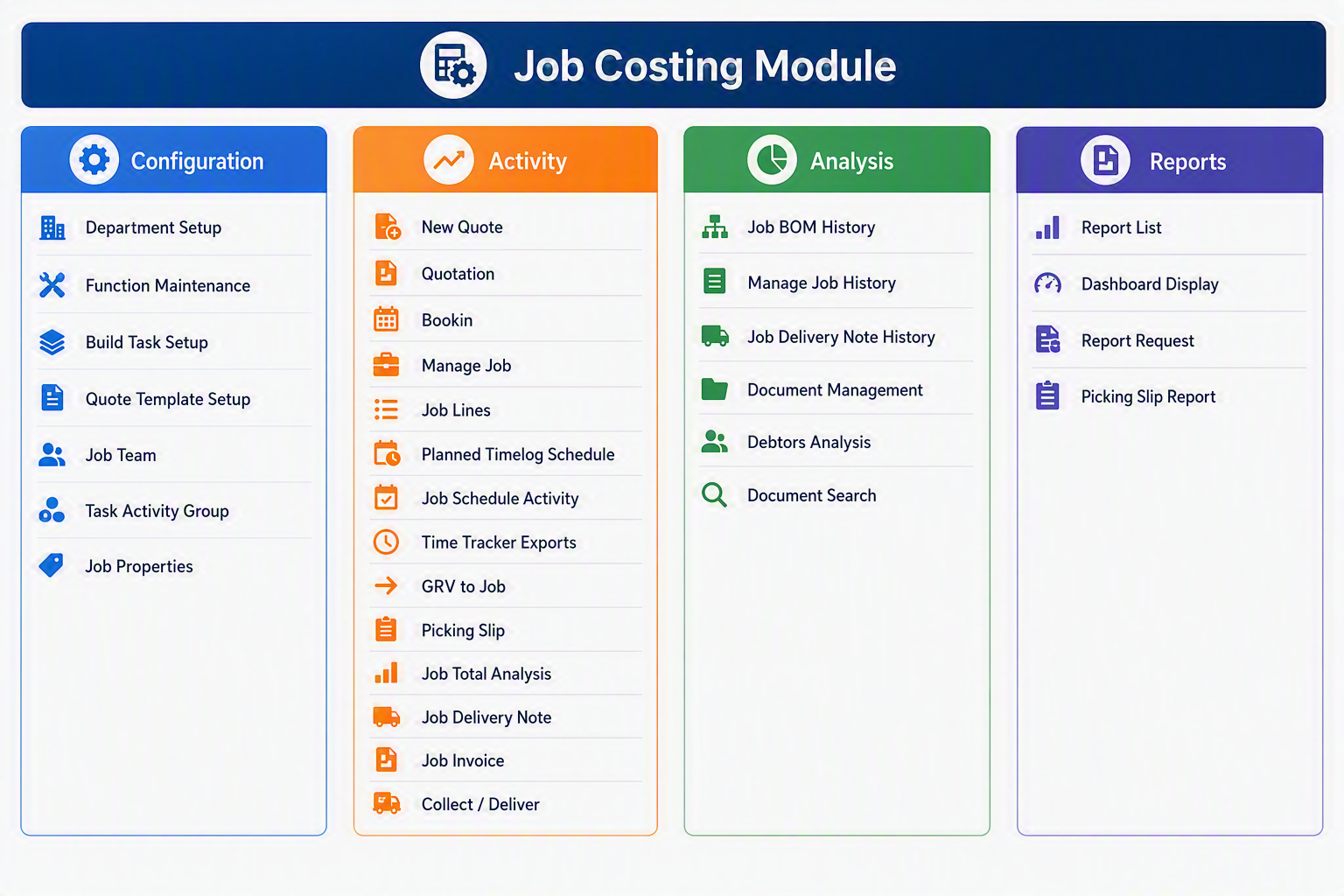
The **Job Costing Module** is designed to help organisations manage the complete lifecycle of a job, from quotation and planning through to costing, delivery, invoicing, and profitability analysis. The module provides a central location for managing job-related activities, materials, labour, scheduling, documentation, and financial performance. By capturing all job costs and revenue in one system, users can monitor budgets, track progress, analyse profitability, and ensure accurate invoicing. The Job Costing Module integrates with purchasing, inventory, debtors, and financial management processes, giving management real-time visibility into the operational and financial performance of every job.

[![Job Costing Module.png](https://hugeerp10.co.za/hsofmanual/uploads/images/gallery/2026-08/scaled-1680-/job-costing-module.png)](https://hugeerp10.co.za/hsofmanual/uploads/images/gallery/2026-08/job-costing-module.png)
####  

#### Job Costing Module Menu Items

##### Configuration

<div id="bkmrk-menu-item-explanatio"><table style="width: 100%;"><thead><tr><th style="width: 19.1844%;">Menu Item</th><th style="width: 80.8156%;">Explanation</th></tr></thead><tbody><tr><td style="width: 19.1844%;">**Department Setup**</td><td style="width: 80.8156%;">Used to create and maintain departments that can be linked to jobs, costs, revenue, reporting, or internal responsibility areas.</td></tr><tr><td style="width: 19.1844%;">**Function Maintenance**</td><td style="width: 80.8156%;">Used to define and maintain job-related functions or work types that may be used during job setup, costing, or operational processing.</td></tr><tr><td style="width: 19.1844%;">**Build Task Setup**</td><td style="width: 80.8156%;">Used to set up standard job tasks or task structures that can be reused when building or managing jobs. A dynamic Bill of Materials.</td></tr><tr><td style="width: 19.1844%;">**Quote Template Setup**</td><td style="width: 80.8156%;">Used to create and maintain quote templates, allowing standard wording, layouts, or predefined quote structures to be applied when preparing job quotations.</td></tr><tr><td style="width: 19.1844%;">**Job Team**</td><td style="width: 80.8156%;">Used to define or maintain the team members, roles, or resources associated with jobs.</td></tr><tr><td style="width: 19.1844%;">**Task Activity Group**</td><td style="width: 80.8156%;">Used to group job activities into logical activity categories for easier job tracking, scheduling, and analysis.</td></tr><tr><td style="width: 19.1844%;">**Job Properties**</td><td style="width: 80.8156%;">Used to define job-specific fields, complexity, or settings that control how job information is captured and managed. Planner allows one to control the number of jobs assigned by day, week or month for a particular category.</td></tr></tbody></table>

</div>##### Activity

<div id="bkmrk-menu-item-explanatio-1"><table><thead><tr><th>Menu Item</th><th>Explanation</th></tr></thead><tbody><tr><td>**New Quote**</td><td>Used to create a new quote for a customer before the job is confirmed or approved.</td></tr><tr><td>**Quotation**</td><td>Used to view, maintain, update, or process existing job quotations.</td></tr><tr><td>**Bookin**</td><td>Used to book in job-related work, items, or activities into the system.</td></tr><tr><td>**Manage Job**</td><td>Used to maintain and control the main job record, including job details, status, customer information, and related job activity.</td></tr><tr><td>**Job Lines**</td><td>Used to enter and maintain the individual lines that make up the job, such as materials, labour, services, or other cost components.</td></tr><tr><td>**Planned Timelog Schedule**</td><td>Used to plan expected time entries or scheduled labour activities against a job.</td></tr><tr><td>**Job Schedule Activity**</td><td>Used to manage scheduled activities linked to a job, helping track planned work and operational progress.</td></tr><tr><td>**Time Tracker Exports**</td><td>Used to export time tracking information, often for payroll, costing, reporting, or external processing.</td></tr><tr><td>**GRV to Job**</td><td>Used to allocate goods received or supplier purchases directly to a job for accurate job costing.</td></tr><tr><td>**Picking Slip**</td><td>Used to create or manage picking slips for stock or materials required for a job.</td></tr><tr><td>**Job Total Analysis**</td><td>Used to review an overall summary of job totals, including costs, charges, margins, or related job financial information.</td></tr><tr><td>**Job Delivery Note**</td><td>Used to create or manage delivery notes for goods, materials, or work delivered as part of a job.</td></tr><tr><td>**Job Invoice**</td><td>Used to prepare or process invoices linked to a job.</td></tr><tr><td>**Collect / Deliver**</td><td>Used to manage collection or delivery activities related to a job, including goods movement or service logistics.</td></tr></tbody></table>

</div>##### Analysis

<div id="bkmrk-menu-item-explanatio-2"><table style="width: 100%;"><thead><tr><th style="width: 22.5203%;">Menu Item</th><th style="width: 77.4797%;">Explanation</th></tr></thead><tbody><tr><td style="width: 22.5203%;">**Job BOM History**</td><td style="width: 77.4797%;">Used to view historical Bill of Materials information linked to jobs, helping users review what materials or components were associated with previous jobs.</td></tr><tr><td style="width: 22.5203%;">**Manage Job History**</td><td style="width: 77.4797%;">Used to review previously processed or completed job records and related job activity.</td></tr><tr><td style="width: 22.5203%;">**Job Delivery Note History**</td><td style="width: 77.4797%;">Used to view past delivery notes associated with jobs.</td></tr><tr><td style="width: 22.5203%;">**Document Management**</td><td style="width: 77.4797%;">Used to store, access, or manage documents linked to a job, such as quotes, drawings, delivery documents, invoices, or supporting files.</td></tr><tr><td style="width: 22.5203%;">**Debtors Analysis**</td><td style="width: 77.4797%;">Used to analyse debtor or customer-related information connected to jobs, such as outstanding balances, billing history, or customer account activity.</td></tr><tr><td style="width: 22.5203%;">**Document Search**</td><td style="width: 77.4797%;">Used to search for job-related documents or records within the system.</td></tr></tbody></table>

</div>##### Reports

<div id="bkmrk-menu-item-explanatio-3"><table style="width: 100%;"><thead><tr><th style="width: 22.875%;">Menu Item</th><th style="width: 77.125%;">Explanation</th></tr></thead><tbody><tr><td style="width: 22.875%;">**Report List**</td><td style="width: 77.125%;">Used to access the available reports for the Job Costing Module.</td></tr><tr><td style="width: 22.875%;">**Dashboard Display**</td><td style="width: 77.125%;">Used to display dashboard-style views of job costing information, giving users a visual summary of key job activity and performance.</td></tr><tr><td style="width: 22.875%;">**Report Request**</td><td style="width: 77.125%;">Used to request, generate, or queue reports from the Job Costing Module.</td></tr><tr><td style="width: 22.875%;">**Picking Slip Report**</td><td style="width: 77.125%;">Used to produce a report showing picking slip details for job-related materials or stock movements.</td></tr></tbody></table>

</div>---

#### Brief Module Summary

<div id="bkmrk-area-purpose-configu"><table style="width: 100%;"><thead><tr><th style="width: 13.1157%;">Area</th><th style="width: 86.8843%;">Purpose</th></tr></thead><tbody><tr><td style="width: 13.1157%;">**Configuration**</td><td style="width: 86.8843%;">Sets up the master data and rules required before jobs, quotes, tasks, teams, and properties can be used.</td></tr><tr><td style="width: 13.1157%;">**Activity**</td><td style="width: 86.8843%;">Handles the day-to-day processing of quotes, jobs, job lines, time, deliveries, picking slips, and invoicing.</td></tr><tr><td style="width: 13.1157%;">**Analysis**</td><td style="width: 86.8843%;">Provides access to historical job information, document records, debtor-related analysis, and job document searches.</td></tr><tr><td style="width: 13.1157%;">**Reports**</td><td style="width: 86.8843%;">Provides reporting and dashboard access for reviewing job costing activity and producing operational reports.</td></tr></tbody></table>

</div>[![Job Costing Module map.png](https://hugeerp10.co.za/hsofmanual/uploads/images/gallery/2026-08/scaled-1680-/job-costing-module-map.png)](https://hugeerp10.co.za/hsofmanual/uploads/images/gallery/2026-08/job-costing-module-map.png)

# Asset Tracker Module map

The **Asset Tracker Module** provides a comprehensive solution for recording, monitoring, and managing organisational assets throughout their lifecycle. It enables businesses to maintain accurate asset records, track asset locations and assignments, schedule maintenance activities, manage incidents, store supporting documentation, and produce detailed reports. By centralising asset information in a single system, the module helps improve asset visibility, accountability, compliance, and operational efficiency while ensuring critical assets are properly maintained and controlled.

[![Asset Tracker Module.png](https://hugeerp10.co.za/hsofmanual/uploads/images/gallery/2026-08/scaled-1680-/asset-tracker-module.png)](https://hugeerp10.co.za/hsofmanual/uploads/images/gallery/2026-08/asset-tracker-module.png)

#### Asset Tracker Module Menu Items

##### Configuration

<div id="bkmrk-menu-item-explanatio"><table style="width: 100%;"><thead><tr><th style="width: 20.8506%;">Menu Item</th><th style="width: 79.1494%;">Explanation</th></tr></thead><tbody><tr><td style="width: 20.8506%;">**Asset Group Setup**</td><td style="width: 79.1494%;">Used to create and maintain asset groups so assets can be organised into logical categories, such as vehicles, equipment, tools, plant, or other asset types.</td></tr><tr><td style="width: 20.8506%;">**Asset Action**</td><td style="width: 79.1494%;">Used to define the different actions that can be recorded against an asset, such as service, repair, inspection, issue, return, or replacement.</td></tr><tr><td style="width: 20.8506%;">**Asset Condition**</td><td style="width: 79.1494%;">Used to set up condition statuses for assets, allowing users to record whether an asset is new, good, damaged, under repair, retired, or unavailable.</td></tr><tr><td style="width: 20.8506%;">**Asset Location**</td><td style="width: 79.1494%;">Used to maintain the locations where assets are stored, used, or assigned. This helps track where each asset is currently located.</td></tr><tr><td style="width: 20.8506%;">**Issue To Users**</td><td style="width: 79.1494%;">Used to set up or manage the users or staff members to whom assets can be issued. This supports accountability and asset control.</td></tr><tr><td style="width: 20.8506%;">**Email Letter Templates**</td><td style="width: 79.1494%;">Used to maintain standard email or letter templates for asset-related communication, such as issue notices, reminders, or policy acknowledgements.</td></tr><tr><td style="width: 20.8506%;">**Policy Control**</td><td style="width: 79.1494%;">Used to manage policy-related settings for assets, helping ensure users follow the required asset usage, safety, or compliance rules.</td></tr><tr><td style="width: 20.8506%;">**Incident Setup**</td><td style="width: 79.1494%;">Used to configure incident types or incident settings so asset-related incidents can be recorded consistently throughout the system.</td></tr></tbody></table>

</div>##### Activity

<div id="bkmrk-menu-item-explanatio-1"><table style="width: 100%;"><thead><tr><th style="width: 23.8314%;">Menu Item</th><th style="width: 76.1686%;">Explanation</th></tr></thead><tbody><tr><td style="width: 23.8314%;">**Asset Tracker**</td><td style="width: 76.1686%;">Used to maintain and view asset records, including key asset details, ownership, location, condition, and tracking information.</td></tr><tr><td style="width: 23.8314%;">**Asset Maintenance Schedule**</td><td style="width: 76.1686%;">Used to record and manage scheduled maintenance tasks for assets, helping ensure services, inspections, and repairs are planned and followed up.</td></tr><tr><td style="width: 23.8314%;">**Vehicle Register**</td><td style="width: 76.1686%;">Used to maintain vehicle-related asset records, including registration details, vehicle information, and associated tracking data.</td></tr><tr><td style="width: 23.8314%;">**Mobile Asset Audit**</td><td style="width: 76.1686%;">Used to support asset audits, allowing assets to be checked, verified, and updated during an audit process, especially where mobile checking is required.</td></tr><tr><td style="width: 23.8314%;">**Incident Log Search**</td><td style="width: 76.1686%;">Used to search and review asset-related incidents that have been logged in the system. This helps users investigate issues and track historical events.</td></tr></tbody></table>

</div>##### Analysis

<div id="bkmrk-menu-item-explanatio-2"><table style="width: 100%;"><thead><tr><th style="width: 25.0193%;">Menu Item</th><th style="width: 74.9807%;">Explanation</th></tr></thead><tbody><tr><td style="width: 25.0193%;">**Asset Action Log**</td><td style="width: 74.9807%;">Used to review the history of actions recorded against assets, such as maintenance, repairs, inspections, movements, or user assignments.</td></tr><tr><td style="width: 25.0193%;">**Document Management**</td><td style="width: 74.9807%;">Used to store, manage, and access documents linked to assets, such as service records, warranties, manuals, inspection reports, or compliance documents.</td></tr></tbody></table>

</div>##### Reports

<div id="bkmrk-menu-item-explanatio-3"><table><thead><tr><th>Menu Item</th><th>Explanation</th></tr></thead><tbody><tr><td>**Report List**</td><td>Used to access the available Asset Tracker reports within the module.</td></tr><tr><td>**Dashboard Display**</td><td>Used to view dashboard-style information or visual summaries relating to assets, asset activity, or asset status.</td></tr><tr><td>**Report Request**</td><td>Used to request, generate, or run specific asset-related reports based on the information required by the user.</td></tr></tbody></table>

</div>---

#### Asset Tracker

The **Asset Tracker Module** provides a central area for managing business assets, including asset setup, tracking, maintenance, incidents, documentation, and reporting. The module is divided into four menu groups: **Configuration**, **Activity**, **Analysis**, and **Reports**. Configuration is used to set up the supporting information required for asset control, Activity is used for day-to-day asset management, Analysis provides access to asset logs and supporting documents, and Reports allows users to review asset information through lists, dashboards, and report requests.

[![Asset Tracker map.png](https://hugeerp10.co.za/hsofmanual/uploads/images/gallery/2026-08/scaled-1680-/asset-tracker-map.png)](https://hugeerp10.co.za/hsofmanual/uploads/images/gallery/2026-08/asset-tracker-map.png)

# CRM Module map

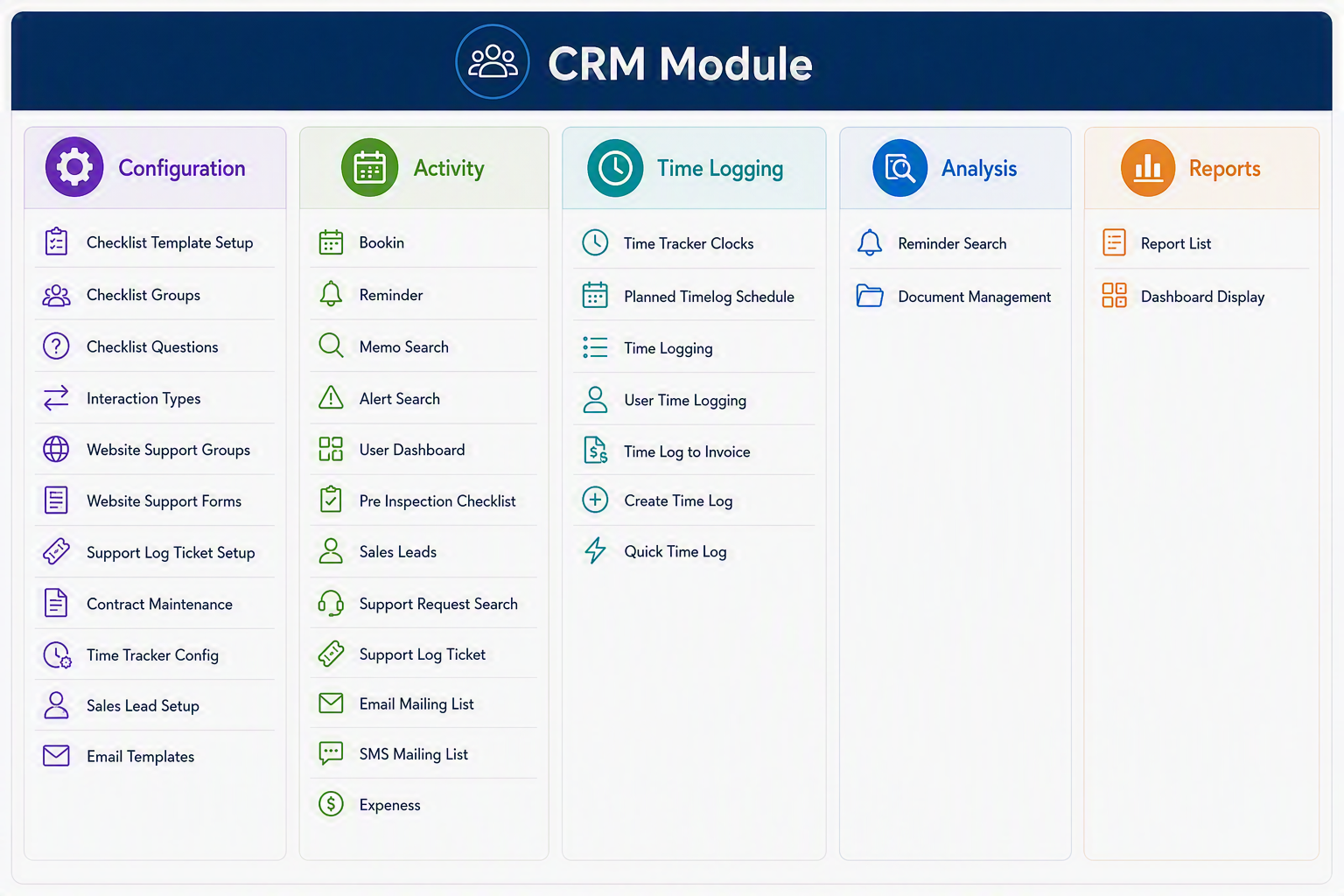
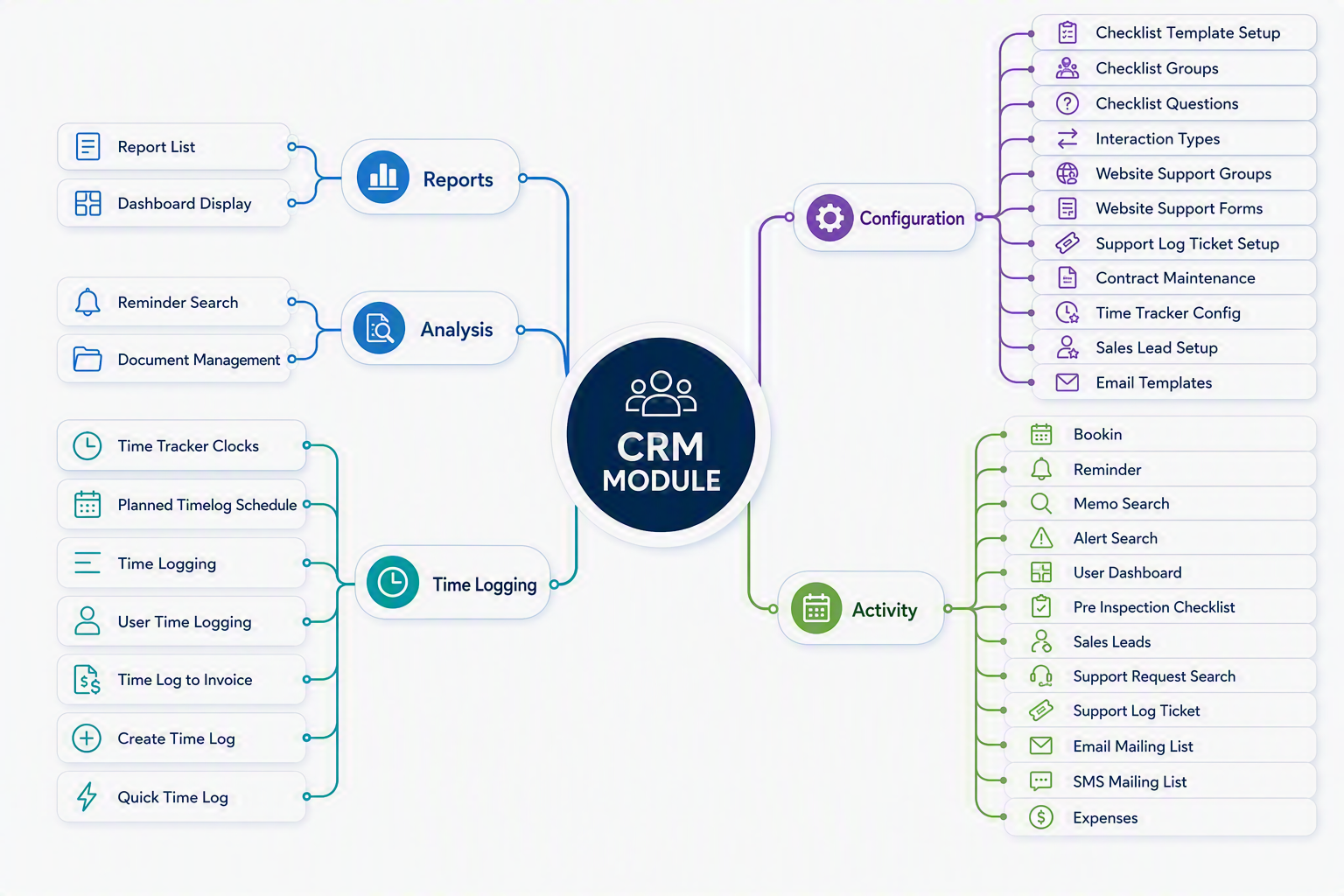
The **CRM (Customer Relationship Management) Module** provides a centralised platform for managing customer interactions, sales opportunities, support requests, communication activities, and time-based services. It enables organisations to maintain stronger customer relationships by capturing and tracking all customer-related activities in a single system.

The module includes tools for managing **sales leads, customer support tickets, reminders, bookings, contracts, document storage, email and SMS communications**, and **time logging**. Integrated checklist management and workflow tracking help ensure that customer enquiries, support issues, and sales opportunities are handled consistently and efficiently.

The CRM Module is divided into five key areas:

<div id="bkmrk-configuration-%E2%80%93-defi">- **Configuration** – Defines CRM settings, interaction types, support configurations, checklists, contracts, email templates, and sales lead parameters.
- **Activity** – Provides day-to-day operational functions including sales lead management, support ticket processing, reminders, bookings, customer communications, and expense recording.
- **Time Logging** – Records and manages time spent on customer support, service activities, and billable work, with the ability to convert approved time into invoices.
- **Analysis** – Offers search and document management facilities for reviewing customer information, reminders, and historical CRM records.
- **Reports** – Delivers reporting and dashboard tools that provide visibility into customer activity, support performance, sales pipeline status, and operational workload.

</div>By combining customer relationship management, service management, communication tracking, and time recording into a single integrated solution, the CRM Module helps organisations improve customer service, increase sales effectiveness, and maintain complete visibility of all customer-related activities.

[![CRM Module.png](https://hugeerp10.co.za/hsofmanual/uploads/images/gallery/2026-08/scaled-1680-/crm-module.png)](https://hugeerp10.co.za/hsofmanual/uploads/images/gallery/2026-08/crm-module.png)
####  

#### CRM Module Menu Groups and Menu Items

##### Configuration

<div id="bkmrk-menu-item-explanatio"><table style="width: 100%;"><thead><tr><th style="width: 25.8539%;">Menu Item</th><th style="width: 74.1461%;">Explanation</th></tr></thead><tbody><tr><td style="width: 25.8539%;">**Checklist Template Setup**</td><td style="width: 74.1461%;">Used to create and maintain checklist templates that can be reused for inspections, support processes, customer follow-ups, or internal procedures.</td></tr><tr><td style="width: 25.8539%;">**Checklist Groups**</td><td style="width: 74.1461%;">Allows checklist items to be grouped into logical sections, making checklists easier to manage and complete.</td></tr><tr><td style="width: 25.8539%;">**Checklist Questions**</td><td style="width: 74.1461%;">Used to create and maintain the individual questions or checklist lines that appear within checklist templates.</td></tr><tr><td style="width: 25.8539%;">**Interaction Types**</td><td style="width: 74.1461%;">Defines the different types of customer or user interactions that can be recorded, such as calls, emails, meetings, support contacts, or follow-ups.</td></tr><tr><td style="width: 25.8539%;">**Website Support Groups**</td><td style="width: 74.1461%;">Used to configure support groups that manage or respond to support requests submitted through the website or online support forms.</td></tr><tr><td style="width: 25.8539%;">**Website Support Forms**</td><td style="width: 74.1461%;">Allows setup and maintenance of online support forms used to capture customer support requests or enquiries.</td></tr><tr><td style="width: 25.8539%;">**Support Log Ticket Setup**</td><td style="width: 74.1461%;">Used to configure the settings, categories, defaults, or rules required for support log tickets.</td></tr><tr><td style="width: 25.8539%;">**Contract Maintenance**</td><td style="width: 74.1461%;">Allows customer contracts, service agreements, or support arrangements to be maintained and referenced within the CRM process.</td></tr><tr><td style="width: 25.8539%;">**Time Tracker Config**</td><td style="width: 74.1461%;">Used to configure the time tracking settings used for recording time against customers, support tickets, jobs, or CRM activities.</td></tr><tr><td style="width: 25.8539%;">**Sales Lead Setup**</td><td style="width: 74.1461%;">Allows setup of sales lead categories, sources, statuses, or other settings required for managing sales opportunities.</td></tr><tr><td style="width: 25.8539%;">**Email Templates**</td><td style="width: 74.1461%;">Used to create and maintain standard email templates for reminders, support replies, customer communication, sales follow-ups, or bulk mailing.</td></tr></tbody></table>

---

</div>##### Activity

<div id="bkmrk-menu-item-explanatio-1"><table style="width: 100%;"><thead><tr><th style="width: 25.1409%;">Menu Item</th><th style="width: 74.8591%;">Explanation</th></tr></thead><tbody><tr><td style="width: 25.1409%;">**Bookin**</td><td style="width: 74.8591%;">Used to create or manage bookings for Asset Tracking where equipment is taken off site from a client or booked in for repair.</td></tr><tr><td style="width: 25.1409%;">**Reminder**</td><td style="width: 74.8591%;">Allows users to create and manage reminders for follow-ups, tasks, customer actions, or important CRM activities.</td></tr><tr><td style="width: 25.1409%;">**Memo Search**</td><td style="width: 74.8591%;">Used to search for memos, notes, or recorded comments linked to customers, users, tickets, or CRM records.</td></tr><tr><td style="width: 25.1409%;">**Alert Search**</td><td style="width: 74.8591%;">Allows users to search for system alerts, CRM notifications, or flagged items that require attention.</td></tr><tr><td style="width: 25.1409%;">**User Dashboard**</td><td style="width: 74.8591%;">Provides a dashboard view of user-specific CRM activities, reminders, tasks, tickets, or key items requiring action.</td></tr><tr><td style="width: 25.1409%;">**Pre Inspection Checklist**</td><td style="width: 74.8591%;">Used to complete or review checklists before inspections, site visits, service work, or customer-related activities.</td></tr><tr><td style="width: 25.1409%;">**Sales Leads**</td><td style="width: 74.8591%;">Allows users to capture, manage, update, and follow up on potential sales opportunities or customer enquiries.</td></tr><tr><td style="width: 25.1409%;">**Support Request Search**</td><td style="width: 74.8591%;">Used to search for support requests raised by customers, users, or website forms.</td></tr><tr><td style="width: 25.1409%;">**Support Log Ticket**</td><td style="width: 74.8591%;">Allows users to create, update, and manage support tickets, including issue details, status, responsibility, and resolution notes.</td></tr><tr><td style="width: 25.1409%;">**Email Mailing List**</td><td style="width: 74.8591%;">Used to manage or select email mailing lists for customer communication, campaigns, notices, or bulk email messages.</td></tr><tr><td style="width: 25.1409%;">**SMS Mailing List**</td><td style="width: 74.8591%;">Used to manage or select SMS mailing lists for sending customer text notifications, alerts, or marketing messages.</td></tr><tr><td style="width: 25.1409%;">**Expenses**</td><td style="width: 74.8591%;">Allows expenses linked to CRM activities, customers, support work, or sales-related tasks to be recorded and reviewed.</td></tr></tbody></table>

---

</div>##### Time Logging

<div id="bkmrk-menu-item-explanatio-2"><table style="width: 100%;"><thead><tr><th style="width: 22.8804%;">Menu Item</th><th style="width: 77.2388%;">Explanation</th></tr></thead><tbody><tr><td style="width: 22.8804%;">**Time Tracker Clocks**</td><td style="width: 77.2388%;">Used to view or manage clocking records captured through the time tracker, including start and finish times.</td></tr><tr><td style="width: 22.8804%;">**Planned Timelog Schedule**</td><td style="width: 77.2388%;">Allows users to view or maintain planned time log schedules for future work, appointments, support tasks, or customer activities.</td></tr><tr><td style="width: 22.8804%;">**Time Logging**</td><td style="width: 77.2388%;">Used to record time spent on CRM activities, support tickets, customer work, or internal tasks.</td></tr><tr><td style="width: 22.8804%;">**User Time Logging**</td><td style="width: 77.2388%;">Allows time logs to be reviewed or entered for a specific user, supporting tracking of individual work activity.</td></tr><tr><td style="width: 22.8804%;">**Time Log to Invoice**</td><td style="width: 77.2388%;">Used to convert approved or billable time logs into invoice lines for customer billing.</td></tr><tr><td style="width: 22.8804%;">**Create Time Log**</td><td style="width: 77.2388%;">Allows users to manually create a new time log entry for work completed.</td></tr><tr><td style="width: 22.8804%;">**Quick Time Log**</td><td style="width: 77.2388%;">Provides a faster way to capture time with minimal entry, suitable for simple or repetitive time recording.</td></tr></tbody></table>

---

</div>##### Analysis

<div id="bkmrk-menu-item-explanatio-3"><table style="width: 100%;"><thead><tr><th style="width: 27.0461%;">Menu Item</th><th style="width: 72.9539%;">Explanation</th></tr></thead><tbody><tr><td style="width: 27.0461%;">**Reminder Search**</td><td style="width: 72.9539%;">Used to search and review reminders by customer, user, date, status, or activity type.</td></tr><tr><td style="width: 27.0461%;">**Document Management**</td><td style="width: 72.9539%;">Allows documents linked to CRM records, customers, support tickets, leads, or contracts to be stored, viewed, and managed.</td></tr></tbody></table>

---

</div>##### Reports

<div id="bkmrk-menu-item-explanatio-4"><table style="width: 100%;"><thead><tr><th style="width: 19.8968%;">Menu Item</th><th style="width: 80.1032%;">Explanation</th></tr></thead><tbody><tr><td style="width: 19.8968%;">**Report List**</td><td style="width: 80.1032%;">Provides access to available CRM reports, allowing users to review CRM activity, sales leads, support requests, time logs, and related information.</td></tr><tr><td style="width: 19.8968%;">**Dashboard Display**</td><td style="width: 80.1032%;">Displays CRM information in a dashboard format, giving users a visual overview of key activity, outstanding items, and performance indicators.</td></tr></tbody></table>

---

</div>#### CRM Module

The CRM Module is used to manage customer relationships, support requests, sales leads, reminders, communication lists, contracts, time logging, and related CRM activities. The module is divided into five main Menu Groups: Configuration, Activity, Time Logging, Analysis, and Reports. Configuration is used to set up the CRM structure and defaults, Activity manages day-to-day customer and support tasks, Time Logging records and processes time spent on activities, Analysis provides search and document management tools, and Reports gives users access to CRM reporting and dashboard views.

[![CRM map.png](https://hugeerp10.co.za/hsofmanual/uploads/images/gallery/2026-08/scaled-1680-/crm-map.png)](https://hugeerp10.co.za/hsofmanual/uploads/images/gallery/2026-08/crm-map.png)
# Production Tracking (PT) map

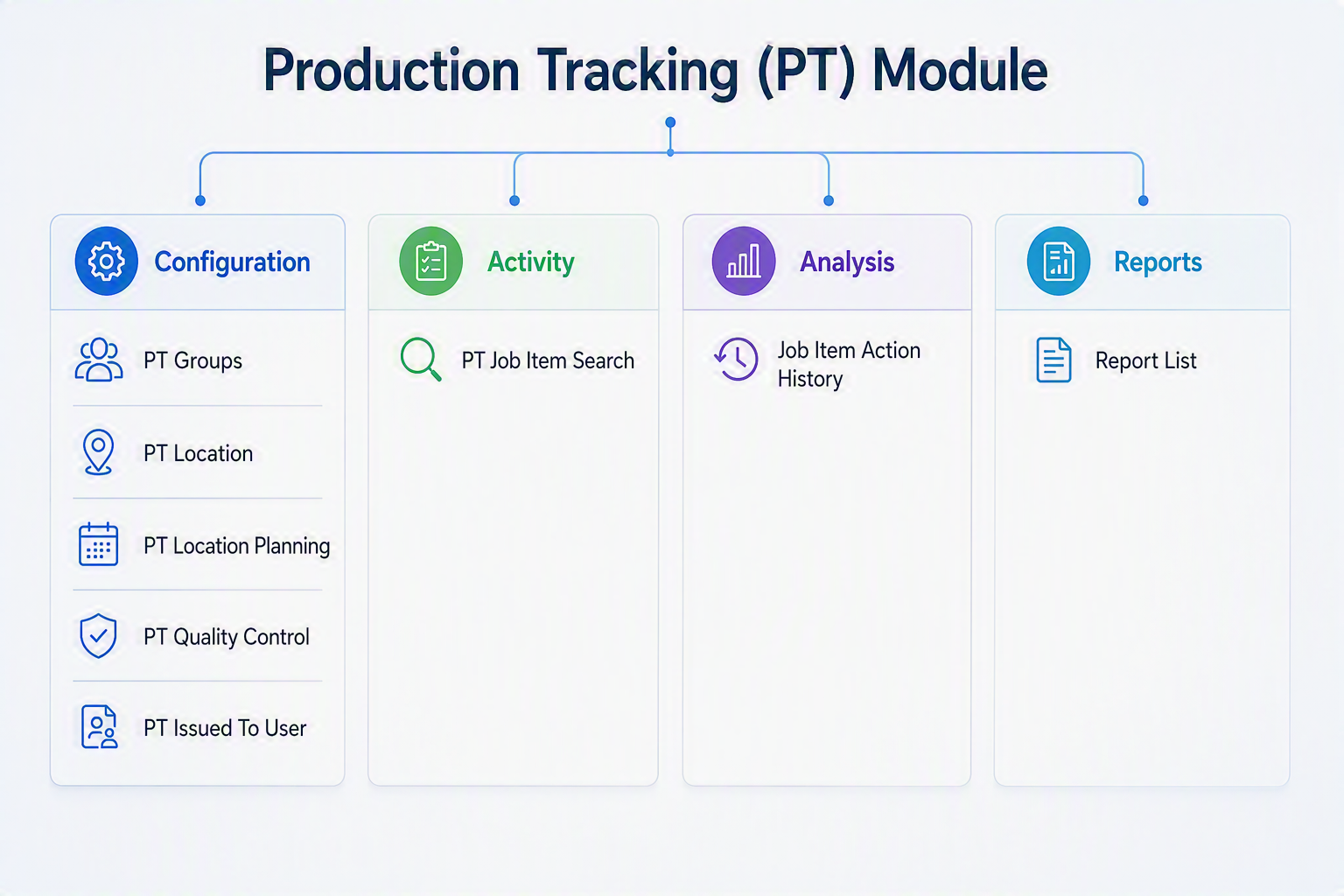
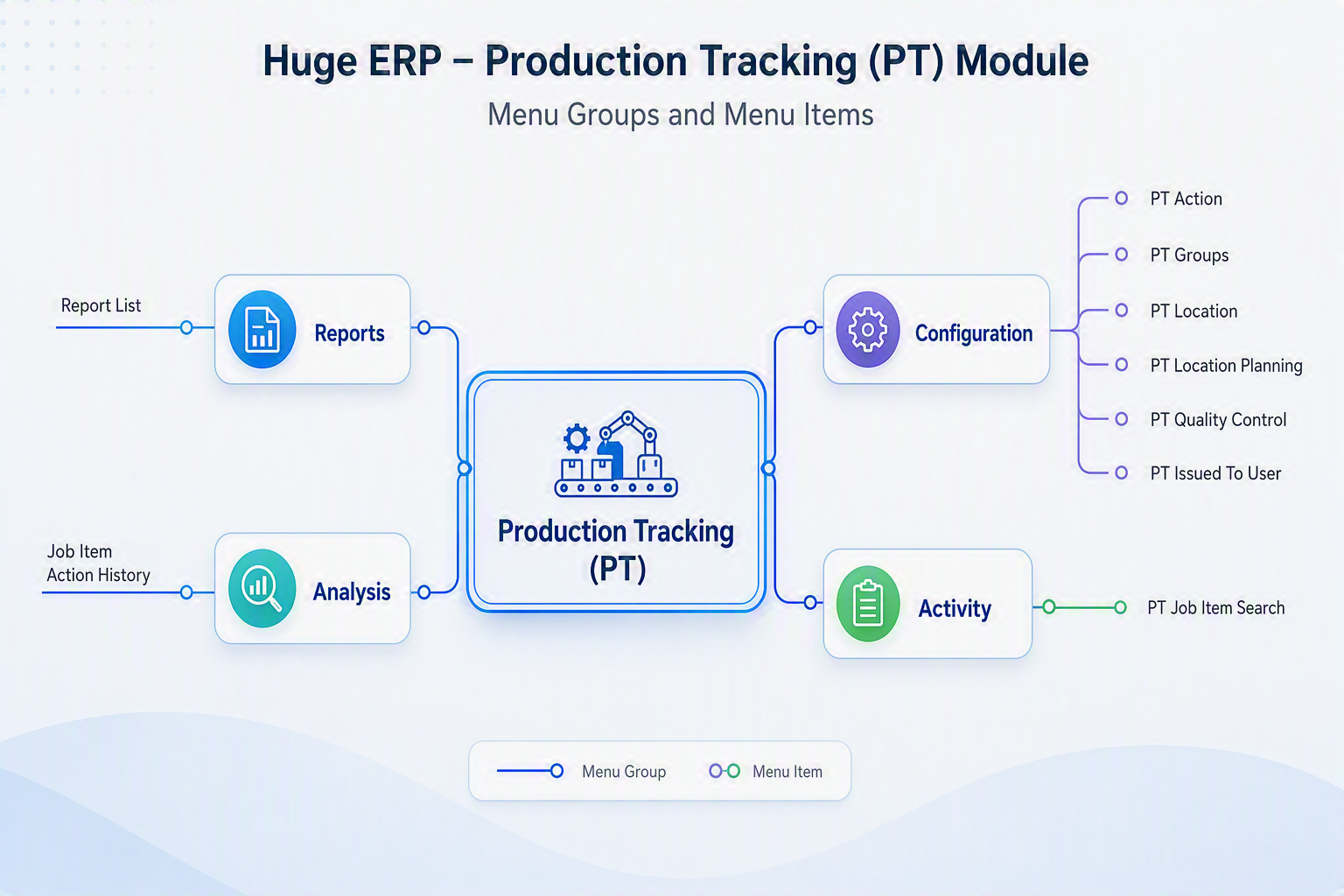
<div id="bkmrk-the-production-track">The **Production Tracking (PT) Module** is used to configure, record, search, analyse, and report on production tracking activities linked to job items. The module is divided into four main menu groups: **Configuration**, **Activity**, **Analysis**, and **Reports**, allowing users to manage production setup, track job item activity, review action history, and access production tracking reports.</div><div id="bkmrk-"></div><div id="bkmrk--1"></div>[![Production Tracking Module.png](https://hugeerp10.co.za/hsofmanual/uploads/images/gallery/2026-08/scaled-1680-/production-tracking-module.png)](https://hugeerp10.co.za/hsofmanual/uploads/images/gallery/2026-08/production-tracking-module.png)

#### Production Tracking (PT) Module

##### Configuration

<div id="bkmrk-menu-item-descriptio"><table style="width: 100%;"><thead><tr><th style="width: 20.7339%;">Menu Item</th><th style="width: 79.2661%;">Description</th></tr></thead><tbody><tr><td style="width: 20.7339%;">**PT Action**</td><td style="width: 79.2661%;">Create and maintain the production tracking actions that can be recorded against job items throughout the production process.</td></tr><tr><td style="width: 20.7339%;">**PT Groups**</td><td style="width: 79.2661%;">Define and manage production tracking groups used to categorise production activities and workflows.</td></tr><tr><td style="width: 20.7339%;">**PT Location**</td><td style="width: 79.2661%;">Maintain the production locations, departments, or work centres where production activities are performed.</td></tr><tr><td style="width: 20.7339%;">**PT Location Planning**</td><td style="width: 79.2661%;">Configure location-based production planning to assist with scheduling and monitoring production progress. Set milestones and email updates.</td></tr><tr><td style="width: 20.7339%;">**PT Quality Control**</td><td style="width: 79.2661%;">Set up quality control requirements and checkpoints used throughout the production process. </td></tr><tr><td style="width: 20.7339%;">**PT Issued To User**</td><td style="width: 79.2661%;">Maintain user assignments and responsibilities for production tracking activities and tasks. </td></tr></tbody></table>

---

</div>##### Activity

<div id="bkmrk-menu-item-descriptio-1"><table style="width: 100%;"><thead><tr><th style="width: 20.2573%;">Menu Item</th><th style="width: 79.7427%;">Description</th></tr></thead><tbody><tr><td style="width: 20.2573%;">**PT Job Item Search**</td><td style="width: 79.7427%;">Search for job items and review their associated production tracking information, progress, planning, and current status.</td></tr></tbody></table>

---

</div>##### Analysis

<div id="bkmrk-menu-item-descriptio-2"><table style="width: 100%;"><thead><tr><th style="width: 22.4024%;">Menu Item</th><th style="width: 77.5976%;">Description</th></tr></thead><tbody><tr><td style="width: 22.4024%;">**Job Item Action History**</td><td style="width: 77.5976%;">Review the complete history of production actions recorded against a job item, providing a full audit trail of activity and progress.</td></tr></tbody></table>

---

</div>##### Reports

<div id="bkmrk-menu-item-descriptio-3"><table style="width: 100%;"><thead><tr><th style="width: 16.7975%;">Menu Item</th><th style="width: 83.2025%;">Description</th></tr></thead><tbody><tr><td style="width: 16.7975%;">**Report List**</td><td style="width: 83.2025%;">Access and generate production tracking reports for analysing production activity, progress, planning, and operational performance.</td></tr></tbody></table>

</div>---

#### Module Summary

The **Production Tracking (PT) Module** enables organisations to monitor and manage production processes against job items. Users can configure production actions, locations, planning requirements, and quality controls, track production activity in real time, analyse job item histories, and generate reports to measure production performance and progress.

[![Production Tracking Module map.png](https://hugeerp10.co.za/hsofmanual/uploads/images/gallery/2026-08/scaled-1680-/production-tracking-module-map.png)](https://hugeerp10.co.za/hsofmanual/uploads/images/gallery/2026-08/production-tracking-module-map.png)
# Lab Module map

The **Laboratory (Lab) Module** is designed to manage the complete laboratory testing process, from configuring test templates and parameters through to sample processing, result analysis, and reporting. It provides full traceability of samples, supports the management of laboratory workflows, and ensures consistent testing procedures are followed. Users can record and track samples, monitor testing activities, review historical results, analyse testing outcomes, and generate comprehensive laboratory reports. By centralising laboratory operations, the module helps improve accuracy, quality control, compliance, and the efficient management of testing and analytical processes.

[![Lab Module.png](https://hugeerp10.co.za/hsofmanual/uploads/images/gallery/2026-08/scaled-1680-/lab-module.png)](https://hugeerp10.co.za/hsofmanual/uploads/images/gallery/2026-08/lab-module.png)
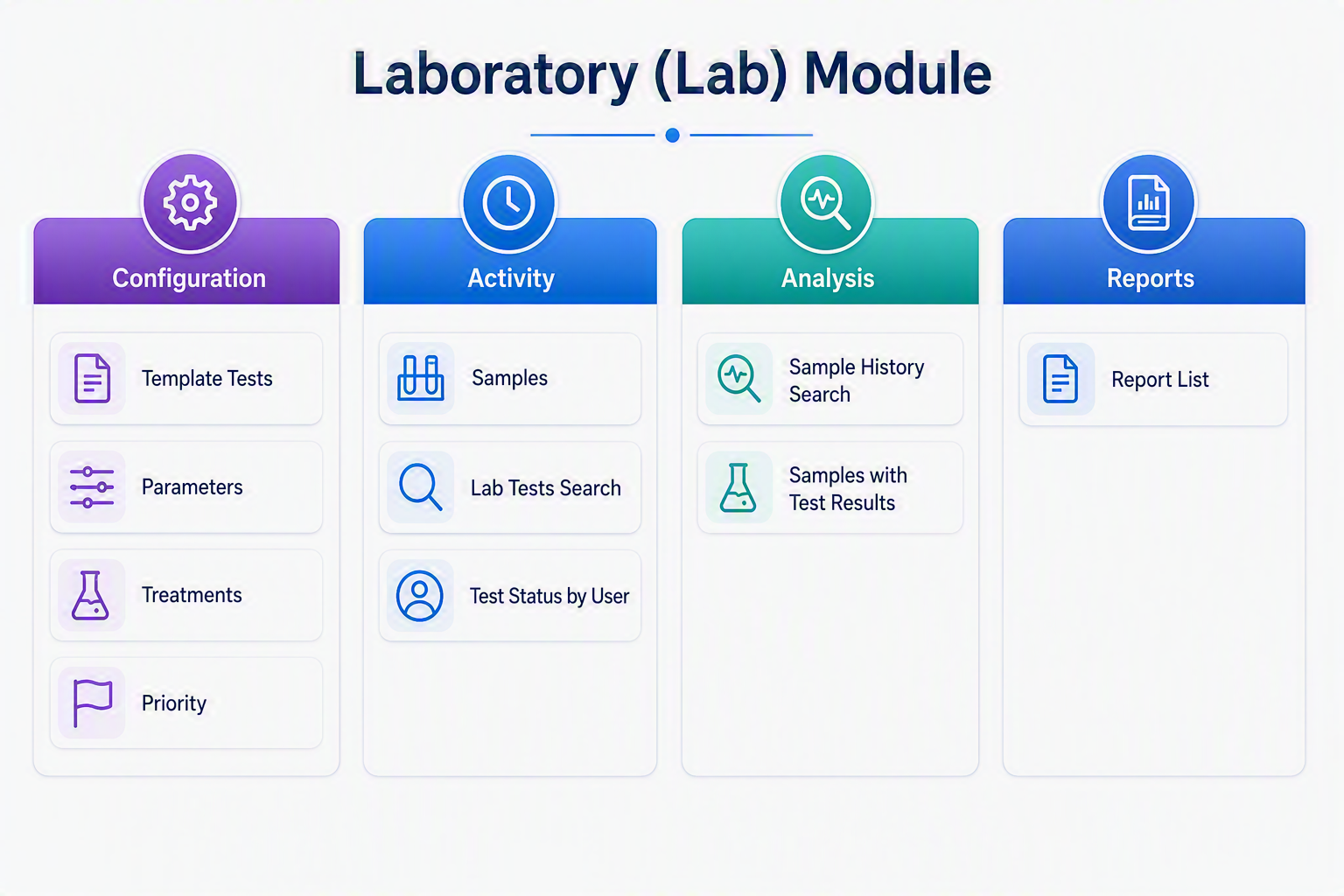
#### Laboratory (Lab) Module Menu Guide

The **Laboratory (Lab) Module** is designed to manage laboratory testing processes, sample tracking, test parameters, and result analysis. It provides a structured workflow from test setup and sample collection through to test result reporting and historical analysis.

##### Configuration

<div id="bkmrk-menu-item-descriptio"><table style="width: 100%;"><thead><tr><th style="width: 17.4061%;">Menu Item</th><th style="width: 82.5939%;">Description</th></tr></thead><tbody><tr><td style="width: 17.4061%;">**Template Tests**</td><td style="width: 82.5939%;">Create and maintain standard laboratory test templates used when defining testing procedures and result requirements.</td></tr><tr><td style="width: 17.4061%;">**Parameters**</td><td style="width: 82.5939%;">Define laboratory testing parameters, measurement criteria, tolerances, and expected result values.</td></tr><tr><td style="width: 17.4061%;">**Treatments**</td><td style="width: 82.5939%;">Configure treatment types, processing methods, or procedures applied to samples before or during testing.</td></tr><tr><td style="width: 17.4061%;">**Priority**</td><td style="width: 82.5939%;">Set up testing priorities to classify urgent, routine, or special laboratory work and assist with workflow scheduling.</td></tr></tbody></table>

---

</div>##### Activity

<div id="bkmrk-menu-item-descriptio-1"><table style="width: 100%;"><thead><tr><th style="width: 19.5406%;">Menu Item</th><th style="width: 80.4594%;">Description</th></tr></thead><tbody><tr><td style="width: 19.5406%;">**Samples**</td><td style="width: 80.4594%;">Capture and maintain laboratory sample records including sample identification, source information, collection dates, and testing requirements.</td></tr><tr><td style="width: 19.5406%;">**Lab Tests Search**</td><td style="width: 80.4594%;">Search and review laboratory test records using various criteria such as sample number, test type, date, or customer.</td></tr><tr><td style="width: 19.5406%;">**Test Status by User**</td><td style="width: 80.4594%;">Monitor testing activities assigned to laboratory personnel, showing the current status and workload from individual users.</td></tr></tbody></table>

---

</div>##### Analysis

<div id="bkmrk-menu-item-descriptio-2"><table style="width: 100%;"><thead><tr><th style="width: 24.438%;">Menu Item</th><th style="width: 75.562%;">Description</th></tr></thead><tbody><tr><td style="width: 24.438%;">**Sample History Search**</td><td style="width: 75.562%;">Review the complete historical testing record of a sample, including previous tests, treatments, and results.</td></tr><tr><td style="width: 24.438%;">**Samples with Test Results**</td><td style="width: 75.562%;">Analyse completed test results, compare outcomes, and review sample performance against required specifications and standards.</td></tr></tbody></table>

---

</div>##### Reports

<div id="bkmrk-menu-item-descriptio-3"><table style="width: 100%;"><thead><tr><th style="width: 13.7011%;">Menu Item</th><th style="width: 86.2989%;">Description</th></tr></thead><tbody><tr><td style="width: 13.7011%;">**Report List**</td><td style="width: 86.2989%;">Generate and print laboratory reports including sample results, testing summaries, status reports, and historical analysis reports.</td></tr></tbody></table>

---

</div>#### Module Summary

The **Laboratory (Lab) Module** enables organisations to manage laboratory operations efficiently by controlling test definitions, tracking samples throughout the testing process, recording results, monitoring laboratory workloads, and producing detailed analytical and compliance reports. The module provides full traceability from sample registration through to final test reporting, ensuring accuracy, quality assurance, and audit compliance.

[![Lab Module map.png](https://hugeerp10.co.za/hsofmanual/uploads/images/gallery/2026-08/scaled-1680-/lab-module-map.png)](https://hugeerp10.co.za/hsofmanual/uploads/images/gallery/2026-08/lab-module-map.png)
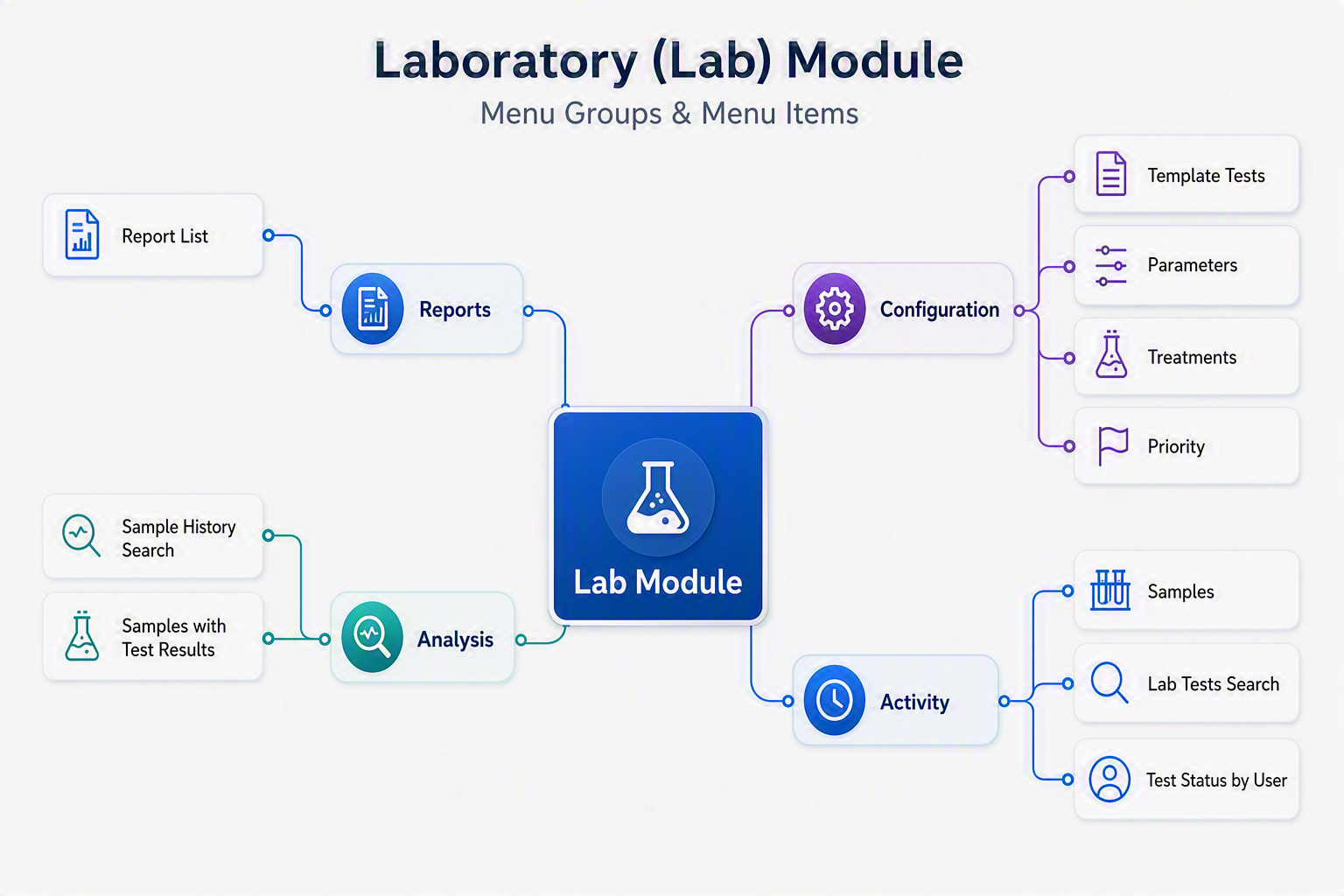
# Energy Module map

The **Energy Module** is designed to manage and maintain key energy-related information used throughout the organisation. It provides a central location for configuring energy parameters, network loss factors, priority settings, and standard naming conventions, ensuring consistency and accuracy across energy operations. The module supports the management of energy activities such as Requests for Proposal (RFPs) and Individual Connection Points (ICPs), helping organisations effectively administer energy supply, infrastructure, and related business processes. By combining configuration and operational functions within a single module, the Energy Module delivers greater control, improved data integrity, and streamlined energy management workflows.

[![Energy Module.png](https://hugeerp10.co.za/hsofmanual/uploads/images/gallery/2026-08/scaled-1680-/energy-module.png)](https://hugeerp10.co.za/hsofmanual/uploads/images/gallery/2026-08/energy-module.png)
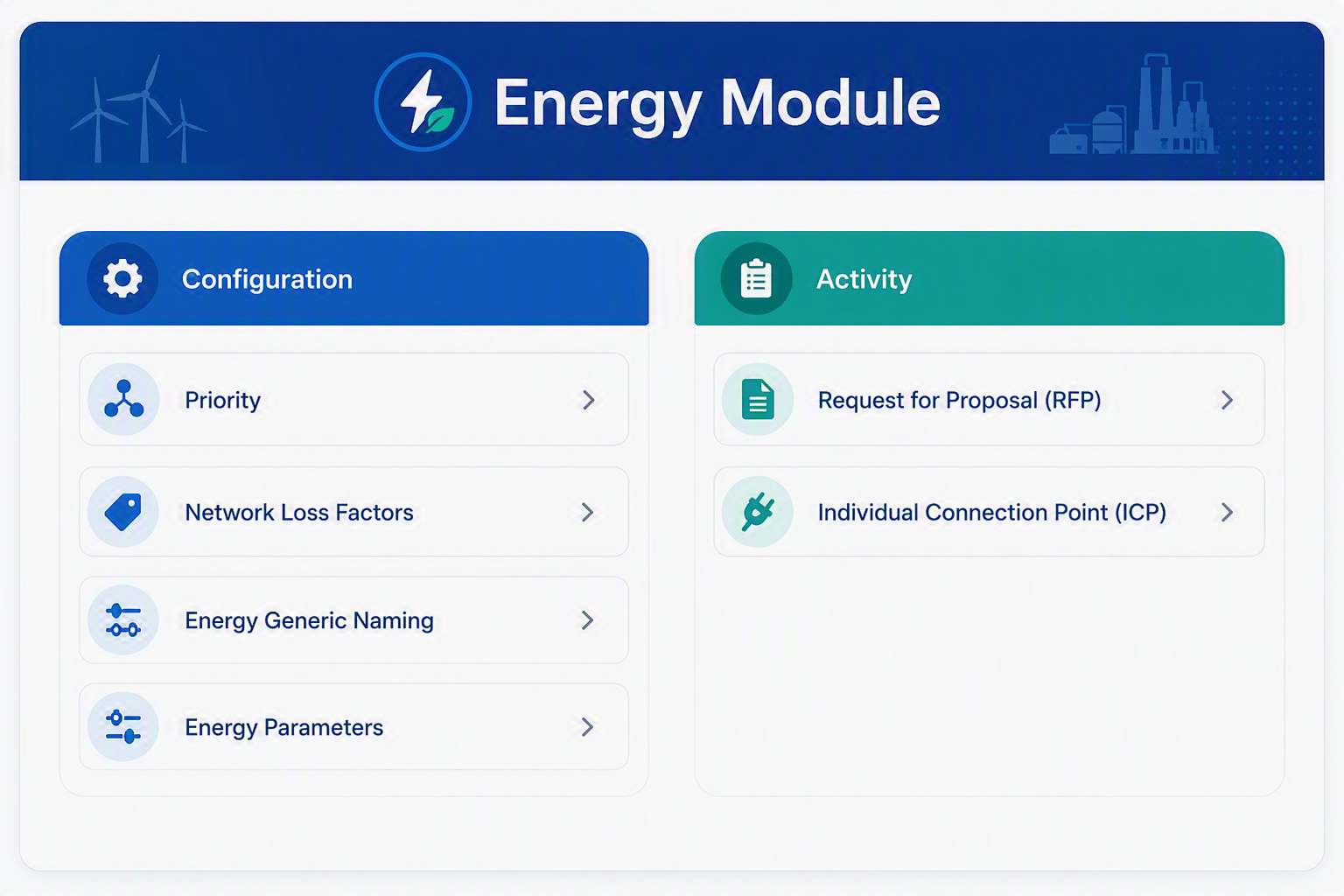
#### Energy Module Menu Items

##### Configuration

<div id="bkmrk-menu-item-explanatio"><table style="width: 100%;"><thead><tr><th style="width: 20.9677%;">Menu Item</th><th style="width: 79.0323%;">Explanation</th></tr></thead><tbody><tr><td style="width: 20.9677%;">**Priority**</td><td style="width: 79.0323%;">Used to define and maintain priority levels for energy-related processes, requests, or tasks. This helps users categorise work based on importance, urgency, or business rules.</td></tr><tr><td style="width: 20.9677%;">**Network Loss Factors**</td><td style="width: 79.0323%;">Used to set up and manage network loss factor values that may apply to energy calculations, reporting, or billing-related processes. These factors help account for energy losses across the network.</td></tr><tr><td style="width: 20.9677%;">**Energy Generic Naming**</td><td style="width: 79.0323%;">Used to maintain standard naming conventions for energy-related records, references, or classifications. This helps keep descriptions consistent across the Energy Module.</td></tr><tr><td style="width: 20.9677%;">**Energy Parameters**</td><td style="width: 79.0323%;">Used to configure the main system settings and control values for the Energy Module. These parameters determine how the module behaves and how energy-related information is processed.</td></tr></tbody></table>

</div>##### Activity

<div id="bkmrk-menu-item-explanatio-1"><table style="width: 100%;"><thead><tr><th style="width: 23.9588%;">Menu Item</th><th style="width: 76.0412%;">Explanation</th></tr></thead><tbody><tr><td style="width: 23.9588%;">**Request for Proposal (RFP)**</td><td style="width: 76.0412%;">Used to create, manage, or review energy-related request for proposal records. This supports the process of requesting pricing, service options, or supply-related proposals from external parties.</td></tr><tr><td style="width: 23.9588%;">**Individual Connection Point (ICP)**</td><td style="width: 76.0412%;">Used to maintain and manage Individual Connection Point details. This may include connection identifiers, energy supply points, or related information used in energy management and reporting.</td></tr></tbody></table>

</div><div id="bkmrk--2"></div>---

#### Energy Module

The **Energy Module** provides tools to configure and manage energy-related setup information and operational records. The Configuration menu group allows users to maintain key setup areas such as priorities, network loss factors, naming standards, and module parameters. The Activity menu group supports day-to-day energy processes, including managing request for proposal records and maintaining Individual Connection Point information. Together, these options help ensure energy records are structured, consistent, and easy to manage within the Huge ERP system.

[![Energy Module map.png](https://hugeerp10.co.za/hsofmanual/uploads/images/gallery/2026-08/scaled-1680-/energy-module-map.png)](https://hugeerp10.co.za/hsofmanual/uploads/images/gallery/2026-08/energy-module-map.png)
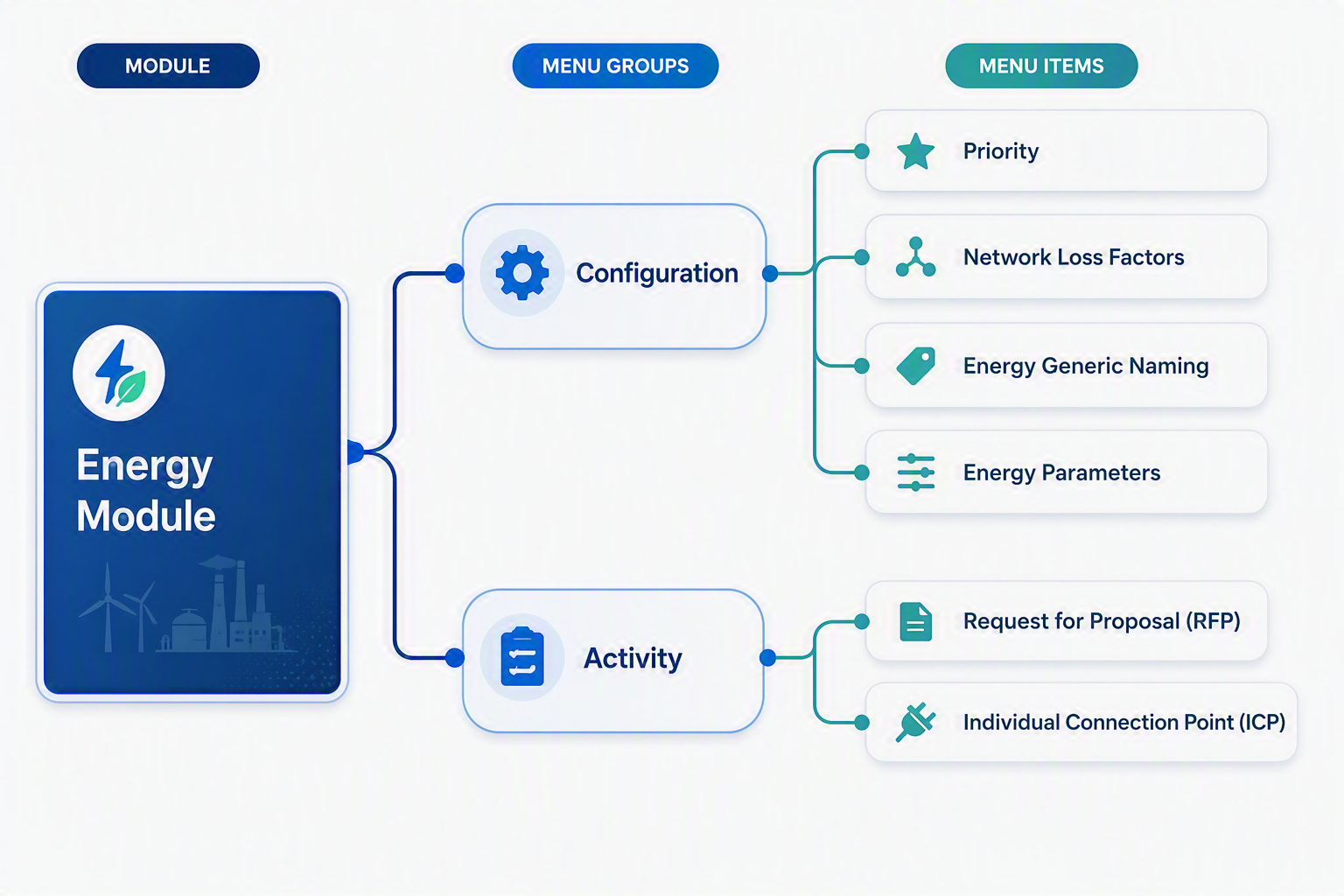
# Mobile App (Webatar)

The **Mobile App (Webatar)** provides secure, real-time access to key ERP functions from **Android, iOS and Windows devices**. Designed for staff working in the field, warehouse, workshop, office, or customer locations, Webatar enables users to capture and access information anytime, anywhere.

The application integrates directly with Huge ERP and includes functionality for:

<div id="bkmrk-production-tracking-">- **Production Tracking** – Record production activities and monitor job progress.
- **Job Costing &amp; Time Tracking** – Manage schedules, jobs, labour time, and client visits.
- **Inventory Management** – Perform stock enquiries, stock counts, transfers, receiving, and barcode scanning.
- **Asset Management** – Search, track, audit, and manage company assets.
- **Client Management** – Create and maintain customer information on the go.
- **Financial Processing** – Submit expenses, review purchase orders, and approve transactions remotely.
- **Sales Management** – Manage leads, quotes, orders, invoicing, payments, and sales reporting.
- **Support Services** – Log support activities and complete operational checklists.

</div>By providing mobile access to critical business processes, Webatar improves productivity, enhances data accuracy, reduces paperwork, and ensures information is updated immediately across the organisation.

[![Webatar Module.png](https://hugeerp10.co.za/hsofmanual/uploads/images/gallery/2026-08/scaled-1680-/webatar-module.png)](https://hugeerp10.co.za/hsofmanual/uploads/images/gallery/2026-08/webatar-module.png)
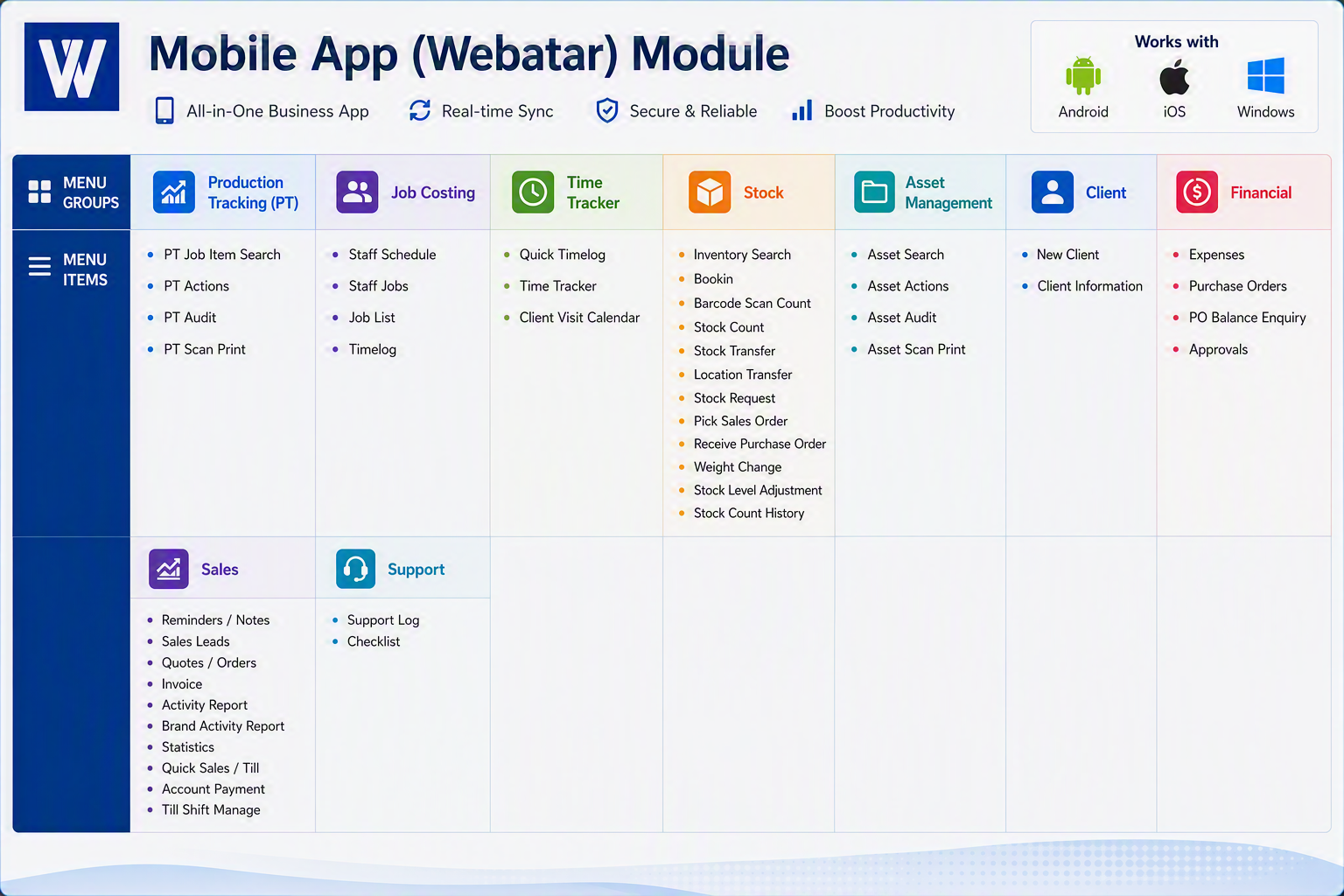
####  

#### Mobile App (Webatar) Modules

The **Mobile App (Webatar)** extends Huge ERP functionality to Android, iOS and Windows devices, enabling staff to access key business processes from the field, warehouse, office, or customer site in real time.

<div id="bkmrk--1">---

</div>##### Production Tracking (PT)

<div id="bkmrk-menu-item-descriptio"><table><thead><tr><th>Menu Item</th><th>Description</th></tr></thead><tbody><tr><td>**PT Job Item Search**</td><td>Search and view production job items, specifications, progress, and status information.</td></tr><tr><td>**PT Actions**</td><td>Record production activities, job completions, and operational transactions against production jobs.</td></tr><tr><td>**PT Audit**</td><td>Review production activity history and audit trails for compliance and traceability.</td></tr><tr><td>**PT Scan Print**</td><td>Scan barcodes and print production labels or documentation directly from the mobile device.</td></tr></tbody></table>

---

</div>##### Job Costing

<div id="bkmrk-menu-item-descriptio-1"><table><thead><tr><th>Menu Item</th><th>Description</th></tr></thead><tbody><tr><td>**Staff Schedule**</td><td>View employee schedules and planned work assignments.</td></tr><tr><td>**Staff Jobs**</td><td>Display jobs allocated to individual staff members.</td></tr><tr><td>**Job List**</td><td>Access and search all available jobs and project records.</td></tr><tr><td>**Timelog**</td><td>Record labour hours and job-related activities against specific jobs.</td></tr></tbody></table>

---

</div>##### Time Tracker

<div id="bkmrk-menu-item-descriptio-2"><table><thead><tr><th>Menu Item</th><th>Description</th></tr></thead><tbody><tr><td>**Quick Timelog**</td><td>Rapid entry of labour hours from the field or workshop.</td></tr><tr><td>**Time Tracker**</td><td>Start, stop and monitor time spent on jobs and activities.</td></tr><tr><td>**Client Visit Calendar**</td><td>View and manage customer appointments, site visits and scheduled meetings.</td></tr></tbody></table>

---

</div>##### Stock

<div id="bkmrk-menu-item-descriptio-3"><table><thead><tr><th>Menu Item</th><th>Description</th></tr></thead><tbody><tr><td>**Inventory Search**</td><td>Search inventory items and view stock availability, pricing and locations.</td></tr><tr><td>**Bookin**</td><td>Record the receipt of incoming assets for repair.</td></tr><tr><td>**Barcode Scan Count**</td><td>Use barcode scanning to perform stock take counts quickly and accurately.</td></tr><tr><td>**Stock Count**</td><td>Conduct manual inventory stock counts.</td></tr><tr><td>**Stock Transfer**</td><td>Transfer stock between warehouses, stores or locations.</td></tr><tr><td>**Location Transfer**</td><td>Move inventory between storage bins or specific warehouse locations.</td></tr><tr><td>**Stock Request**</td><td>Create requests for inventory replenishment or transfer.</td></tr><tr><td>**Pick Sales Order**</td><td>Pick stock for customer orders using mobile scanning functionality.</td></tr><tr><td>**Receive Purchase Order**</td><td>Receive goods against approved purchase orders.</td></tr><tr><td>**Weight Change**</td><td>Record weight adjustments for variable-weight inventory items.</td></tr><tr><td>**Stock Level Adjustment**</td><td>Increase or reduce stock quantities due to corrections, damage or write-offs.</td></tr><tr><td>**Stock Count History**</td><td>Review previous stock level adjustments and inventory count transactions.</td></tr></tbody></table>

---

</div>##### Asset Management

<div id="bkmrk-menu-item-descriptio-4"><table><thead><tr><th>Menu Item</th><th>Description</th></tr></thead><tbody><tr><td>**Asset Search**</td><td>Search and locate assets using barcode, serial number or asset details.</td></tr><tr><td>**Asset Actions**</td><td>Record maintenance, movement, issue, return or disposal transactions.</td></tr><tr><td>**Asset Audit**</td><td>View complete asset history and transaction records.</td></tr><tr><td>**Asset Scan Print**</td><td>Scan asset labels and print identification tags or documentation.</td></tr></tbody></table>

---

</div>##### Client

<div id="bkmrk-menu-item-descriptio-5"><table><thead><tr><th>Menu Item</th><th>Description</th></tr></thead><tbody><tr><td>**New Client**</td><td>Create new customer records directly from the mobile application.</td></tr><tr><td>**Client Information**</td><td>View customer contact details, addresses, account information and related activity.</td></tr></tbody></table>

---

</div>##### Financial

<div id="bkmrk-menu-item-descriptio-6"><table><thead><tr><th>Menu Item</th><th>Description</th></tr></thead><tbody><tr><td>**Expenses**</td><td>Capture employee expenses and submit them for processing.</td></tr><tr><td>**Purchase Orders**</td><td>View and manage approved purchase orders.</td></tr><tr><td>**PO Balance Enquiry**</td><td>Review outstanding purchase order balances and commitments.</td></tr><tr><td>**Approvals**</td><td>Approve transactions, requests and workflows while away from the office.</td></tr></tbody></table>

---

</div>##### Sales

<div id="bkmrk-menu-item-descriptio-7"><table><thead><tr><th>Menu Item</th><th>Description</th></tr></thead><tbody><tr><td>**Reminders / Notes**</td><td>Create and view customer notes, follow-ups and reminders.</td></tr><tr><td>**Sales Leads**</td><td>Manage prospective customers and sales opportunities.</td></tr><tr><td>**Quotes / Orders**</td><td>Create, review and update customer quotations and sales orders.</td></tr><tr><td>**Invoice**</td><td>Generate and view customer invoices.</td></tr><tr><td>**Activity Report**</td><td>Review sales activities, appointments and customer interactions.</td></tr><tr><td>**Brand Activity Report**</td><td>Analyse sales and marketing activity by brand or product category.</td></tr><tr><td>**Statistics**</td><td>View sales performance metrics and summary information.</td></tr><tr><td>**Quick Sales / Till**</td><td>Process point-of-sale sales transactions directly from the device.</td></tr><tr><td>**Account Payment**</td><td>Record customer payments against accounts and invoices.</td></tr><tr><td>**Till Shift Manage**</td><td>Open, close and manage cash register or till shifts.</td></tr></tbody></table>

---

</div>##### Support

<div id="bkmrk-menu-item-descriptio-8"><table><thead><tr><th>Menu Item</th><th>Description</th></tr></thead><tbody><tr><td>**Support Log**</td><td>Record service calls, support incidents and customer issues.</td></tr><tr><td>**Checklist**</td><td>Complete operational, maintenance or compliance checklists in the field.</td></tr></tbody></table>

</div>---

#### Mobile App (Webatar)

The **Webatar Mobile App** provides real-time access to core Huge ERP functions from **Android, iOS and Windows devices**. It enables staff to manage production activities, job costing, time tracking, inventory, asset management, sales, financial approvals and customer support from anywhere. By connecting directly to Huge ERP, Webatar improves productivity, reduces paperwork, accelerates data capture and ensures information is updated instantly across the organisation.

[![Webatar map.png](https://hugeerp10.co.za/hsofmanual/uploads/images/gallery/2026-08/scaled-1680-/webatar-map.png)](https://hugeerp10.co.za/hsofmanual/uploads/images/gallery/2026-08/webatar-map.png)