Module Maps defined
- System Configuration map
- General Ledger Module map
- Debtors Module map
- Creditors Module map
- Inventory Module map
- Job Costing map
- Asset Tracker Module map
- CRM map
- Production Tracking (PT) map
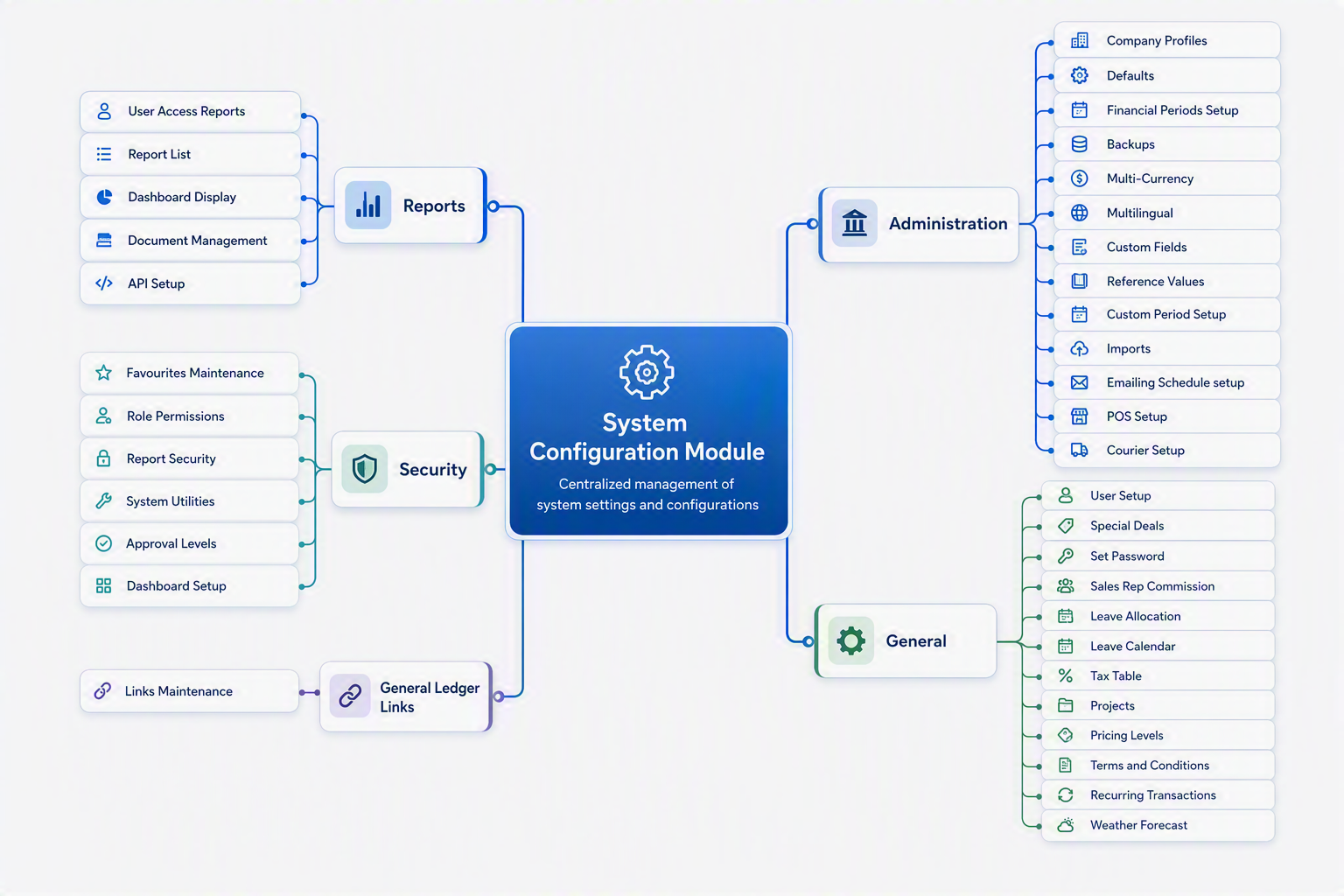
System Configuration map
Welcome to the System Configuration Module, the central administration area of Huge ERP. This module is designed to control and maintain the core settings that drive the operation of the entire ERP system. It provides administrators and authorised users with the tools required to configure company information, maintain security settings, manage users, define financial periods, set default system behaviour, and establish critical links between operational modules and the General Ledger.
The System Configuration Module serves as the foundation of Huge ERP, ensuring that all modules operate consistently and efficiently. Changes made within this module can affect system-wide functionality, making it one of the most important areas of the application. Proper setup and maintenance help ensure data accuracy, streamline business processes, improve security, and support organisational compliance requirements.
Within this module, users can manage company profiles, user accounts, security permissions, approval workflows, tax settings, pricing structures, email schedules, imports, integrations, and reporting access. The module is organised into five main menu groups:
- Administration – Controls system-wide configuration settings and company setup.
- General – Maintains users, pricing, tax structures, projects, and recurring information.
- General Ledger Links – Defines how transactions from other modules are posted to the General Ledger.
- Security – Manages permissions, approvals, favourites, dashboard settings, and access controls.
- Reports – Provides access to configuration reports, security reports, dashboards, and document management functions.
Because many settings in this module affect the entire ERP environment, it is recommended that only authorised personnel make changes. Before updating configuration settings, users should ensure they understand the impact these changes may have on business processes and other system users.
By maintaining accurate configuration settings, organisations can maximise the efficiency, security, and reliability of their Huge ERP environment.
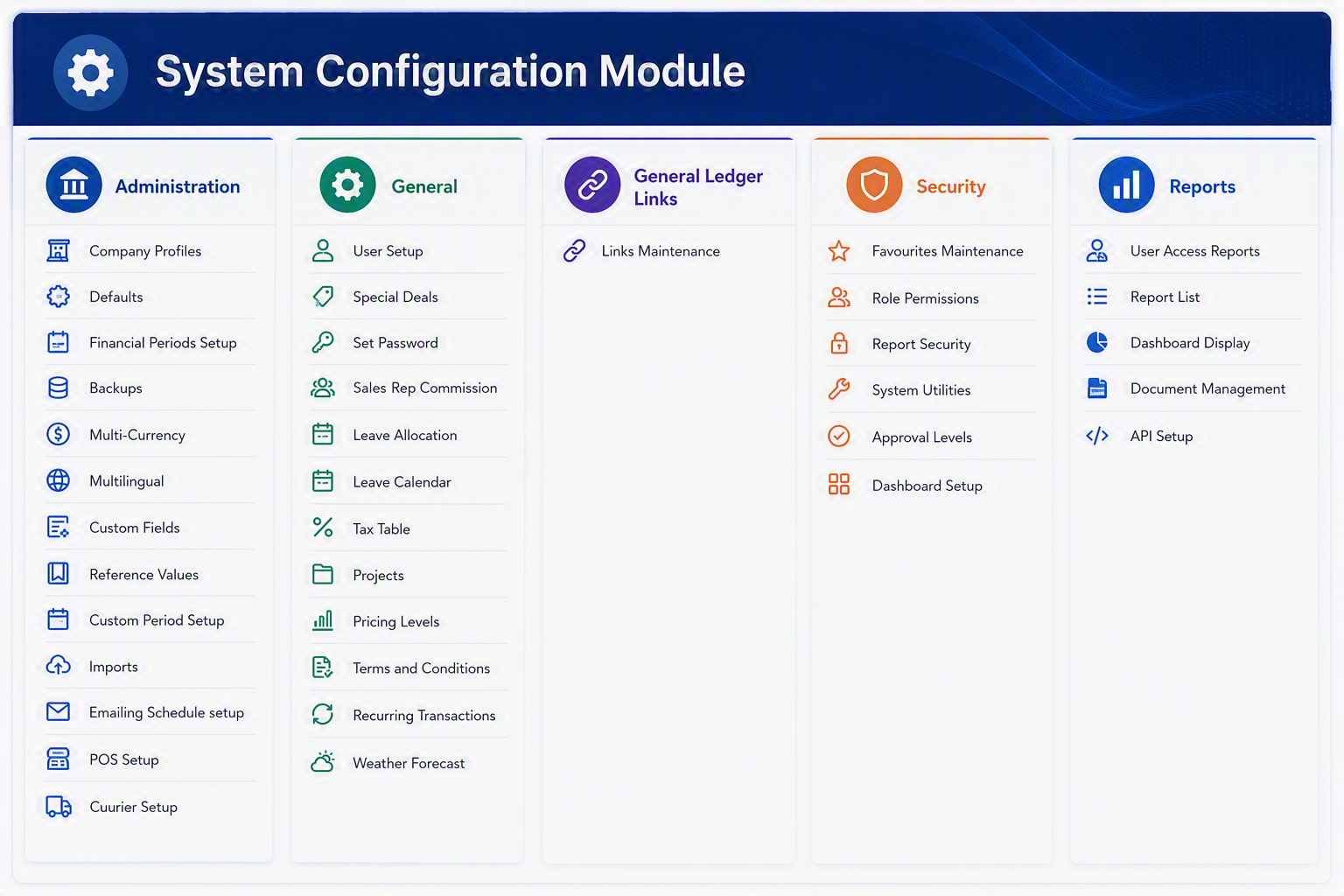
System Configuration Module Menu Items
Administration
General
General Ledger Links
Security
Reports
Brief Manual Description
The System Configuration Module is used to manage the central setup areas of Huge ERP. This module controls key system settings such as company profiles, user setup, security permissions, financial periods, tax tables, pricing levels, email scheduling, imports, POS setup, and reporting access. It is normally used by administrators or authorised users to configure how the system operates, control access, and maintain the core information required by other modules.
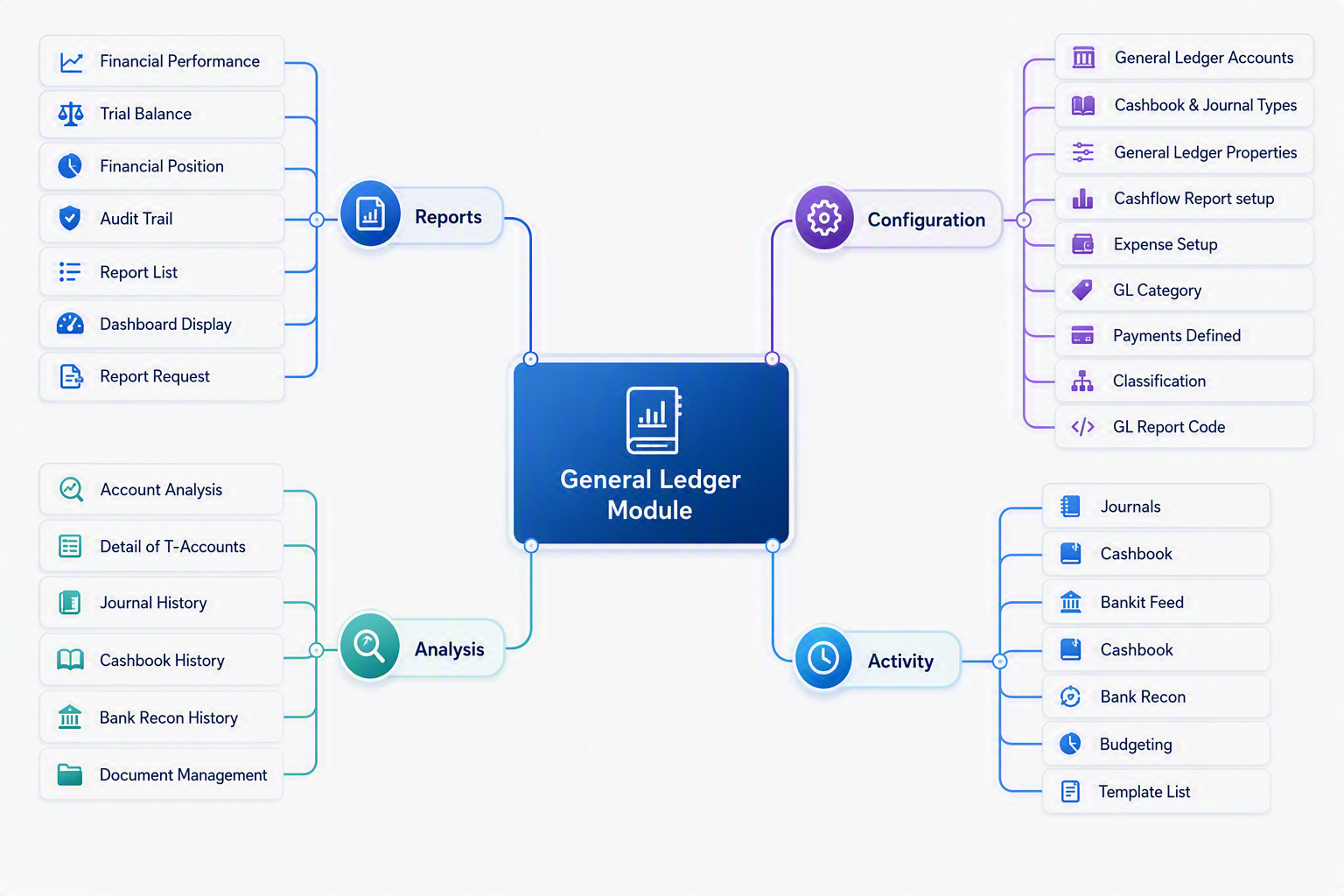
General Ledger Module map
General Ledger Module
The General Ledger Module is the central financial management area of Huge ERP. It allows users to configure accounting settings, process financial transactions, analyse financial information, and produce management and statutory reports.
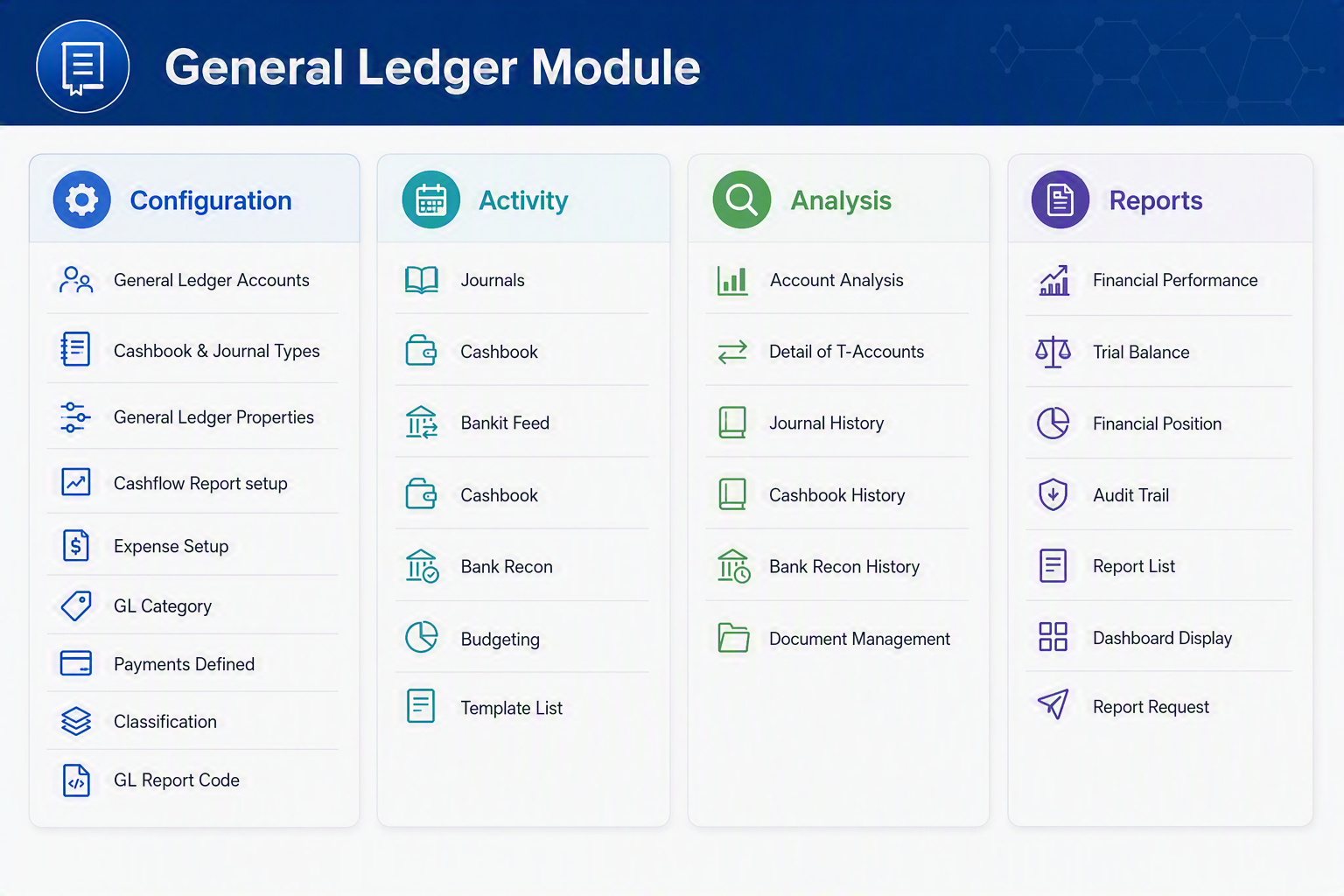
Configuration Menu Group
Activity Menu Group
Analysis Menu Group
Reports Menu Group
General Ledger Workflow
| Step | Purpose |
|---|---|
| Configuration | Setup accounts, categories, report structures, and financial settings. |
| Activity | Process journals, cashbook entries, bank transactions, and budgets. |
| Analysis | Review financial activity and investigate balances or transactions. |
| Reports | Produce financial statements, management reports, and audit information. |
This structure follows the standard accounting process of Configure → Process → Analyse → Report, making the General Ledger the financial backbone of the Huge ERP system.
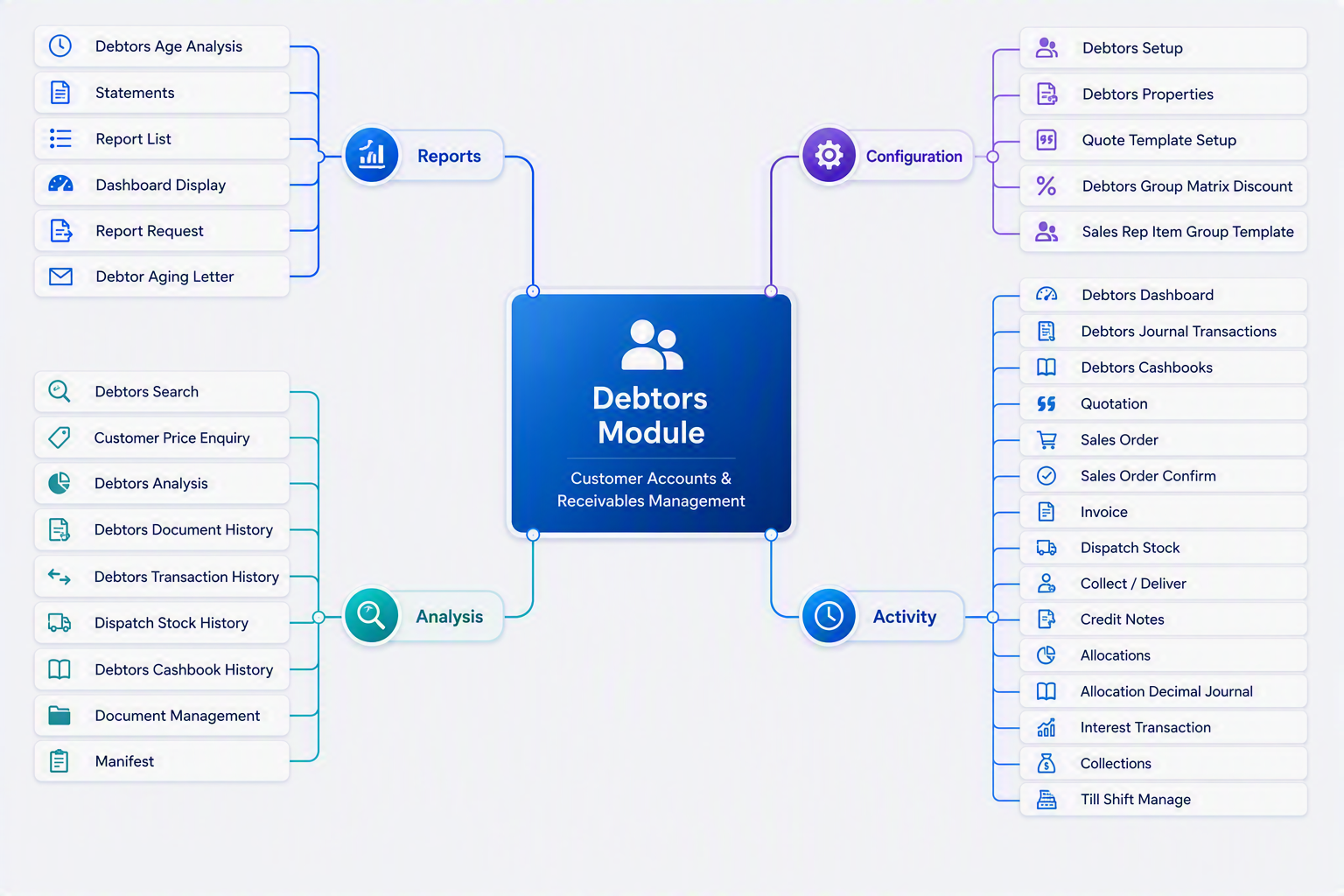
Debtors Module map
The Debtors Module manages the complete customer receivables process, from quotation and sales order entry through to invoicing, payment allocation, collections, customer analysis, and financial reporting. It provides sales staff, accounts receivable teams, and management with the tools required to control customer accounts, monitor outstanding debt, and improve cash flow.
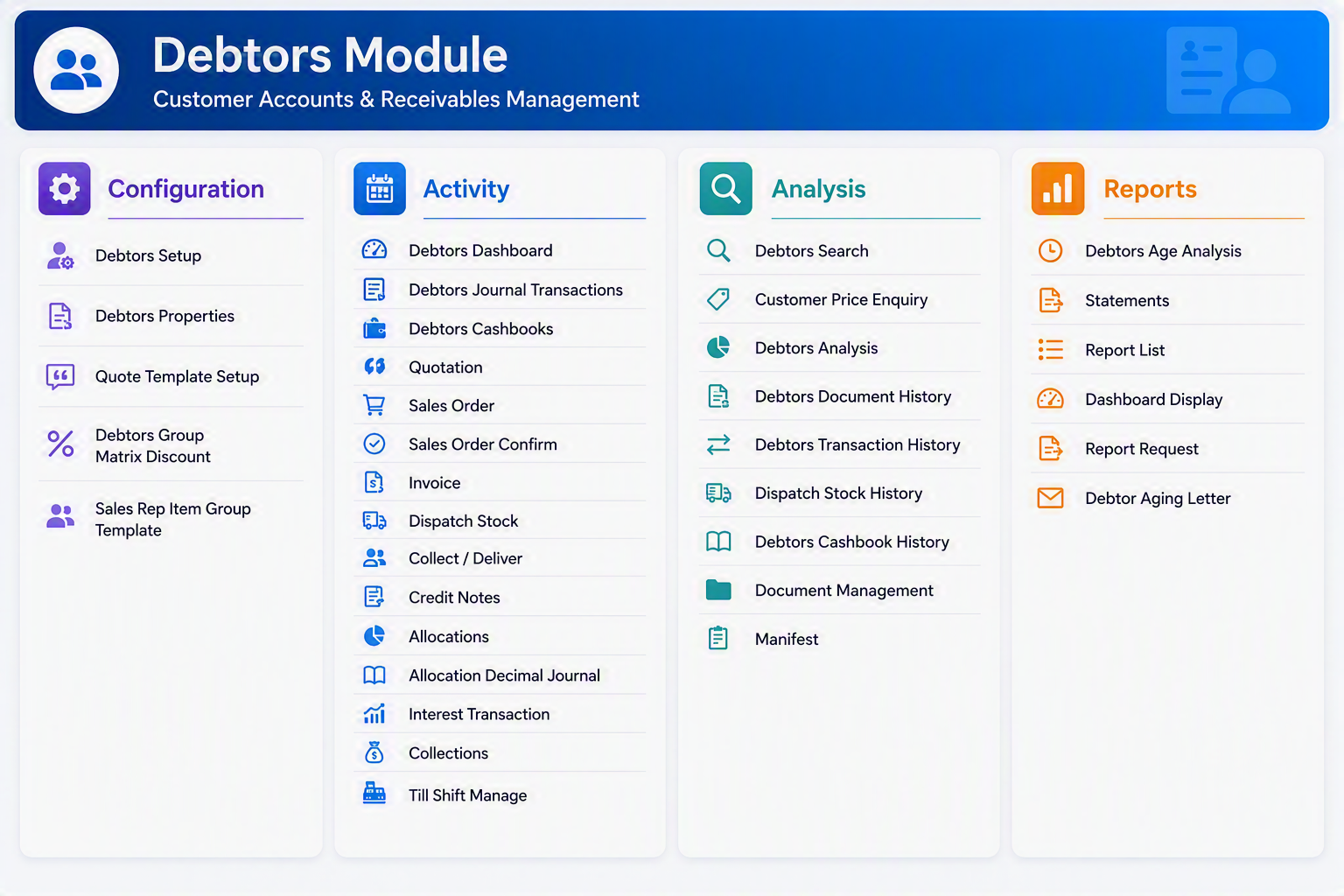
Debtors Module - Menu Item Explanations
Configuration
Activity
Analysis
Reports
Debtors Workflow
| Step | Purpose |
|---|---|
| Configuration | Configure customer account settings, quotation templates, discount structures, debtor groups, and sales-related defaults. |
| Activity | Process daily customer transactions including quotations, sales orders, invoicing, cash receipts, allocations, collections, and credit notes. |
| Analysis | Review customer activity, outstanding balances, pricing information, transaction history, document records, and stock movement information. |
| Reports | Generate debtor ageing reports, customer statements, collection letters, dashboards, and management reports to monitor receivables performance. |
This structure follows the standard customer receivables process of Configure → Process → Analyse → Report, making the Debtors Module the central hub for managing customer accounts, sales transactions, collections, and cash flow within the Huge ERP system.
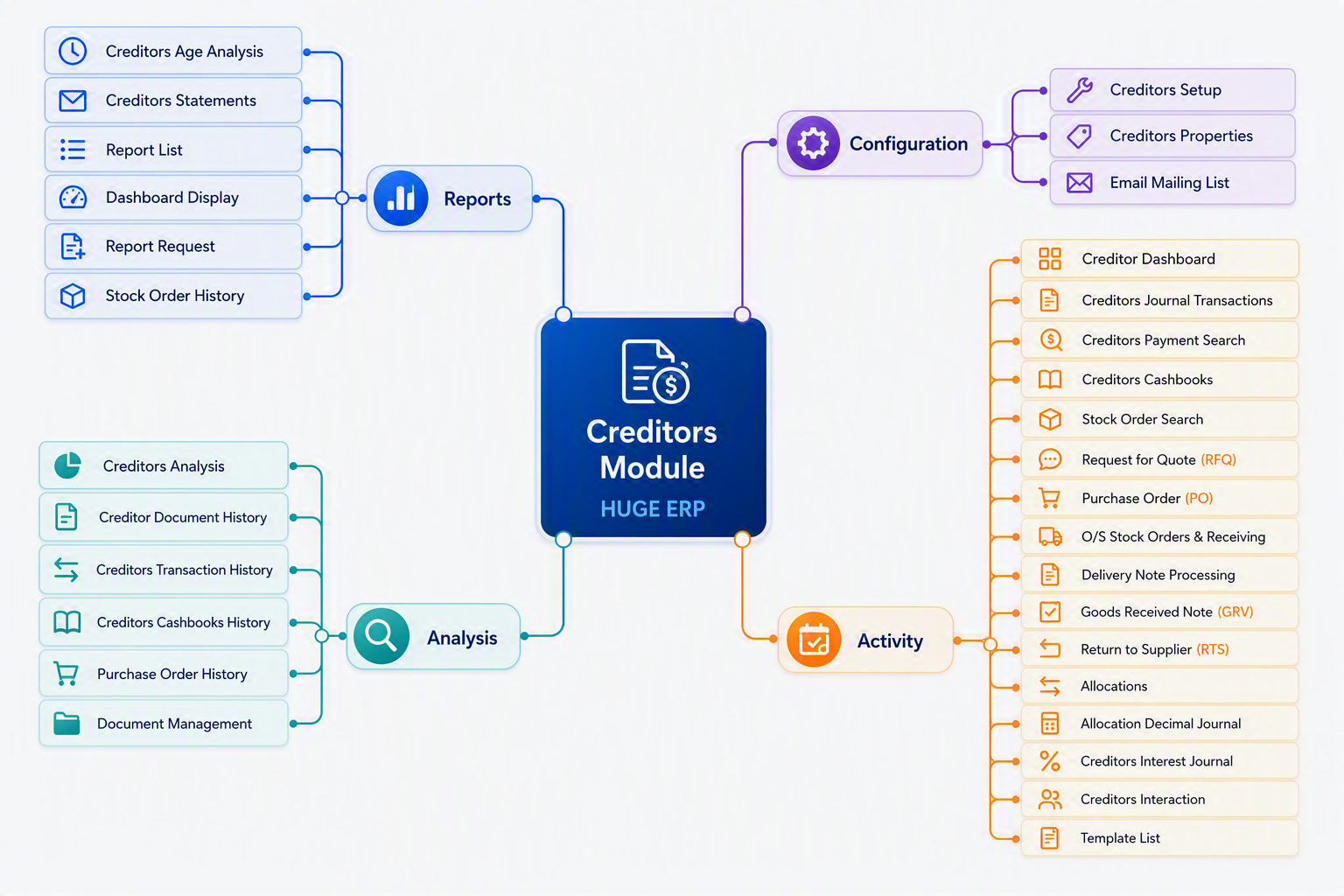
Creditors Module map
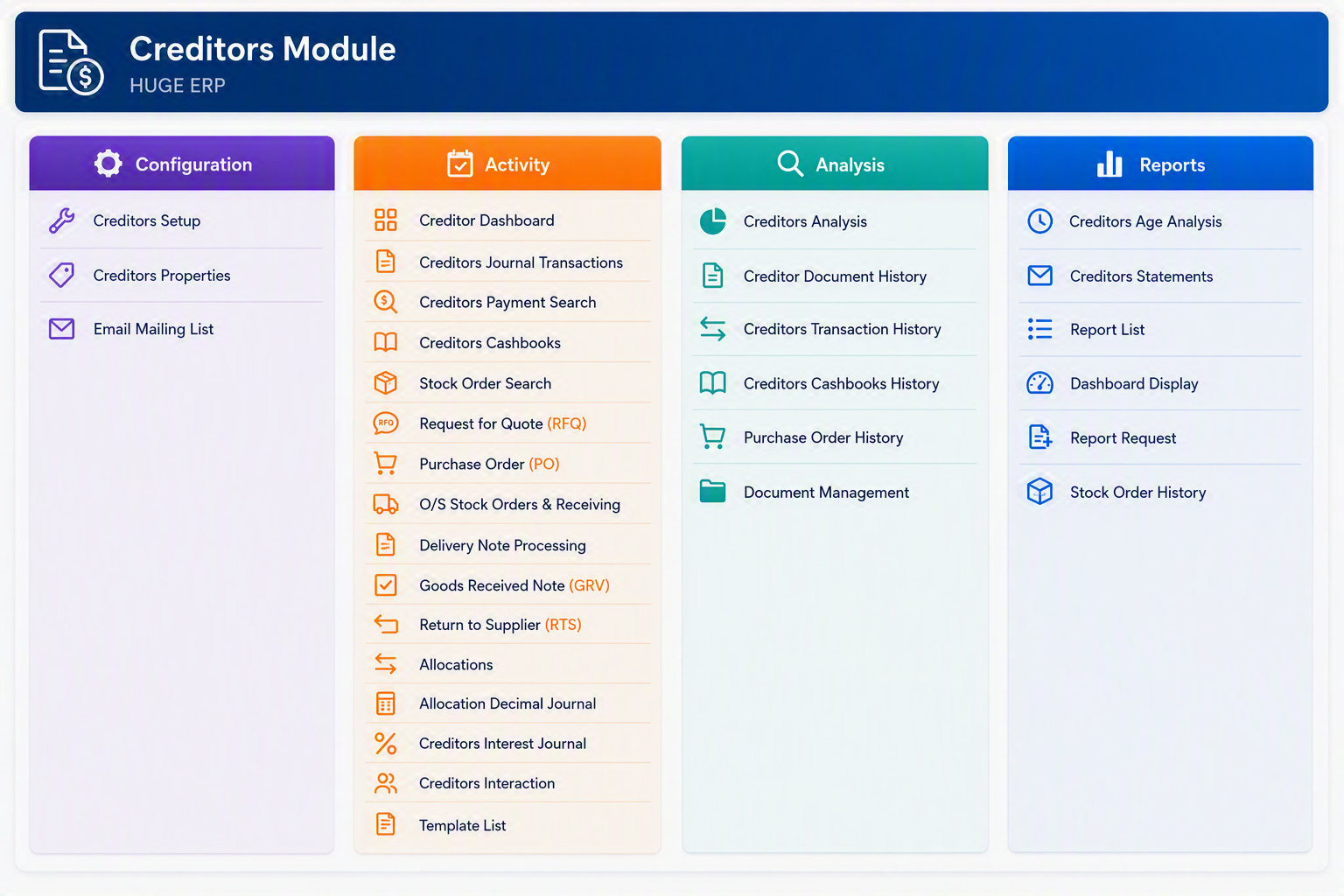
Creditors Module - Configuration
Creditors Module - Activity
Creditors Module - Analysis
Creditors Module - Reports
Creditors Module Overview
The Creditors Module is used to manage supplier accounts, purchasing activities, goods receiving, creditor payments, allocations, and supplier reporting. The module is divided into four menu groups:
Creditors Purchasing Flow Overview
The Creditors Purchasing Flow illustrates the complete purchasing lifecycle within the Huge ERP Creditors Module, from supplier setup through to payment and reporting. It provides a visual guide to the key processes used when purchasing goods and services from suppliers and managing creditor accounts.
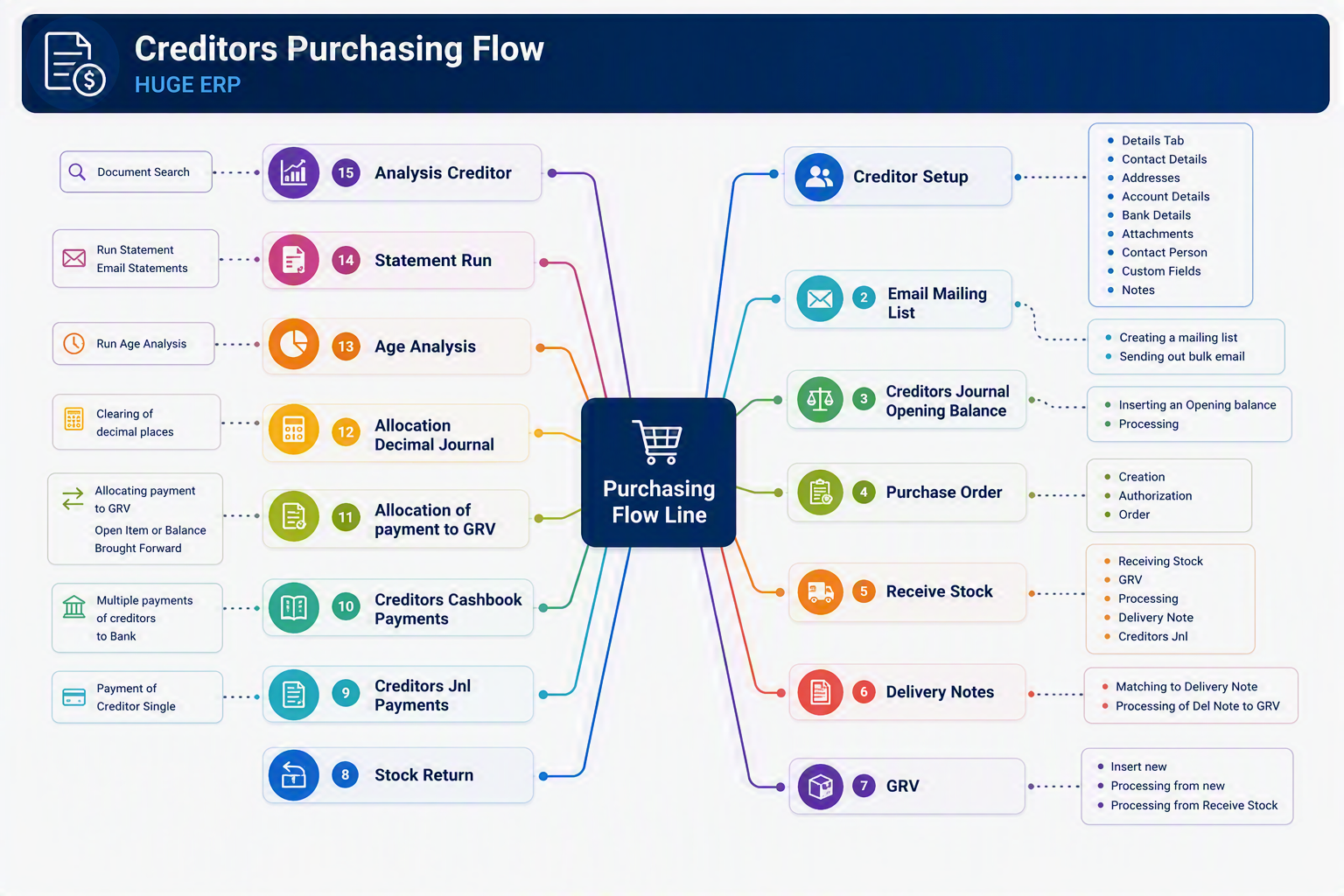
Flow Summary
-
Creditor Setup
- Create and maintain supplier records.
- Store contact details, addresses, bank details, attachments, contact persons, custom fields, and notes.
-
Email Mailing List
- Maintain supplier email distribution lists.
- Send bulk communications or supplier notices.
-
Creditors Journal Opening Balance
- Enter opening balances when implementing the system.
- Record historical creditor balances brought forward.
-
Purchase Order (PO)
- Create and authorise purchase orders.
- Generate formal orders for suppliers.
-
Receive Stock
- Record the arrival of goods from suppliers.
- Capture received quantities prior to invoice processing.
-
Delivery Notes
- Process supplier delivery notes.
- Match delivered goods against purchase orders and receipts.
-
Goods Received Voucher (GRV)
- Confirm goods received into inventory.
- Create the accounting transaction that links purchasing and creditors.
-
Stock Return
- Return damaged, incorrect, or surplus stock to suppliers.
- Adjust inventory and supplier balances accordingly.
-
Creditors Journal Payments
- Process individual supplier payments via creditor journals.
-
Creditors Cashbook Payments
- Generate and process multiple supplier payments.
- Transfer payments through bank processing and cashbooks.
-
Allocation of Payment to GRV
- Match supplier payments against invoices and GRVs.
- Clear outstanding creditor balances.
-
Allocation Decimal Journal
- Handle rounding differences and minor allocation variances.
-
Age Analysis
- Review outstanding creditor balances by ageing period.
- Identify suppliers requiring payment.
-
Statement Run
- Produce creditor statements.
- Email statements directly to suppliers if required.
-
Analysis Creditor
- Access historical creditor transactions.
- Review documents, balances, purchasing history, and supplier activity.
Typical Purchasing Process
For most organisations the purchasing cycle follows this sequence:
Creditor Setup → Purchase Order → Receive Stock → Delivery Note → GRV → Supplier Payment → Allocation → Age Analysis → Reporting
This process ensures that:
- Goods received are matched to purchase orders.
- Supplier invoices are correctly recorded.
- Payments are allocated accurately.
- Creditor balances remain up to date.
- Complete audit trails are maintained throughout the purchasing cycle.
Business Benefit
The Creditors Purchasing Flow provides full control over supplier purchasing, inventory receipts, invoice matching, payment processing, and creditor analysis, ensuring accurate financial records and improved supplier management throughout the organisation.
Inventory Module map
Inventory Module Overview
The Inventory Module is the central hub for managing stock, warehouses, inventory movements, and product control within Huge ERP. It provides organisations with complete visibility of inventory levels across multiple locations while supporting purchasing, manufacturing, stock adjustments, transfers, barcode scanning, RFID tracking, serial number management, and batch-controlled inventory. The module is designed to help businesses maintain accurate stock records, optimise inventory holdings, improve warehouse efficiency, and ensure inventory costs are accurately reflected throughout the organisation.
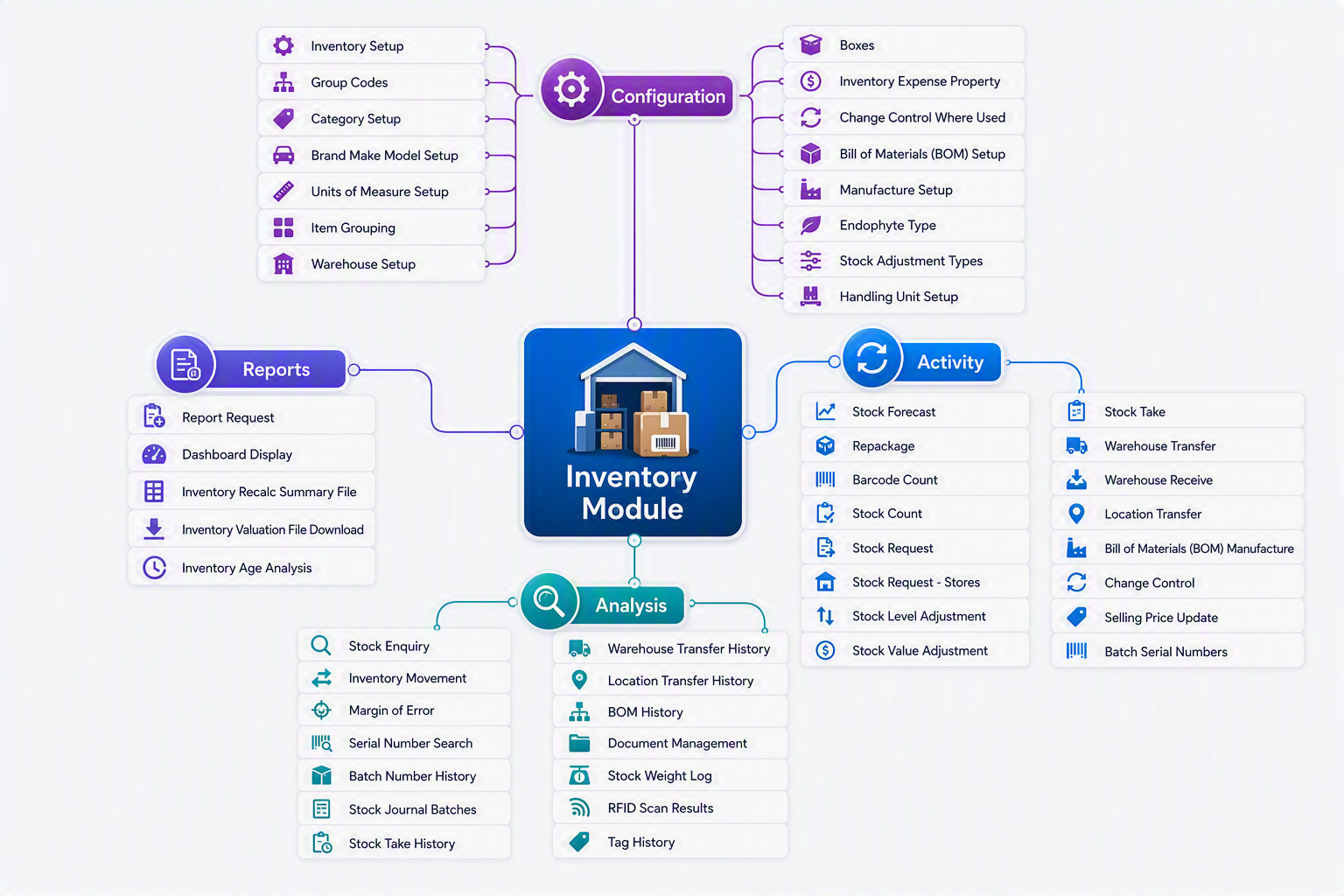
The Inventory Module is divided into four key areas:
- Configuration – Setup and maintain inventory structures, warehouses, categories, units of measure, handling units, and manufacturing settings.
- Activity – Perform day-to-day inventory transactions such as stock receipts, transfers, stock takes, adjustments, forecasting, and manufacturing.
- Analysis – Monitor inventory performance through enquiries, movement history, batch tracking, RFID results, and stock analysis tools.
- Reports – Generate inventory reports, dashboards, valuation extracts, and ageing analysis to support operational and management decision-making.
Using these tools together allows businesses to maintain accurate inventory records, improve stock control, support manufacturing processes, and provide real-time visibility of inventory across the organisation.
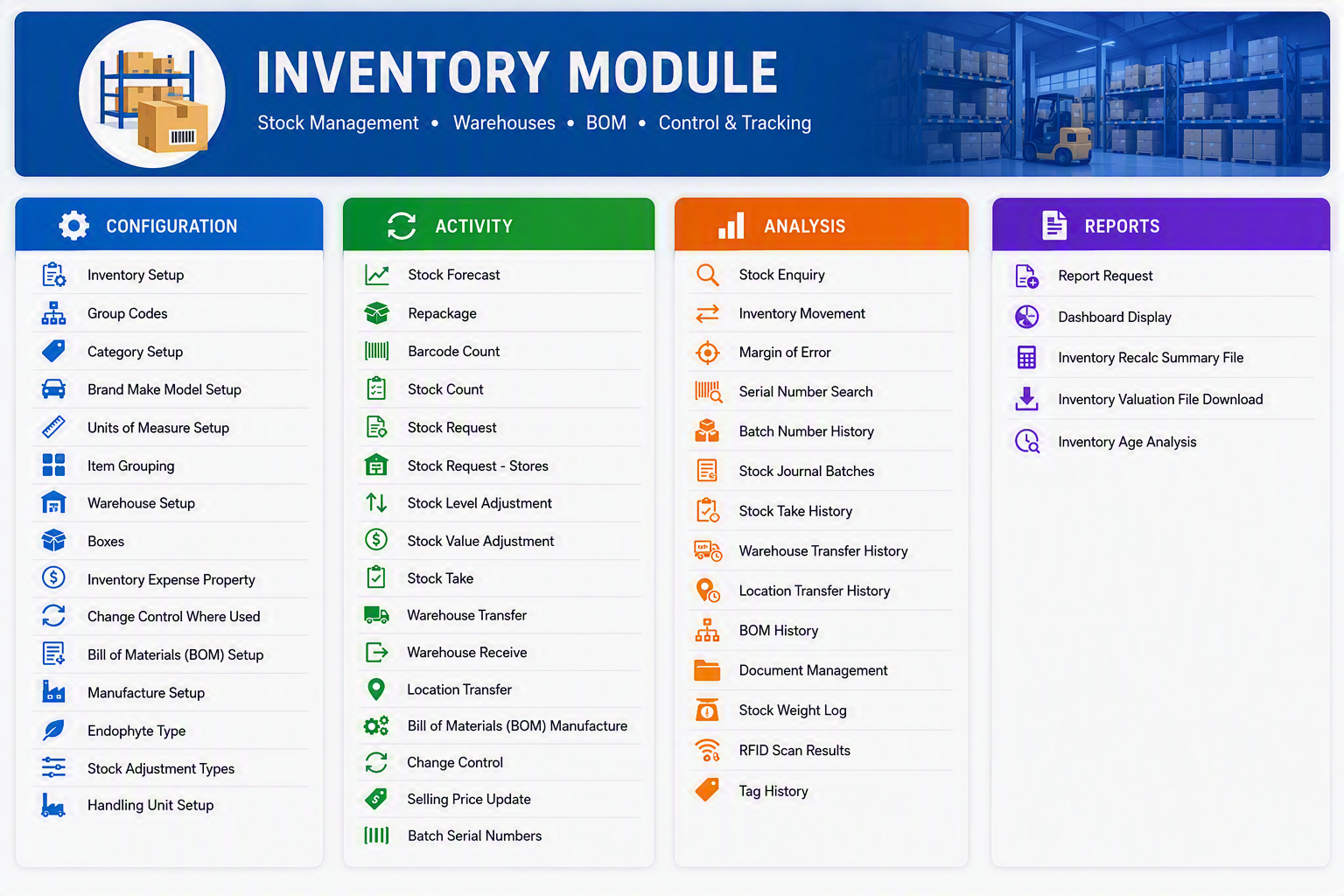
Inventory Module
The Inventory Module manages stock items, warehouses, inventory movements, valuation, manufacturing, barcode/RFID tracking, and stock analysis. The following tables provide a high-level explanation of each menu item available within the module.
Configuration
Activity
Analysis
Reports
Inventory Module Workflow
Job Costing map
Job Costing Module Overview
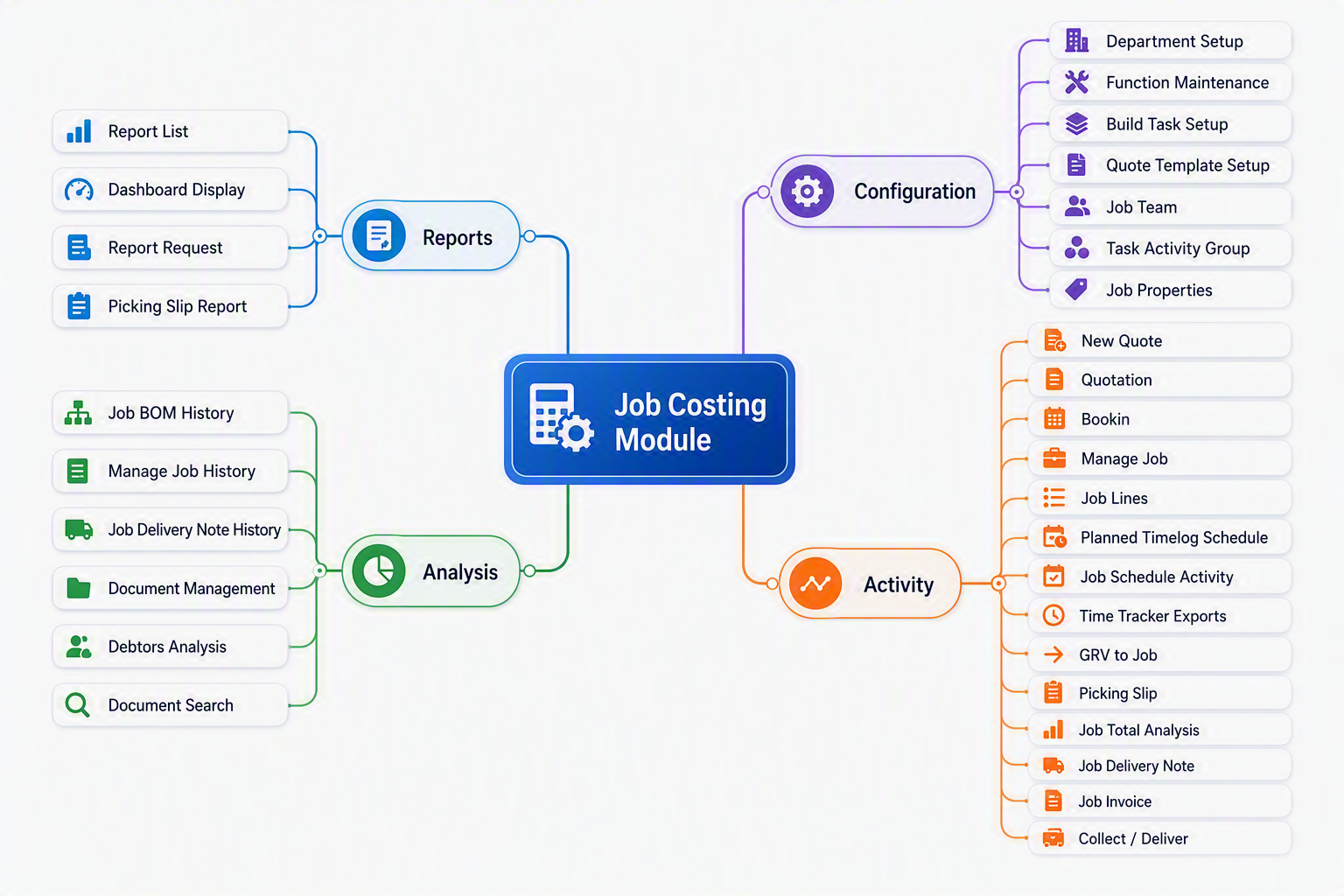
The Job Costing Module is designed to help organisations manage the complete lifecycle of a job, from quotation and planning through to costing, delivery, invoicing, and profitability analysis. The module provides a central location for managing job-related activities, materials, labour, scheduling, documentation, and financial performance. By capturing all job costs and revenue in one system, users can monitor budgets, track progress, analyse profitability, and ensure accurate invoicing. The Job Costing Module integrates with purchasing, inventory, debtors, and financial management processes, giving management real-time visibility into the operational and financial performance of every job.
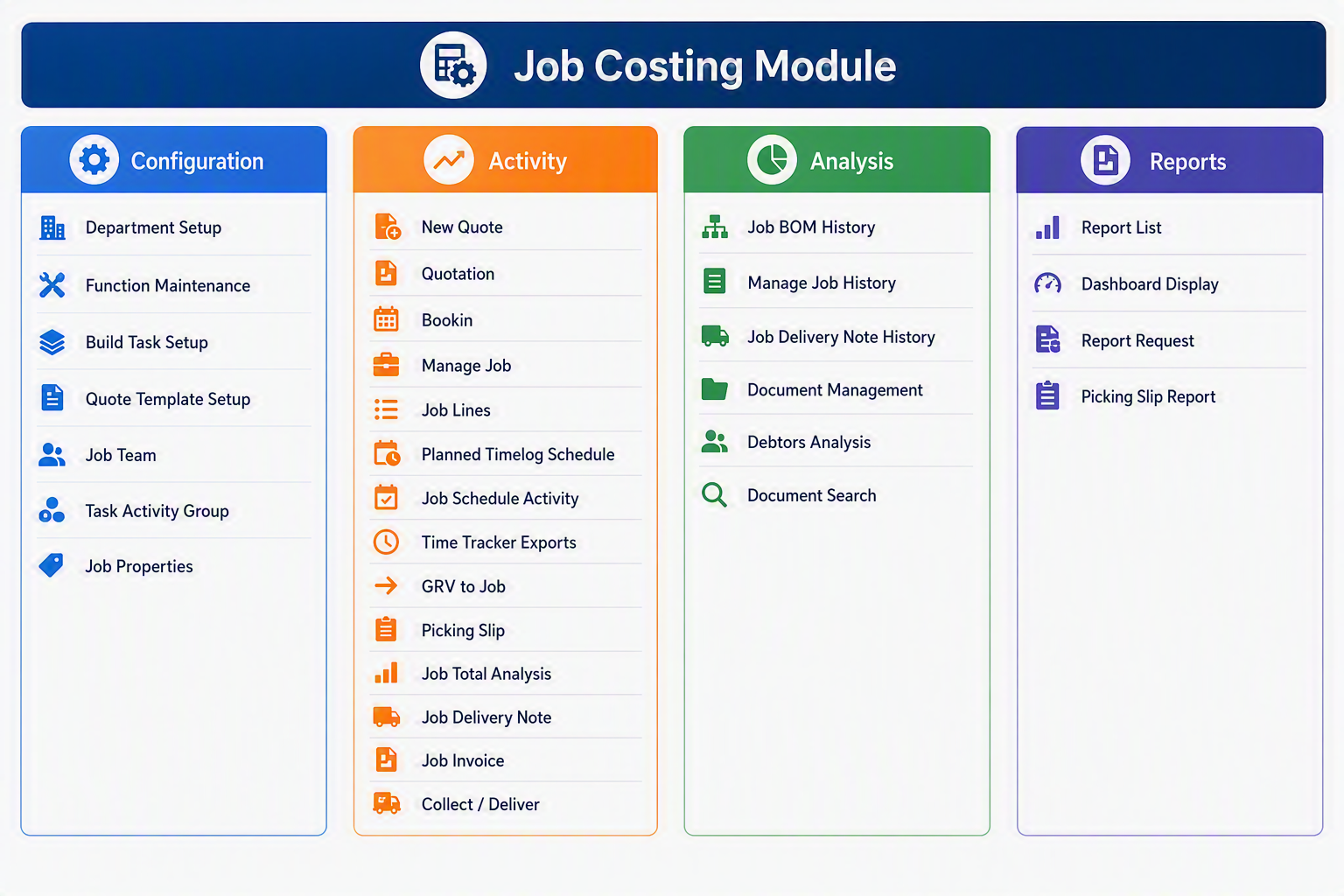
Job Costing Module Menu Items
Configuration
Activity
Analysis
Reports
Brief Module Summary
| Area | Purpose |
|---|---|
| Configuration | Sets up the master data and rules required before jobs, quotes, tasks, teams, and properties can be used. |
| Activity | Handles the day-to-day processing of quotes, jobs, job lines, time, deliveries, picking slips, and invoicing. |
| Analysis | Provides access to historical job information, document records, debtor-related analysis, and job document searches. |
| Reports | Provides reporting and dashboard access for reviewing job costing activity and producing operational reports. |
Asset Tracker Module map
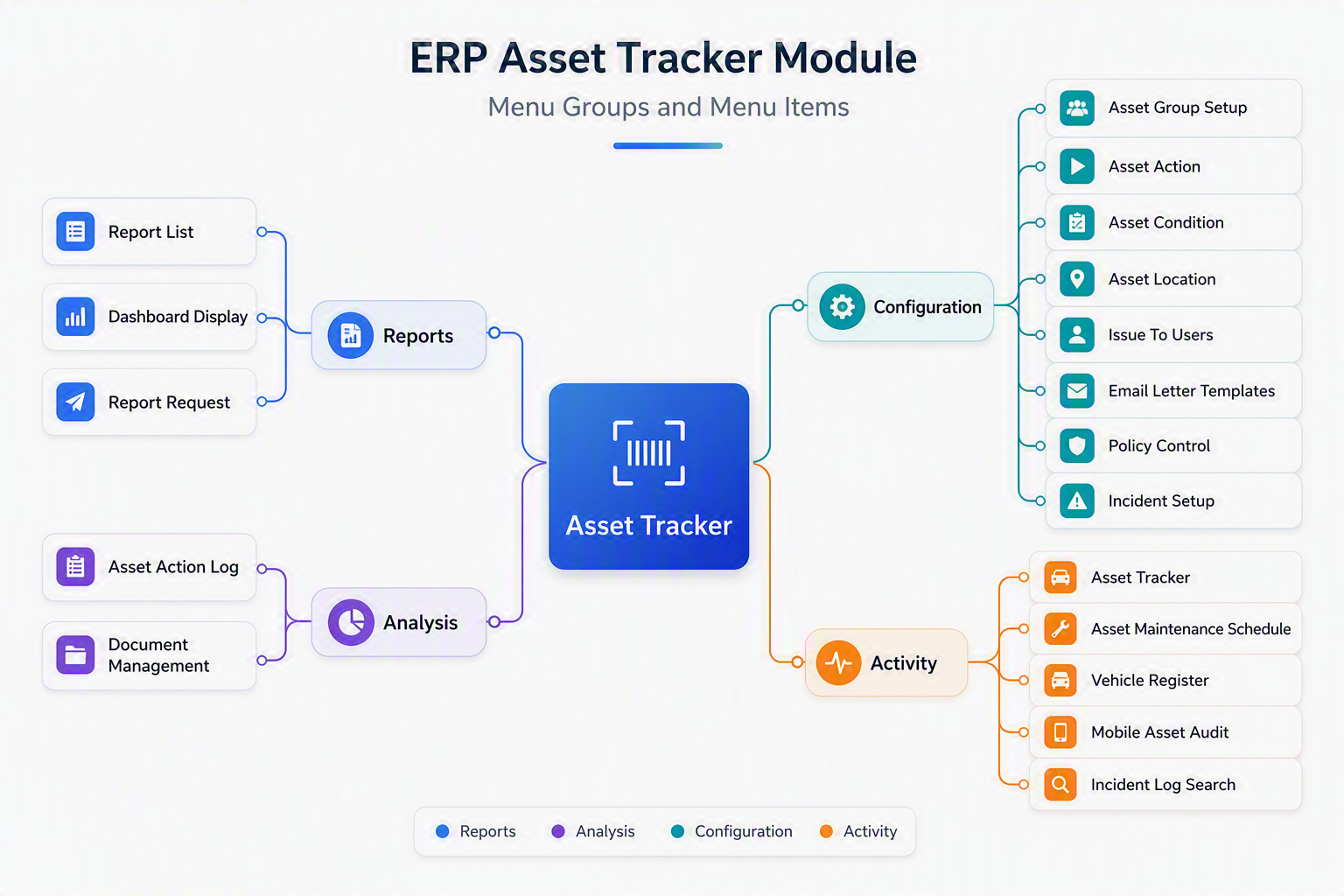
The Asset Tracker Module provides a comprehensive solution for recording, monitoring, and managing organisational assets throughout their lifecycle. It enables businesses to maintain accurate asset records, track asset locations and assignments, schedule maintenance activities, manage incidents, store supporting documentation, and produce detailed reports. By centralising asset information in a single system, the module helps improve asset visibility, accountability, compliance, and operational efficiency while ensuring critical assets are properly maintained and controlled.
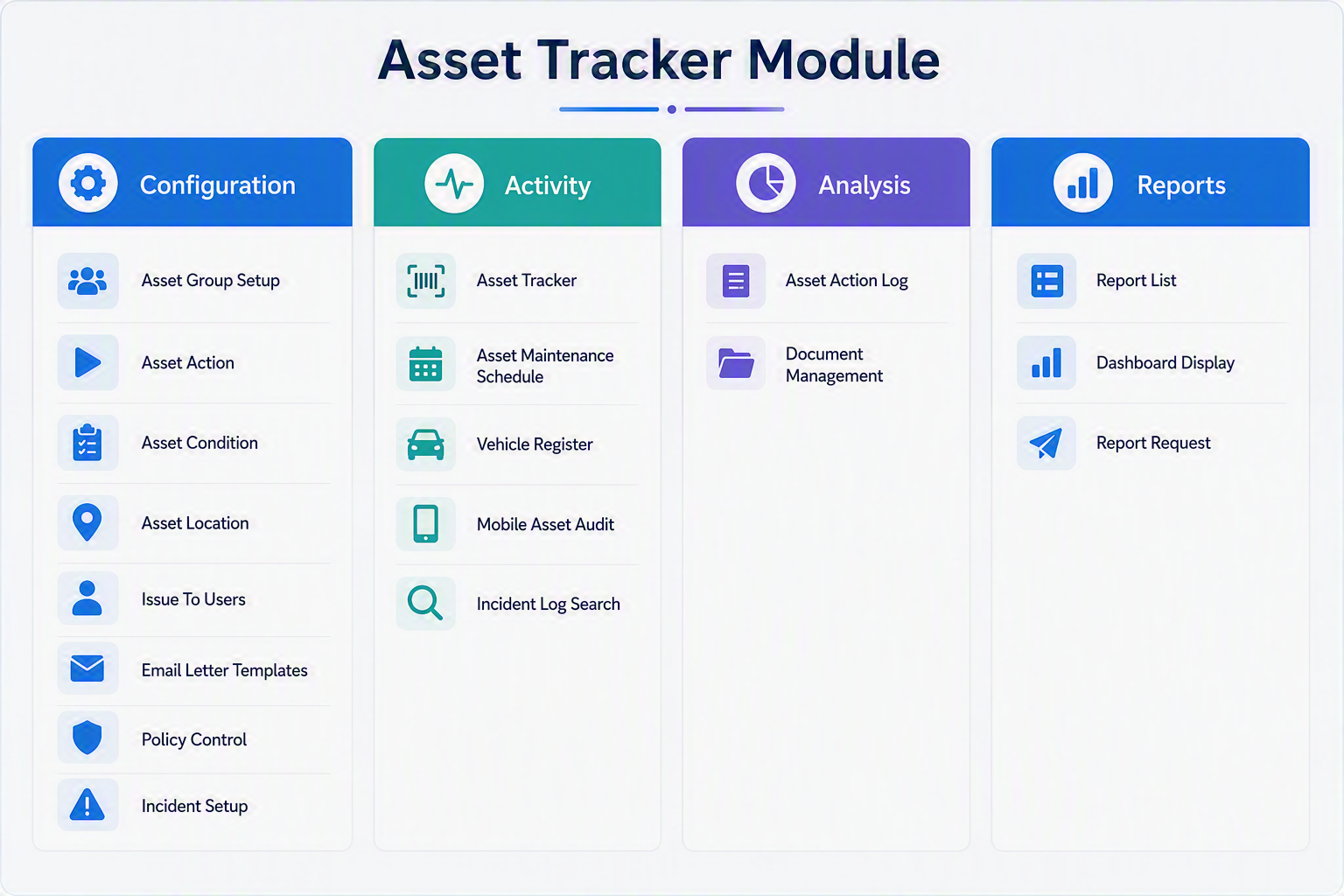
Asset Tracker Module Menu Items
Configuration
Activity
Analysis
Reports
Asset Tracker
The Asset Tracker Module in Huge ERP provides a central area for managing business assets, including asset setup, tracking, maintenance, incidents, documentation, and reporting. The module is divided into four menu groups: Configuration, Activity, Analysis, and Reports. Configuration is used to set up the supporting information required for asset control, Activity is used for day-to-day asset management, Analysis provides access to asset logs and supporting documents, and Reports allows users to review asset information through lists, dashboards, and report requests.
CRM map
The CRM (Customer Relationship Management) Module within Huge ERP provides a centralised platform for managing customer interactions, sales opportunities, support requests, communication activities, and time-based services. It enables organisations to maintain stronger customer relationships by capturing and tracking all customer-related activities in a single system.
The module includes tools for managing sales leads, customer support tickets, reminders, bookings, contracts, document storage, email and SMS communications, and time logging. Integrated checklist management and workflow tracking help ensure that customer enquiries, support issues, and sales opportunities are handled consistently and efficiently.
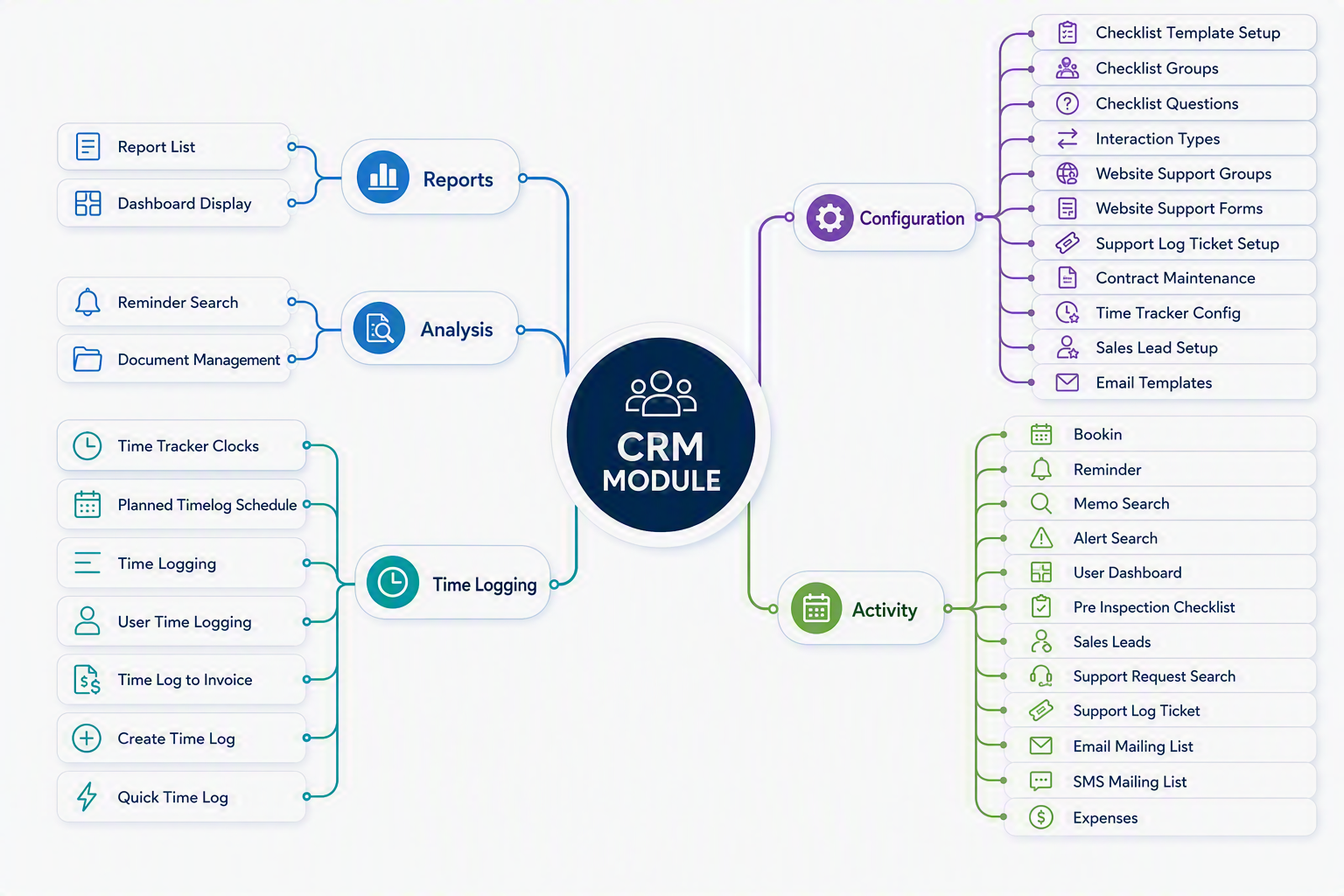
The CRM Module is divided into five key areas:
- Configuration – Defines CRM settings, interaction types, support configurations, checklists, contracts, email templates, and sales lead parameters.
- Activity – Provides day-to-day operational functions including sales lead management, support ticket processing, reminders, bookings, customer communications, and expense recording.
- Time Logging – Records and manages time spent on customer support, service activities, and billable work, with the ability to convert approved time into invoices.
- Analysis – Offers search and document management facilities for reviewing customer information, reminders, and historical CRM records.
- Reports – Delivers reporting and dashboard tools that provide visibility into customer activity, support performance, sales pipeline status, and operational workload.
By combining customer relationship management, service management, communication tracking, and time recording into a single integrated solution, the CRM Module helps organisations improve customer service, increase sales effectiveness, and maintain complete visibility of all customer-related activities.
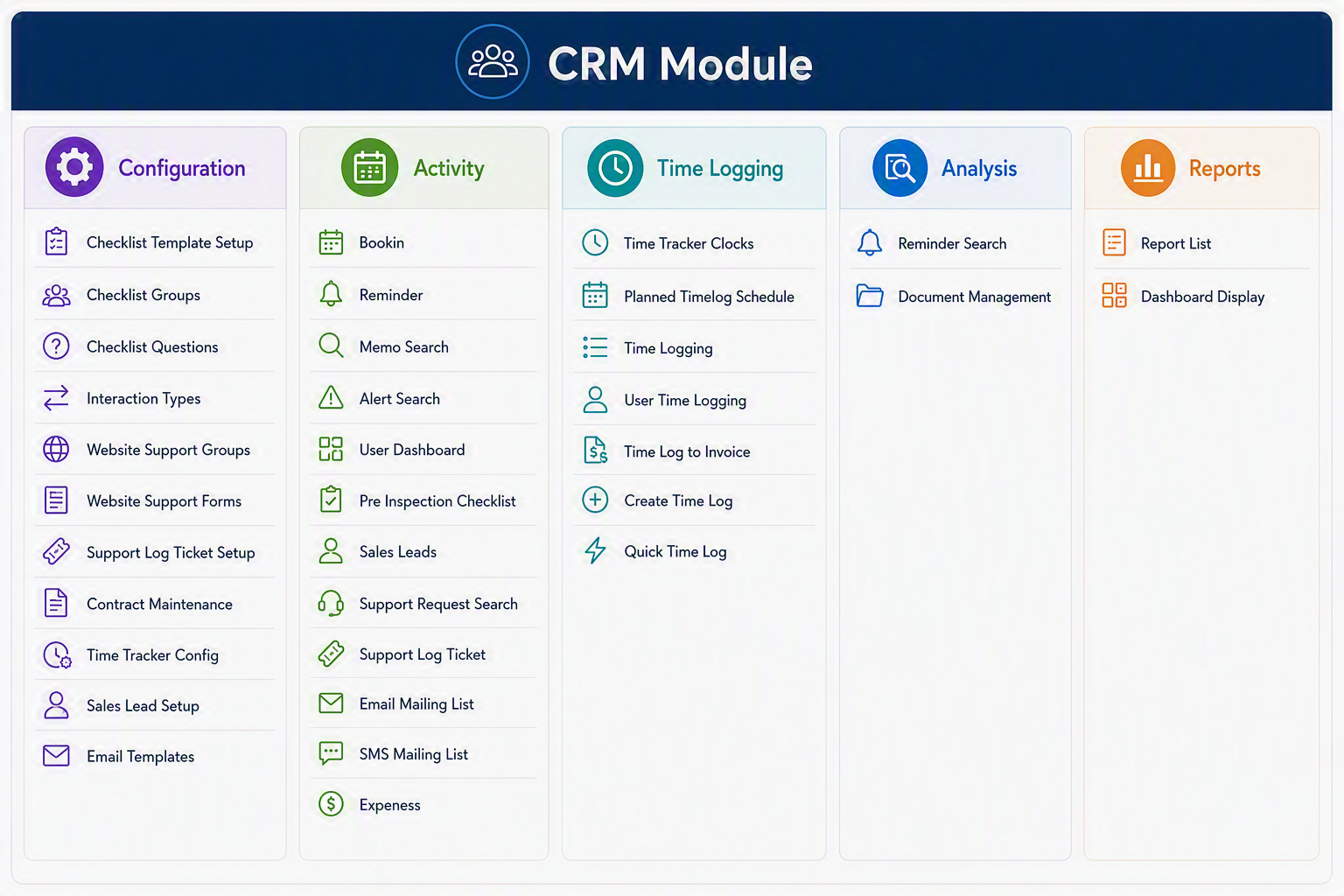
CRM Module Menu Groups and Menu Items
Configuration
Activity
Time Logging
Analysis
Reports
CRM Module
The CRM Module in Huge ERP is used to manage customer relationships, support requests, sales leads, reminders, communication lists, contracts, time logging, and related CRM activities. The module is divided into five main Menu Groups: Configuration, Activity, Time Logging, Analysis, and Reports. Configuration is used to set up the CRM structure and defaults, Activity manages day-to-day customer and support tasks, Time Logging records and processes time spent on activities, Analysis provides search and document management tools, and Reports gives users access to CRM reporting and dashboard views.
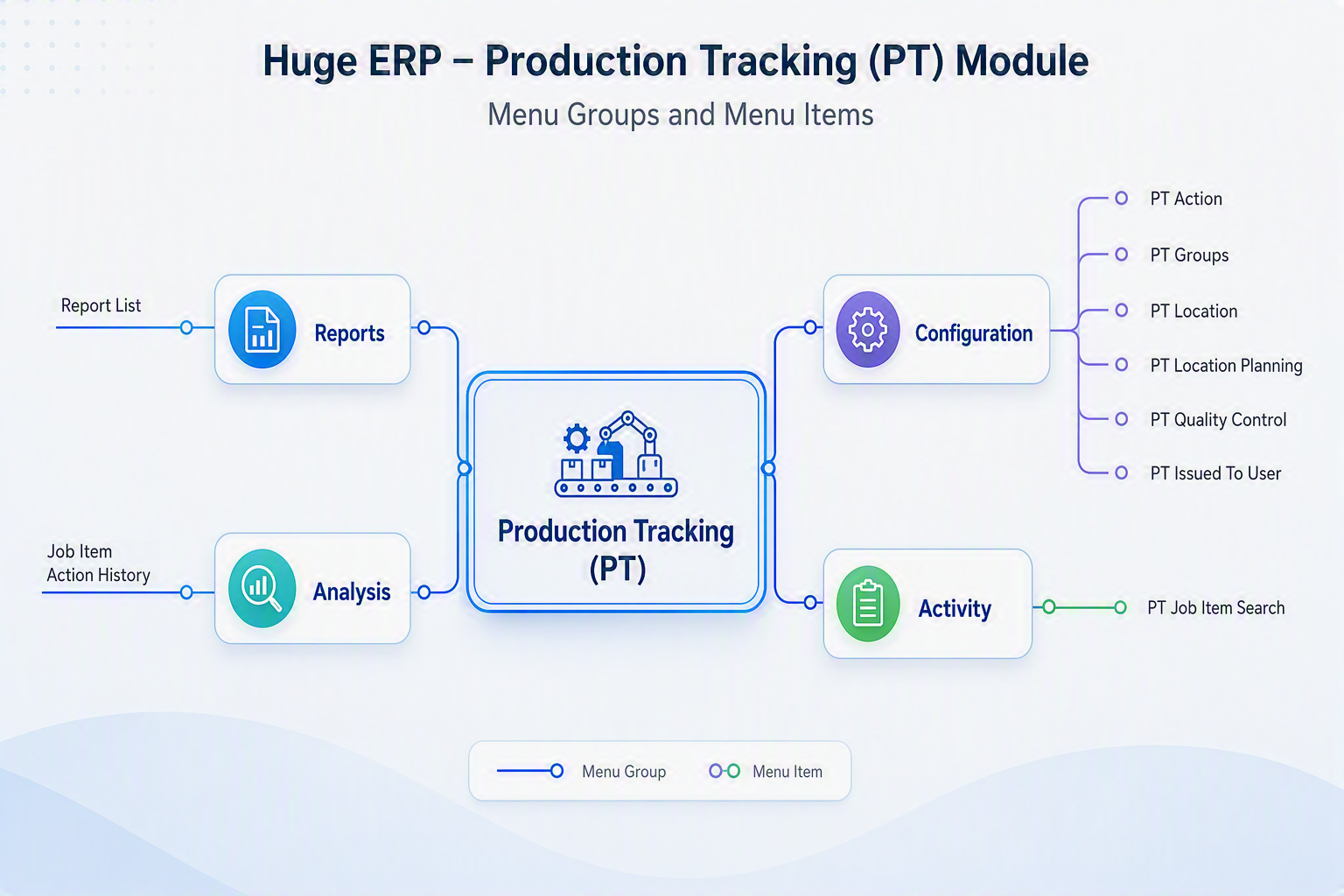
Production Tracking (PT) map
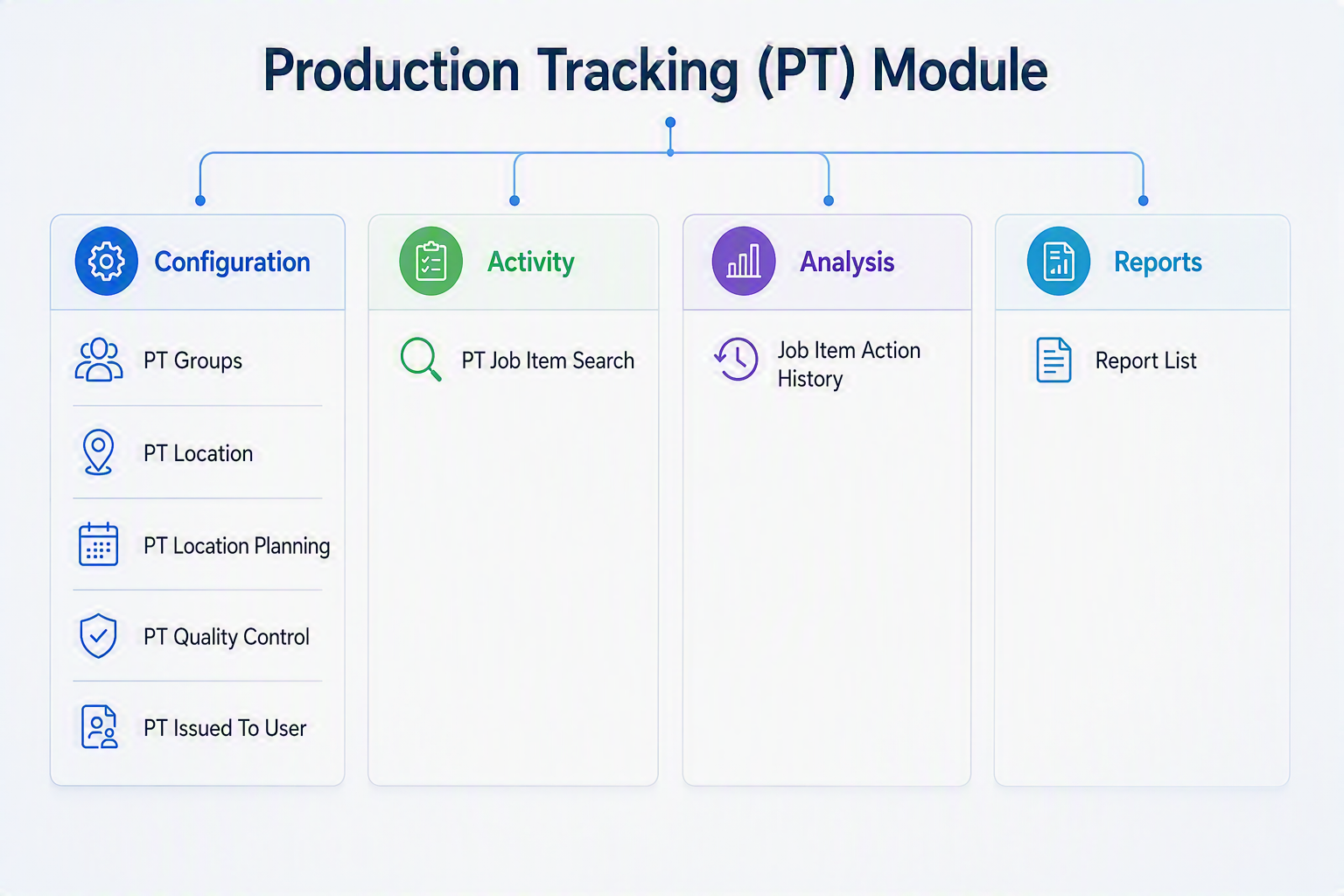
Production Tracking (PT) Module
Configuration
Activity
Analysis
Reports
Module Summary
The Production Tracking (PT) Module enables organisations to monitor and manage production processes against job items. Users can configure production actions, locations, planning requirements, and quality controls, track production activity in real time, analyse job item histories, and generate reports to measure production performance and progress.