# Sample Submit

# Lab Sample Submit

Quick Add window allows users to add in a Lab Sample request

It has limited information

#### Test Status by User

This search is filtered by the user logged into the system.

Allows the user to check on all Samples submitted and their status

[![image.png](https://hugeerp10.co.za/hsofmanual/uploads/images/gallery/2024-06/scaled-1680-/9wdimage.png)](https://hugeerp10.co.za/hsofmanual/uploads/images/gallery/2024-06/9wdimage.png)

---

#### General Tab

[![image.png](https://hugeerp10.co.za/hsofmanual/uploads/images/gallery/2024-06/scaled-1680-/mGiimage.png)](https://hugeerp10.co.za/hsofmanual/uploads/images/gallery/2024-06/mGiimage.png)

<table border="1" id="bkmrk-general-tab-details-" style="border-collapse: collapse; width: 100%; height: 646.469px;"><colgroup><col style="width: 26.1112%;"></col><col style="width: 74.0124%;"></col></colgroup><tbody><tr style="height: 29.7969px;"><td style="height: 29.7969px;">**General Tab**</td><td style="height: 29.7969px;">**Details**</td></tr><tr style="height: 29.7969px;"><td style="height: 29.7969px;">**Test No**</td><td style="height: 29.7969px;">Displays the Lab unique test number</td></tr><tr style="height: 29.7969px;"><td style="height: 29.7969px;">**Application number**</td><td style="height: 29.7969px;">The application number the user entered</td></tr><tr style="height: 29.7969px;"><td style="height: 29.7969px;">**Requested by**</td><td style="height: 29.7969px;">The name of the user who requested the lab test</td></tr><tr style="height: 29.7969px;"><td style="height: 29.7969px;">**Customer**</td><td style="height: 29.7969px;">Customer requesting Lab test</td></tr><tr style="height: 29.7969px;"><td style="height: 29.7969px;">**Order Number**</td><td style="height: 29.7969px;">The Order number the user entered</td></tr><tr style="height: 35.3906px;"><td style="height: 35.3906px;">**Request Type**</td><td style="height: 35.3906px;">Internal or External (default to Internal)

</td></tr><tr style="height: 29.7969px;"><td style="height: 29.7969px;">**Description**</td><td style="height: 29.7969px;">Description of Lab test to be done</td></tr><tr style="height: 29.7969px;"><td style="height: 29.7969px;">**Date Required By**</td><td style="height: 29.7969px;">Date the test is required, will default to 14 dates from issue</td></tr><tr style="height: 29.7969px;"><td style="height: 29.7969px;">**Lot/Line**</td><td style="height: 29.7969px;">Lot / Line information entered by the user</td></tr><tr style="height: 57.7812px;"><td style="height: 57.7812px;">**Priority**</td><td style="height: 57.7812px;">Priority levels (defaulted to Normal)

Low, Normal, Urgent, Very Urgent

</td></tr></tbody></table>

<table border="1" id="bkmrk-item-to-test-item-se" style="border-collapse: collapse; width: 100%; height: 297.969px;"><colgroup><col style="width: 26.605%;"></col><col style="width: 73.5186%;"></col></colgroup><tbody><tr style="height: 29.7969px;"><td style="height: 29.7969px;">**Item to test**</td><td style="height: 29.7969px;">Item search on inventory list</td></tr><tr style="height: 29.7969px;"><td style="height: 29.7969px;">**Item Description**</td><td style="height: 29.7969px;">Description of item, can be changed</td></tr><tr style="height: 29.7969px;"><td style="height: 29.7969px;">**Quantity**</td><td style="height: 29.7969px;">The quantity to be tested</td></tr><tr style="height: 29.7969px;"><td style="height: 29.7969px;">**UOM**</td><td style="height: 29.7969px;">Unit of Measure of selected item</td></tr><tr style="height: 29.7969px;"><td style="height: 29.7969px;">**Kind**</td><td style="height: 29.7969px;">Enter the kind of item</td></tr><tr style="height: 29.7969px;"><td style="height: 29.7969px;">**Cultivar**  
</td><td style="height: 29.7969px;">Enter the cultivar</td></tr><tr><td>**Test Type**</td><td>Enter Test Type</td></tr><tr style="height: 29.7969px;"><td style="height: 29.7969px;">**Notes**</td><td style="height: 29.7969px;">Enter a Note</td></tr></tbody></table>

---

Address Tab

[![image.png](https://hugeerp10.co.za/hsofmanual/uploads/images/gallery/2024-06/scaled-1680-/5X7image.png)](https://hugeerp10.co.za/hsofmanual/uploads/images/gallery/2024-06/5X7image.png)

---

#### Tests Required

[![image.png](https://hugeerp10.co.za/hsofmanual/uploads/images/gallery/2024-06/scaled-1680-/2hLimage.png)](https://hugeerp10.co.za/hsofmanual/uploads/images/gallery/2024-06/2hLimage.png)

<table border="1" id="bkmrk-tests-required-detai" style="border-collapse: collapse; width: 100%;"><colgroup><col style="width: 23.1482%;"></col><col style="width: 76.9754%;"></col></colgroup><tbody><tr><td>**Tests Required**</td><td>**Details**</td></tr><tr><td>**Grid of listed tests**</td><td>Tick the tests required</td></tr></tbody></table>

---

#### View Test Results

High the test you want to see test results

Click on View Test Results

[![image.png](https://hugeerp10.co.za/hsofmanual/uploads/images/gallery/2024-06/scaled-1680-/Tnaimage.png)](https://hugeerp10.co.za/hsofmanual/uploads/images/gallery/2024-06/Tnaimage.png)

# New Seeds upload

Seeds must exist in the database before submitting samples

Prepare Import file for Seed/Stock items

[![image.png](https://hugeerp10.co.za/hsofmanual/uploads/images/gallery/2024-08/scaled-1680-/L50image.png)](https://hugeerp10.co.za/hsofmanual/uploads/images/gallery/2024-08/L50image.png)

Export file layout for header information

[![image.png](https://hugeerp10.co.za/hsofmanual/uploads/images/gallery/2024-08/scaled-1680-/6RTimage.png)](https://hugeerp10.co.za/hsofmanual/uploads/images/gallery/2024-08/6RTimage.png)

See example of file layout - [Basic Inventory Import Seed.xlsx](https://hugeerp10.co.za/hsofmanual/attachments/44)

[![image.png](https://hugeerp10.co.za/hsofmanual/uploads/images/gallery/2024-08/scaled-1680-/CiLimage.png)](https://hugeerp10.co.za/hsofmanual/uploads/images/gallery/2024-08/CiLimage.png)

[![image.png](https://hugeerp10.co.za/hsofmanual/uploads/images/gallery/2024-08/scaled-1680-/AfXimage.png)](https://hugeerp10.co.za/hsofmanual/uploads/images/gallery/2024-08/AfXimage.png)

[![image.png](https://hugeerp10.co.za/hsofmanual/uploads/images/gallery/2024-08/scaled-1680-/96Wimage.png)](https://hugeerp10.co.za/hsofmanual/uploads/images/gallery/2024-08/96Wimage.png)

Once you have prepared the import file, save as an Excel document and close.

Importing will do the following:

1. New items will be added if it does not exist
2. Existing items will be updated

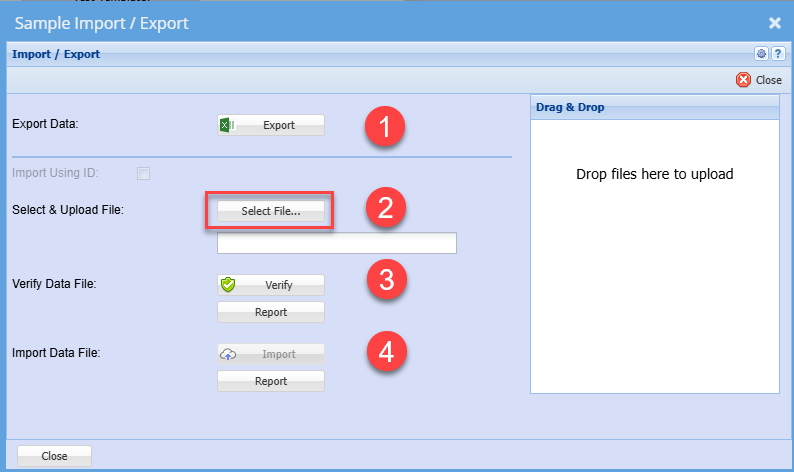
Follow steps 2 to 4 to upload new and existing items

[![image.png](https://hugeerp10.co.za/hsofmanual/uploads/images/gallery/2024-08/scaled-1680-/nrximage.png)](https://hugeerp10.co.za/hsofmanual/uploads/images/gallery/2024-08/nrximage.png)

# New Samples Submit upload

Uploading new samples via Excel sheet.

<p class="callout warning">Uploading will ALWAYS create a NEW submission. There is no editing an existing submission</p>

After uploading the seed items, one can submit the samples.

[![image.png](https://hugeerp10.co.za/hsofmanual/uploads/images/gallery/2024-08/scaled-1680-/FQbimage.png)](https://hugeerp10.co.za/hsofmanual/uploads/images/gallery/2024-08/FQbimage.png)
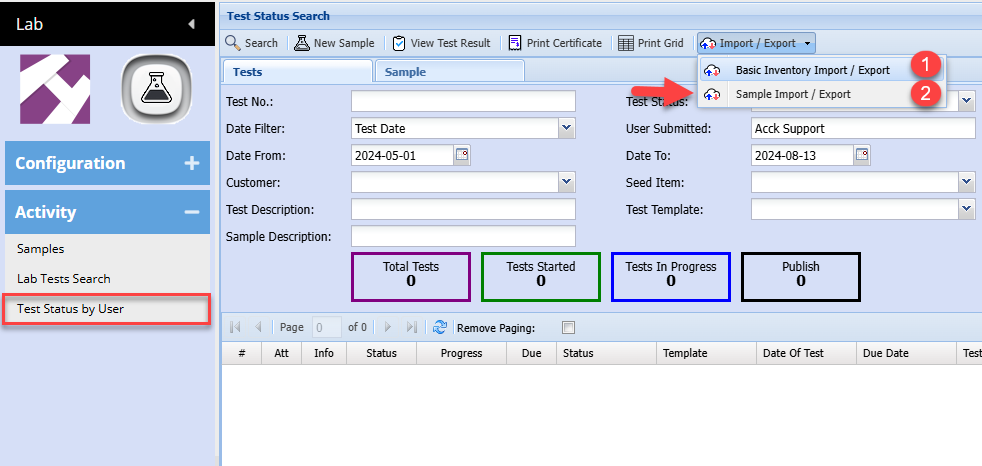
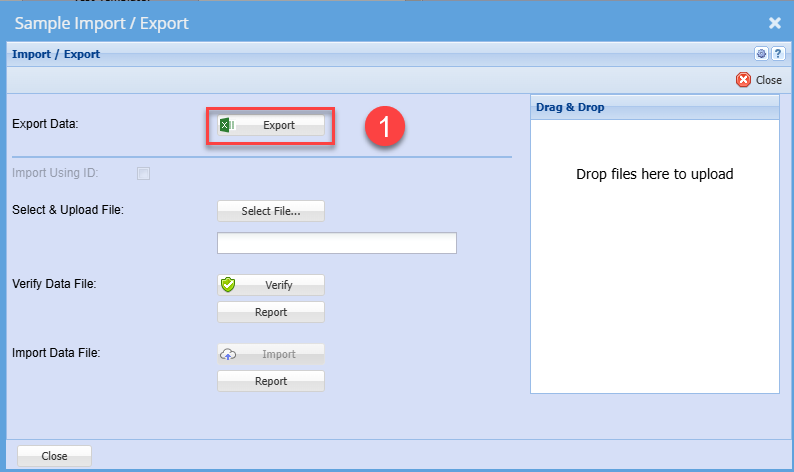
Export for template layout

[![image.png](https://hugeerp10.co.za/hsofmanual/uploads/images/gallery/2024-08/scaled-1680-/cLwimage.png)](https://hugeerp10.co.za/hsofmanual/uploads/images/gallery/2024-08/cLwimage.png)
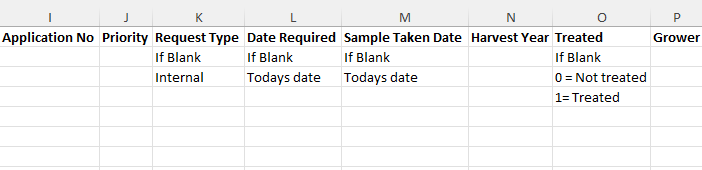
See example of file layout - [Lab Sample Submission.xlsx](https://hugeerp10.co.za/hsofmanual/attachments/45)

[![image.png](https://hugeerp10.co.za/hsofmanual/uploads/images/gallery/2024-08/scaled-1680-/Fglimage.png)](https://hugeerp10.co.za/hsofmanual/uploads/images/gallery/2024-08/Fglimage.png)

[![image.png](https://hugeerp10.co.za/hsofmanual/uploads/images/gallery/2024-08/scaled-1680-/0dZimage.png)](https://hugeerp10.co.za/hsofmanual/uploads/images/gallery/2024-08/0dZimage.png)
[![image.png](https://hugeerp10.co.za/hsofmanual/uploads/images/gallery/2024-08/scaled-1680-/M7eimage.png)](https://hugeerp10.co.za/hsofmanual/uploads/images/gallery/2024-08/M7eimage.png)

Once you have prepared the import file, save as an Excel document and close.

Importing will do the following:

1. New items will be added if it does not exist
2. Existing items will be updated

Follow steps 2 to 4 to upload new and existing items

[![image.png](https://hugeerp10.co.za/hsofmanual/uploads/images/gallery/2024-08/scaled-1680-/yzGimage.png)](https://hugeerp10.co.za/hsofmanual/uploads/images/gallery/2024-08/yzGimage.png)