# Job List

Job list gives the user view of open jobs and view of job lines.

It is part of the Job Group

[![image.png](https://hugeerp10.co.za/hsofmanual/uploads/images/gallery/2025-06/scaled-1680-/image.png)](https://hugeerp10.co.za/hsofmanual/uploads/images/gallery/2025-06/image.png)

---

#### Searching for Jobs

<table border="1" id="bkmrk-a-compac-view-or-det" style="border-collapse: collapse; width: 100%;"><colgroup><col style="width: 14.1923%;"></col><col style="width: 85.8077%;"></col></colgroup><tbody><tr><td class="align-center">A</td><td>Compac view or detail view</td></tr><tr><td class="align-center">B</td><td>Grouping and sorting</td></tr><tr><td class="align-center">C</td><td>Searching and filtering data</td></tr><tr><td class="align-center">D</td><td>Refresh grid</td></tr><tr><td class="align-center">E</td><td>Add new job (this is govern by security)</td></tr></tbody></table>

[![image.png](https://hugeerp10.co.za/hsofmanual/uploads/images/gallery/2025-06/scaled-1680-/idEimage.png)](https://hugeerp10.co.za/hsofmanual/uploads/images/gallery/2025-06/idEimage.png)

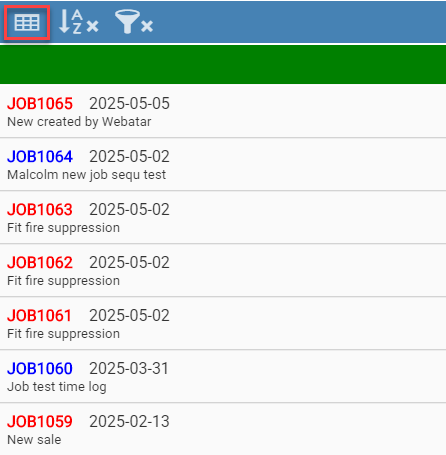
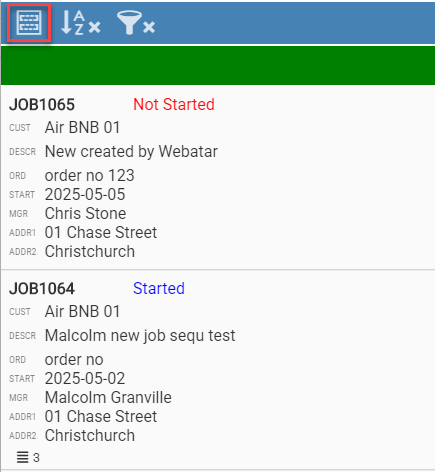
##### Compac View or detail view

<table border="1" id="bkmrk-compac-view-detail-v" style="border-collapse: collapse; width: 100%;"><colgroup><col style="width: 50%;"></col><col style="width: 50%;"></col></colgroup><tbody><tr><td>Compac View</td><td>Detail View</td></tr><tr><td>[![image.png](https://hugeerp10.co.za/hsofmanual/uploads/images/gallery/2025-06/scaled-1680-/vUFimage.png)](https://hugeerp10.co.za/hsofmanual/uploads/images/gallery/2025-06/vUFimage.png)

</td><td>[![image.png](https://hugeerp10.co.za/hsofmanual/uploads/images/gallery/2025-06/scaled-1680-/DQHimage.png)](https://hugeerp10.co.za/hsofmanual/uploads/images/gallery/2025-06/DQHimage.png)

</td></tr></tbody></table>

##### Grouping and sorting

When applying grouping, this will remember when next accessing the Job list.

This will be indicated with a tick if the grouping is active.

<table border="1" id="bkmrk-group-by-none%2C-date-" style="border-collapse: collapse; width: 100%;"><colgroup><col style="width: 26.7263%;"></col><col style="width: 73.3929%;"></col></colgroup><tbody><tr><td>**Group By**</td><td>None, Date Started, Job Status, Customer Name, Job Manager, Asset</td></tr><tr><td>**Sort By 1**</td><td>None, Date Started, Job Status, Order No, Customer Name, Job Manager, Asset Name</td></tr><tr><td>**Sort By 2**</td><td>None, Date Started, Job Status, Order No, Customer Name, Job Manager, Asset Name</td></tr></tbody></table>

[![image.png](https://hugeerp10.co.za/hsofmanual/uploads/images/gallery/2025-06/scaled-1680-/ANQimage.png)](https://hugeerp10.co.za/hsofmanual/uploads/images/gallery/2025-06/ANQimage.png)

##### Searching and filtering data

When applying searching and filtering, this will remember when next accessing the Job list.

This will be indicated with a tick if the filter is active.

<table border="1" id="bkmrk-job-number-search-by" style="border-collapse: collapse; width: 100%;"><colgroup><col style="width: 30.0596%;"></col><col style="width: 70.0596%;"></col></colgroup><tbody><tr><td>**Job Number**</td><td>Search by a Job number</td></tr><tr><td>**Job Manager**</td><td>Filter by Job Manager</td></tr><tr><td>**Customer**</td><td>Search by customer name</td></tr><tr><td>**Asset**</td><td>Filter by Asset Name</td></tr><tr><td>**Date from and Date to**</td><td>Search by job date started</td></tr><tr><td>**Description**</td><td>Search by Description</td></tr><tr><td>**Job Status**</td><td>Filter by All, Started and Not Started Jobs</td></tr><tr><td>**Min Lines**</td><td>Search for jobs with minimum job lines</td></tr><tr><td>**Min Atts**</td><td>Search for jobs with minimum attachments</td></tr><tr><td>**Min Uploads**</td><td>Search for jobs with minimum uploads</td></tr></tbody></table>

[![image.png](https://hugeerp10.co.za/hsofmanual/uploads/images/gallery/2025-06/scaled-1680-/TR0image.png)](https://hugeerp10.co.za/hsofmanual/uploads/images/gallery/2025-06/TR0image.png)