# Searching Inactive Records
There is a way to search for customers, suppliers, inventory and GL accounts marked inactive in the various analysis screens.
So on the following analysis sections, add in a tick box that when ticked only searches for those items that are marked inactive
This is relevant for
1. Debtors / Customer analysis
2. Creditors / Supplier analysis
3. Inventory analysis
4. GL account analysis
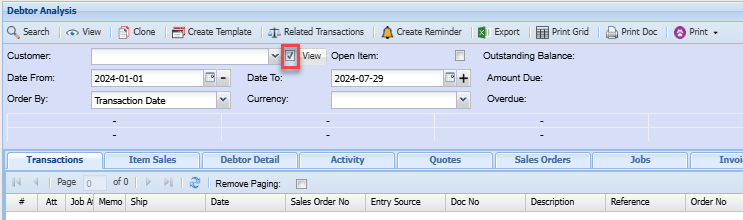
e.g To get to the analysis, go to any module mentioned above> Click analysis then click the document analysis (Debtor Analysis)
[](https://hugeerp10.co.za/hsofmanual/uploads/images/gallery/2024-07/e78image.png)
Click on the tick box shown above
When selecting a debtor/customer, creditor/supplier, or any of the mentioned documents, the drop-down menu will only show inactive customers, suppliers, inventory item codes, or GL analysis