# User Access Report

# User Access Reports

<span class="ts10">Video training manual 2016 - </span>[Click Here](https://vimeo.com/357001169)

<span style="color: rgb(45, 194, 107);">**<span class="ts15">System Configuration&gt; </span><span class="ts15">Reports</span><span class="ts15">&gt; </span><span class="ts15">User Access Report</span>**</span>

<span class="ts0"> </span>![](https://hugeerp0.co.za/csp/webhelp/topics/images/image(1193).png)

# Additional Reports Activation

<span lang="EN-US" style="mso-ansi-language: EN-US;">To Activate additional reports on a user profile, go to:</span>

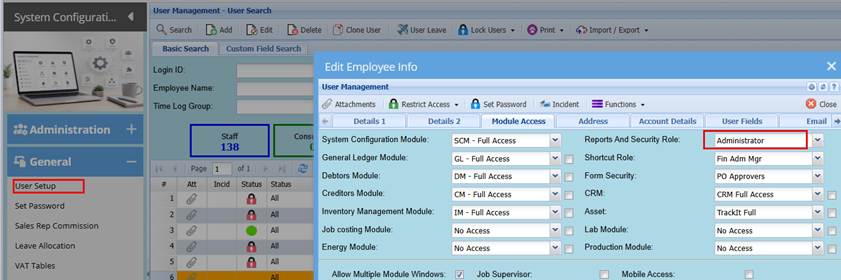
**<span lang="EN-US" style="color: #00b050; mso-ansi-language: EN-US;">System configuration&gt; General&gt; User Setup</span>**

<span lang="EN-US" style="mso-ansi-language: EN-US;">Search and select the specific user profile and then Click Edit.</span>

<span lang="EN-US" style="mso-ansi-language: EN-US;">Click the Modules tab</span>

<span lang="EN-US" style="mso-ansi-language: EN-US;">Take note of the Reports security profile</span>

<span style="mso-no-proof: yes;">![](https://hugeerp10.co.za/hsofmanual/uploads/images/gallery/2026-07/embedded-image-el7ea5vd.png)</span>

<span lang="EN-US" style="mso-ansi-language: EN-US;"> </span><span lang="EN-US" style="mso-ansi-language: EN-US;">Close the screen.</span>

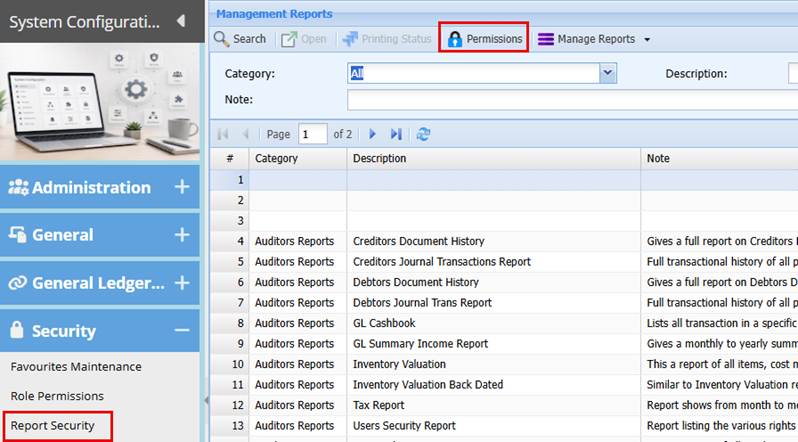
<span lang="EN-US" style="mso-ansi-language: EN-US;">Go to: **<span style="color: #00b050;">System Configuration&gt; Security&gt; Report Security</span>**</span>

<span lang="EN-US" style="mso-ansi-language: EN-US;">Click the Permission button at the top of the screen</span>

<span style="mso-no-proof: yes;">![](https://hugeerp10.co.za/hsofmanual/uploads/images/gallery/2026-07/embedded-image-ezynqvck.png)</span>

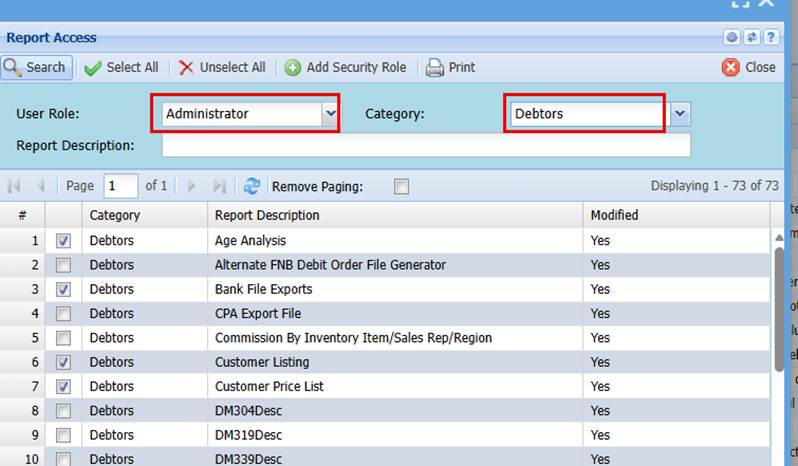
<span lang="EN-US" style="mso-ansi-language: EN-US;"> </span><span lang="EN-US" style="mso-ansi-language: EN-US;">Select the Reports security profile noted from the user setup</span>

<span lang="EN-US" style="mso-ansi-language: EN-US;">Then select the respective module for the reports access required</span>

<span style="mso-no-proof: yes;">![](https://hugeerp10.co.za/hsofmanual/uploads/images/gallery/2026-07/embedded-image-5q5qqsph.png)</span>

<span lang="EN-US" style="mso-ansi-language: EN-US;">Tick the box adjacent to the reports required</span>

<span lang="EN-US" style="mso-ansi-language: EN-US;">Click Save</span>

<span lang="EN-US" style="mso-ansi-language: EN-US;">You can select the next category (module Reports)</span>

<span lang="EN-US" style="mso-ansi-language: EN-US;">Again, tick the box adjacent to the respective report required</span>

<span lang="EN-US" style="mso-ansi-language: EN-US;">Click save</span>

<span lang="EN-US" style="mso-ansi-language: EN-US;">This updated the reports security profile</span>

<span lang="EN-US" style="mso-ansi-language: EN-US;">When you go to the module reports list, the additional reports will be amongst the reports listed on your profile.</span>