# 00. Overview of Costs and Expenses on a Job
**Job Costing> Reports> Reports List**
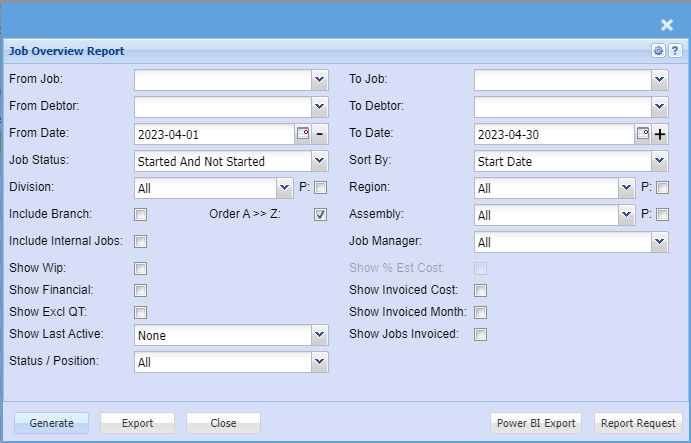
This report can be run by selecting a Job Number range, a Debtor range or a Date range as the selection criteria working in conjunction with the Job Status options available in the Job Status drop down.
Please Note : When a Job Number range is selected the Date range is disabled.
[](https://hugeerp10.co.za/hsofmanual/uploads/images/gallery/2023-06/image.png)
| **From Job / To Job** | |
| **From Debtor / To Debtor** |
|
| **From Date / To Date** |
|
| **Job Status** |
|
| **Division** | Division, region and assembly have options to filter by these cost centres.
a. There is a P next to each with a tick box which stands for Print – Show as a column on the report to display the relevant cost centre
|
| **Include Branch** | display branch as a column on the report |
| **Include Internal Jobs** | This is a flag on the job, by default we exclude internal jobs on report. Put tick on to include them in report |
| **Show Wip** | Future Managed Costs on Job – This displays areas in the system that has a job linked to it that has not yet been added to job.
a. It looks at documents that are in process or in preparation
|
| **Show Financial** | Shows columns related to sales figures on the job |
| **Show Excl QT** | This is a flag on the quotes which flags that the quote values for sell and cost should not be part of the calculation for budget.
a.If ticked it means you want to include these quotes as part of your report
|
| **Show Last Active** |
|
| **Status / Position** |
|
| **Sort By** |
|
| **Region** | Division, region and assembly have options to filter by these cost centres.
a. There is a P next to each with a tick box which stands for Print – Show as a column on the report to display the relevant cost centre |
| **Assembly** | Division, Region and Assembly have options to filter by these cost centres.
a. There is a P next to each with a tick box which stands for Print – Show as a column on the report to display the relevant cost centre |
| **Job Manager** |
|
| **Show % Est Cost** | Shows the percentage cost figures from percentage invoices as columns on the report |
| **Show Invoiced Cost** | displays new columns on the report to show invoiced costs |
| **Show Invoiced Month** |
|
| **Show Jobs Invoiced** |
|
1. Start date – the start date of the job
2. Est Start Date – Estimated start date which is used to work out the task activities
3. Comp Date – Completion date – the date you want the job to finish – lets say Friday because on Monday to delivery
4. Del Date – Delivery date – the date you want to the job to be delivered
5. Days – the outstanding days from today to completion date
6. Project Manager – the project manager assigned to the job
7. Debtor code – the customer code
8. Debtor name – the customer name
9.Job No – The job number – click on this number to open up the manage job screen
10. Description – the short description of the job
11. Job status – the status of the job – Non Started, Started, Completed, cancelled or closed
13. % Complete – the percentage of completion of the job – Budget versus managed
14. Order No – The customer order number
15. Quote No – The original quote number
2. Order value - This is the quote sell value of all quotes (excluding quotes flagged as excluded)
2. Planned cost - This is the quote cost value of all quotes (excluding quotes flagged as excluded)
3. Planned Profit - This is the profit of the quote = Order value - Planned cost
4. Managed – Total managed on job – actual managed items
5. Total – The total managed WIP = Future WIP + Total managed
6. Incurred Costs – Displays values of cashbooks and creditors journals linked to the job
7. Job del note – the value of cost in Job delivery note before Job invoice
a.once the delivery note is processed to invoice, value is taken out of this column
8. Job Invoice – the cost of job invoices via Usage job invoice or Percentage job invoice
a.If job is usage – total usage value on invoices processed
b. If job is percentage – the estimated percentage cost value entered by the user
9. Debtor invoice – the cost of the customer invoice done linked to the job
10. Credit note – the cost value of the credit note linked to the job.
1. Job Invoice – the sell value of job invoices via Usage job invoice or Percentage job invoice
a.If job is usage – total usage value on invoices processed
b. If job is percentage – the estimated percentage cost value entered by the user
2. Debtor invoice – the sell value of the customer invoice done linked to the job
3. Credit note – the sell value of the credit note linked to the job
4. Total Sales = Job Invoice sell + Debtors Invoice sell - Credit Note sell
5. Outstanding T/O = Order sell Value - Invoiced sell value (if negative will not show)
6. Future Costs = Quote cost - WIP (if positive will not show)
a.If negative, shows as a positive figure to indicate that you are creating more costs than estimated - warning
b. If positive, this indicates that your estimated cost has not exceeded actual cost
7. Future profit = Quote cost - WIP (if negative will not show)
a.If positive, shows as a positive figure to indicate that you are under your estimated cost to actual managed and therefore will see more profit
b. If negative, this indicates that your estimated cost has exceeded actual cost (will not show here but in Future costs)
8.Invoiced Cost = Job Invoice cost + Debtor Invoice cost - Credit Note cost
9. Invoiced Profit = Total invoiced sales sell – Total invoiced cost
10. Closed job costs – shows the value of costs of the closed job items
11. Job Profit = Invoiced cost - Planned quote cost – Total managed
12. Profit variance = Job Profit – Planned quote cost
13. Last memo note on job
| A | Order Value | Selling Value of the quote. |
| B | Planned Cost | Costs as per the quote. |
| C | Profit | Difference between the Order Value and the Planned Cost. |
| D | Stock Requests | All cost values of Stock Requests with the status Requested or Authorised. |
| E | Outstanding Purchase Orders | All cost values of Purchase Orders with the status Created or Authorised. |
| F | GRV To Job | All cost values of GRVs with the status Preparation or Posted. |
| G | Del. Note To Job | All cost values of Delivery Notes with the status Created. |
| H | BOM | All cost values of a BOM item with the status Created, Pending or Active. |
| I | Picking Slips | All cost values of items on Picking Slips that have not been managed. |
| J | Time Sheet WIP | All cost values of items on Job Capture that have not been processed. |
| K | Managed | All cost values of items on a Job that have been managed. |
| L | TOTAL | Sum of A, B, C, D, E, F, G, H, I, J and K |
| M | Incurred Costs | All GL Cash Books and Creditor Journals that have been posted linked to the job. |
| N | Job Delivery Note | All cost values of items on a Job Delivery Note. |
| O | Job Invoice | All cost values of items on a Job Invoice. |
| P | Debtor Invoice | All cost values of items on a Debtor Invoice with the status Posted. |
| Q | Credit Note | All cost values of items on a Debtor Credit Note with the status Posted |
| R | Outstanding Turn Over | A - (O + P - Q) |
| S | Future Costs | B – L |
| T | Future Profit | B – K |