GL Report List Menu
- Account List
- Balance Enquiry
- BankIt Report
- Cash Book Report
- Cash Flow Report
- Customer Link Financial Performance
- Export Bank Manager Data
- Financial Performance by Cost Centre
- Financial Performance by Period
- Financial Performance Summary Report
- Financial Performance with Cost Centres
- General Ledger Budget Summary
- GL Cashbook Recon Report
- GL Cashbook Report
- GL Journal Report
- GL Transaction Report
- GL Transaction Report (No1)
- GL Transaction with Balances (No2)
- GL Tree Report
- Ledger Graph
- Post Dated Cheques
- Project Group Profit and Loss Report
- Project Line Profit and Loss Report
- Report Displaying All Unprocessed Documents
- Sales Profit Analysis
- Statistics Report
- Trial Balance By Period
- View the Transaction Lines for a Specific Document
Account List
General Ledger>Reports>Report List
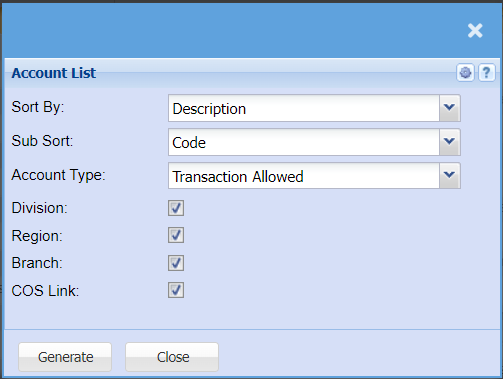
Report on all general ledger accounts and the structure path which have being added to the general ledger Setup.
This is a list of all the accounts
Accounts can be sorted out according to the user’s preference before they are generated
| Sort By |
Sort the report by selecting one option from the drop-down arrow. Options area: by Code, Description, Group Code or Bin Location |
| Sub Sort | Select a sub sort by Code from the drop-down menu to narrow down the search, select from Description, Group Code or Bin Location |
| Account Type | select account type from the drop-down arrow |
| Division | If you have Divisions, this will add Divisions to the report. |
| Region | If you have Regions, this will add Regions to the report. |
| Branch | If you have Branches, this will add Branches to the report. |
| COS Link |
Balance Enquiry
General Ledger>Reports>Report List
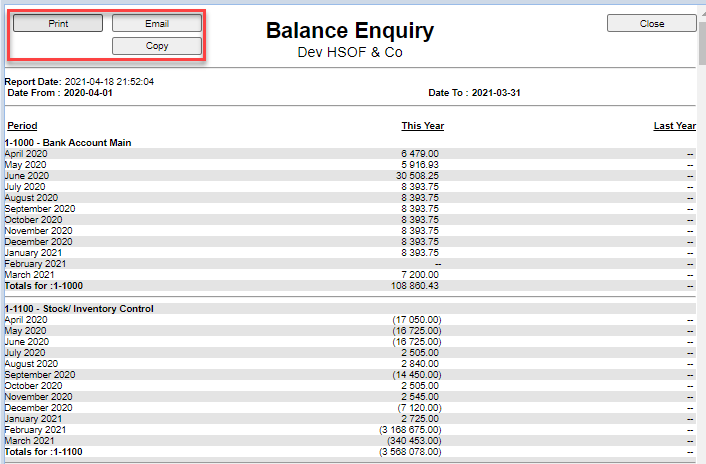
This Report has been modified, will open on chrome and edge.
has no export button as yet but can be copied to excel.
Balances by period for year Financial Year
Report that allows the user to check the performance and balance of the subaccounts
Select account from which the report will run from and the account to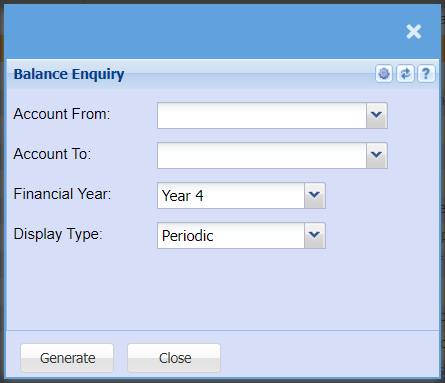
| Account From / To | Select the account from which you want to run the report from and to. |
| Financial Year | select the year for running the report |
| Display Type | to select the type of display form the drop-down arrow |
BankIt Report
General Ledger>Reports>Report List
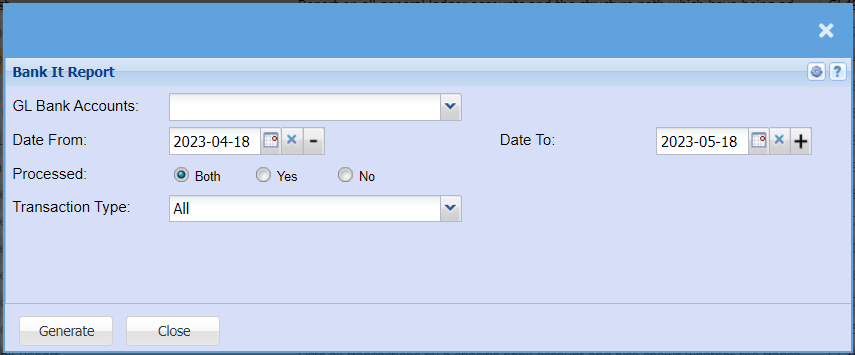
| GL Bank Accounts | Choose the account you want to run the report for. |
| Date From / To | Choose the date range for which you want to view the report from / Select a date range of when you want to see up to on the report. |
| Processed | Select weather you want to run the report for Processed or unprocessed transactions or both. |
| Transaction Type | Select the type of transactions you want to run the report for. |
Cash Book Report
General Ledger>Reports>Report List
Cash Book Report printed from the Cash Book not from the Transaction table.
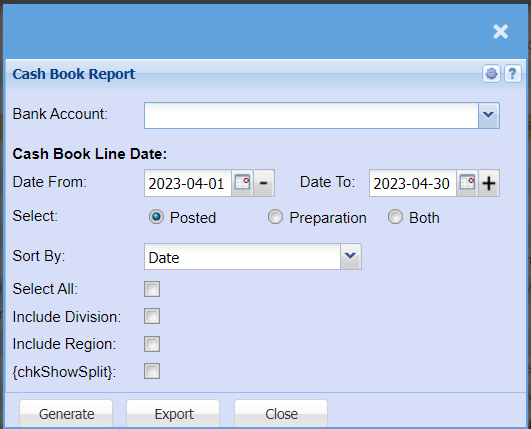
| Bank Account | Select the bank account for which you would like to run the report. |
| Date From / To | Choose the date range for which you want to view the report from / Select a date range of when you want to see up to on the report. |
| Select | Select whether you want to pull a report for Posted transactions, Transactions still in preparation or both. |
| Sort By | Sort the report by selecting one option from the drop-down arrow. Options area: by Code, Description, Group Code or Bin Location |
| Select All | Select all filters |
| Include Division | Include Division in your report |
| Include Region | Include Region in your report |
| chkShowSplit |
Cash Flow Report
General Ledger>Reports>Report List
Cash flow is a financial statement that shows how changes in balance sheet accounts and income affect cash and cash equivalents, and breaks the analysis down to operating, investing, and financial activities.
The user has to select the Year, From Period and To Period in order to generate a report
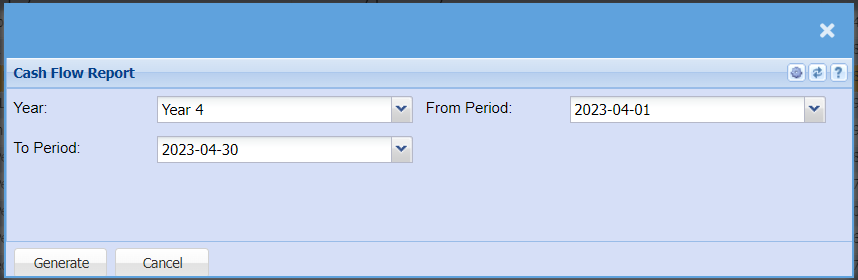
| Year | Select the year you would like to pull a report for |
| From Period / To Period | Select the from and to period for your report. The From Period will always be the first of the month you select and the To Period will always be the last day of that month. |
Customer Link Financial Performance
General Ledger>Reports>Report List
Customer Link financial performance report monthly
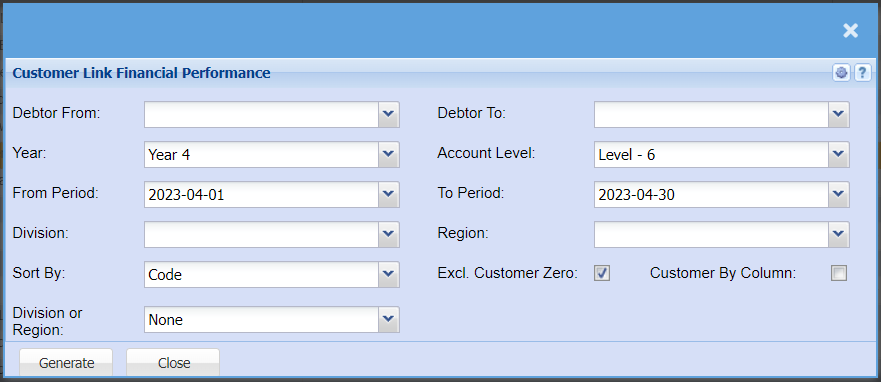
| Debtor From / To | Select a Customer/Debtor you wish to view the report from / Select the Customer/Debtor you wish to see up to in the report. |
| Year | Select the financial year you are running the report for |
| From Period / Period To | Select the period From and the period to from the drop-down arrow |
| Division | If you have multiple Divisions, by selecting this will add this column to your report. |
| Sort By | Sort the report by selecting one option from the drop-down arrow. Options area: by Code, Description, Group Code or Bin Location |
| Division or Region | Select if you are wanting to pull your report by Division or Region |
| Account Level | |
| Region | If you have Regions, this will add Regions to the report. |
| Excl. Customer Zero | |
| Customer By Column |
Export Bank Manager Data
General Ledger>Reports>Report List
Pressing continue will download the report
Financial Performance by Cost Centre
General Ledger>Reports>Report List
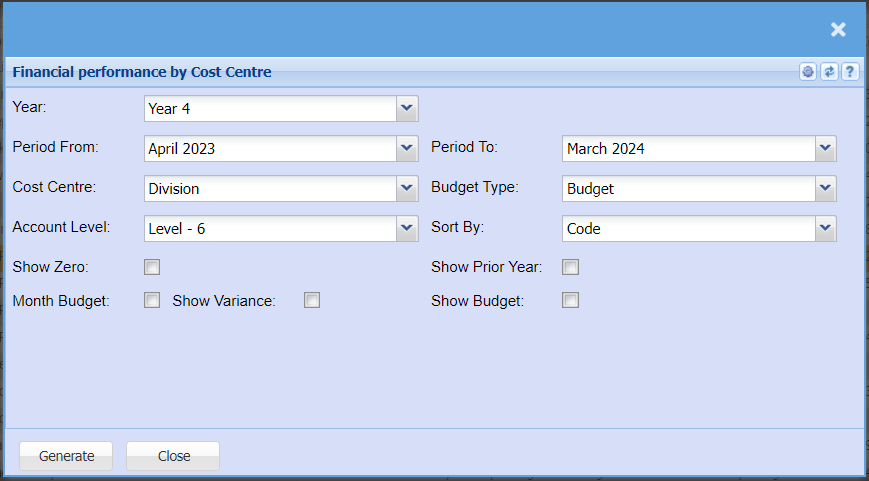
| Year | Select the financial year you are running the report for |
| Period From / Period To | Select the period From and the period to from the drop-down arrow |
| Cost Centre | Select which cost centre you want to enable for division and region. Division and region is disabled until a cost centre is stipulated |
| Account Level | Select the level that you want to report on, the lower the number the more roll up will occur. Default is always the last level |
| Budget Type | |
| Sort By | Sort the report by selecting one option from the drop-down arrow. Options area: by Code, Description, Group Code or Bin Location |
| Show Zero | |
| Month Budget | |
| Show Variance | |
| Show Prior Year | |
| Show Budget |
Financial Performance by Period
General Ledger > Reports > Report List
View a year of Financial Performance per period in one report, one can also drill down on the values to the detail
Report is also known as Financial Performance / Income Statement or Profit and Loss
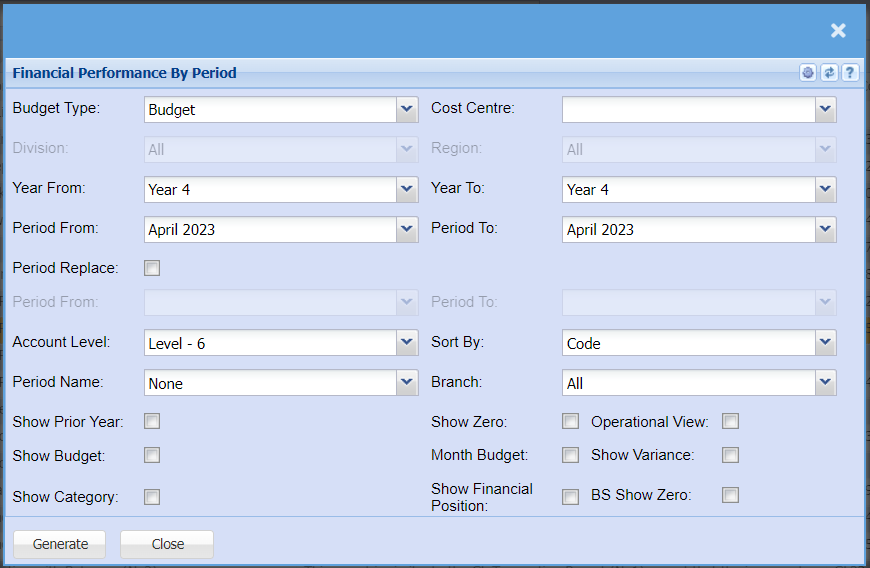
Report criteria defined
| Budget Type |
View the budget or the revised budget for this report Budget is the default |
| Cost Centre |
Select which cost centre you want to enable for division and region Division and region is disabled until a cost centre is stipulated |
| Division | Run the report for a specific division |
| Region | Run the report for a specific region |
| Year From | Select the year from to start your report |
| Period From | Select the period from which is derived from your year from |
| Year To | Select the year To for the end of your report |
| Period To | Select the period from which is derived from your year To |
| Period Replace |
Enable period replace so that your budgets replace the months that are still to come. Great report if you're looking at the whole year and you still have a few months to go to the end of the financial year. |
| Period From | Select the period from that you want budgets to replace actuals |
| Period To | Select the period To that you want budgets to replace actuals |
| Account Level | Select the level that you want to report on, the lower the number the more roll up will occur. Default is always the last level |
| Sort By | Allow the report to sort by General Ledger code or by General Ledger name |
| Period Name | These are three customizable names to run reports, mainly used in the dairy farming industry. |
| Branch | Filter the report by branch |
| Show Prior Year | Show the prior year for the same time in that period |
| Show Zero | Enable show zero to show all accounts that have not had a movement in them within the period that you have selected |
| Operational View |
This is a great report for operational managers, it splits the profit and loss into two versions, operational profit and loss and then general profit and loss. There is a tick on each ledger account to enable the ledger account to be in the operational view |
| Show Budget |
Show the budget total at the end of the report Shows total variance between actual and budget |
| Month Budget | Show the monthly budget |
| Show Variance | Show the variance between your actual and budget per month |
| Show Category |
Show the category of each ledger account Good to have when you're exporting and want to summarise by category |
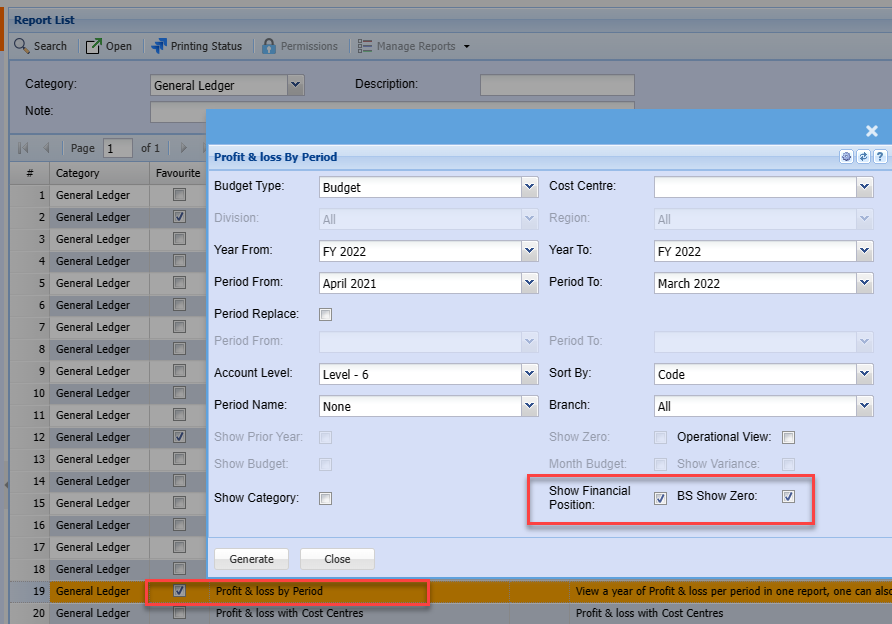
| Show Financial Position |
Show the financial position / Balance sheet at the bottom of the profit and loss report. This will show as a monthly movement with each month. The report shows the opening balance sheet balance and closing balance sheet balance with the movement in between |
| Show BS show zero | Show all accounts in the balance sheet that have not had a movement in that month |
Report example
The report allows for drill downs to source data
Click on a value to transaction detail

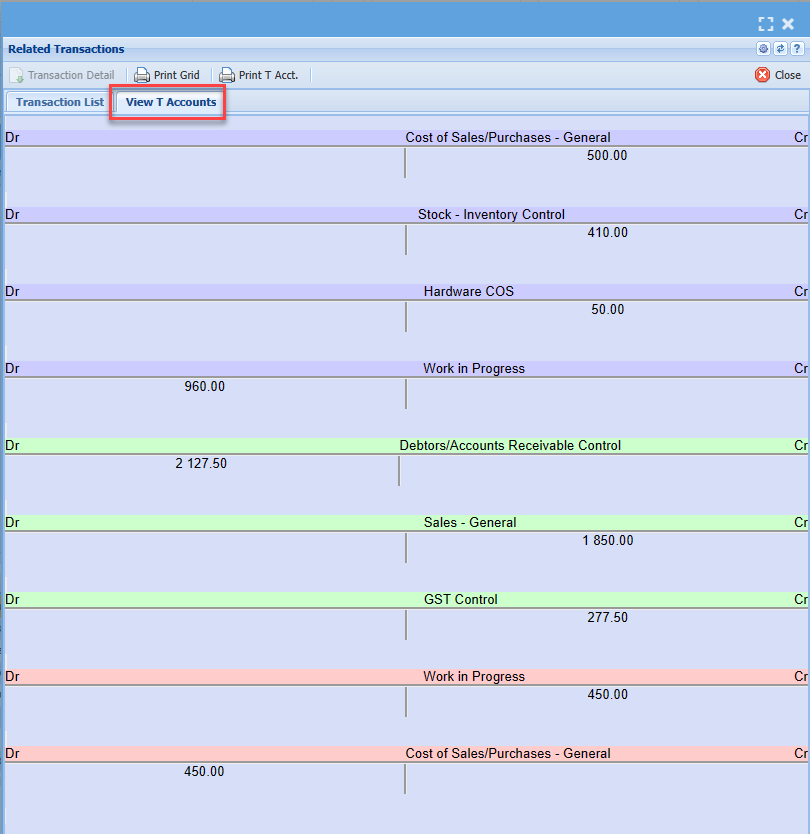
Click on the Date for Document T-Accounts debit and credits
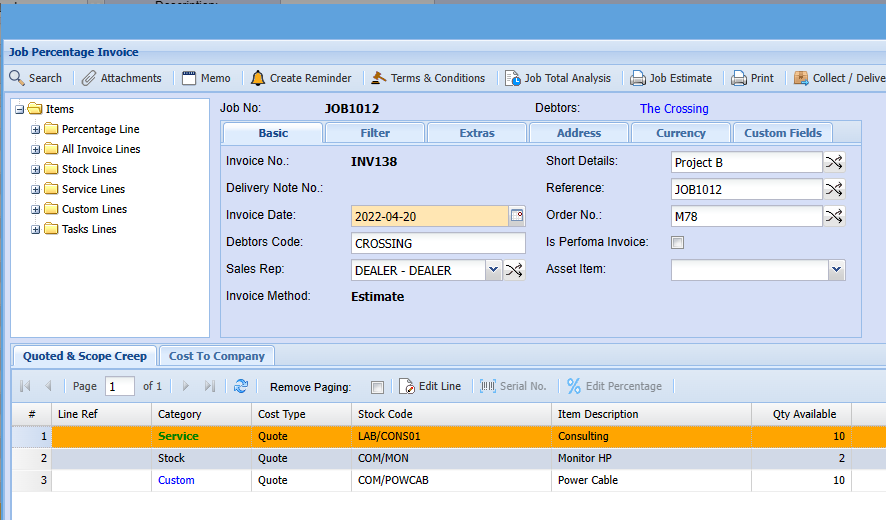
Click on the Document number to view the source document
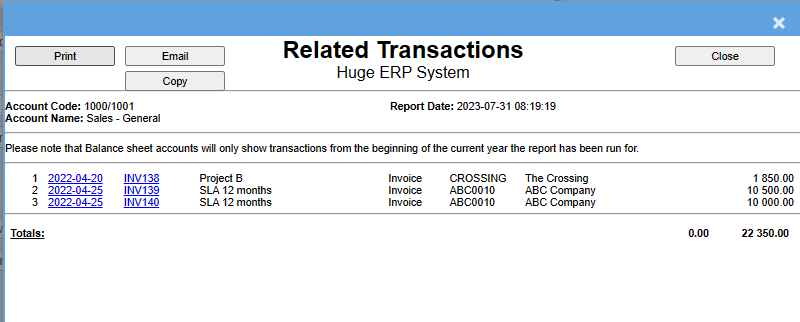
Date shows document GL transaction detail
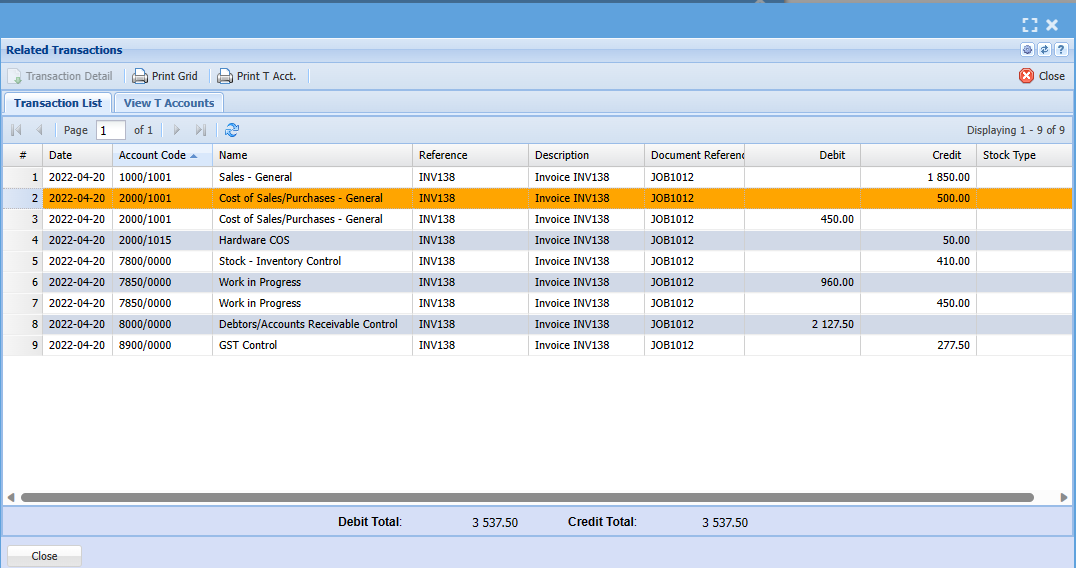
Click on the tab for T-Account view
Click on the document number to view the source document
Show Profit and Loss and Financial Position
Display both profit and loss and financial position in one report by selecting two ticks.
The Financial position will show at the bottom of the report
Financial Performance Summary Report
General Ledger > Reports > Report List
Gives a monthly to yearly summary per financial period of Turnover less Cost of sales giving Gross Profit plus Income less expenses to Nett Profit. Can also be viewed as a summary income statement.
Income statement report shows an income statement for the selected month or a financial period
The user has to select to generate a report or graph report type then select the following from the drop down arrows
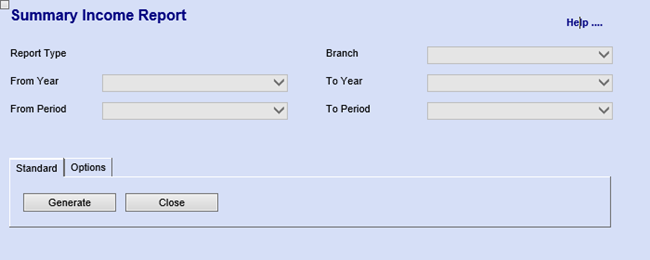
Options Tab has one button
| Recalculate button | to recalculate the report |
Financial Performance with Cost Centres
General Ledger > Reports > Report List
This is a financial performance report with cost centres and can be printed on screen to view financial performance with cost centre analysis.
Before printing the report, the user has to select from the following
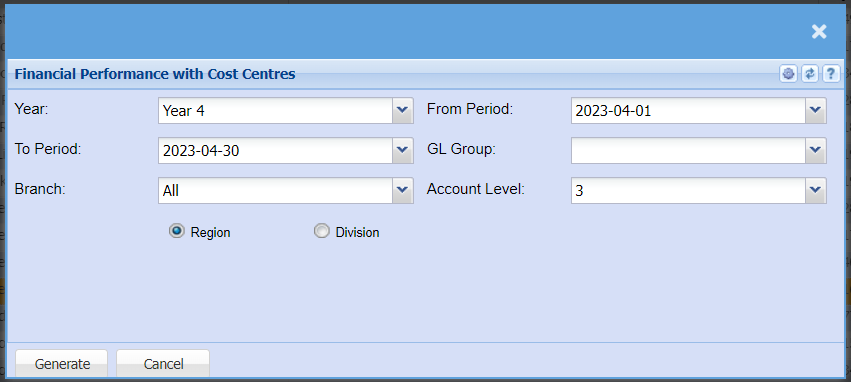
| Year | to select from the drop down arrow |
| To Period | select From period and To period from the drop down arrow |
| Branch | to select branch from the drop down arrow |
| From Period | select From period and To period from the drop down arrow |
| GL Group | to select general ledger group from the drop down arrow |
| Account Level | Select the level from the drop down arrow |
| Region or Division | Select either Region or Division |
General Ledger Budget Summary
General Ledger > Reports > Report List
This report shows what the budget figure is, per ledger account, per financial period, setup under the GL activity budget setup.
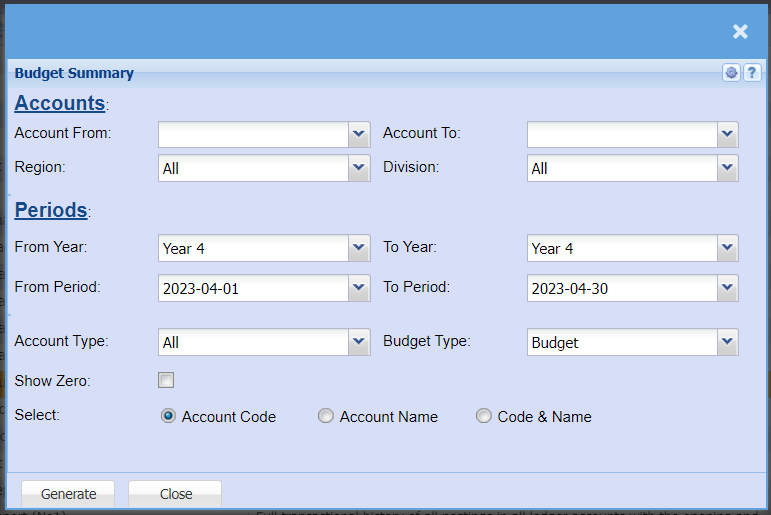
| Account From | to select the account from which the report will run from |
| Account To | to select the account from which the report will stop at, to limit the report run |
| Region | |
| Division | |
| From Year / To Year | to select the year from and the year to from the drop down arrow |
| From Period / To Period | to select the period from and the period to |
| Account Type | |
| Budget Type | |
| Show Zero | |
| Select | Select either account code and account name or both |
GL Cashbook Recon Report
General Ledger > Reports > Report List
This report looks at unposted cashbooks, journals and documents which affect the bank and put onto a report with cashbook balance forward and all transactions which would affect the bank
This is a GL cashbook recon report
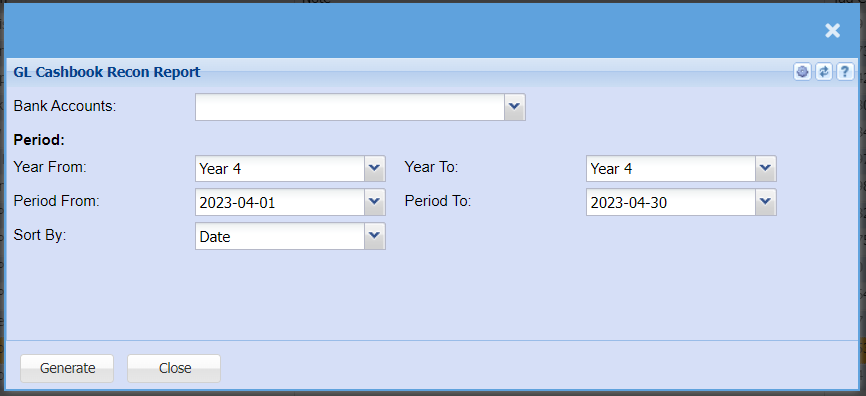
| Bank Accounts | to select the bank account from the drop down arrow |
| To select the Year From and Year To | for generating the report |
| To select Period From and Period To | for generating the report |
| Sort By | to sort the report by selecting from the drop down arrow |
GL Cashbook Report
General Ledger > Reports > Report List
Lists all transactions by a specific bank account and also shows whether the transaction has been reconciled or not, gives the opening and closing balance based on the date selected.
This is a report that lists all transactions by a specific bank account and also shows whether the transactions has been reconciled or not. 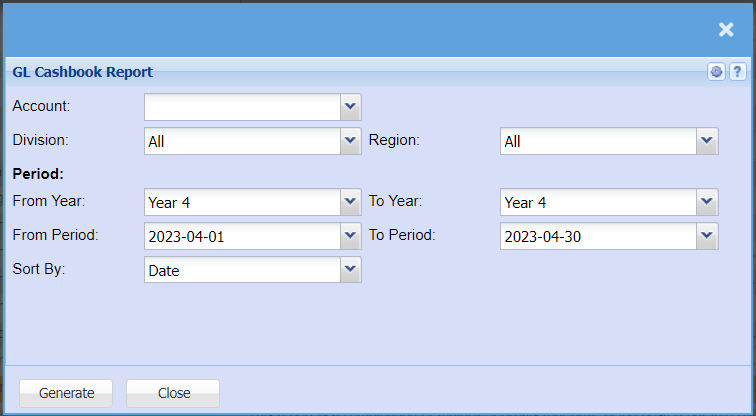
| Account | to select the account from the drop down arrow |
| Division | to select the division from the drop down arrow |
| Region | to select the region from the drop down arrow |
| From Year | to select the year from which the GL cashbook report will run from and year to, for limiting the report run |
| From Period | to select the period from which the GL cashbook report will run from and the period to, for limiting the report run |
| Sort By | to sort the report by selecting from the drop down arrow |
GL Journal Report
General Ledger >Reports >Report List
This report is a combination of multiple journals that have being posted put into one report with debits and credits. It will show the user which journal the transaction came from.
Journal report provides a summary of general ledger transactions sorted by a variety of user defined criteria
The report will allow you to choose different criteria’s
Select Posted under Journal Status
Take your date from far back
If you want to see the additional notes on the journal lines, tick the Additional Comments.

| Journal No. | enter journal number to view a certain detailed journal report |
| Journal Status | to select status from the drop down arrow |
| Date From / Date To | to select the date from and the date to for running a report |
| Order By | to select order by, from the drop down arrow |
| Detail | to run the report by either detail or summary from the drop down arrow |
| Additional Comments | tick the box to include additional comments on the report |
GL Transaction Report
General Ledger >Reports >Report List
Full transactional history of all postings in all ledger accounts with the opening and closing balance per Ledger Account and movement between specified dates.
This is a full transactional history of all postings against all ledger accounts with the opening and closing balance per Ledger accounts and movement between dates specified
| Ledger Accounts | select the start account and the end account for the report |
| Periods | select the year, period from, period to, from the drop down arrow |
| Options | select sheet type, sort by and sub sort by options from the drop down arrow |
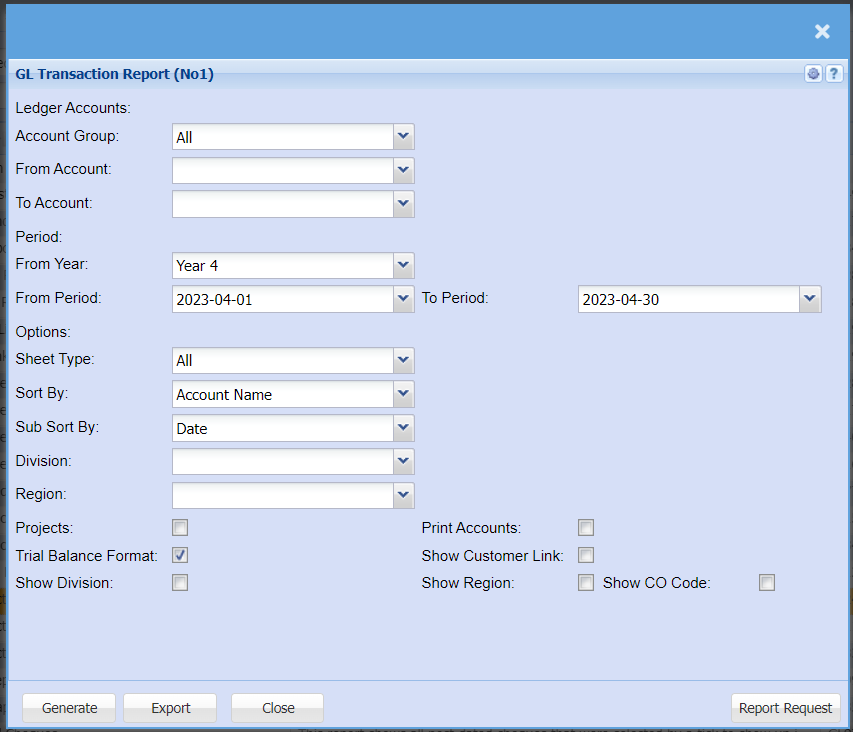
| Account Group | |
| From Account | |
| To Account | |
| From Year | |
| From Period | |
| To Period | |
| Sheet Type | |
| Sort By | |
| Sub Sort By | |
| Division | |
| Region | |
| Projects | if these options are selected, the accounts with no transactions and projects will be included in the report |
| Trail Balance Format | This button allows you to run the report in a Trial Balance Format. i.e., If the account has a debit opening balance, the report will open with a positive value. It will add each debit transaction and subtract each credit transaction. If the account opening balance is a credit, the report will reflect each asset account as a positive opening balance if the opening balance is a debit. It will also reflect each liability account as a positive if the opening balance is a credit. |
| Show Division | |
| Print Accounts | if these options are selected, the accounts with no transactions and projects will be included in the report |
| Show Customer Link | |
| Show Region | |
| Show CO Code |
GL Transaction Report (No1)
General Ledger >Reports >Report List
Full transactional history of all postings in all ledger accounts with the opening and closing balance per Ledger Account and movement between specified dates report No1
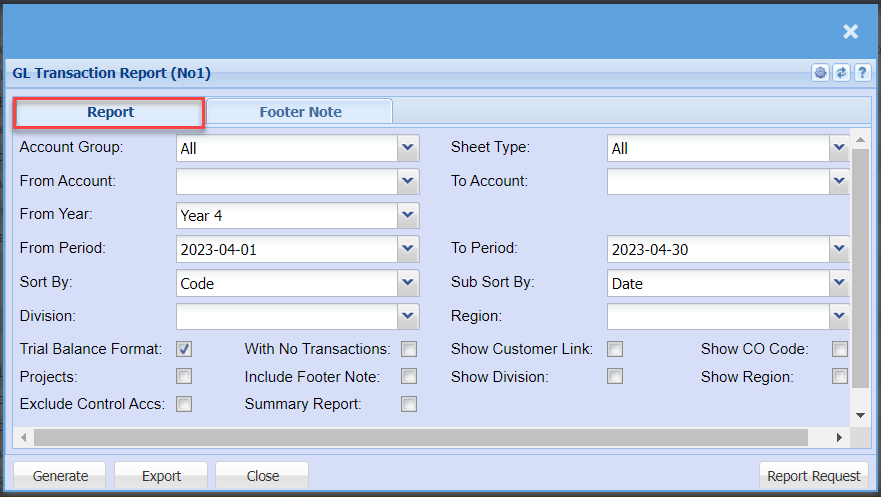
| Account Group | |
| From Account | |
| From Year | |
| From Period | |
| Sort By | |
| Division | |
| Sheet Type | |
| To Account | |
| To Period | |
| Sub Sort By | |
| Region | |
| Trial Balance Format Tick | |
| Projects Tick | |
| Exclude Control Accs Tick | |
| With No Transactions Tick | |
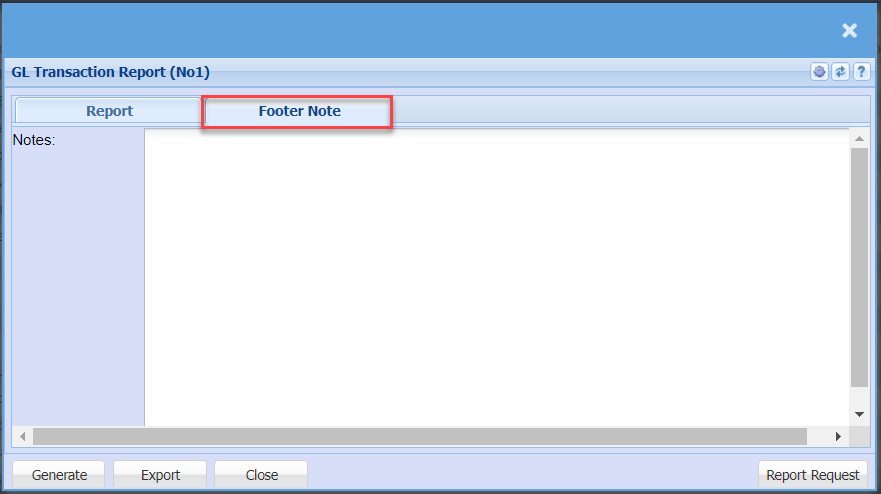
| Include Footer Note Tick | |
| Summary Report Tick | |
| Show Customer Link Tick | |
| Show Division Tick | |
| Show CO Code Tick | |
| Show Region Tick |
GL Transaction with Balances (No2)
General Ledger >Reports >Report List
This report is similar to the GL Transaction Report (No1) except that the income statement values show the opening balance from Year 1 of operating the package.
It does not reset to zero on each financial year like the GL Transaction Report (No1).
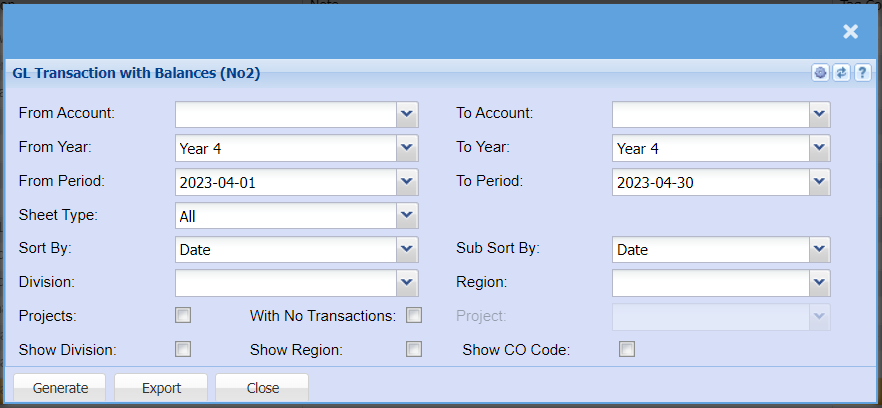
| From Account | |
| From Year | |
| From Period | |
| Sheet Type | |
| Sort By | |
| Division | |
| To Account | |
| To Year | |
| To Period | |
| Sub Sort By | |
| Region | |
| Project | |
| Projects Tick | |
| Show Division Tick | |
| With No Transactions Tick | |
| Show Region Tick | |
| Show CO Code Tick |
GL Tree Report
General Ledger >Reports >Report List
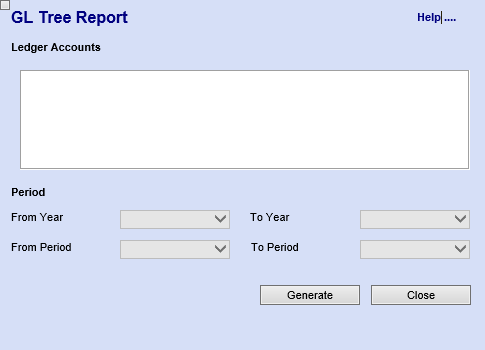
Gives a report using the tree structure of the general ledger setup to find the values of all children account values under the main structure.
The report that gives a tree structure of all general ledger accounts. Select one of the accounts first and generate the report to get detailed view of the select account report.
Period: this allows the user to select the year and period for running the report
Ledger Graph
General Ledger > Reports > Report List
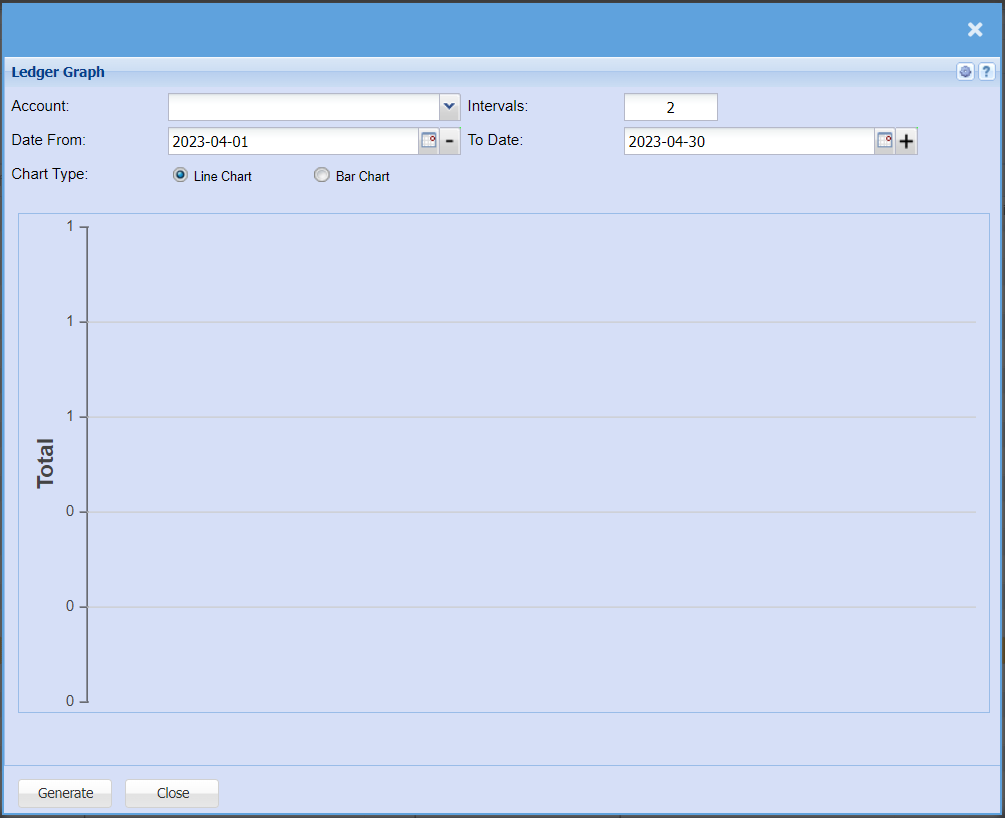
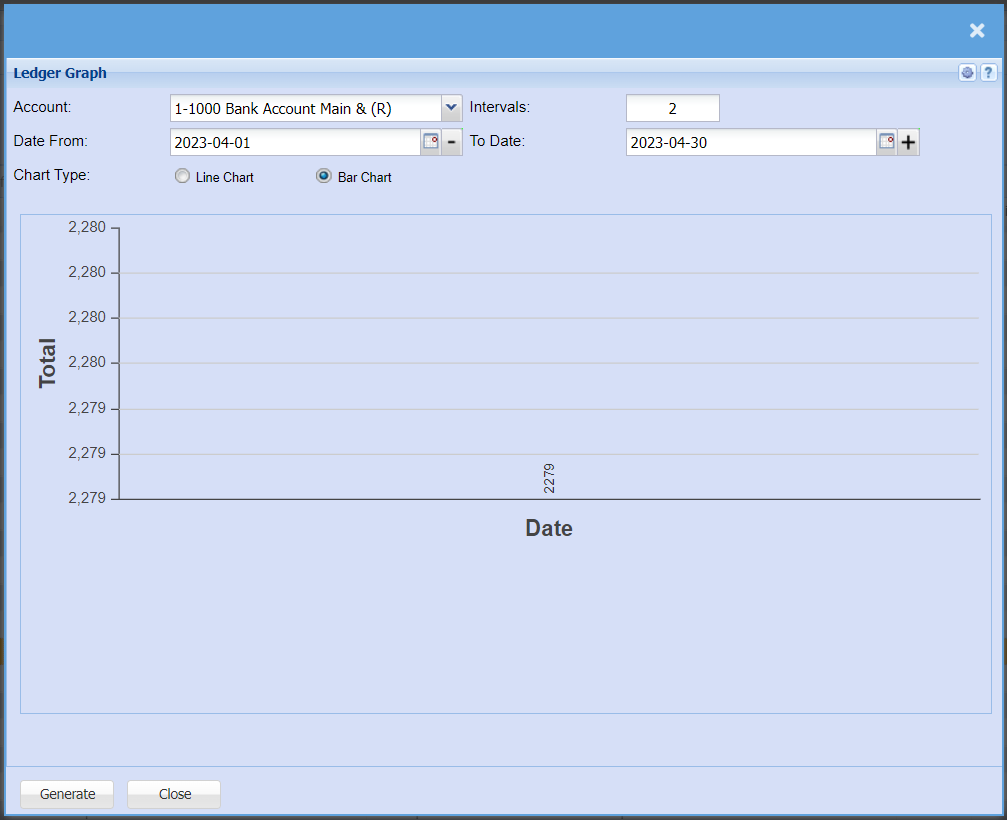
Displays a line or bar graph of all values of debits less credits depending on the specific general ledger account. Day intervals can be specified.
Post Dated Cheques
General Ledger >Reports >Report List
This report shows all post-dated cheques that were selected by a tick to show up in this report.
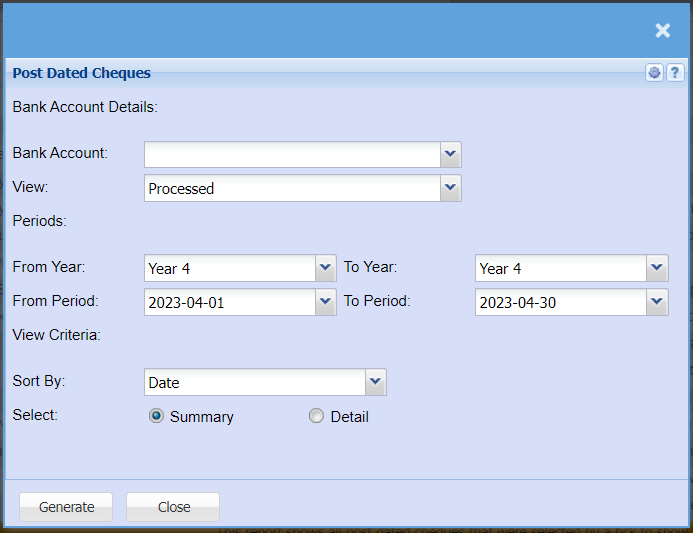
| Bank Account | |
| View | |
| Periods | |
| From Year / To Year | |
| From Period / To Period | |
| View Criteria | |
| Sort By | |
| Select | select either summary or detail |
Project Group Profit and Loss Report
General Ledger >Reports >Report List
Gives an income statement report based on the project group selected. Project groups can have many project lines within it.
This is an income statement report based on the project group selected
Note: If the report returns zeros. Then please check that the GL Account setup (Sales Accounts) has a linked cost of sales account.
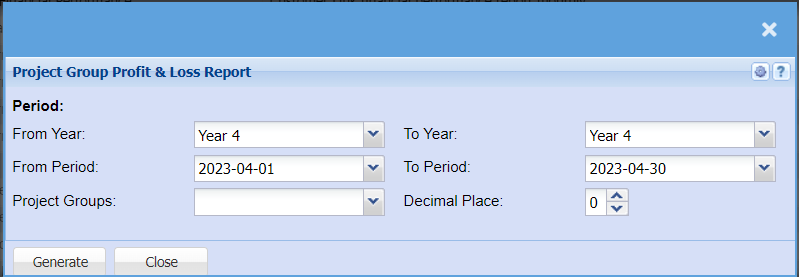
| From Year / To Year | To run the report, the user has to select the year from which the report will run from, and the year to |
| From Period / To Period | Select the period from and report to |
| Project Groups | Select group from the drop down arrow |
| Decimal Place |
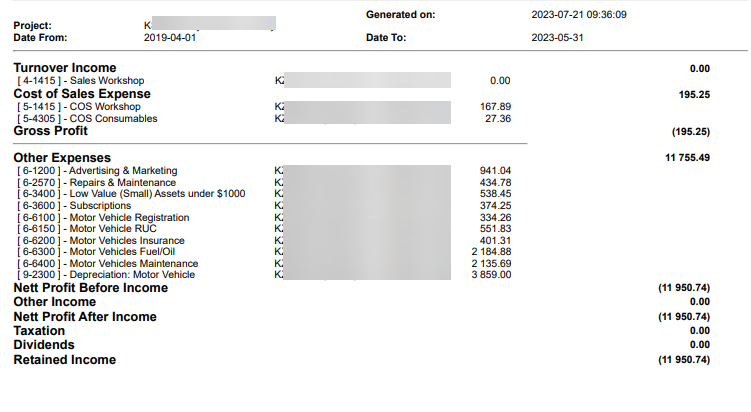
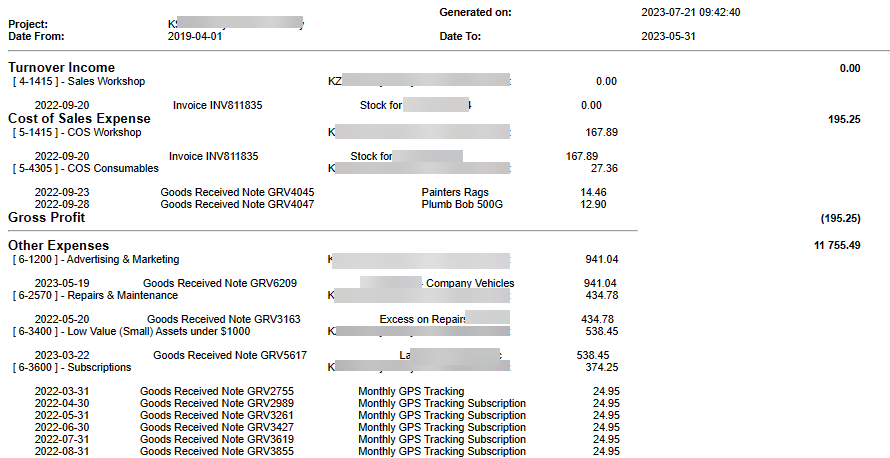
Project Line Profit and Loss Report
General Ledger >Reports >Report List
Shows an income statement report based on the project line selected.
Project lines are singular projects setup and are not part of a group.
The report comes in summary and detail
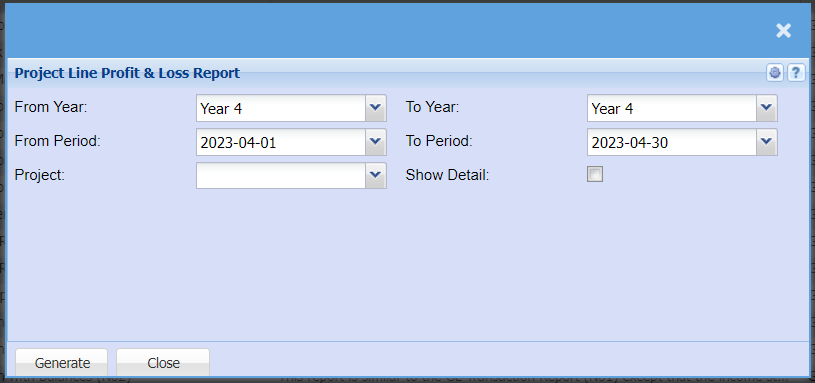
| From Year / To Year | To run the report, the user has to select the year from, and the year to |
| From Period / To Period | select the period from and report to |
| Project | select project from the drop down arrow |
| Show Detail | Tick the Show detail to have the detail report or Remove the tick to run the summary report |
Report is found under General Ledger
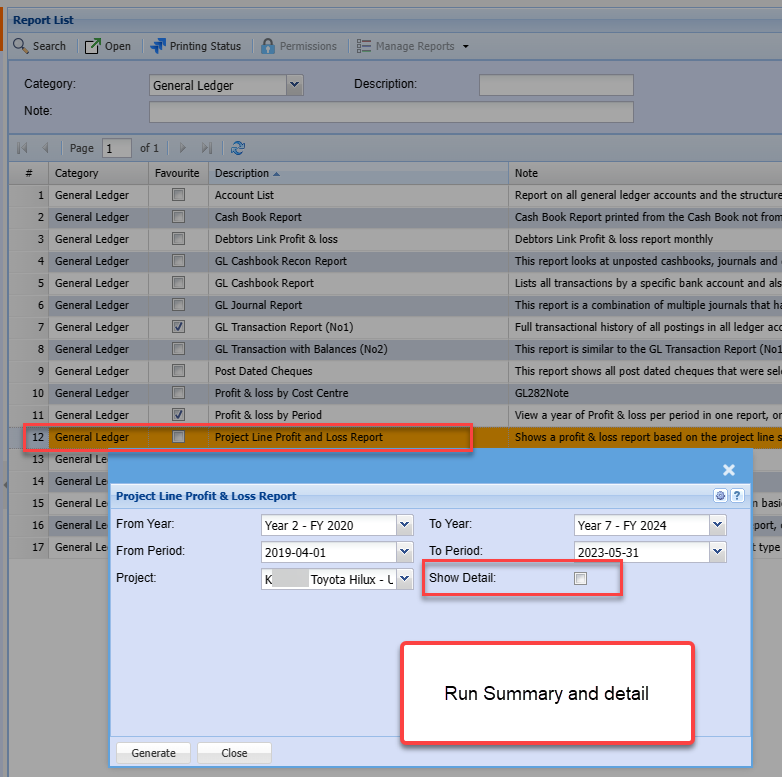
Summary report
Detail report
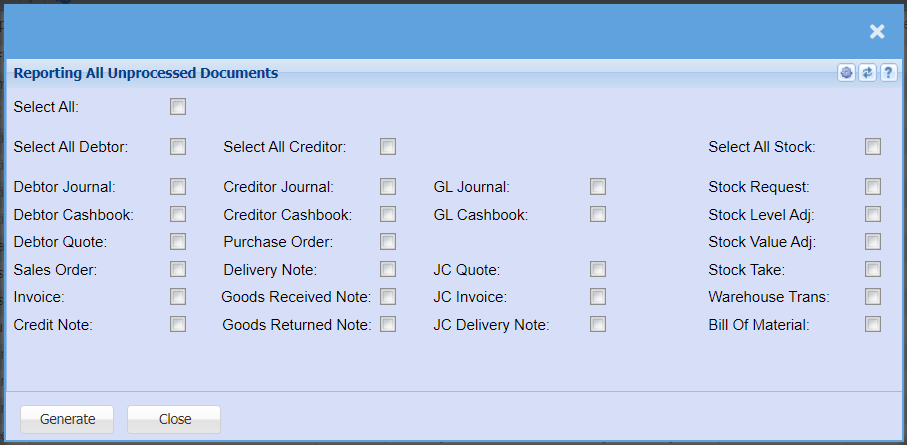
Report Displaying All Unprocessed Documents
General Ledger >Reports >Report List
Sales Profit Analysis
General Ledger >Reports >Report List
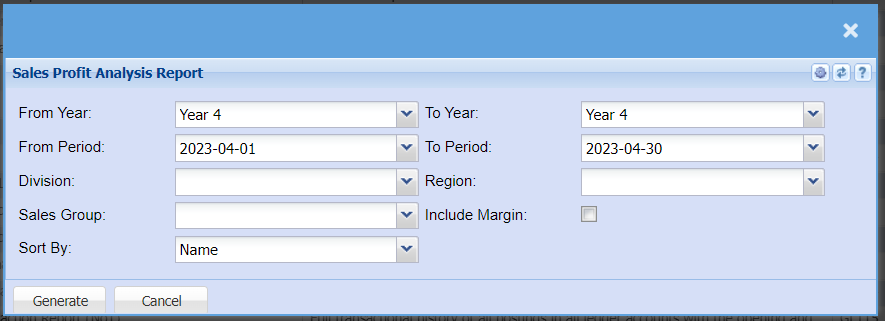
| From Year / To Year | |
| From Period / To Period | |
| Division | |
| Region | |
| Sales Group | |
| Include Margin Tick | |
| Sort By |
Statistics Report
General Ledger >Reports >Report List
This report shows statistics for a certain period on basic information
It’s a report on collection of methods used to process accounts amounts of data and report overall trends.
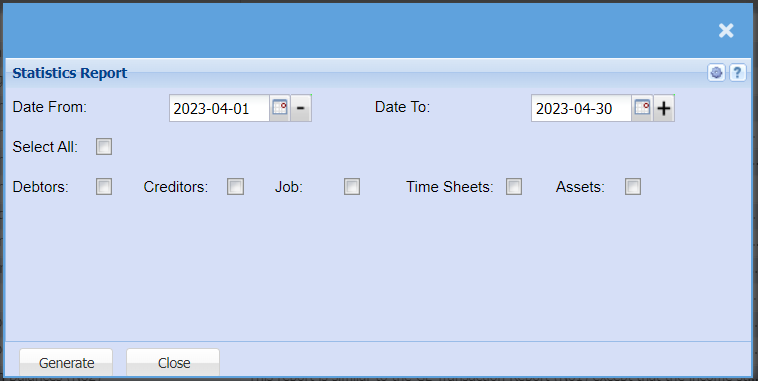
| Date From / Date To | To generate the report, the user has to select the date from which the report will run from and the date to |
| Select Ticks | select the debtors, creditors, job, time sheets, assets or select all of them. |
Trial Balance By Period
General Ledger >Reports >Report List
View a year of Trial Balances per period in one report, one can also drill down on the values to the detail
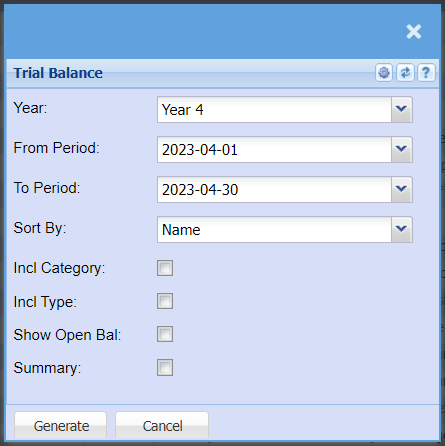
| Year | |
| From Period / To Period | |
| Sort By | |
| Incl. Category | |
| Incl. Type | |
| Show Open Bal | |
| Summary |
View the Transaction Lines for a Specific Document
General Ledger >Reports >Report List
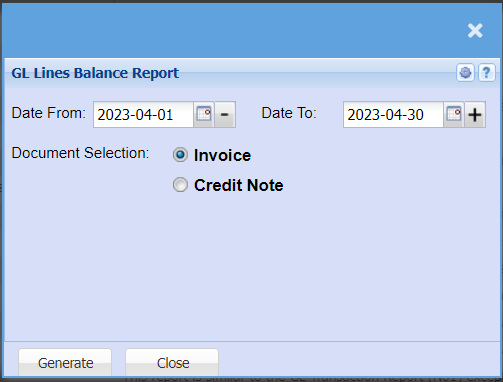
View the transaction lines for a specific document type and date range.