# Debtors Search Analysis

Debtors search is a duplicate of the Debtors setup menu however you cannot add new debtors here.

This menu is for staff members who want to see the debtor's/customer's details but may not be allowed to any details.

Enable Edit Debtor in the security button

[![image.png](https://hugeerp10.co.za/hsofmanual/uploads/images/gallery/2024-01/scaled-1680-/8Ndimage.png)](https://hugeerp10.co.za/hsofmanual/uploads/images/gallery/2024-01/8Ndimage.png)
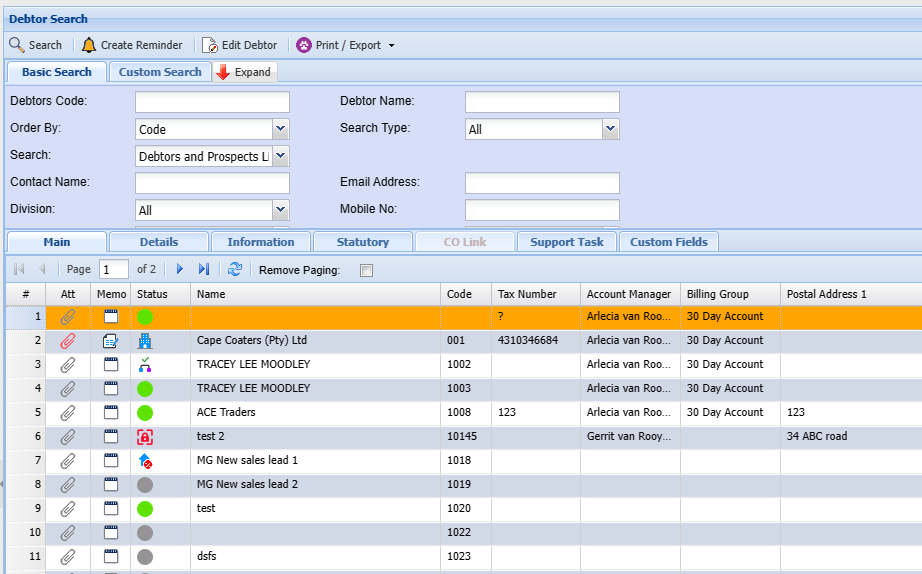
<span class="ts0">System Buttons:</span>

<span class="ts0">The search button allows a user to search using the Basic Search Tab and Custom Search Tab</span>

<table border="1" id="bkmrk-expand-button-to-sho" style="border-collapse: collapse; width: 100%;"><colgroup><col style="width: 22.5186%;"></col><col style="width: 77.5803%;"></col></colgroup><tbody><tr><td>**<span class="ts0">Search</span>**</td><td><span class="ts0">Search Debtors</span></td></tr><tr><td>**Create Reminder**</td><td>Create a reminder for a Debtor</td></tr><tr><td>**<span class="ts0">Edit button</span>**</td><td><span class="ts0">Click the edit button to make changes to an existing Debtor.</span></td></tr><tr><td>**<span class="ts0">Expand button</span>**</td><td><span class="ts0">To show more search filter criteria or a Contract button to show less search filter criteria</span></td></tr></tbody></table>

<span class="ts0">Print Export Drop Down allows one to select from the following options:</span>

<table border="1" id="bkmrk-print-button-print-a" style="border-collapse: collapse; width: 100%; height: 89.3907px;"><colgroup><col style="width: 22.1482%;"></col><col style="width: 77.9507%;"></col></colgroup><tbody><tr style="height: 29.7969px;"><td style="height: 29.7969px;">**<span class="ts0">Print button</span>**</td><td style="height: 29.7969px;"><span class="ts0">Print all the debtors listed in the system sorted alphabetically</span></td></tr><tr style="height: 29.7969px;"><td style="height: 29.7969px;">**<span class="ts0">Export Debtors button</span>**</td><td style="height: 29.7969px;"><span class="ts0">Export debtors list to Excel spreadsheet.</span></td></tr><tr style="height: 29.7969px;"><td style="height: 29.7969px;">**<span class="ts0">Export Contacts button</span>**</td><td style="height: 29.7969px;"><span class="ts0">Exports Contacts to an Excel spreadsheet</span></td></tr></tbody></table>

<p class="callout info"><span class="ts0">In the Basic Search tab, if the debtor’s code or name is left blank, this will bring back all the debtors listed in the system sorted alphabetically. If the cursor is placed on Name at the column head, this will sort the names A-Z or Z-A as preferred. Remember to put a tick by remove paging so it sorts by all customers/ debtors or this will only look at a current page</span></p>

<span class="ts0">The Custom Search tab searches according to the category selection on the drop-down arrow, and the system will bring back all that is selected in that category.</span>